Remember the first time you interacted with a basic enterprise chatbot? You probably typed a specific question, only to get a generic link to an FAQ page. Frustrating, right? We have all been there. For years, enterprise applications relied on rigid, text-based interfaces that forced users to adapt to the machine. But the Multimodal AI in app design flips this dynamic. It bridges the gap between how we naturally communicate and interact with software.
Gartner predicts that multimodal models will power over 60% of generative AI solutions by 2026, so the message for us as product teams is clear. To build the next generation of enterprise tools, we need to rethink user experience (UX) from the ground up.
Designing for multimodal interaction isn’t just about adding a voice assistant to your dashboard. It demands a fundamental shift in how we approach architecture, data integration, and interface design to build systems that can see, hear, and respond with true contextual awareness.
If you are a CTO, Product Manager, or UX Designer, you know that simple chatbots no longer cut it. Your users expect intuitive, seamless interactions that understand context across multiple inputs.
In this guide, we’ll explore how you can leverage multimodal AI to revolutionize your app design, tackle enterprise challenges, and create experiences that feel human. We’ll show you how Enlight Lab can help you turn these advanced concepts into practical solutions.
Understanding Multimodal AI
Think about how traditional artificial intelligence usually works. It often operates in silos. You might have a computer vision model that spots defects on a manufacturing line, while a completely separate natural language processing (NLP) model analyzes customer support tickets. Multimodal AI breaks down these barriers. It combines and analyzes different types of data to gain a complete picture of a situation.
So, how do you build a system like this? At an architectural level, multimodal systems have three core components:
- Input Modules (Encoders): Think of these as your specialists. You’ll have specific neural networks to process different data types. For example, you might use convolutional neural networks (CNNs) for images and transformer models for text or audio. Their job is to convert these raw formats into numerical representations (embeddings) that can be compared.
- The Fusion Layer: This is where the magic happens and all the different data streams come together. You can combine information from various senses using different strategies. You could use early fusion to combine raw data right away, late fusion to make separate predictions for each sense and then merge the results, or a hybrid approach that mixes both.
- The Output Module: Based on this unified understanding, your system can now generate predictions, deliver insights, or create dynamic interfaces.
By linking visual, auditory, and textual data, you can build an AI that achieves a level of contextual reasoning that single-mode systems just can’t match. Imagine a user pointing their device at a broken machine part and asking, “What’s the replacement code for this?” The system seamlessly merges what it sees with what it hears to give you an accurate answer right away.
How Multimodal AI Is Redefining User Experience (UX)
Human communication isn’t one-dimensional. You use gestures, tone of voice, and words to show what you mean. When your apps work the same way, the multimodal AI UX becomes far more intuitive.
Imagine your field technician trying to use a dropdown menu with greasy gloves. It’s frustrating. Now, picture them speaking a command while the app’s camera scans the environment. This is the power of “human-centric” AI-driven app design. You spend less time figuring out the software and more time getting work done. As AI becomes more advanced, it will handle tasks for you, knowing when to step in and when to give you back control.
Why Should You Integrate Multimodal AI into Your Enterprise App?
Integrating multimodal AI into your enterprise app makes work easier and more efficient. It lets your team interact with the app using voice, touch, or even visual recognition.
Let’s keep a close eye on how this flexibility transforms daily workflows.
Make Your App Accessible to Everyone
Multimodal interfaces support diverse user needs from the start. Features like voice commands for visually impaired users and visual cues for those with hearing impairments make your app inclusive by design, not as an afterthought. This is a key benefit of multimodal AI in app design.
- Voice commands and text-to-speech: Empower visually impaired users to navigate your app and consume content without needing to see the screen.
- Visual cues and captions: Offer on-screen text and visual alerts for users with hearing impairments, ensuring they don’t miss important audio information.
- Simplified inputs: Allow users with motor impairments to use voice dictation or simple gestures instead of complex keyboard and mouse interactions.
Boost Your Team’s Efficiency
The biggest return on investment for enterprise AI applications is streamlining complex workflows. When you let users input data in the most efficient way for their situation, you drastically cut down the time it takes to complete tasks.
- On-the-go data entry: A field technician can dictate notes and use voice commands to log a service report while walking, rather than waiting to type it out back at the office.
- Visual information capture: An insurance adjuster can upload photos of vehicle damage, and the AI can automatically populate claim forms with details like make, model, and damage type.
- Reduced cognitive load: Instead of navigating complex menus, a user can simply ask the app to “show me last quarter’s sales figures for the western region,” getting an instant result.
Deliver Hyper-Personalized Experiences
Your app can adapt to what your user is doing. For example, a multimodal system can detect high background noise through the microphone and automatically switch from voice to text, ensuring your user can keep working without interruption. This dynamic adaptation is central to a good multimodal AI UX.
- Environmental adaptation: A multimodal system can detect high background noise through the microphone and automatically switch from voice-based interaction to a text-based interface, ensuring the user can keep working without interruption.
- Context-aware assistance: If a user is designing a presentation, the AI can analyze the slide’s content and listen for verbal cues like “find a chart for this data” to automatically suggest relevant visuals.
- Behavioral adjustments: The system can learn a user’s preferred interaction method (e.g., they always use voice for search but touch for navigation) and prioritize that mode for a smoother experience.
Unlock Deeper Data Insights
Processing multiple data streams at once gives you richer analytics. A customer service platform that analyzes a caller’s voice tone and their chat history gives you a more accurate picture of customer sentiment than just reading a transcript.
- Enhanced customer sentiment analysis: A customer service platform can simultaneously analyze a caller’s voice tone (frustration, satisfaction), their chat history, and their on-screen activity to build a more accurate picture of their experience than a text transcript alone.
- Comprehensive user feedback: By combining usage heatmaps (touch), common voice queries (speech), and text feedback forms, you can identify usability issues with far greater accuracy.
- Predictive analytics: In a manufacturing setting, an AI could analyze sensor data, thermal imaging, and machine sounds to predict equipment failure before it happens.
Gain a Competitive Edge
Software that adapts to your user’s context is software people want to use. By deploying true multimodal experiences, you set your products apart from competitors still stuck with static, outdated interfaces, proving the value of AI-driven app design.
- Superior user experience: An app that fluidly combines voice, text, and touch feels more intuitive and “smarter” than one limited to a single mode of interaction, leading to higher user satisfaction and retention.
- Innovation leader: Being an early adopter of multimodal AI positions your brand as forward-thinking and committed to cutting-edge technology.
- Broader market appeal: An adaptable, accessible app can serve a wider range of users in more diverse situations, opening up new customer segments that competitors with static interfaces can’t reach.
Real-World Examples: See Multimodal AI in Action
Reimagining Finance and Security
In finance, multimodal AI is changing advisory services. Wealth management apps analyze market data and a client’s voice during calls to help you gauge risk tolerance. Fraud detection systems combine facial recognition, voiceprints, and transaction history to secure high-value transfers in these advanced enterprise AI applications.
Here’s how it is being used:
- Enhanced Fraud Detection
- Smarter Wealth Management
- Improved Customer Verification
Transforming Healthcare
Medical professionals are tired of staring at screens. Multimodal AI helps by processing clinical notes, MRI scans, and patient data all at once. This gives doctors a complete view of a patient’s health without manually comparing different systems.
Some applications include:
- Comprehensive Patient Diagnostics
- Streamlined Clinical Workflows
- Personalized Treatment Plans
Revolutionizing Manufacturing & Logistics
AI is changing quality control by combining computer vision with sensor data. If a model sees a tiny crack, it can instantly check acoustic data from the machinery to confirm it’s a real issue. For warehouse workers, AR glasses show picking instructions while listening for their verbal confirmation.
Here are some examples of its applications:
- Predictive Maintenance
- Automated Quality Control
- Optimized Supply Chain Management
Elevating Customer Service
Modern contact centers use AI to handle interactions across all channels. It analyzes customer intent, text sentiment, and voice tone to route frustrated customers to a human agent who already has the full context.
Multimodal AI can be used for:
- Sentiment Analysis
- Call and Chat Routing
- Agent Assistance
Fusing Physical and Digital Retail
Retail apps are using multimodal AI to blend the shopping experience. You can upload a photo of a room and ask the app for furniture suggestions. Virtual try-on features track your movements while you use your voice to change colors or sizes.
Retail apps can use multimodal AI for:
- Visual Search
- Virtual Try-Ons
- Personalized Recommendations
How to Design Effective Multimodal AI Apps
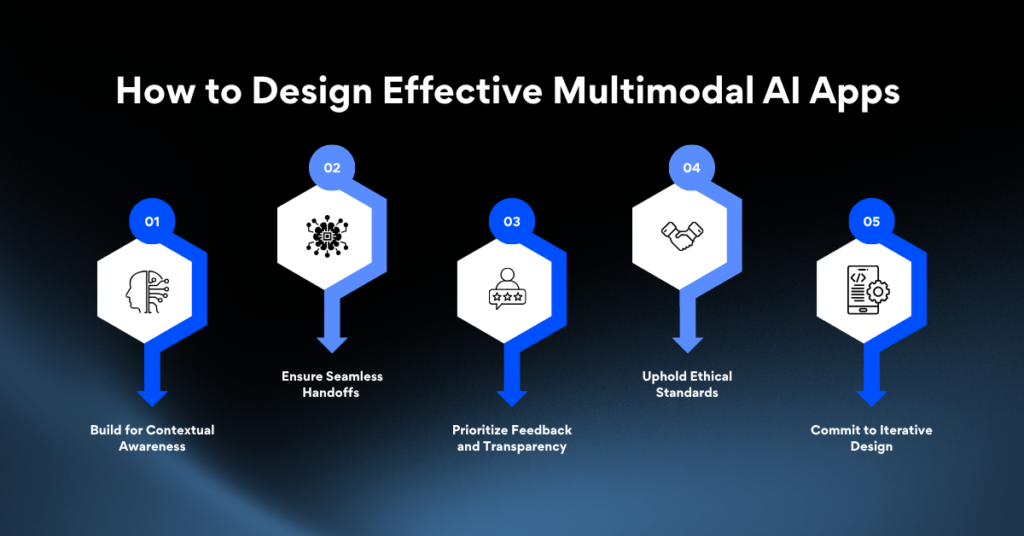
1. Build for Contextual Awareness
Your interface must adapt to the user’s environment. If your app detects that a user is driving, it should switch to voice commands. A successful multimodal AI in app design strategy requires designing safety rules to handle real-world situations.
2. Ensure Seamless Handoffs
Your users switch between devices. Design your app so they can start a task on their phone and finish it on their desktop without losing their place. The transition between voice, touch, and AR must feel effortless to create a superior multimodal AI UX.
3. Prioritize Feedback and Transparency
Users won’t trust a system they don’t understand. If your AI model makes a recommendation, the interface must show why. For example, if it flags a defect, it should show the exact visual and audio data that triggered the alert.
4. Uphold Ethical Standards
Processing biometric data, voice, and video comes with huge privacy risks. You must give users clear control over their data, allowing them to opt out of certain data collection without breaking the app.
5. Commit to Iterative Design
Launching your AI-driven app design is just the beginning. You need to monitor how users interact with different features and use that data to constantly refine the experience.
Overcoming Key Challenges in Enterprise Adoption
Taming Data Integration Complexity
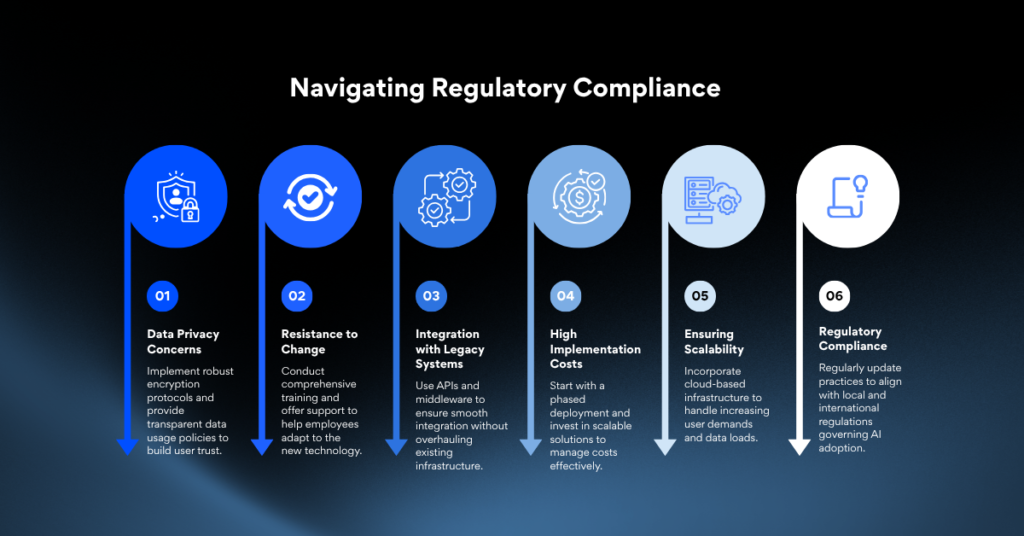
The biggest technical challenge is aligning data from different sources. Your systems need to sync timing across various formats and scale effectively. Without a solid data integration strategy, your enterprise AI applications will fail to find meaningful patterns.
To overcome this, create a unified data pipeline that can synchronize timing across various formats and scale effectively. Use robust ETL (Extract, Transform, Load) processes and standardized data schemas to ensure consistency.
Managing Computational Resources
Multimodal models require a lot of power. Processing video, audio, and text at the same time demands significant GPU compute. You must balance the cost of these models with the performance needs of your application.
Navigating Regulatory Compliance
Industries like finance and healthcare have strict data laws. Storing and processing voice and video data requires tight security to comply with regulations like HIPAA or GDPR.
How Enlight Lab Can Help You Implement Multimodal AI
While multimodal AI holds great promise, its implementation can be challenging. Enlight Lab can guide your journey with expert AI consulting services.
We offer tailored solutions designed to deliver measurable results, including:
- AI Implementation Strategy: We evaluate your AI readiness and create a detailed roadmap for successful adoption.
- Model Selection & Customization: Our team helps you select and customize AI models that align with your unique requirements and operational context.
- Continuous Testing: We leverage advanced AI tools to provide continuous testing services.
- Advanced Analytics: We incorporate sophisticated analytics into your app development process for real-time data processing.
- Data Compliance & Preparation: Our experts ensure your data practices meet regulatory standards and guide your teams in preparing high-quality datasets for optimal performance.
Start Your Multimodal AI Revolution Today
Switching to multimodal AI in app design is essential for modern enterprise software. By processing text, audio, and vision together, you can finally build applications that match how people actually think and work.
Ready to elevate your app with Multimodal AI?
Success takes more than just calling an API. It requires a smart approach to data fusion, a commitment to transparent interfaces, and a focus on contextual multimodal AI UX. If you invest in a flexible multimodal architecture now, you will gain a massive competitive advantage with tools that are smarter and easier to use.
Don’t get left behind in the AI revolution. Now is the time to invest in cutting-edge multimodal solutions that transform the way your organization operates. At Enlight Lab, we empower your team with tools that think, adapt, and perform like never before.
Unlock the power of multimodal AI with Enlight Lab to build smarter, more intuitive applications and elevate user experience.