Cloud computing is no longer something only big companies use. It has become the foundation of how modern businesses operate. Yet, while most organizations have already “moved to the cloud,” many are still struggling to unlock its full value.
Why? Because migrating to the cloud is only half the equation.
The real differentiator lies in how your cloud is architected. However, the difference between a cloud environment that drains your budget and one that accelerates growth comes down to a single factor i.e., architecture.
Building the right cloud computing architecture provides the same structural integrity as a solid foundation does for a skyscraper. Get it right, and you can scale infinitely, adapt to market shifts, and keep customer data secure. Get it wrong, and you risk staggering costs, devastating security breaches, and vendor lock-in.
This guide breaks down exactly why the right cloud computing architecture is critical for enterprises. We’ll help you understand:
- What cloud architecture actually means in simple terms
- Why it matters for your business, not just your tech team
- How the right setup can save money and reduce risk
- What mistakes to avoid early before they become expensive
What is Cloud Computing Architecture?
Cloud computing architecture is the blueprint of how your cloud environment is designed and structured.
It includes:
- The services you use (compute, storage, databases, networking)
- How these services connect and communicate
- The security layers and access controls
- The deployment model (public, private, hybrid, multi-cloud)
- The way applications are built, deployed, and scaled
A well-designed cloud setup ensures all components communicate seamlessly to deliver a unified service, especially when supported by robust automation and DevOps consulting services.
Key Components of Cloud Computing Architecture
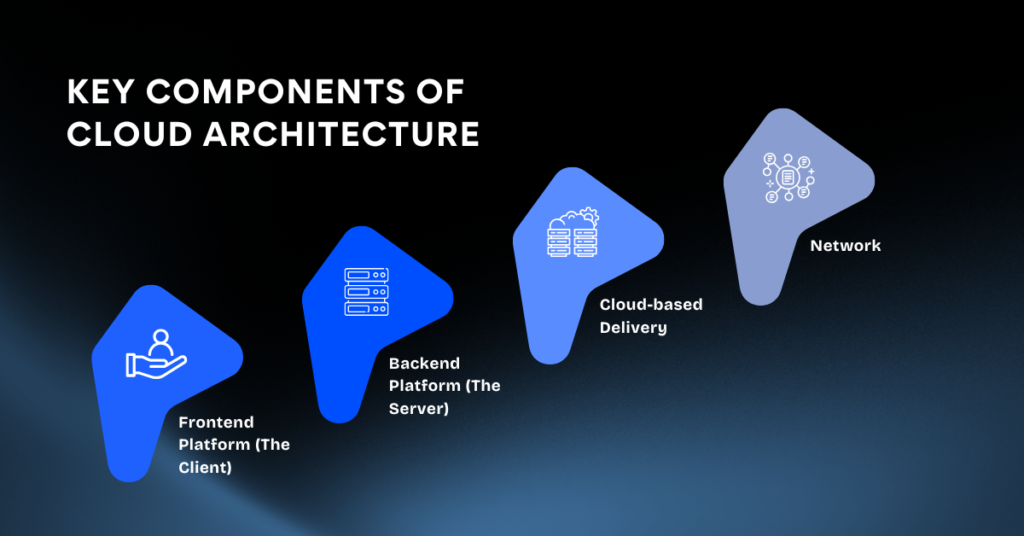
A robust cloud architecture is built from several interconnected components:
- Frontend Platform (The Client): This is the user-facing part of the architecture, including the graphical user interface (GUI) and applications that customers interact with directly.
- Backend Platform (The Server): This is the core computing power, including servers, storage systems, and databases, that processes requests and manages data. It’s the engine room that makes everything happen behind the scenes.
- Cloud-based Delivery: This defines how services are provided to users, often using a combination of software applications and network protocols.
- Network: This includes the virtual networks, internet connectivity, and other networking components that enable communication between the frontend, backend, and external users.
To grasp this concept fully, you need to understand the three primary service models that providers offer.
The Three Primary Service Models You Need To Know
The following service models define what you manage versus what the vendor manages for you:
Infrastructure as a Service (IaaS)
With IaaS, you rent basic building blocks like servers, virtual machines, storage, and operating systems from a cloud provider. You have maximum control over the infrastructure, but this also means your team is responsible for configuration, patching, and maintenance.
- Best for: Companies with skilled IT teams that need granular control to build highly customized systems.
- Example: Renting virtual servers on AWS EC2 or Azure Virtual Machines to host a custom application.
Platform as a Service (PaaS)
PaaS provides a framework for developers to build and deploy applications without worrying about managing the underlying servers or databases. The provider handles the infrastructure, so your team can focus purely on coding.
- Best for: Development teams looking to accelerate the software development lifecycle.
- Example: Using Google App Engine or Heroku to build and deploy a web application.
Software as a Service (SaaS)
With SaaS, the provider delivers a fully functional application over the internet. You simply log in and use it, with zero maintenance responsibility. This is the most common model for end-user applications.
- Best for: Businesses that want a turnkey solution without any operational overhead.
- Example: Using Salesforce for CRM, Google Workspace for collaboration, or Dropbox for file storage.
Why This Matters If You Are a Novice
If you are a founder or business owner, you do not need to know how to configure servers or write infrastructure code.
But you do need to understand the impact of decisions being made.
Because:
- The wrong cloud setup can quietly burn your budget every month
- Poor architecture can slow down your product and hurt user experience
- Security gaps can expose your business to serious risks
- Fixing mistakes later is far more expensive than doing it right early
Think of cloud computing architecture like building the foundation of a house.
You might not lay the bricks yourself, but you definitely want to make sure it is built correctly.
Types of Enterprise Cloud Architectures
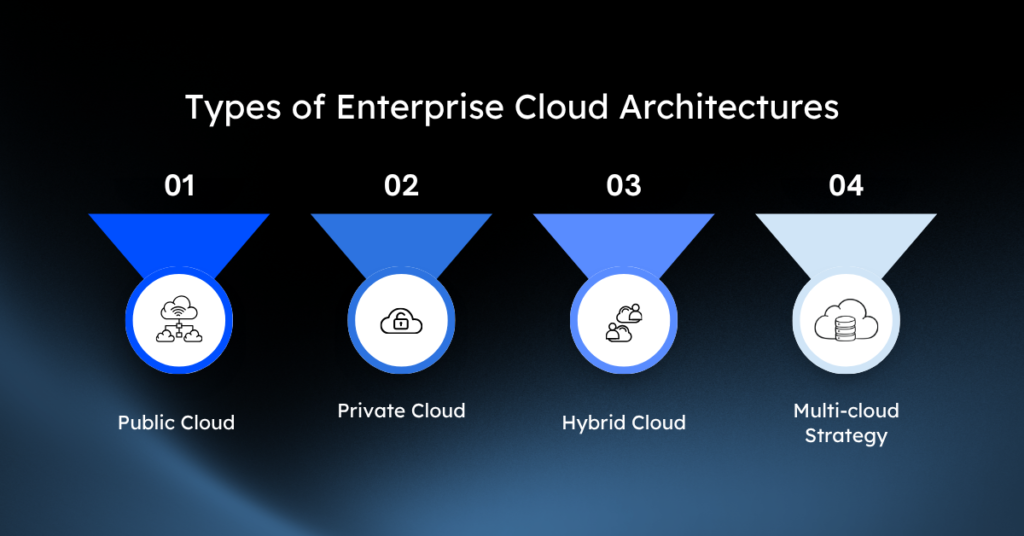
There is no universal solution for cloud computing. Different organizations require different setups based on their size, budget, and regulatory constraints.
Here are the four main deployment models.
1. Public Cloud
A public cloud environment is owned and operated by a third-party provider like Amazon Web Services (AWS), Microsoft Azure, or Google Cloud Platform (GCP). In this model, you share the same hardware, storage, and network devices with other organizations (known as “multi-tenancy”), though your data remains securely isolated.
- Pros: Zero hardware maintenance costs, and you only pay for the resources you consume (pay-as-you-go). The scalability is practically infinite, and you get immediate access to cutting-edge tools and services.
- Cons: Limited control over the underlying infrastructure can be a drawback. The shared nature of resources can also create compliance hurdles for industries handling highly sensitive data, such as finance or healthcare.
2. Private Cloud
A private cloud consists of computing resources used exclusively by one business. It can be located at your organization’s on-site data center or hosted by a third-party service provider, but the hardware and network are dedicated solely to your company. This is a single-tenant environment.
- Pros: Offers the highest level of security and control, making it a required choice for financial institutions, government agencies, and healthcare organizations with strict data sovereignty and compliance requirements.
- Cons: Requires a massive initial capital investment and a highly skilled IT team to manage and maintain the infrastructure. This high upfront cost and operational burden make it difficult to scale as quickly or cost-effectively as a public cloud.
3. Hybrid Cloud
A hybrid cloud combines public and private environments, allowing data and applications to be shared between them through a secure, encrypted connection. This architecture enables organizations to strategically place workloads where they make the most sense.
- Pros: Offers the best of both worlds. You can keep sensitive data and critical legacy systems locked down in your private cloud while leveraging the robust computing power and cost-effectiveness of a public cloud for less sensitive applications, development, and testing.
- Cons: Integrating different environments creates significant complexity. Your IT team must ensure smooth communication, consistent security policies, and unified management across both platforms, which often requires specialized tools and expertise.
4. Multi-cloud Strategy
A multi-cloud approach involves using two or more public cloud providers simultaneously. This is not to be confused with hybrid cloud. For example, a company might use AWS for web hosting, Google Cloud for data analytics and machine learning, and Microsoft Azure to support its Microsoft-centric enterprise applications. Over 89% of enterprises have embraced this strategy to optimize for cost, performance, and features.
- Pros: You avoid vendor lock-in, which gives you negotiating leverage and flexibility. It also boosts resilience; if one provider experiences a regional outage, your business stays online because workloads are distributed across multiple platforms.
- Cons: Managing multiple providers dramatically increases operational complexity. Engineers need to understand the nuances of several platforms, and consolidating billing, security monitoring, and governance requires sophisticated third-party tools.
Why Your Business Needs Cloud Architecture
1. Scalability That Works
A sudden surge in website traffic can crash your servers, costing you sales. Cloud computing architecture automatically scales your resources up or down to meet demand. This means your website stays online during busy periods, and you only pay for the power you use.
2. Cost Optimization
Physical servers are expensive to buy, run, and maintain. With the cloud, you rent computing power instead, following a “pay-as-you-go” model. This frees up capital for other business areas, like marketing or product development, while improving performance.
3. Built-In Security
Protecting customer data is crucial. Major cloud providers invest billions in security, offering world-class protection that most businesses can’t afford on their own. Features include data encryption and automatic backups, ensuring your information is safe from hackers and physical disasters.
4. Faster Innovation
Waiting for IT to set up physical servers slows down development. The cloud allows your team to create new testing environments in minutes. This speed encourages experimentation and helps you launch new products and features faster than your competition.
5. Better Performance
A slow website drives customers away. Cloud data centers are located worldwide, allowing you to host your application closer to your users. This reduces load times, improves user experience, and can increase sales.
6. Flexible Strategies
You don’t have to go all-in on the cloud at once. A hybrid approach lets you keep sensitive data on private servers while using the public cloud for other applications. A multi-cloud strategy lets you mix services from different providers to get the best features and pricing.
7. Data Management at Scale
Businesses generate vast amounts of data. The cloud provides central, organized storage and integrates with powerful analytics tools. This helps you uncover hidden trends and make smarter, data-driven decisions without the mess of physical hard drives.
8. Easier Compliance
Many industries have strict data-handling regulations. Cloud providers design their systems to meet global compliance standards, building in the necessary privacy and security controls. This simplifies your audits and reduces the burden of regulatory compliance.
9. Operational Efficiency
When teams use separate systems, collaboration suffers. Cloud architecture unifies your organization on a central platform, allowing seamless information sharing. It also automates repetitive tasks, freeing up your employees to focus on work that drives business growth.
What Are the Common Mistakes You Can Make
Even you are an experienced person, you can fall into these traps:
- Treating cloud migration as a one-time project
- Overcomplicating architecture too early
- Ignoring cost governance
- Neglecting security in early stages
- Failing to align architecture with business goals
Avoiding these mistakes can save millions in long-term costs and inefficiencies.
When You Know Your Cloud Architecture Needs Improvement
Ask yourself:
- Are your cloud costs unpredictable or rising rapidly?
- Do deployments take longer than expected?
- Are performance issues common during peak usage?
- Is security handled reactively instead of proactively?
- Do teams struggle with visibility and control?
If the answer is “yes” to even a few of these, your architecture likely needs optimization.
How to Design the Right Cloud Architecture for Your Business
You can’t buy great cloud computing architecture off the shelf; it requires clarity on how Cloud 3.0 applies to your business. Follow these phases for a smooth implementation.
Phase 1: Assess Business Needs and Goals
Start by identifying the exact problems you want to solve. Are you trying to accelerate software deployment cycles? Process massive amounts of customer data faster? Facilitate a remote workforce? Define specific, measurable objectives.
Phase 2: Evaluate Existing Infrastructure
Conduct a thorough audit of your current technological assets. Catalog every application, database, and server your company uses. Determine which legacy applications can be easily moved, which need to be rewritten for the cloud, and which should remain on-premises.
Phase 3: Choose the Right Cloud Models
Match your workloads to the appropriate architecture. A fast-growing consumer app might thrive in a public cloud, while a bank processing financial transactions may need a hybrid approach. Choose the model that perfectly balances performance, security, and cost.
Phase 4: Plan for Migration and Integration
Don’t move everything at once. Start with a pilot program, migrating a few low-risk applications to test your processes. Use infrastructure-as-code (IaC) tools like Terraform to automate provisioning. Ensure your new cloud applications integrate smoothly with any systems remaining on-premises.
Best Practices for Enterprise Cloud Computing Architecture
Once your architecture is deployed, the real work begins. Maintaining an efficient cloud environment requires ongoing discipline.
Governance and Policy Management
- Establish strict rules about who can create, modify, and delete cloud resources.
- Implement role-based access control (RBAC) to ensure employees only have the access they need.
Performance Monitoring and Optimization
- Deploy comprehensive observability tools to monitor server health, application load times, and error rates.
- Regularly audit usage and shut down idle instances.
Cost Management and FinOps
- Incorporate FinOps practices to bring financial accountability to the cloud.
- Establish budgets, tag resources, and use cost-monitoring tools to catch anomalies.
Security and Compliance
- Establish a shared responsibility model.
- Secure your data, configure access controls, and encrypt sensitive information.
Disaster Recovery and Business Continuity
- Your architecture must anticipate failure.
- Design systems for high availability by distributing applications across multiple geographic regions and implementing automated backups.
Vendor Lock-in Mitigation
- Build your applications using open-source, cloud-native technologies like Kubernetes and Docker containers.
- Move your software seamlessly between providers without rewriting code.
Real-World Examples of Cloud Success
Massive global enterprises have already paved the way, proving that intentional architecture yields incredible results.
- Fidelity Investments: The financial services giant adopted a multi-cloud strategy to modernize its infrastructure. By migrating thousands of applications using cloud-native technologies, Fidelity achieved greater business agility and resilience without compromising financial security.
- Airbus: The aerospace company implemented a multi-cloud approach to support its complex global manufacturing processes. By leveraging different cloud providers, Airbus enhanced its ability to perform massive data simulations and collaborative engineering projects.
The Future of Your Enterprise Infrastructure
Cloud architecture is the invisible engine driving modern business success. By carefully evaluating your goals, auditing your infrastructure, and choosing the right mix of public, private, or multi-cloud environments, you position your enterprise to scale rapidly and securely.
Looking ahead, cloud environments will only become more intelligent. The integration of generative AI will soon allow systems to auto-remediate performance issues and optimize their own resource consumption. Serverless computing will continue to grow, allowing developers to deploy code without ever thinking about servers.
Build a Cloud Computing Architecture That Scales with Your Business
The cloud is powerful but only when it is used intentionally. Enterprises that invest in the right cloud computing architecture don’t just avoid problems; they also unlock opportunities.
They build systems that:
- Scale effortlessly
- Perform consistently
- Stay secure by design
- Adapt to change without friction
And most importantly, they create a foundation that supports long-term growth and innovation.
The companies that win tomorrow are the ones establishing a flexible, secure, and cost-efficient cloud architecture today. Start auditing your current infrastructure, bring your engineering and finance teams together, and build the foundation for your next decade of growth.
Don’t make your cloud work harder, make it smarter instead. No unnecessary complexity. No one-size-fits-all solutions. Just thoughtful architecture that works. Start creating future-proof cloud strategy with Enlight Lab.
Your cloud has more potential than you think.
Let’s unlock it together.