Enterprise data migration is often described as a technical project, but experienced technology leaders know it is fundamentally a business transformation initiative. Every customer interaction, financial report, operational workflow, AI model, and executive dashboard depends on the integrity of enterprise data. When migration goes wrong, organizations don’t simply lose data. They lose operational continuity, decision-making confidence, and valuable time that could have been spent driving innovation.
As organizations accelerate cloud adoption and invest heavily in artificial intelligence, data migration has become one of the most important prerequisites for digital transformation. Modern AI platforms, real-time analytics, and cloud-native applications all depend on reliable, well-governed, and accessible data. Migrating decades of business information across legacy systems, cloud platforms, and modern architectures introduces significant technical and operational complexity that cannot be solved with technology alone.
Based on our experience helping enterprises modernize data platforms, the organizations that achieve the best outcomes approach migration as an opportunity to improve data quality, strengthen governance, and build a scalable foundation for future innovation. Those who focus only on moving data often discover that they have simply relocated existing problems into a newer environment.
In this guide, we’ll examine the most common data migration challenges, explain why enterprise migration projects fail, and share practical implementation frameworks, architectural guidance, and proven best practices to help organizations reduce risk while building AI-ready data platforms.
What Is Enterprise Data Migration?
Enterprise data migration is the strategic process of moving data from one or more source systems to a new target environment. This is not a simple data transfer. It involves a comprehensive set of activities: assessing and cleansing source data, mapping data fields from old to new schemas, transforming data to meet target requirements, validating the accuracy and completeness of the moved data, and decommissioning legacy systems. It is a business process as much as a technical one, requiring careful planning, coordination, and governance to succeed.
To help clarify the different types of enterprise data migration, the table below outlines the most common categories:
| Type of Data Migration | Description | Key Challenges |
| Database Migration | Moving data between database engines or versions (e.g., Oracle to PostgreSQL, SQL Server to Azure SQL). | Stored procedure/function compatibility, data type differences, and indexing strategy changes. |
| Application Migration | Moving data between business applications (e.g., Salesforce to HubSpot, on-premise CRM to cloud ERP). | Object model differences, custom field mapping, and preserving workflow logic. |
| Cloud Migration | Moving data from on-premise infrastructure to a cloud platform (e.g., AWS, Azure) or between cloud providers. | Network throughput, security, and encryption, and managing IAM access controls. |
| Data Warehouse/Lake Migration | Moving an analytics stack to a modern data warehouse or data lake platform (e.g., Teradata to Snowflake). | Rebuilding ETL/ELT pipelines, managing massive historical volumes, and ensuring “same numbers” expectation between old and new systems. |
| Storage Migration | Moving unstructured data such as files and documents from one storage system to another (e.g., NAS to cloud object storage). | Metadata preservation, file path/name constraints, and permissions translation. |
| Legacy Modernization | A larger initiative that often combines several migration types to replace outdated, monolithic legacy systems with modern, flexible architectures. | System complexity, undocumented data dependencies, and deep technical debt. |
Why Data Migration Projects Fail
Data migration projects fail at an alarming rate. Research from Gartner indicates that a staggering 83% of data migration projects either fail outright or exceed their budget and timeline. These failures are not random; they are the predictable outcome of well-documented patterns and root causes that can be identified and addressed before the project begins.
In many enterprise migration projects, we see a combination of the following factors that drive failure:
- Poor Planning: Migrating data without a clear strategy, defined scope, and measurable success criteria is the fastest path to failure. A lack of a detailed data migration roadmap inevitably leads to missed deadlines, unanticipated costs, and operational chaos.
- Poor Data Quality: This is the single most destructive force in data migration. Moving “dirty” data – which includes duplicates, inconsistencies, incomplete records, and outdated information – does not solve the problem; it simply amplifies it in the new system.
- Legacy System Complexity: Many legacy systems were built decades ago, with undocumented data structures, proprietary formats, and obscure business logic. Extracting data in a usable form and mapping it to modern schemas is a significant technical hurdle.
- Lack of Governance: Without a clear governance framework defining data ownership, roles, and responsibilities, migration teams struggle to make critical decisions. This often leads to inconsistent practices, security risks, and non-compliance.
- Poor Stakeholder Communication: Excluding business stakeholders is a critical error. They possess crucial context about how data is used. Their absence often results in misaligned outcomes, where the new system fails to meet operational needs.
- Insufficient Testing: Testing a migration with a tiny subset of data is a recipe for disaster. The performance failures, data corruption, and system outages that occur at scale will not be revealed. Validation must be continuous and comprehensive.
- Changing Business Requirements: As the migration project progresses, business needs may evolve. Without a formal change management process, these changes can derail the project by expanding scope, increasing costs, and confusing the project team.
12 Common Data Migration Challenges
Here, we detail the most common challenges enterprises face during data migration and offer practical, actionable solutions for avoiding them. Each challenge is a potential point of failure that must be addressed proactively.
Challenge 1: Poor Data Quality
Why it happens: Data quality degrades over time due to human error, system integration issues, and a lack of maintenance. If not assessed, this flawed data is migrated wholesale.
Business Impact: Leads to bad business decisions, inaccurate reporting, customer dissatisfaction, and failed AI/ML initiatives.
Technical Impact: Causes mapping errors, increases cleansing effort, and can corrupt data in the new system.
How to Avoid It: Invest heavily in pre-migration data profiling. Use automated tools to analyze data quality and establish cleansing rules before the first byte is moved.
Challenge 2: Duplicate Records
Why it happens: Multiple systems store overlapping data with different identifiers (e.g., a customer ID vs. an email address). A lack of a “golden record” creates duplicates that are difficult to resolve.
Business Impact: Skews analytics, damages customer experience (sending duplicate communications), and complicates operations.
Technical Impact: Data inconsistency in the target system, load failures due to primary key conflicts, and complex reconciliation.
How to Avoid It: Prioritize data deduplication in the source before extraction. Define a clear “golden record” strategy and use automated tools for entity resolution.
Challenge 3: Incomplete Data Mapping
Why it happens: Source and target systems have different data models. Without a detailed mapping plan that accounts for every field, transformation, and relationship, data is incorrectly translated or lost.
Business Impact: Critical data is missing from the new system, breaking reports and workflows.
Technical Impact: Leads to errors, failed loads, and corrupt or lost data.
How to Avoid It: Create a comprehensive, business-led data mapping plan. Involve stakeholders to ensure field definitions are correct. Use automation to handle complex transformations and document everything meticulously.
Challenge 4: Legacy System Complexity
Why it happens: Legacy systems are often built on outdated architectures with proprietary data formats, obsolete hardware, and complex, undocumented schemas.
Business Impact: Prolongs project timelines, increases costs, and risks of project failure.
Technical Impact: Makes data extraction difficult, limits tool compatibility, and requires extensive reverse engineering to understand data dependencies.
How to Avoid It: Start with a thorough assessment of the legacy environment. Employ specialized ETL tools that support legacy formats. If possible, consider a “data extraction” phase where you move to an intermediate format before final migration.
Enterprise Data Migration Framework
To successfully navigate these challenges, an enterprise needs a structured, repeatable framework. The following nine-stage framework provides a clear roadmap for execution. Each phase must be completed with defined exit criteria before proceeding to the next.
- Current Environment Assessment: The critical first step to discover your entire data landscape. Quantify all sources, volumes, and file types. Understand system dependencies and identify potential bottlenecks. Document everything that is in-scope and out-of-scope to prevent scope creep.
- Data Discovery: Leverage automated data discovery tools to perform deep profiling on source data. Identify data quality issues, duplicates, null values, and schema mismatches. This phase answers the question “What is the current state of my data?” .
- Data Cleansing: Based on findings from discovery, cleanse the data. De-duplicate records, standardize formats, and address integrity violations. “Fix it in the source” is the golden rule. You want to migrate clean data, not a problem.
- Migration Planning: Develop the migration runbook. Choose a migration strategy (Big Bang, Phased, or Parallel). Define the sequence, data mapping, and transformation rules. Establish success metrics and define the rollback plan. This is the “blueprint” for the entire project.
- Migration Execution: Execute the migration using the defined processes and tools. This can be a “trickle” of data or a “Big Bang” event. For complex projects, start with “pilot” migrations of less critical data domains to validate the pipeline.
- Validation: Continuously validate the migration. Run automated checksums, record counts, and field-level reconciliations between the source and target. Ensure data was transferred accurately, completely, and securely.
- Testing: Perform extensive system and UAT. Test the new environment to ensure it functions as expected with the migrated data. Verify performance, security, and all integrations. Test the rollback plan.
- Monitoring: For 2-4 weeks post-migration, intensively monitor system performance, access patterns, and error rates. This is a period of stability and fine-tuning.
- Continuous Optimization: With a successful migration complete, the focus shifts to continuous improvement. Use the new data foundation to optimize analytics, feed AI models, and drive business value.
Modern Enterprise Data Migration Architecture
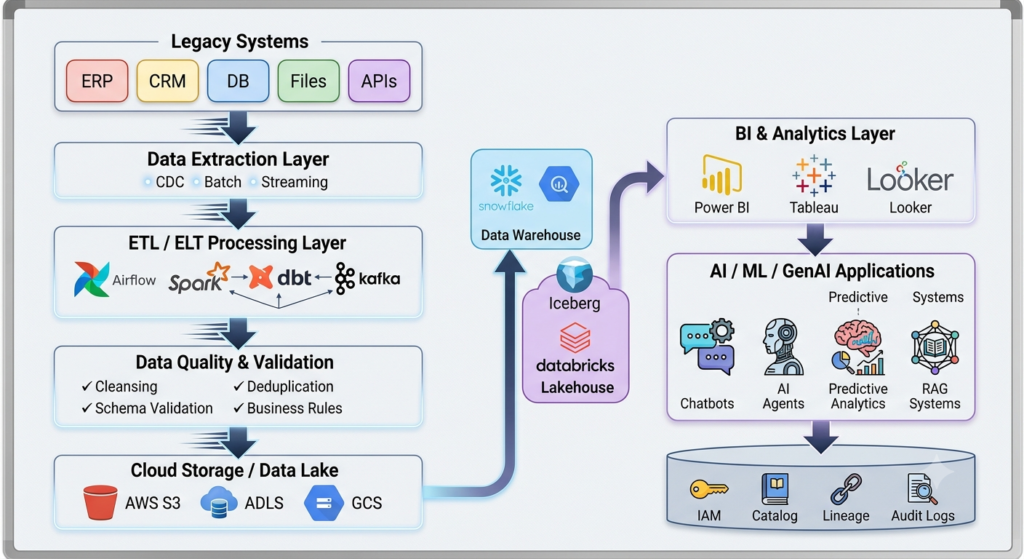
Modernizing data infrastructure requires an architecture that is scalable, resilient, and capable of handling diverse data types. A modern migration architecture is not a simple point-to-point transfer; it is a well-orchestrated data pipeline.
The architecture typically flows as follows: Data is first extracted from Legacy Applications and databases. It then passes through an ETL/ELT layer, where it is prepared for the new environment. After this, a robust Data Validation layer ensures all data meets quality and governance standards. The data is then transformed to fit the target schema and moved into Cloud Storage. From here, it is loaded into the Data Warehouse for structured analytics and the Data Lake for raw, semi-structured, and unstructured data. This foundation powers Analytics and AI Applications with an always-on Monitoring layer to ensure pipeline health and data quality.
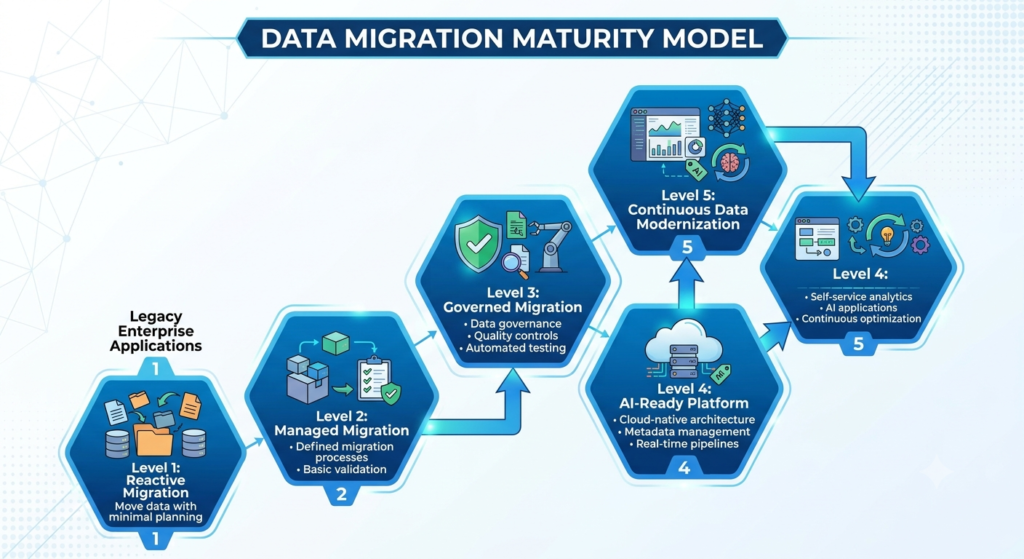
Organizations rarely move directly from legacy infrastructure to an AI-ready enterprise. Migration maturity develops over time. Each stage builds additional capabilities in governance, automation, architecture, and operational excellence. Understanding your current maturity level helps define realistic migration objectives and investment priorities.
Key Technologies in the Modern Stack
- Ingestion and Orchestration: Apache Kafka for real-time event streaming and Apache Airflow for scheduling and orchestrating complex data pipelines.
- Cloud Platforms: AWS (with tools like AWS DMS), Microsoft Azure (with Azure Data Factory), and Google Cloud Platform.
- Data Warehousing and Lakes: Databricks for a unified data and AI platform, and Snowflake for a powerful data warehouse solution.
- Data Integration: Fivetran for automated ELT pipelines, Informatica, and Talend for enterprise data integration and governance.
- Processing: Apache Spark for large-scale data processing and transformation.
Cloud Migration vs Traditional Migration
A debate often arises between simple “lift and shift” cloud migration and a more complex, traditional data migration that involves re-platforming or re-architecting. The right choice depends on the business strategy and long-term goals.
| Feature | Cloud Migration (Lift and Shift) | Traditional Migration |
| Cost | Short-term savings: Lower upfront capital expense by moving to Opex. | Higher upfront cost: Requires significant investment in hardware and new software licenses. |
| Scalability | Highly scalable: Resources can be elastically scaled up or down on-demand. | Limited: Scaling requires purchasing, provisioning, and installing new hardware, which is slow. |
| Downtime | Can be minimized: With a good strategy, zero or near-zero downtime is achievable. | High risk: Often requires a lengthy “Big Bang” cutover window, increasing business disruption. |
| Security | Advanced, built-in: Leverages the cloud provider’s robust security, but the organization is still responsible for its data. | Variable: Depends on on-premise security practices and resources, which can be underfunded. |
| Performance | High-performance options: Access to cutting-edge hardware and services. Performance can be optimized on the fly. | Capped: Performance is limited by the capacity of the purchased hardware, which can quickly become outdated. |
| Maintenance | Managed by provider: The cloud provider handles the underlying infrastructure maintenance. Focus shifts to data and applications. | Resource-intensive: Requires significant IT staff for hardware maintenance, patching, and upgrades. |
| Business Agility | Increases agility: Rapidly provision environments to test new ideas. Enables faster innovation. | Slows agility: Delays time-to-market for new projects due to infrastructure constraints. |
How Data Migration Supports AI and Analytics
Organizations frequently invest in artificial intelligence before addressing the quality and accessibility of their enterprise data. While modern AI models continue to improve, they cannot compensate for incomplete customer records, inconsistent business definitions, or fragmented knowledge repositories.
In our experience, the most successful AI initiatives are preceded by disciplined data engineering and well-executed migration programs. Reliable enterprise data remains the single most important ingredient for machine learning, generative AI, Retrieval-Augmented Generation (RAG), and advanced analytics.
Industry Use Cases
Data migration challenges and solutions are highly contextual, varying significantly by industry. Here are specific scenarios for different sectors:
- Healthcare: Migrating legacy EHR systems to a cloud-based data lake for analytics. Key Challenge: Strict HIPAA compliance and preserving the integrity of patient records.
- Financial Services: Consolidating data from multiple systems after an M&A event. Key Challenge: Managing sensitive financial data, ensuring auditability, and meeting high regulatory requirements for accuracy.
- Insurance: Modernizing a complex policy management system to a modern platform. Key Challenge: Integrating vast amounts of third-party data for underwriting and claims processing.
- Retail: Moving from an on-premise data warehouse to a cloud-native solution to support real-time inventory and customer insights. Key Challenge: Managing massive transaction volumes with near-zero downtime.
- Manufacturing: Migrating data from legacy MES and SCADA systems into an IoT platform. Key Challenge: Handling highly structured and time-series data from disparate operational systems.
- Travel: Moving a legacy reservation system to a modern, cloud-based, microservices architecture. Key Challenge: Minimizing downtime and ensuring data consistency across all booking channels.
- Education: Consolidating student information systems (SIS), LMS, and financial aid data into a single cloud data platform. Key Challenge: Ensuring data privacy and creating a unified view of the student journey.
Best Practices for Successful Data Migration
Based on our experience helping enterprises modernize data platforms, we recommend adhering to these best practices:
- Data Profiling: Always perform comprehensive profiling on source data before you start planning the migration. The data is almost always messier than you expect.
- Data Governance: Establish a governance framework early. Define who owns the data, who decides on standards, and who has access.
- Automated Validation: Do not rely on manual checks. Implement checksum validation, record counts, and field-level reconciliation for every load.
- Incremental Migration: Where possible, use an incremental approach. Move data in chunks. This makes failures easier to isolate and fix.
- Rollback Strategy: A tested rollback plan is mandatory. Decide in advance what triggers a rollback (e.g., error rate > 2%). Rehearse it.
- Disaster Recovery and Backup: Back up all data thoroughly before the project starts. Have a disaster recovery plan that extends beyond the migration.
- Monitoring: Implement real-time monitoring dashboards. Track progress, error rates, and record counts to catch issues early.
- Documentation: Meticulously document everything: source systems, mapping rules, transformation logic, and validation results. This is your audit trail and future reference.
Common Mistakes Enterprises Make
Understanding what not to do is just as important as knowing best practices. Here are some of the most frequent and costly mistakes we observe.
- Migrating “Bad” Data: Assuming the data is good and skipping profiling is a catastrophic error.
- Ignoring Governance: Starting a migration without a clear governance structure leads to chaos.
- Poor Testing: Testing with a small sample and assuming it will work at scale.
- No Rollback Plan: Failing to prepare for a failure. This ensures that when a failure happens, the entire project is derailed.
- Skipping Validation: Assuming the data landed correctly without checking it.
- Ignoring Business Users: Not engaging the stakeholders who will actually use the data. This dooms adoption.
- No Monitoring: Deploying the new system and walking away without verifying it works as expected.
- Choosing Tools Before Defining a Strategy: Buying technology without knowing how it fits into the business goal.
Enterprise Data Migration Checklist
Use this detailed readiness checklist to prepare for your data migration project:
- Assessment and Planning
- Comprehensive data audit performed on all source systems.
- Migration scope and key success criteria are clearly defined.
- Migration strategy (Big Bang vs. Phased) selected and approved.
- Data governance framework defined (roles, responsibilities, ownership).
- Data retention policies established.
- Data Quality and Cleansing
- Data profiling completed; all quality issues are identified and documented.
- Data cleansing and deduplication plan in place and executed.
- Technical Readiness
- Target environment (e.g., cloud) is fully provisioned and configured.
- Data mapping and transformation rules are finalized and documented.
- Comprehensive backup of all source data is complete.
- A tested rollback strategy and disaster recovery plan are in place.
- Testing and Validation
- Pilot migration performed with a small dataset; issues resolved.
- Full migration simulation test completed at production scale.
- Validation and reconciliation plan (checksums, record counts) is ready.
- User Acceptance Testing (UAT) is planned with business stakeholders.
- Execution and Monitoring
- Migration runbook is documented and available to the execution team.
- Real-time monitoring and alerting dashboards are set up.
- Post-migration support and monitoring plan defined.
How to Choose the Right Data Migration Partner
Choosing the right partner is critical to the success of your data migration. Look for a partner that demonstrates more than just technical capability.
- Industry and Enterprise Expertise: They must understand the complexities and compliance requirements of your specific industry and have a proven track record with enterprises of a similar scale.
- Architectural Capability: The partner should be able to design a modern, scalable architecture that fits your specific business needs, not just lift and shift your problem to the cloud.
- Cloud Expertise: Deep knowledge of cloud platforms (AWS, Azure, GCP) and their native migration tools like AWS DMS or Azure Data Factory is essential.
- Security and Compliance: They must demonstrate a rigorous approach to security and compliance to protect your sensitive data.
- Support and Partnership: Look for a long-term partnership. The migration is just the beginning. You need a partner that will support you through post-migration monitoring and future optimizations.
- Case Studies: Request case studies from similar organizations to see their methodology and results. Success should be measured in business outcomes, not just technical completion.
Final Thoughts
Enterprise data migration is ultimately about enabling better business decisions, not simply relocating information from one platform to another.
Organizations that invest in data quality, governance, scalable architecture, and disciplined execution create a foundation that supports cloud modernization, advanced analytics, automation, and enterprise AI for years to come.
Based on our experience helping organizations modernize complex data ecosystems, the most successful migration programs treat modernization as an ongoing capability rather than a one-time project. Every migration should leave the organization with cleaner data, stronger governance, better operational visibility, and greater confidence in future technology investments.
At Enlight Lab, we help enterprises design, execute, and optimize complex data migration initiatives through our Data Engineering Services and AI Consulting Services. From legacy modernization and cloud migration to AI-ready data platforms, our focus is not simply delivering a successful migration but creating a trusted data foundation that enables long-term innovation and measurable business value.