Choosing between Snowflake and Databricks is one of the most consequential technology decisions a data organization makes. Both platforms have matured significantly, both now claim to do what the other does well, and the marketing from each side makes it harder not easier to evaluate clearly.
The confusion is understandable. Snowflake started as a cloud data warehouse and has expanded aggressively into AI, data engineering, and lakehouse capabilities. Databricks started as an Apache Spark and machine learning platform and has pushed hard into SQL analytics and enterprise governance. In 2026, there is genuine overlap between them.
One of the most common mistakes we see in enterprise platform evaluations is treating this as a binary choice between two equal generalists. In reality, each platform still has a dominant design center, and the right decision depends on what your team actually builds, how your data is structured, and where your AI and analytics investments are heading over the next three years.
This guide cuts through the positioning and examines each platform on architecture, performance, pricing, AI capabilities, security, governance, and real-world fit across industries. If you are a CTO, data architect, VP of Engineering, or enterprise decision-maker comparing these platforms before committing budget and resources, this is the analysis you need.
What Is Snowflake?
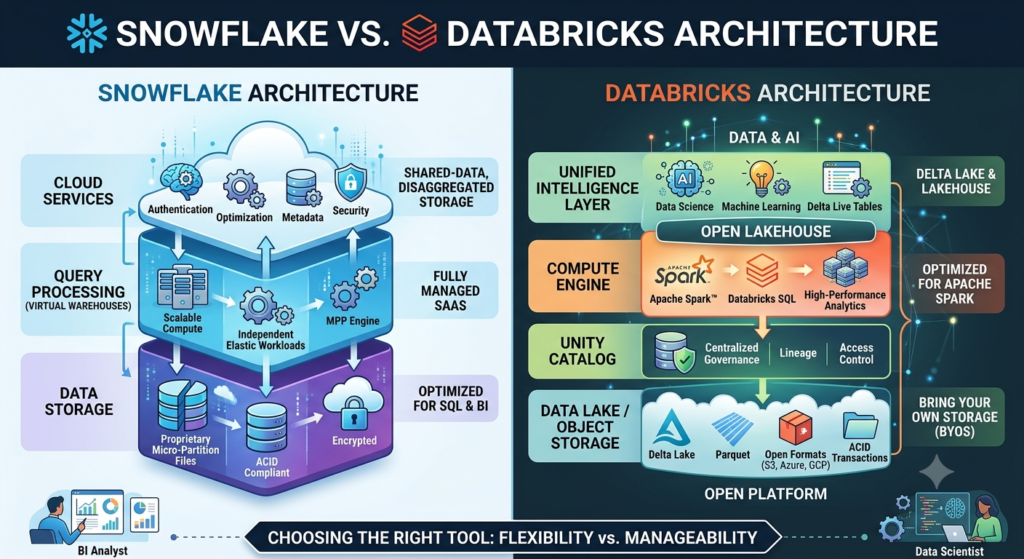
Direct answer: Snowflake is a cloud-native data platform built around a multi-cluster shared data architecture. It separates storage and compute entirely, which allows independent scaling of each. Snowflake is optimized for SQL-based analytics, governed data sharing, and enterprise business intelligence at scale.
Snowflake was founded in 2012 and built from the ground up for the cloud not ported from an on-premises system. Its architecture stores data in a centralized, columnar format on object storage (Amazon S3, Azure Blob, or Google Cloud Storage) and runs compute through independently scalable virtual warehouses. This means query performance does not depend on how much data you store, and storage costs do not grow with compute consumption.
Key architectural concepts
- Virtual warehouses: Isolated compute clusters that query shared storage. Multiple warehouses can run simultaneously without competing for resources.
- Data Cloud: Snowflake’s ecosystem for governed data sharing between organizations, including the Data Marketplace where verified third-party datasets can be joined with internal data without copying or moving files.
- Snowpark: A developer framework for running Python, Java, and Scala code directly inside Snowflake’s compute layer, reducing the need to move data out for transformation.
- Cortex AI: Snowflake’s integrated AI layer supporting LLM access, vector search, and retrieval-augmented generation within the platform.
Benefits of Snowflake
- Near-zero administration. No clusters to tune, no indexes to manage. Snowflake’s auto-scaling handles concurrency spikes automatically.
- Strong SQL performance on structured and semi-structured data (JSON, Parquet, Avro natively supported).
- Governed data sharing at scale. No ETL required to share live datasets with external partners.
- Broad BI tool compatibility: Tableau, Power BI, Looker, Sigma, and Qlik all connect natively.
- Strong compliance posture: SOC 2 Type II, HIPAA, GDPR, FedRAMP, and PCI DSS support out of the box.
Limitations of Snowflake
- Machine learning and AI pipelines are not a native strength. Snowpark ML has improved, but Databricks still leads significantly for model training, MLOps, and complex AI workflows.
- Real-time streaming requires additional tooling. Snowflake supports Kafka integration and Dynamic Tables, but stream processing is not Snowflake’s core design.
- Cost management requires discipline. Auto-scaling is convenient but can generate unexpected consumption charges if warehouses are not configured with appropriate limits.
- Proprietary storage format means data is less portable than Databricks’ open Delta Lake format.
Best use cases for Snowflake
Snowflake performs best when your primary workloads are SQL analytics, enterprise reporting, multi-tenant data sharing, or governed access to structured data across business units. Organizations with large analyst teams, complex BI requirements, or a need for cross-company data products typically find Snowflake a more natural fit.
What Is Databricks?
Direct answer: Databricks is a unified analytics platform built on Apache Spark and the open-source Delta Lake table format. It is designed for data engineering, machine learning, AI model training, and real-time streaming. The Databricks Lakehouse architecture stores data in open formats that can be accessed by multiple compute engines without vendor lock-in.
Databricks was founded in 2013 by the original creators of Apache Spark and has grown into one of the highest-valued enterprise software companies, reaching a $62 billion valuation in its 2023 funding round, according to Reuters. The platform’s core design philosophy is the lakehouse: a single architecture that combines the reliability and governance of a data warehouse with the flexibility and openness of a data lake.
Key architectural concepts
- Delta Lake: An open-source storage layer that adds ACID transactions, schema enforcement, and time travel to cloud object storage. Unlike Snowflake’s proprietary format, Delta Lake files can be read by Spark, Presto, Trino, and other engines.
- Unity Catalog: Databricks’ enterprise governance layer providing centralized access control, lineage tracking, and audit logging across all data assets.
- MLflow: An open-source platform for managing the ML lifecycle experiment tracking, model registry, and deployment natively integrated into Databricks.
- Mosaic AI: Databricks’ integrated AI suite for building, fine-tuning, deploying, and monitoring LLMs and AI agents within the platform.
- Structured Streaming: Native real-time stream processing using Spark Streaming, suited for high-throughput event pipelines.
Benefits of Databricks
- Industry-leading data engineering and ETL capabilities using Apache Spark at scale.
- Best-in-class ML and AI tooling: MLflow, Feature Store, Model Serving, and Mosaic AI form a complete MLOps environment.
- Open storage formats (Delta Lake, Apache Iceberg) reduce vendor lock-in and allow interoperability with other compute engines.
- Superior streaming support for real-time analytics, IoT pipelines, and event-driven architectures.
- Strong Python ecosystem integration for data scientists and ML engineers.
Limitations of Databricks
- Cluster management requires more expertise than Snowflake. Auto-scaling is available but configuration complexity is higher.
- SQL analytics performance has improved significantly with Photon but still trails Snowflake for concurrent BI workloads with many simultaneous users.
- Higher operational overhead. Data engineers are typically required to manage notebooks, cluster configurations, and pipeline orchestration effectively.
- Unity Catalog governance is powerful but reaches full maturity only when deployed from the beginning retrofitting it into legacy Databricks workspaces adds complexity.
Best use cases for Databricks
Databricks performs best when your primary workloads involve data engineering pipelines, machine learning model training, AI application development, real-time streaming, or Python-heavy analytics. Organizations building AI products, running complex ETL at scale, or operating data science teams with deep Spark expertise typically find Databricks a better fit.
Snowflake vs Databricks: Feature Comparison
| Dimension | Snowflake | Databricks |
|---|---|---|
| Architecture | Cloud data warehouse with virtual warehouses | Lakehouse (Delta Lake on cloud object storage) |
| Storage format | Proprietary (columnar, micro-partitioned) | Open (Delta Lake, Apache Iceberg) |
| Primary compute | SQL virtual warehouses | Apache Spark clusters + Photon SQL engine |
| SQL performance | Excellent (high concurrency, BI workloads) | Very good (Photon), slightly behind at high concurrency |
| Data engineering | Good (Snowpark, Tasks) | Excellent (native Spark, Delta Live Tables) |
| ML and AI | Growing (Cortex AI, Snowpark ML) | Excellent (MLflow, Mosaic AI, Model Serving) |
| Streaming | Basic (Kafka integration, Dynamic Tables) | Excellent (Structured Streaming, native Kafka) |
| Python support | Snowpark (improving) | Native (first-class Python, notebooks) |
| Governance | Strong (RBAC, column masking, policies) | Strong (Unity Catalog, lineage, audit logs) |
| Pricing model | Credit-based (storage + compute separated) | DBU-based (instance-based compute) |
| Ease of use | High (minimal administration) | Moderate (requires data engineering expertise) |
| BI integration | Excellent (Tableau, Power BI, Looker, Sigma) | Good (but requires JDBC/ODBC or partner tools) |
| Data sharing | Excellent (Data Marketplace, Cleanrooms) | Developing (Delta Sharing, less mature ecosystem) |
| Open source | No (proprietary platform) | Yes (Delta Lake, MLflow, Apache Spark) |
| Multi-cloud | Yes (AWS, Azure, GCP) | Yes (AWS, Azure, GCP) |
| Enterprise readiness | Excellent | Excellent |
| Best for | SQL analytics, BI, governed data sharing | Data engineering, ML, AI, streaming |
Architecture Comparison: Data Warehouse vs Lakehouse
Direct answer: Snowflake uses a decoupled storage-compute warehouse architecture optimized for concurrent SQL queries. Databricks uses a lakehouse architecture built on open storage formats, optimized for diverse workloads including engineering pipelines, ML, and SQL analytics. The architectural choice determines which workloads each platform handles efficiently by design and which ones require workarounds.
Snowflake’s architecture
Snowflake’s multi-cluster shared data architecture stores all data in centralized cloud object storage, separate from compute. Virtual warehouses independent Snowflake-managed clusters query that shared storage without interfering with one another. A reporting warehouse and a data loading warehouse can run simultaneously on the same dataset without resource contention.
This design delivers reliable concurrency. When 50 analysts run queries simultaneously, Snowflake routes them across warehouses without degradation. The trade-off is that Snowflake’s storage layer is proprietary. Data written by Snowflake is not directly readable by external Spark jobs or other query engines without export.
Databricks’ lakehouse architecture
Databricks stores data in open formats primarily Delta Lake on cloud object storage. The same files can be read by Spark, Presto, Trino, Athena, and other engines. Delta Lake adds ACID transactions, schema enforcement, and time-travel versioning to what would otherwise be raw object storage.
This openness is a meaningful advantage for organizations that run heterogeneous compute environments. A Delta Lake table written by a Databricks pipeline can be queried directly by Snowflake (via external tables or Iceberg), Athena, BigQuery, or a custom Spark cluster. The architecture avoids lock-in.
The trade-off is operational complexity. Cluster configuration, auto-scaling policies, Spark tuning, and garbage collection management require data engineering expertise that Snowflake’s managed environment eliminates.
Workload isolation
Snowflake’s virtual warehouse model provides hard workload isolation by design. Databricks supports workload isolation through separate clusters and SQL warehouses, but configuration requires more deliberate planning. For organizations with strict SLA requirements for BI and reporting workloads running alongside heavy data engineering jobs, Snowflake’s isolation model is simpler to enforce.
Performance Comparison
Direct answer: Snowflake consistently outperforms Databricks on concurrent SQL analytics workloads with many simultaneous users. Databricks outperforms Snowflake on complex data transformations, large-scale ETL pipelines, and AI or ML workloads requiring Python execution at scale. Neither platform dominates across all workload types.
Analytical workloads and concurrency
Snowflake was built for high-concurrency SQL from the beginning. Automatic multi-clustering scales compute out horizontally when query queues grow, maintaining consistent response times regardless of how many analysts are running dashboards simultaneously. For BI-heavy environments with dozens or hundreds of concurrent users, this architecture delivers predictable performance.
Databricks’ Photon engine a native vectorized SQL execution engine written in C++ has significantly closed the SQL performance gap since its introduction. For single-query performance on large datasets, Databricks with Photon is competitive with Snowflake. The remaining gap appears under high concurrency, where Snowflake’s warehouse model still provides a simpler path to consistent performance.
ETL and data transformation
Databricks holds a clear advantage for complex ETL and large-scale data transformation. Apache Spark’s distributed processing model handles transformations across billions of records efficiently, and Delta Live Tables provides a declarative framework for building reliable data pipelines. Organizations running nightly ETL jobs that process terabytes of raw data will generally find Databricks faster and more cost-effective than Snowflake for this workload.
AI and ML pipeline performance
For machine learning workloads feature engineering, model training, hyperparameter tuning, and model evaluation Databricks has no meaningful competitor on this platform. Snowflake’s Snowpark ML and Cortex AI have improved, but they are not designed for the scale of compute that training large models or running distributed ML experiments requires. If your team is training models, Databricks is the right environment.
Pricing Comparison
Direct answer: Snowflake charges credits for compute and separately for storage. Databricks charges Data Brownout Units (DBUs) for compute based on cluster type, plus underlying cloud infrastructure costs. Databricks pricing is typically more cost-effective for heavy data engineering and ML workloads. Snowflake is often more predictable for stable SQL analytics workloads. Neither platform is inherently cheaper workload type determines the real cost.
| Cost Factor | Snowflake | Databricks |
|---|---|---|
| Compute model | Credits per second per virtual warehouse | DBUs per hour, varies by cluster type |
| Storage | Separate, based on compressed data volume | Separate, billed through cloud provider |
| On-demand vs committed | On-demand credits; discounts via pre-purchase | On-demand or reserved compute; pre-purchased DBUs |
| Auto-scaling | Auto-suspend and multi-cluster scaling | Auto-scaling clusters; requires configuration |
| Cost transparency | High (credits map to warehouse usage) | Moderate (DBU rates vary by instance type) |
| Cost optimization | Warehouse suspension, query result caching | Spot instances, cluster policies, autoscaling |
| Best value for | Concurrent SQL analytics, governed data sharing | Data engineering, ML training, streaming |
Cost optimization strategies
For Snowflake: Set warehouse auto-suspend to 60 seconds or less for ad hoc workloads. Use query result caching to avoid redundant compute on repeated queries. Size warehouses for typical load, not peak load, and use multi-clustering for burst capacity rather than permanently oversized single warehouses.
For Databricks: Use spot or preemptible instances for ETL workloads that can tolerate interruption this typically reduces compute costs by 60 to 80%. Apply cluster policies to prevent engineers from spinning up oversized clusters unnecessarily. Use job clusters instead of interactive clusters for production pipelines.
One mistake we frequently see is organizations benchmarking platform costs using synthetic workloads that do not reflect production patterns. A Snowflake cost estimate based on a small development warehouse will not predict production costs accurately when 200 analysts run concurrent dashboards during business hours. Benchmark against real workloads before committing.
AI and Machine Learning Capabilities
Direct answer: Databricks is the stronger platform for the full ML lifecycle: feature engineering, model training, experimentation, MLflow tracking, model serving, and AI agent development. Snowflake’s Cortex AI is competitive for inference, vector search, and RAG workflows that keep AI workloads within the data platform. The right choice depends on whether your AI needs center on training or inference and how much Python-heavy ML work your team does.
Snowflake’s AI capabilities
Snowflake has invested heavily in making AI accessible to SQL-centric teams through Cortex AI. Current capabilities include:
- Cortex LLM Functions: Call hosted LLMs (including Arctic, Llama, Mistral, and others) directly from SQL using functions like
COMPLETE(),SUMMARIZE(), andCLASSIFY(). - Cortex Search: Semantic vector search over unstructured documents stored in Snowflake, enabling RAG applications without moving data out of the platform.
- Cortex Analyst: Natural language to SQL interface allowing business users to query data in plain English.
- Snowpark ML: A Python-based framework for training and deploying ML models within Snowflake’s compute environment.
Snowflake’s AI approach is designed for teams that want AI capabilities without leaving the platform or building complex MLOps infrastructure. For inference workloads, summarization, document classification, and RAG applications over structured enterprise data, Cortex AI is production-ready.
The limitation is depth. Snowflake is not the right environment for training large language models, running distributed ML experiments, managing complex model registries, or building production ML pipelines that require Python ecosystem flexibility.
Databricks’ AI capabilities
Databricks has assembled a comprehensive AI development environment through Mosaic AI:
- MLflow: The industry-standard open-source platform for experiment tracking, model registry, and deployment created by Databricks and now widely adopted outside the platform.
- Model Serving: Scalable real-time model inference endpoints with automatic scaling and monitoring.
- Feature Store: A centralized repository for sharing and reusing ML features across teams, preventing duplicate feature engineering work.
- Mosaic AI Agent Framework: Tools for building, evaluating, and deploying AI agents using LLMs with tool calling, RAG, and multi-step reasoning.
- Vector Search: Managed vector database integrated with Delta Lake for RAG applications.
- LLM Fine-tuning: Databricks supports instruction fine-tuning and continued pre-training of open-source models at scale.
For organizations building AI-native products, running model training pipelines, or deploying production ML systems, Databricks provides a more complete environment. The platform supports the full lifecycle from raw data to deployed model to monitored inference.
Generative AI and RAG
Both platforms now support vector search and RAG architectures. Snowflake’s approach keeps everything within the SQL-accessible platform, which appeals to teams with strong SQL skills and existing Snowflake governance infrastructure. Databricks’ approach gives ML engineers more control over embedding pipelines, vector index management, and retrieval logic through Python.
For teams building RAG applications over enterprise data already in Snowflake, Cortex Search is a practical choice. For teams building more complex AI agent systems with custom retrieval logic and fine-tuned models, Databricks provides greater depth and flexibility.
If you are evaluating AI agent development for enterprise use cases, see AI Agent Development Services for a framework on selecting the right infrastructure for production AI systems.
Security and Governance
Direct answer: Both platforms meet enterprise security requirements, including SOC 2 Type II, HIPAA, GDPR, and ISO 27001. Snowflake’s governance model is simpler to deploy and manage for SQL-centric teams. Databricks’ Unity Catalog is more powerful for organizations with complex, multi-workload data estates but requires more implementation effort. The gap has narrowed significantly since Unity Catalog reached general availability.
Snowflake security and governance
Snowflake’s security model is well-designed and straightforward to implement:
- RBAC: Role-based access control with hierarchical role inheritance. Privileges are granted to roles, not users directly, making access policy management scalable.
- Column-level security: Dynamic data masking applies masking policies at the column level, so sensitive fields like Social Security numbers or credit card numbers can be masked for non-privileged roles without modifying underlying data.
- Row-level security: Row access policies restrict which rows a query returns based on the querying user’s role or attributes.
- End-to-end encryption: AES-256 encryption at rest and TLS 1.2+ in transit. Tri-Secret Secure allows customer-managed keys alongside Snowflake keys, providing an additional layer of control.
- Network policies: IP allowlisting and private connectivity through AWS PrivateLink, Azure Private Link, and Google Cloud Private Service Connect.
- Audit logging: The QUERY_HISTORY and ACCESS_HISTORY views provide detailed records of all data access, useful for compliance reviews and incident investigation.
Snowflake holds SOC 2 Type II, HIPAA, PCI DSS, FedRAMP Moderate, ISO 27001, and HITRUST certifications.
Databricks security and governance
Unity Catalog is Databricks’ centralized governance solution, available since 2022 and significantly matured since then. Key capabilities include:
- Unified metastore: A single governance layer that applies access policies across all workloads notebooks, SQL warehouses, ML experiments, and streaming jobs within a Databricks workspace.
- Fine-grained access control: Table, column, and row-level access control using SQL-standard GRANT and REVOKE commands.
- Data lineage: Automatic tracking of data flow from source to destination across pipelines, transformations, and model training runs.
- Audit logs: Detailed logs of every data access event, schema change, and administrative action, exportable to external SIEM systems.
- Delta Sharing: An open protocol for sharing live data with external organizations without copying files similar in concept to Snowflake’s Data Sharing but using open standards.
Databricks holds SOC 2 Type II, ISO 27001, HIPAA, and FedRAMP Moderate certifications.
Key governance consideration
Unity Catalog’s governance is most effective when implemented from the beginning of a Databricks deployment. Organizations migrating existing Databricks workspaces to Unity Catalog encounter significant migration effort. This is the governance equivalent of a common architectural mistake: design for compliance and governance at project inception, not after production data is already flowing. Retrofitting governance is consistently more expensive than building it in from the start.
For organizations in regulated industries requiring detailed audit trails and data lineage across AI pipelines, Unity Catalog’s lineage capabilities are a meaningful differentiator. Snowflake’s ACCESS_HISTORY view provides query-level lineage for SQL workloads but does not trace lineage through Python transformations or ML training runs.
Industry Use Cases
Healthcare
Healthcare organizations handle sensitive patient data under strict HIPAA requirements while needing to run analytics on clinical outcomes, population health, and operational efficiency.
Choose Snowflake for clinical analytics, regulatory reporting, and governed data sharing between provider networks and payers. Snowflake’s HIPAA certification, column masking, and Data Marketplace for healthcare data products are well-suited to this environment.
Choose Databricks for building predictive models on patient populations, running ML-based diagnostic support tools, or processing real-time medical device data streams. Databricks’ MLflow and model governance capabilities provide an auditable ML lifecycle that healthcare AI applications require.
Financial Services
Financial institutions run risk models, fraud detection systems, regulatory reporting, and customer analytics workloads that span SQL, Python, and real-time processing.
Choose Snowflake for financial reporting, regulatory filings (CCAR, DFAST, Basel), and governed data sharing with regulators or partner institutions. Snowflake’s PCI DSS certification and Tri-Secret Secure key management support the data sovereignty requirements common in financial services.
Choose Databricks for fraud detection models, real-time transaction scoring, credit risk ML pipelines, and algorithmic trading data infrastructure. Financial services firms running Python-heavy quantitative analysis teams typically align more naturally with Databricks’ environment.
Retail and E-Commerce
Retail requires a combination of real-time personalization, demand forecasting, and business intelligence across large transaction datasets.
Choose Snowflake for centralized sales analytics, inventory reporting, and supplier data sharing. Snowflake’s BI tool integrations and multi-warehouse architecture support enterprise retail analytics teams effectively.
Choose Databricks for real-time recommendation engines, demand forecasting models, and streaming clickstream analysis. Databricks’ streaming capabilities and ML infrastructure handle the real-time personalization requirements of large e-commerce operations.
Manufacturing
Manufacturing organizations increasingly rely on IoT sensor data for predictive maintenance, quality control, and supply chain optimization.
Choose Databricks for IoT data ingestion pipelines, predictive maintenance ML models, and real-time sensor data processing. Databricks’ streaming architecture and Python ML tools are better suited to manufacturing’s data engineering complexity.
Choose Snowflake for supply chain analytics dashboards, financial reporting, and governed sharing of production data with external suppliers.
SaaS Companies
SaaS organizations need product analytics, customer success metrics, and ML-based churn prediction often with multi-tenant data isolation requirements.
Early-stage SaaS teams with limited data engineering resources typically start with Snowflake for its low operational overhead. Growth-stage teams building ML-driven features and complex data pipelines often adopt Databricks as their data engineering complexity increases. Many mature SaaS data platforms use both.
Startups
Startups face a specific trade-off: operational simplicity vs. long-term flexibility.
Snowflake’s low administration overhead makes it faster to reach production for analytics use cases. Databricks requires more initial setup but avoids storage format lock-in and provides a better foundation if AI and ML become core to the product roadmap. Startups with a defined ML product direction should consider Databricks from the beginning rather than migrating later.
Snowflake vs Databricks: Decision Framework
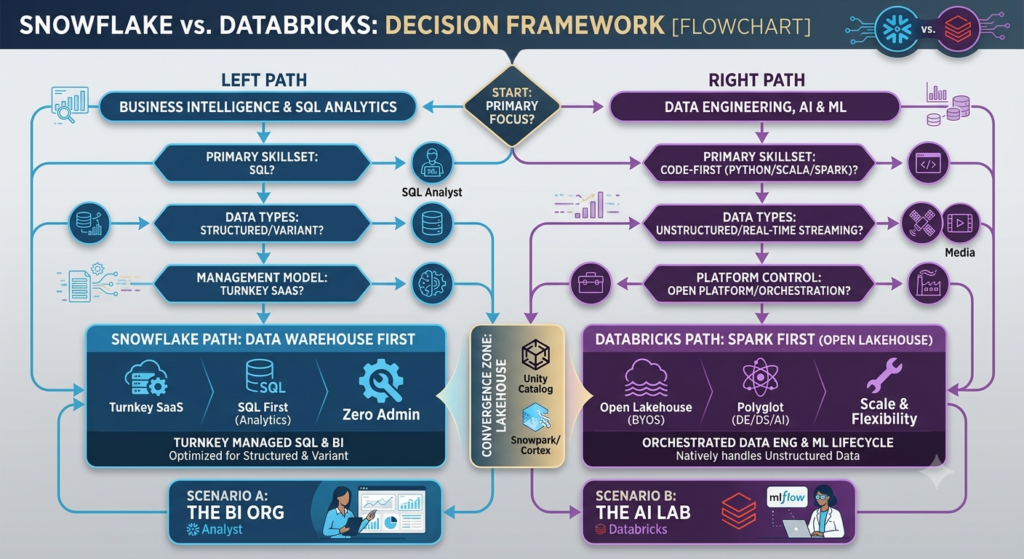
Use this framework as a starting point. The right answer depends on your specific workload mix, team skills, and strategic direction.
Choose Snowflake if:
- Your primary workload is SQL analytics and business intelligence
- You have a large analyst team that needs reliable concurrent query performance
- You need governed data sharing with external partners or subsidiaries
- Your data engineering is moderate in complexity and does not require heavy Spark use
- Low operational overhead is a priority and you prefer a fully managed platform
- Your team’s core skill set is SQL rather than Python or Scala
- You are in a regulated industry and need a governed platform with minimal configuration
- You need Marketplace access to third-party data products
Choose Databricks if:
- Your team runs complex data engineering pipelines that require Apache Spark
- ML model training, experimentation, and MLOps are core to your data strategy
- You are building AI-native products that require LLM fine-tuning, model serving, or AI agents
- Real-time streaming data is a significant part of your architecture
- You prioritize open storage formats and want to avoid proprietary vendor lock-in
- Your team has strong Python and data engineering expertise
- You are investing heavily in generative AI and need a complete MLOps environment
Consider using both when:
- Your organization has separate SQL analytics and data engineering/ML teams with different needs
- You want to keep BI workloads on Snowflake while running ML pipelines on Databricks, with shared Delta Lake storage
- You are building a modern data stack where each platform serves a distinct layer
Many large enterprises run both platforms, using Snowflake as the governed analytics layer for business users and Databricks as the data engineering and AI layer for technical teams. This architecture is more expensive but provides genuine best-of-breed capabilities for each workload type. If your budget and team size support it, this dual-platform approach avoids the trade-offs inherent in either single-platform choice.
For help designing your data architecture before committing to a platform, see Data Engineering Services or Cloud Consulting Services.
Common Mistakes in Platform Selection
Mistake 1: Evaluating platforms based on marketing rather than workload fit
Snowflake and Databricks both claim to do everything now. Evaluate each platform against your actual current workloads, not theoretical future capabilities. Run benchmarks against real production query patterns, not vendor-provided demo datasets.
Mistake 2: Choosing based on a single benchmark
TPC-DS and TPC-H benchmarks measure specific SQL query patterns at specific concurrency levels. Your workload is different. A benchmark showing Databricks Photon outperforming Snowflake on single-node queries does not predict how each platform will perform under your specific mix of concurrent dashboard queries, ETL jobs, and ad hoc analysis.
Mistake 3: Underestimating operational complexity differences
Snowflake’s managed environment genuinely reduces data engineering overhead. Databricks requires cluster configuration, Spark tuning, and pipeline management expertise. If your team does not have strong data engineering skills, Databricks’ operational complexity will slow implementation and create maintenance risk.
Mistake 4: Ignoring migration cost
Switching platforms after initial deployment is expensive. Moving data, rewriting pipelines, retraining teams, and rebuilding governance policies takes months and significant budget. The right platform decision made at the beginning saves more than any other optimization made later.
Mistake 5: Treating storage format lock-in as a minor detail
Snowflake’s proprietary storage format means your data is readable only through Snowflake. Delta Lake’s open format means your data is readable by multiple compute engines. For organizations that may need flexibility in their compute layer over a three-to-five-year horizon, this distinction is more significant than it appears during initial evaluation.
Mistake 6: Selecting a platform based on current team skills alone
Current team skills matter for speed of implementation. But platform decisions last for years. If your organization’s strategy involves significant AI and ML investment over the next 24 months, selecting a platform based on today’s SQL-only team skills may create an architectural bottleneck. Factor in your hiring roadmap, not just your current headcount.
Mistake 7: Overlooking total cost of ownership
Platform pricing is only part of the cost. Factor in data engineering time to build and maintain pipelines, compute cost for development and testing environments, training for new team members, third-party tooling integrations, and cloud egress costs. Teams that model only storage and compute costs consistently underestimate real operating expenditure by 30 to 50%.
Mistake 8: Assuming governance is easy to add later
Both Snowflake and Databricks support strong governance, but governance is most effective when designed from the start. Access policies, data masking, audit logging, and Unity Catalog configuration added to a production system after data is already flowing require significant rework. Treat governance as a Day 1 requirement, not a post-launch enhancement.
Snowflake vs Databricks Pros and Cons
| Snowflake | Databricks | |
|---|---|---|
| Pros | Simple administration; strong SQL concurrency; governed data sharing; broad BI compatibility; low operational overhead | Best-in-class ML and AI; open storage formats; superior data engineering; real-time streaming; full MLOps lifecycle |
| Cons | Proprietary storage format; limited ML depth; streaming requires additional tooling; cost requires active management | Higher operational complexity; SQL concurrency lags at scale; requires data engineering expertise; cluster management overhead |
Future Trends
AI-native data platforms
Both platforms are evolving toward AI-native architectures where AI capabilities are embedded directly into data workflows rather than bolted on as external services. Snowflake’s Cortex AI and Databricks’ Mosaic AI represent this direction. By 2027, the distinction between “data platform” and “AI platform” will largely disappear the question will be which platform’s AI capabilities align with your workloads.
Lakehouse convergence
Snowflake’s support for Apache Iceberg as an external table format, combined with Databricks’ support for reading Snowflake data through Delta Sharing, indicates that the storage format war is moving toward coexistence rather than winner-take-all. Organizations that standardize on open formats now will have more flexibility to adapt as the ecosystem evolves.
Governance as competitive differentiator
As AI systems make automated decisions using enterprise data, the ability to track data lineage, audit model inputs, and enforce access policies across the full data-to-model lifecycle will become a competitive differentiator not just a compliance requirement. Both platforms are investing heavily here. Organizations that build governance infrastructure now will be better positioned to deploy AI systems that meet emerging regulatory requirements.
Multi-cloud and hybrid strategies
Enterprise data strategies are increasingly multi-cloud. Both Snowflake and Databricks support AWS, Azure, and GCP, and both offer cross-cloud data sharing capabilities. Expect multi-cloud data architectures to become standard practice for large enterprises seeking resilience, regulatory compliance, and negotiating leverage with cloud providers.
The role of open source
Databricks’ continued investment in open-source projects Apache Spark, Delta Lake, MLflow, and Unity Catalog creates an ecosystem that extends well beyond the platform itself. Snowflake’s proprietary approach delivers simplicity but limits ecosystem interoperability. As enterprise architects increasingly prioritize portability and avoiding single-vendor dependency, Databricks’ open-source posture may become a stronger strategic advantage.