What Is the Core Difference Between Microsoft Fabric and Databricks?
Microsoft Fabric is a fully managed SaaS platform optimized for Microsoft-native organizations that need unified analytics, Power BI reporting, and data engineering on Azure. Databricks is a PaaS lakehouse platform optimized for organizations running large-scale Spark workloads, machine learning pipelines, and multi-cloud data infrastructure. Both use Delta Lake as their storage format, but their architecture, governance model, and target buyer differ substantially.
One of the most common mistakes we see in enterprise platform evaluations is selecting a data platform based on a feature comparison table. Features matter. Architecture matters more. The platform that integrates most naturally with your existing systems, skill sets, and strategic direction will deliver far greater long-term ROI than the one with the longest feature list.
This is a buying guide, not a product overview. Every recommendation is grounded in technical reasoning. Trade-offs are stated explicitly.
What Is Microsoft Fabric?
Microsoft Fabric is a unified, SaaS-first data analytics platform from Microsoft that consolidates data engineering, data warehousing, real-time analytics, data science, and business intelligence into a single environment built on OneLake. It reached general availability in November 2023 and replaces the need for separate Azure Synapse Analytics, Azure Data Factory, Power BI Premium, and Azure Data Explorer subscriptions.
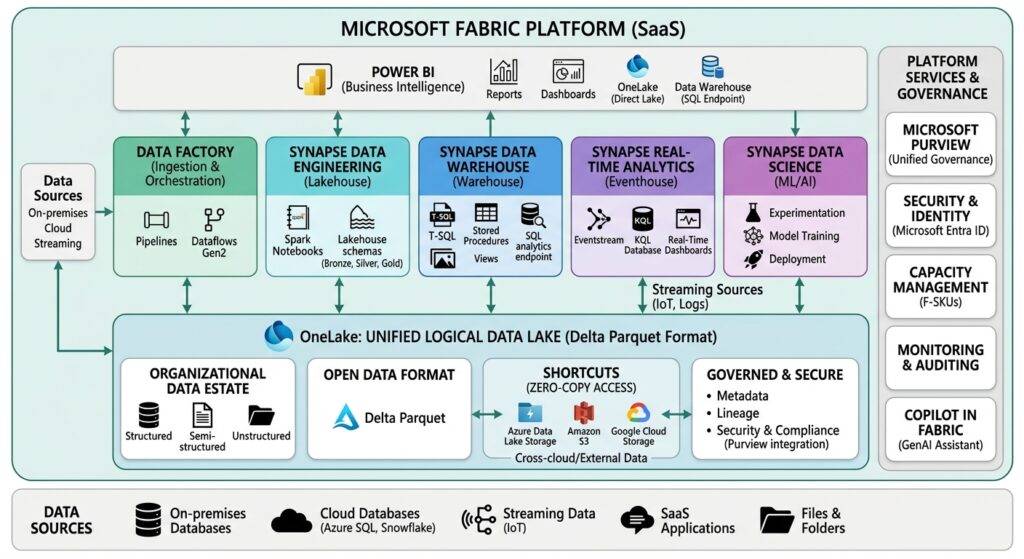
Definition – OneLake: OneLake is Microsoft Fabric’s single, unified storage layer. All Fabric workloads read from and write to OneLake without duplicating data across services. It uses the Delta Parquet format and is architecturally equivalent to a multi-tenant, organization-wide data lake hosted on Azure.
Microsoft Fabric is licensed through a capacity-based model using F SKUs (F2 through F2048) or Power BI Premium. It requires no infrastructure management from the customer—Microsoft handles compute, storage scaling, and runtime maintenance.
Key components and their definitions:
- OneLake: Single logical data lake shared across all Fabric workloads. Eliminates data silos and movement between services.
- Fabric Lakehouse: A Delta Lake-compatible environment supporting structured and unstructured data with both SQL and Spark access patterns.
- Data Factory: Cloud-scale data integration with 150+ connectors and low-code pipeline authoring.
- Synapse Data Engineering: Apache Spark-based data engineering with notebook support for Python, Scala, and SQL.
- Synapse Data Warehouse: T-SQL-based data warehousing with native lake integration—no data movement required.
- Real-Time Intelligence (Eventhouse): A KQL-based engine derived from Azure Data Explorer, purpose-built for streaming and time-series analytics.
- Power BI: Native business intelligence and reporting embedded directly across all Fabric workloads, with DirectLake mode for zero-copy querying.
- Microsoft Copilot for Fabric: AI-assisted authoring, code generation, and data exploration built into the platform using Azure OpenAI.
For organizations already operating in Azure and Microsoft 365, Fabric’s native integrations with Microsoft Entra ID, Microsoft Purview, and Dynamics 365 reduce integration engineering significantly.
What Is Databricks?
Databricks is a cloud-native data intelligence platform founded in 2013 by the creators of Apache Spark. It is built on Apache Spark and Delta Lake, and is designed for large-scale data engineering, advanced machine learning, LLM training, and multi-cloud deployments across AWS, Azure, and Google Cloud. Unlike Microsoft Fabric, Databricks deploys within your own cloud account, giving your organization full infrastructure ownership.
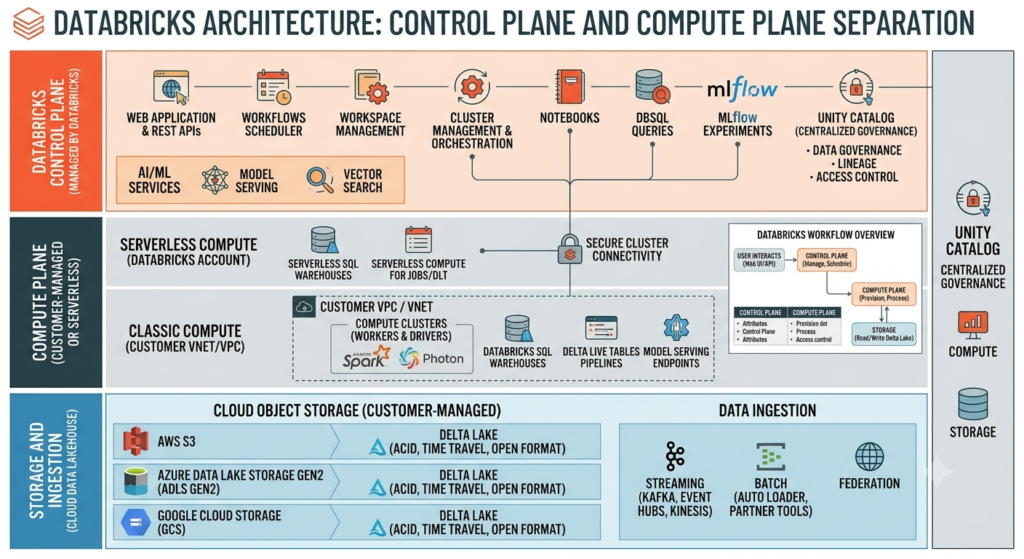
Definition — Lakehouse Architecture: A lakehouse combines the low-cost, scalable storage of a data lake with the reliability, ACID transactions, and query performance of a data warehouse. Both Microsoft Fabric and Databricks use this architecture, but implement it differently.
Definition — Delta Lake: Delta Lake is an open-source ACID-compliant storage layer built on Parquet files in cloud object storage. It adds schema enforcement, time travel (data versioning), and transaction support. Delta Lake was created by Databricks and is also used as the native format in Microsoft Fabric’s OneLake.
Databricks acquired MosaicML in 2023 and has since positioned itself as an AI-first data platform focused on enterprise LLM training, fine-tuning, and model deployment at scale.
Key components and their definitions:
- Lakehouse Platform: Unified environment combining data lake scalability with data warehouse reliability, built on Delta Lake.
- Apache Spark: Open-source distributed computing engine that powers all data processing workloads on Databricks.
- Photon Engine: A native vectorized query engine written in C++ that bypasses JVM overhead and delivers 2–12x performance improvement over standard Spark SQL on TPC-DS benchmarks.
- MLflow: Open-source ML lifecycle management platform for experiment tracking, model registry, and deployment. Now an industry standard for MLOps.
- Unity Catalog: Unified data governance layer providing fine-grained row-level and column-level access controls, lineage tracking, and metadata management across clouds and workspaces.
- Mosaic AI: Databricks’ enterprise AI platform supporting LLM fine-tuning, model serving, vector search, and AI agent infrastructure—acquired through MosaicML in 2023.
- Delta Live Tables (DLT): Declarative framework for building reliable, maintainable data pipelines with automatic dependency resolution and data quality enforcement.
How Do Microsoft Fabric and Databricks Compare Side by Side?
Microsoft Fabric and Databricks share a Delta Lake foundation and lakehouse architecture, but differ across deployment model, ML maturity, multi-cloud support, governance tooling, and BI integration. Fabric is a fully managed SaaS platform on Azure. Databricks is a PaaS platform available on AWS, Azure, and GCP with deeper control over infrastructure.
| Dimension | Microsoft Fabric | Databricks |
|---|---|---|
| Architecture | SaaS, unified platform | PaaS, lakehouse on your cloud account |
| Storage Format | OneLake (Delta Parquet) | Delta Lake (open-source) |
| Primary Processing Engine | Spark, T-SQL, KQL | Apache Spark, Photon |
| ML & AI Capabilities | Copilot, SynapseML, AzureML integration | MLflow, Mosaic AI, DBRX, model serving |
| Governance | Microsoft Purview integration | Unity Catalog |
| BI Integration | Power BI (native, DirectLake) | DirectQuery connector to Power BI |
| Multi-Cloud Support | Azure only | AWS, Azure, GCP |
| Infrastructure Management | Fully managed (SaaS) | Partially managed (PaaS) |
| Pricing Model | Capacity-based (F SKUs) | Consumption-based (Databricks Units) |
| Best Fit | Microsoft-native orgs, BI-heavy teams | Advanced ML, data engineering, multi-cloud |
How Does the Architecture Differ Between Microsoft Fabric and Databricks?
Microsoft Fabric uses a unified, shared-service architecture where all workloads – pipelines, warehouses, notebooks, and reports operate over a single OneLake storage layer. Databricks uses a modular, compute-over-storage architecture where Apache Spark clusters process data stored in Delta Lake within your own cloud account. Fabric simplifies management. Databricks provides more engineering control.
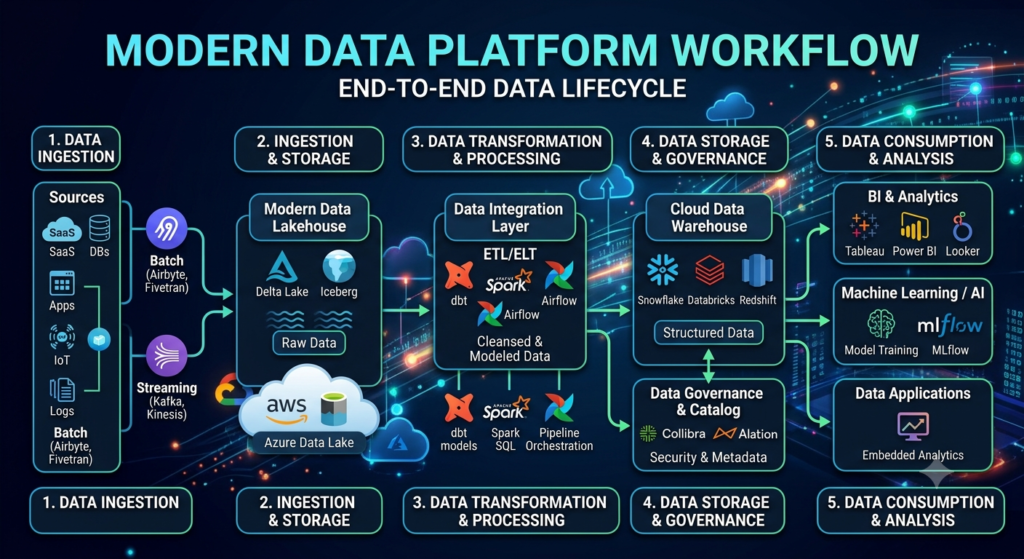
How does data ingestion work in Microsoft Fabric vs Databricks?
Microsoft Fabric ingests data through Data Factory, which provides 150+ connectors and low-code pipeline authoring with native integration to Microsoft 365, Dynamics 365, and Azure services. Databricks ingests data through Auto Loader for incremental cloud storage ingestion and Delta Live Tables for declarative, reliable pipeline construction.
For teams connecting primarily to Microsoft data sources, Fabric’s native connectors eliminate custom integration work. For teams building complex, high-throughput pipelines with transformation logic embedded in ingestion, Databricks’ Auto Loader and DLT offer more engineering flexibility.
How does storage architecture differ between Fabric and Databricks?
Both platforms use Delta Lake as their table format. Fabric stores all data in OneLake, a single, Microsoft-managed lake shared across all workloads. Databricks stores data in Delta Lake within your own cloud storage account (S3, ADLS, or GCS), which your organization owns and controls.
OneLake simplifies governance and eliminates data movement between services. Databricks storage provides portability and full infrastructure ownership, but requires your team to manage access policies, lifecycle rules, and storage costs directly.
How do Microsoft Fabric and Databricks handle data transformation?
Both platforms support Apache Spark for distributed data transformation. Databricks adds the Photon engine, which delivers 2–12x query performance improvements over standard Spark SQL according to Databricks engineering benchmarks on TPC-DS workloads. Fabric uses a managed Spark runtime with auto-scaling and also offers a T-SQL warehouse for SQL-centric transformation teams.
For teams running petabyte-scale transformations with complex Spark logic, Databricks has a measurable performance advantage. For teams primarily using SQL and Power BI, Fabric’s T-SQL warehouse and managed Spark environment reduce operational complexity.
Which platform provides better machine learning capabilities?
Databricks leads on machine learning depth. It maintains MLflow—the open-source standard for ML experiment tracking—and provides Unity Catalog for model governance, Mosaic AI for LLM fine-tuning and serving, and feature stores for production ML pipelines. Microsoft Fabric integrates Azure Machine Learning but does not have an equivalent native ML stack.
Choose Databricks if machine learning, model training, or LLM fine-tuning is a primary workload. Choose Fabric if AI means Copilot-assisted development and Power BI-integrated analytics.
How does governance compare between Microsoft Fabric and Databricks?
Microsoft Fabric integrates with Microsoft Purview for data cataloging, lineage, sensitivity labeling, and compliance reporting across the Microsoft ecosystem. Databricks provides Unity Catalog, which offers fine-grained row-level and column-level access controls, cross-workspace governance, and data lineage across multiple cloud environments.
Definition — Microsoft Purview: Microsoft Purview is an enterprise data governance platform that catalogs, classifies, and tracks data assets across Microsoft 365, Azure, and external sources. It is not specific to Fabric but integrates natively with it.
Definition — Unity Catalog: Unity Catalog is Databricks’ unified governance layer. It manages permissions, lineage, and metadata for data tables, ML models, and AI assets across workspaces and cloud providers.
For organizations embedded in Microsoft compliance workflows, Purview integration is a meaningful operational advantage. For organizations needing cross-cloud, cross-workspace governance with granular access control, Unity Catalog is technically more capable.
What Are the Feature Differences Between Microsoft Fabric and Databricks?
Microsoft Fabric and Databricks overlap heavily in data engineering and SQL analytics, but diverge significantly in ML depth, BI integration, multi-cloud support, and governance architecture. Fabric leads on BI and SQL. Databricks leads on Spark performance, ML, and open-source flexibility.
| Feature | Microsoft Fabric | Databricks |
|---|---|---|
| Data Engineering | Spark, Data Factory, Dataflows | Spark, DLT, Auto Loader |
| Data Science | Notebooks, SynapseML | Notebooks, MLflow, Mosaic AI |
| Machine Learning | AzureML integration, Copilot | MLflow, Model Serving, Feature Store, DBRX |
| SQL Analytics | T-SQL Warehouse, KQL | Databricks SQL, Photon Engine |
| Streaming | Eventstream, Eventhouse (KQL) | Structured Streaming, Delta Live Tables |
| Lakehouse | OneLake Lakehouse | Delta Lakehouse |
| Data Warehouse | Synapse Warehouse (T-SQL) | Databricks SQL Warehouse |
| Power BI | Native, DirectLake mode | DirectQuery connector |
| Notebook Support | Jupyter-compatible | Jupyter-compatible |
| Spark Runtime | Managed, auto-scaled | Full control, Photon-accelerated |
| Python | Yes | Yes |
| Scala | Yes | Yes (primary language) |
| SQL Dialects | T-SQL, KQL, Spark SQL | Spark SQL, ANSI SQL |
| Governance | Microsoft Purview | Unity Catalog |
| Cost Model | F SKU capacity (fixed) | DBU consumption (variable) |
| Deployment | SaaS, Azure only | PaaS, AWS / Azure / GCP |
| Performance Strength | BI and SQL workloads | Large-scale Spark and ML workloads |
| Identity & Security | Microsoft Entra ID, Purview | Unity Catalog, cloud-native IAM |
How Do Microsoft Fabric and Databricks Perform on Enterprise Workloads?
Databricks outperforms Fabric on large-scale Spark and ML workloads due to the Photon engine and deeper compute optimization. Microsoft Fabric outperforms Databricks on business intelligence workloads due to native Power BI integration and DirectLake mode. For real-time analytics, Fabric’s Eventhouse is purpose-built; for streaming pipelines, Databricks’ Structured Streaming is more mature.
How do Fabric and Databricks perform on large datasets?
Databricks has a measurable performance advantage for large-scale Spark workloads. The Photon engine—written in C++—bypasses JVM overhead and delivers vectorized query execution. Databricks’ own TPC-DS benchmarks show 2–12x performance improvement over standard Spark SQL. Fabric’s managed Spark runtime performs competitively at medium scale but has no Photon equivalent.
For petabyte-scale transformations or complex multi-join analytical queries, Databricks has a clear engineering edge. For medium-scale analytical workloads with SQL-centric teams, Fabric’s managed runtime reduces operational burden without significant performance trade-off.
How does real-time processing compare between the two platforms?
Direct Answer: Microsoft Fabric’s Eventhouse—built on Azure Data Explorer—is purpose-built for high-velocity streaming data and supports sub-second KQL queries over millions of events per second. Databricks handles streaming through Structured Streaming and Delta Live Tables, which are mature and pipeline-integrated but not optimized specifically for interactive real-time KQL queries.
For organizations requiring dedicated real-time analytics—IoT telemetry, clickstream data, financial tick data—Fabric’s Eventhouse offers purpose-built latency characteristics that Databricks does not match natively.
Which platform performs better for business intelligence workloads?
Microsoft Fabric wins decisively for BI workloads. Power BI is embedded natively, and DirectLake mode eliminates data movement between OneLake and the reporting layer—reports query live lake data without import or DirectQuery latency. Databricks supports Power BI through DirectQuery, which requires a connector layer and adds integration overhead.
Definition — DirectLake Mode: DirectLake is a Power BI query mode exclusive to Microsoft Fabric that reads data directly from OneLake Delta files without importing data into a model or using a live DirectQuery connection. It delivers import-speed performance on live data.
For reporting-heavy teams, the absence of DirectLake in Databricks is a meaningful operational cost measured in query latency, engineering effort, and semantic model complexity.
How do the platforms compare for machine learning workloads?
Databricks outperforms Fabric for production ML. MLflow, feature stores, model serving, and Mosaic AI are tightly integrated—training runs, experiment tracking, and model deployment occur inside a unified environment. Fabric delegates ML to Azure Machine Learning, which requires context switching between two separate platforms and adds orchestration complexity.
For data science teams running frequent experiments and production model deployments, that integration gap compounds over time. Databricks is the more capable platform for ML-intensive organizations.
What Does Microsoft Fabric vs Databricks Actually Cost?
Microsoft Fabric uses a capacity-based pricing model (F SKUs from ~$262/month for F2) that is predictable for steady workloads. Databricks uses a consumption-based model billed in Databricks Units (DBUs) per cluster hour, which rewards platform engineering expertise but creates variable costs for teams without strong cluster management discipline. Total cost of ownership—not list price—is the correct comparison metric.
| Cost Dimension | Microsoft Fabric | Databricks |
|---|---|---|
| Licensing Model | F SKU capacity (F2–F2048) | Databricks Units (DBUs) per workload type |
| Entry Point | F2 SKU (~$262/month) | Pay-as-you-go; no minimum commitment |
| Storage | OneLake (~$0.023/GB/month) | Cloud provider storage rates (S3, ADLS, GCS) |
| Compute | Included in capacity SKU | DBUs billed per cluster-hour |
| BI Licensing | Power BI included in Fabric | Power BI licensed separately |
| Infrastructure | No infrastructure cost (fully SaaS) | Cloud VM costs billed by cloud provider |
| Common Hidden Costs | Overage charges when capacity is exceeded | Idle clusters, auto-scaling overruns |
| Typical SMB TCO | Lower for BI-heavy teams | Higher initial; lower at scale with tuning |
| Typical Enterprise TCO | Predictable (capacity model) | Variable; depends on platform management investment |
Fabric’s capacity model is predictable for organizations with steady, foreseeable workloads. Databricks’ consumption model provides a lower cost ceiling for organizations with strong platform engineering—but organizations that neglect cluster management, auto-termination, and workload scheduling consistently overspend.
If your team lacks dedicated data platform engineers, Fabric’s SaaS model reduces operational overhead significantly. Choosing Databricks without that engineering investment is one of the most common and expensive platform selection mistakes we observe.
What Are the Pros and Cons of Microsoft Fabric?
Microsoft Fabric’s primary strengths are its unified SaaS architecture, native Power BI integration with DirectLake, predictable capacity pricing, and deep alignment with the Microsoft ecosystem. Its primary weaknesses are Azure-only deployment, a less mature ML stack compared to Databricks, and limited flexibility for teams that need infrastructure control or multi-cloud portability.
| Pros | Cons |
|---|---|
| Unified SaaS platform reduces tool sprawl | Azure-only; no AWS or GCP deployment |
| Native Power BI with DirectLake mode | ML capabilities less mature than Databricks |
| OneLake eliminates data duplication across services | Relatively new platform (GA: November 2023) |
| Microsoft Purview governance integration | Less infrastructure control than PaaS alternatives |
| Predictable capacity-based pricing | Ecosystem limited largely to Microsoft tooling |
| Copilot for low-code/no-code development | Some workloads still require Synapse familiarity |
| Lower barrier for SQL and Power BI teams | Spark runtime has no Photon-equivalent optimization |
What Are the Pros and Cons of Databricks?
Databricks’ primary strengths are Photon-accelerated Spark performance, a mature ML platform (MLflow, Mosaic AI), multi-cloud portability, and Unity Catalog governance. Its primary weaknesses are higher operational complexity, variable costs without strong platform management, no native BI layer, and a steeper learning curve for non-engineering teams.
| Pros | Cons |
|---|---|
| Industry-leading Spark performance via Photon | Steeper learning curve for non-engineering teams |
| MLflow, Mosaic AI, and enterprise LLM support | Requires cloud infrastructure management |
| Multi-cloud support: AWS, Azure, GCP | Variable costs without disciplined platform management |
| Unity Catalog for fine-grained governance | No native BI layer; requires external tools |
| Open architecture built on Delta Lake, MLflow, Spark | Higher operational overhead than SaaS alternatives |
| Strong partner ecosystem and integrations | Power BI integration requires connector configuration |
| Most mature lakehouse platform by track record | Less suited for pure BI or SQL-only teams |
Which Industries Should Use Microsoft Fabric vs Databricks?
Healthcare, government, and manufacturing organizations with Microsoft 365 environments and BI-heavy requirements are better served by Microsoft Fabric. Financial services, insurance, SaaS companies, and AI-first organizations with complex ML pipelines and multi-cloud requirements are better served by Databricks. Retail organizations should evaluate based on their existing stack and whether analytics or ML is the primary use case.
| Industry | Recommended Platform | Primary Technical Reason |
|---|---|---|
| Healthcare | Microsoft Fabric | Purview integration for PHI governance, HIPAA alignment with Azure, Microsoft 365 integration |
| Financial Services | Databricks | Complex ML scoring models, regulatory lineage, multi-cloud data infrastructure |
| Manufacturing | Microsoft Fabric | IoT real-time analytics via Eventhouse, Power BI operational reporting |
| Retail | Evaluate both | Fabric for BI-led analytics; Databricks for demand forecasting ML |
| Insurance | Databricks | Actuarial ML models, complex pipeline logic, cross-cloud data |
| Government | Microsoft Fabric | Azure Government Cloud alignment, Microsoft compliance posture |
| SaaS Companies | Databricks | Scalable data engineering, product analytics, multi-cloud portability |
Healthcare organizations gain the most from Fabric’s Purview integration for Protected Health Information (PHI) governance and its native alignment with the Azure Government Cloud compliance framework. Financial services firms running multi-model ML infrastructure and needing cross-cloud regulatory lineage will find Databricks’ Unity Catalog and MLflow stack technically more capable.
When Should You Choose Microsoft Fabric?
Choose Microsoft Fabric when your organization is already invested in Azure, Power BI, and Microsoft 365—and your primary workloads are business intelligence, SQL analytics, and data engineering at moderate to large scale without heavy machine learning or multi-cloud requirements. Fabric is optimized for teams that want a managed, unified analytics environment without dedicated infrastructure engineering.
Specific conditions that favor Microsoft Fabric:
- Your organization uses Power BI and needs DirectLake performance without additional integration layers.
- You operate entirely within Azure with no multi-cloud requirements.
- Your data team is SQL-centric or includes Power BI developers and data engineers alongside analysts.
- You need a SaaS platform that reduces infrastructure management overhead.
- You are migrating from Azure Synapse Analytics, Azure Data Factory, or Azure Data Explorer.
- Your governance requirements are already anchored in Microsoft Purview and Microsoft Entra ID.
- Your data team is small to medium-sized and cannot support a dedicated platform engineering function.
Microsoft Fabric is not the right choice if your primary workload is large-scale machine learning, LLM training, or multi-cloud data portability. Selecting Fabric for those requirements means accepting significant capability gaps from day one.
When Should You Choose Databricks?
Choose Databricks when your organization requires enterprise-scale machine learning, complex multi-hop data pipelines, multi-cloud portability, or LLM training on proprietary data—and has the engineering team to manage a PaaS platform. Databricks is optimized for organizations where data engineering and ML are strategic differentiators, not operational infrastructure.
Specific conditions that favor Databricks:
- Your data science team runs frequent ML experiments, model training cycles, and production model deployments.
- You operate across multiple cloud providers (AWS + Azure, or GCP + AWS) and need a consistent data platform.
- Your pipelines process petabyte-scale data where Photon engine performance is a material factor.
- You are building or fine-tuning large language models on proprietary enterprise data.
- Your governance requirements include row-level and column-level access controls across multiple workspaces.
- Your team includes experienced Spark engineers, ML engineers, and platform engineers.
- You want an open-source foundation (Delta Lake, MLflow, Apache Spark) to avoid proprietary tool lock-in.
Databricks is not the right choice if your team lacks Spark expertise, your primary use case is Power BI reporting, or you need a fully managed SaaS platform with minimal infrastructure overhead. Purchasing Databricks without the engineering capacity to operate it is a predictable path to overspending on platform management rather than data product development.
What Are the Migration Considerations for Each Platform?
Migrating to Microsoft Fabric is most straightforward from Azure Synapse Analytics and Power BI Premium environments. Migrating to Databricks is most straightforward from existing Spark-based or AWS-native environments. Neither migration is plug-and-play. The effort depends on workload complexity, SQL dialect differences, and governance policy re-creation.
Migrating from Azure Synapse Analytics to Microsoft Fabric
Microsoft provides documented migration paths from Azure Synapse to Fabric. Synapse Spark pools and Data Factory pipelines migrate with relatively low friction—Fabric uses compatible runtimes and pipeline authoring patterns. Dedicated SQL Pool workloads require more effort because Fabric’s T-SQL warehouse has architectural differences from Synapse Dedicated SQL. Expect workload-by-workload validation.
Migrating from Snowflake to Microsoft Fabric or Databricks
Snowflake-to-Fabric migration requires SQL dialect translation from Snowflake SQL to T-SQL. Snowflake-to-Databricks migration involves converting to Spark SQL or Databricks SQL, which offers more compatibility but still requires workload testing and performance validation. Both migrations are achievable for teams with strong SQL engineering. Neither should be treated as a lift-and-shift operation.
Migrating from AWS or Google Cloud to Microsoft Fabric
This migration requires a broader cloud migration decision. Microsoft Fabric is Azure-only. Organizations running primary data infrastructure on AWS or GCP cannot deploy Fabric without first migrating to Azure. This is a hard architectural constraint, not a configuration gap. Databricks runs natively on AWS, Azure, and GCP—making it the only viable choice between the two platforms for organizations that need to stay on AWS or GCP.
Migrating from a legacy on-premise data warehouse
Organizations moving from SQL Server, Teradata, or Oracle data warehouses face a fork: land on Fabric’s T-SQL warehouse for SQL dialect compatibility and Power BI integration, or land on Databricks SQL for Spark-based lakehouse architecture. The correct path depends on whether your downstream consumers are Power BI users (Fabric) or Python and Spark engineers (Databricks).
What Are the Most Common Mistakes When Choosing Between Fabric and Databricks?
Direct Answer: The five most common platform selection mistakes are: comparing list prices instead of total cost of ownership, ignoring existing ecosystem alignment, overestimating team readiness for Databricks, selecting the wrong governance architecture, and ignoring the three-year AI roadmap. Each mistake is predictable, and each is avoidable with structured evaluation.
Mistake 1: Choosing based on licensing cost alone
Total cost of ownership is not list price. Databricks clusters left running outside business hours cost significantly more than the headline DBU rate implies. Fabric capacity overage charges appear when exploratory workloads exceed provisioned F SKUs. Build a 12-month TCO model that includes compute, storage, engineering labor, and platform management before making a decision.
Mistake 2: Ignoring existing ecosystem alignment
The platform that integrates best with your current tools will consistently outperform the technically superior platform that requires months of integration work. Organizations running Microsoft 365, Azure Active Directory, and Power BI will find Fabric’s native integration measurably more productive from day one. Organizations running AWS with a mature Spark team will find Databricks reduces migration risk significantly.
Mistake 3: Ignoring team skill sets
Databricks requires Spark expertise, cluster management knowledge, and platform engineering capacity. Organizations that purchase Databricks without those skills spend months on infrastructure management rather than data product development. Fabric has a lower technical barrier for SQL analysts and Power BI developers—but it still requires data engineering expertise to build reliable, production-grade pipelines.
Mistake 4: Ignoring data governance requirements
Selecting the wrong governance architecture creates remediation work that is expensive and disruptive. If your compliance team is already embedded in Microsoft Purview workflows, Fabric extends naturally. If your requirements include cross-cloud, cross-workspace governance with fine-grained column-level access control, Unity Catalog is the technically correct choice. Retrofitting governance after deployment is consistently more expensive than designing for it upfront.
Mistake 5: Ignoring the three-year AI roadmap
Microsoft is embedding Copilot across Fabric workloads and integrating Azure OpenAI natively. Databricks is investing in Mosaic AI, DBRX, and enterprise LLM infrastructure. Choose the platform whose AI roadmap aligns with your strategic direction—not just your current workloads. Migrating a data platform mid-AI initiative is significantly more costly than selecting correctly at the start.
Where Are Microsoft Fabric and Databricks Headed in the Next Three Years?
Direct Answer: Microsoft Fabric’s roadmap is focused on deeper Copilot integration, real-time intelligence expansion, native vector search, and Microsoft 365 Copilot integration for business users. Databricks’ roadmap is focused on enterprise LLM training, AI agent infrastructure, vector search at scale, and deeper Unity Catalog governance for AI assets. Both platforms are converging toward AI-augmented data workflows, but through different architectural approaches.
Microsoft Fabric roadmap
Microsoft has shipped significant quarterly updates since Fabric’s November 2023 GA. Key roadmap directions include:
- Deeper Copilot integration across all Fabric workloads (data engineering, warehousing, real-time analytics, Power BI)
- Expanded real-time intelligence through Eventhouse
- Native vector search for Retrieval-Augmented Generation (RAG) workloads
- Tighter integration with Microsoft 365 Copilot for business user AI experiences
Fabric’s AI roadmap is oriented toward accessible, copilot-driven analytics for a broad user base—not enterprise ML engineering.
Databricks roadmap
Following the MosaicML acquisition, Databricks’ roadmap is focused on:
- Enterprise LLM training and fine-tuning on proprietary data
- AI agent infrastructure and orchestration
- Vector search and RAG at production scale
- Unity Catalog governance extended to AI model assets
Gartner’s 2024 Magic Quadrant for Data Science and Machine Learning Platforms recognized Databricks as a Leader, citing its execution in ML lifecycle management. For organizations building AI products on proprietary enterprise data, Databricks’ roadmap is the more directly aligned investment.
The lakehouse format evolution
Delta Lake, the open-source table format used by both platforms, faces growing competition from Apache Iceberg and Apache Hudi particularly in multi-cloud environments. Databricks’ Universal Format (UniForm) now supports reading Delta Lake tables as Iceberg tables, reducing format lock-in. Microsoft Fabric is Delta-native but does not yet offer equivalent cross-format interoperability. Organizations prioritizing long-term table format portability should treat this as an active consideration in their platform decision.
Which Platform Should Your Organization Choose in 2026?
Microsoft Fabric is the right choice for Microsoft-native organizations that need unified analytics, strong Power BI integration, and a predictable, fully managed SaaS platform on Azure. Databricks is the right choice for organizations that need enterprise-scale machine learning, multi-cloud portability, advanced Spark performance, and AI infrastructure. Neither platform is universally superior—the correct answer depends on your existing stack, team skills, and strategic direction.
| Organization Type | Recommended Platform | Primary Rationale |
|---|---|---|
| Azure-native startups | Microsoft Fabric | Lower TCO, unified SaaS, Power BI included |
| AWS-first startups | Databricks | Native AWS deployment, scalable from day one |
| SMBs with BI-heavy workloads | Microsoft Fabric | SQL-friendly, Power BI native, predictable capacity model |
| SMBs with engineering teams | Databricks | Spark scalability, open architecture, ML-ready |
| Large enterprises on Microsoft 365 | Microsoft Fabric | Governance alignment with Purview, Copilot integration |
| Large enterprises (multi-cloud) | Databricks | Unity Catalog, multi-cloud portability, Photon performance |
| Healthcare organizations | Microsoft Fabric | HIPAA alignment with Purview, Azure Government Cloud |
| Financial services | Databricks | Complex ML models, regulatory lineage, multi-cloud |
| AI-first companies | Databricks | Mosaic AI, MLflow, LLM training, Unity Catalog for AI assets |
| Government agencies | Microsoft Fabric | Azure Government Cloud, Microsoft compliance posture |
The worst platform decision is choosing based on a vendor demo or a feature checklist. Start with your current infrastructure, your team’s demonstrated skill profile, and your three-year AI and data strategy. Evaluate both platforms against those criteria not against synthetic bench.