Why These Mistakes Cost You More Than You Think
A broken website doesn’t just look bad. It bleeds revenue.
Every second of load delay drops conversions. Every confusing menu sends a buyer to a competitor. Every untracked visit is data you’ll never get back. These aren’t cosmetic problems. They’re business problems wearing a technical disguise.
For early-stage startups, the stakes are higher.
You operate on tight runways, lean teams, and unforgiving deadlines. You can’t afford to pour budget into traffic that lands on a site engineered to lose. Beyond the initial Web App Development Cost, choosing the wrong approach can create ongoing losses through missed leads, poor user experience, and expensive fixes later.
That’s why so many founders wonder why their websites fail to generate leads. The traffic arrives, but the build fails to convert.
The 15 Biggest Website Development Mistakes & How to Fix Them
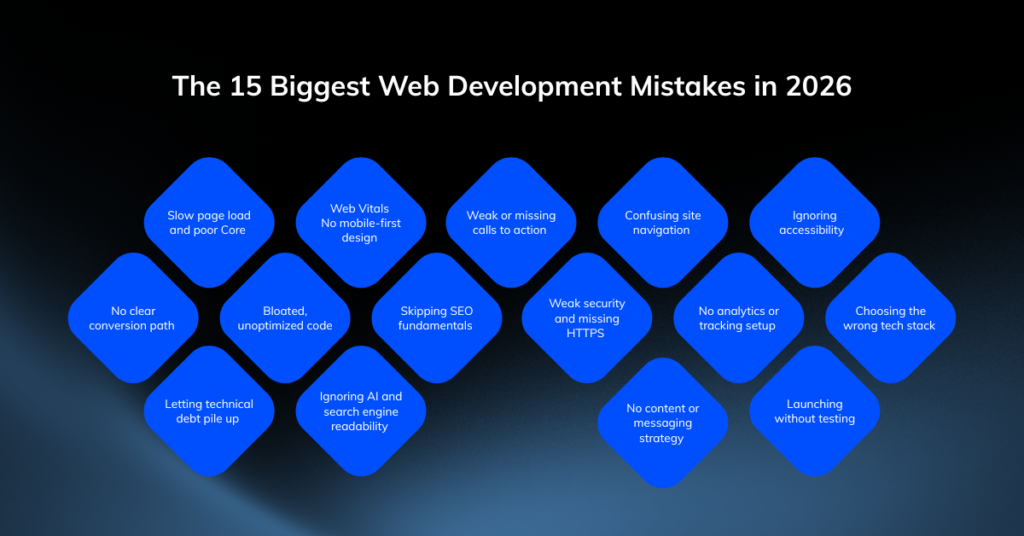
Let’s go through the 15 mistakes one by one. Each comes with the cost, the symptoms, and the fix.
1. Slow Page Load Speed
Speed is not a feature. It’s the price of an entry.
Users decide whether to stay in milliseconds. A site that takes more than three seconds to load loses a large share of visitors before they see a single word. Google notices too. Slow websites rank lower, costing you traffic before visitors even arrive and conversions when they do.
What slow load speed costs you
- Lost visitors: Every extra second of delay pushes more people to hit the back button.
- Lower rankings: Core Web Vitals are a direct ranking signal in 2026.
- Wasted ad spend: You pay for the click, then the slow page eats the lead.
How to fix it
- Run a Core Web Vitals audit to find render-blocking scripts and bloated assets.
- Compress and lazy-load images.
- Use a CDN and modern caching.
- Trim third-party scripts that add weight without value.
Fast sites win. Slow sites grind to a halt and take your pipeline with them.
2. No Mobile-First Design
Most of your traffic is on a phone. Your design probably isn’t.
If your site was built for desktop and “adjusted” for mobile as an afterthought, your largest audience is getting your worst experience. Buttons too small to tap. Text that demands pinching. Forms that fight the user. That’s a sale lost on a four-inch screen.
Mobile-first essentials
- Responsive layouts that adapt cleanly to every screen size.
- Thumb-friendly buttons sized for real fingers, not cursors.
- Readable text without zooming.
- Fast mobile load with images and code optimized for cellular connections.
Design the phone first. Scale up to a desktop second. Do it in that order, or watch your mobile bounce rate climb
3. Weak or Missing Calls to Action
A visitor who doesn’t know what to do next does nothing.
This is one of the most common reasons a good-looking site still produces zero leads. The design is clean, the copy is fine, but there’s no clear instruction. No “Book a demo.” No “Start free.” No obvious next step. So, the visitor leaves, and you never hear from them again.
Strong CTAs do three things
- State the action plainly: Use verbs like “Start,” “Book,” or “Get,” not vague labels like “Submit.”
- Stand out visually: A CTA buried in gray text converts no one.
- Appear at decision points: Place them where interest peaks, not only in the footer.
One clear action per page. Make it impossible to miss.
4. Confusing Navigation
If users can’t find it, it doesn’t exist.
Cluttered menus, vague labels, and buried pages force visitors to think. Thinking is friction, and friction kills conversions. People don’t troubleshoot your navigation. They leave and choose a competitor whose site simply works.
Clean navigation checklist
- Keep your main menu to seven items or fewer.
- Use plain, descriptive labels over clever ones.
- Make sure every key page is reachable in two clicks.
- Add a visible, working search for content-heavy sites.
Good navigation feels invisible. The user always knows where they are and where to go next.
5. Ignoring Accessibility
An inaccessible site shuts out paying customers and invites legal risk.
When you skip accessibility, you exclude users with disabilities, lose the SEO benefits of a clean structure, and expose yourself to compliance lawsuits that hit hard on a startup budget. This isn’t a nice-to-have. It’s a basic responsibility and smart business.
Accessibility basics that matter
- Add descriptive alt text to all images
- Ensure sufficient color contrast that meets WCAG standards for readability
- Make all interactive elements keyboard-navigable
- Use semantic HTML for screen reader compatibility
Build for everyone. You widen your market and protect your business at the same time.
6. No Clear Conversion Path
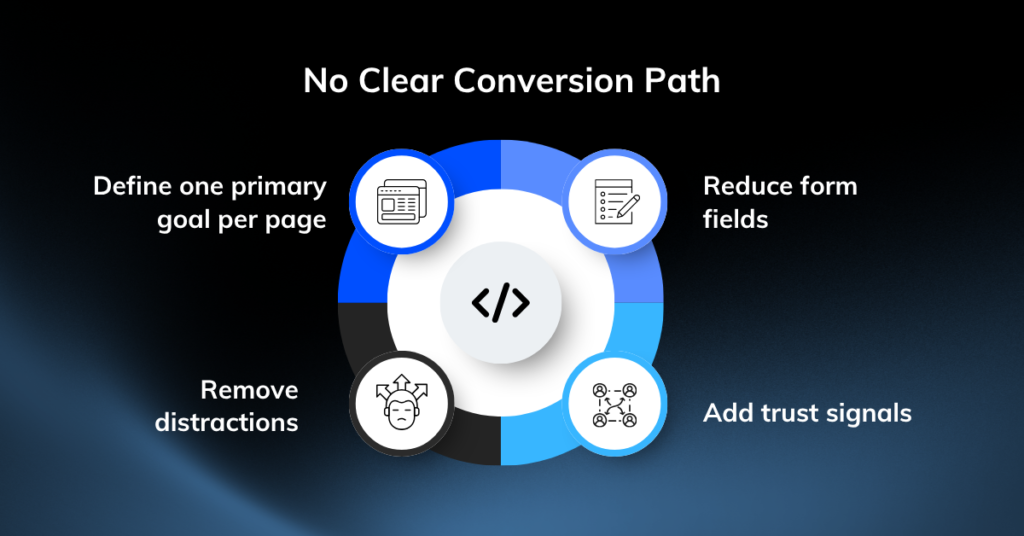
Traffic without a path is just expensive noise.
Visitors land on your homepage, and then what? If there’s no deliberate route from “just arrived” to “became a lead,” people wander and drop off. Many founders mistake a busy site for an effective one. Busy isn’t the goal. Guided is.
Map the journey deliberately
- Define one primary goal per page, like demo, signup, or purchase.
- Remove distractions that pull attention away from that goal.
- Reduce form fields to the minimum you actually need.
- Add trust signals near the point of action, such as logos, reviews, and guarantees.
Design the path you want users to take. Then strip out everything that competes with it.
7. Bloated, Unoptimized Code
Messy code slows everything down, including your team.
Bloated builds load slowly, break unpredictably, and cost more to maintain. When your developers spend their days fighting tangled code instead of shipping features, you lose speed where it matters most. This is the hidden version of why websites fail to generate leads: the front end looks fine, but the foundation drags.
Signs your code is working against you
- Slow load times that no image fix solves.
- Frequent bugs that reappear after every release.
- High maintenance hours spent on small changes.
- Unused libraries and dead code padding your bundle.
Steps to Fix It:
- Clean code with no shortcuts
- Document custom code thoroughly for future developers
- Avoid “just in case” features that add complexity without value
After fixing overcomplicated code issues, your website will start loading faster, costing less to maintain, and scaling without any disruptions.
8. Skipping SEO Fundamentals
A site no one can find generates nothing.
You can build the best product page on the internet, but if search engines can’t read it, it earns zero organic traffic. SEO isn’t a marketing add-on you bolt on later. It’s a development decision baked into how the site is built.
SEO foundations to get right
- Clean URL structure that’s readable and logical.
- Use Proper heading hierarchy from H1 down.
- Optimize meta titles and descriptions for every page
- Implement structured data like schema markup for rich snippets
- Create a logical internal linking structure
Bake SEO into the build. Retrofitting it later costs more and works less.
9. Weak Security and Missing HTTPS
One breach can end a young company.
Customers won’t hand over data to a site that feels unsafe. Browsers now flag any non-HTTPS page as “not secure.” That warning alone scares off visitors before they read a word. For a startup, a single breach means lost trust, legal exposure, and a reputation hit you can’t easily recover from.
Security non-negotiables
- HTTPS everywhere with a valid SSL certificate.
- Regular dependency updates to patch known vulnerabilities.
- Input validation to block injection attacks.
- Secure authentication with proper password handling.
Security is cheaper than recovery. Build it in from day one.
10. No Analytics or Tracking
You can’t fix what you can’t see.
Running a website without analytics is like flying blind. You don’t know which pages convert, where users drop off, or which channels send your best traffic. So, you make decisions on gut instead of data, and gut is expensive when the budget is tight.
Track what actually matters
- Conversion events like signups, demos, and purchases.
- Traffic sources to see what’s worth your spend.
- Drop-off points in your funnel.
- User behavior through heatmaps or session recordings.
Set up tracking before launch. Data turns guesses into decisions you can defend
11. Choosing the Wrong Tech Stack
The wrong foundation limits everything you build on top of it.
Founders often pick a stack based on what a freelancer knows or what’s trending, not on what the business needs. Then growth hits a wall. The platform can’t scale, talent is hard to hire, or every new feature becomes a battle. Now you’re rebuilding instead of growing.
Choose a stack that fits your goals
- Match it to your scale plans, not just today’s needs.
- Pick technologies with strong talent pools so hiring stays affordable.
- Favor proven tools over novelty for core infrastructure.
- Weigh long-term cost, not just the speed of the first build.
The right stack scales with you quietly. The wrong one becomes your biggest constraint.
12. Not Optimizing for Voice and AI Search
With the rise of AI-powered search and voice assistants, websites optimized only for traditional keyword search are missing a growing segment of discovery traffic. Content needs to answer questions directly and conversationally.
Adapting to AI-Driven Search
- Structure content to directly answer common questions
- Use natural, conversational language in headings and copy
- Implement FAQ sections with structured data markup
- Focus on topical authority rather than isolated keywords
13. No Content or Messaging Strategy
A beautiful site that says nothing converts no one.
Plenty of startups invest in design and ignore the words. The result is a polished page that fails to explain what you do, who it’s for, or why it matters. Visitors arrive confused and leave unconvinced. Design draws them in. Messaging closes the deal.
Build a message that converts
- Lead with the problem you solve, not your feature list.
- Speak to one clear audience, not everyone at once.
- Tie every claim to an outcome, such as time saved, cost cut, or revenue gained.
- Back it with proof through testimonials, numbers, or case studies.
Clear messaging is conversion infrastructure. Treat it like part of the build, because it is.
14. Launching Without Testing
Launch day is the worst time to discover what’s broken.
Skipping testing to hit a deadline feels like saving time. It costs you more. Broken forms, dead links, and layouts that collapse on certain devices push away the very first visitors you worked hardest to attract. First impressions don’t get a second chance.
Test before you ship
- Cross-browser checks on Chrome, Safari, Firefox, and Edge.
- Device testing across phones, tablets, and desktops.
- Form and CTA validation to confirm leads actually arrive.
- Load testing to see how the site holds under traffic spikes.
Test everything before launch. A clean first impression turns visitors into leads instead of bounce stats.
15. Choosing the Wrong Development Partner
Making the wrong decision when choosing a web development partner can amplify every other mistake.
Perhaps the most overlooked common web development mistakes aren’t technical at all. It’s the decision-making process behind who builds your website.
The wrong development partner can introduce unexpected issues that impact the project’s success. Often, businesses discover these problems only when they are too far along to resolve them easily.
What to Look for in a Development Partner
- A proven portfolio with measurable results, not just visuals
- Transparent communication about technical decisions
- Post-launch support and maintenance offerings
- A process that prioritizes performance, SEO, and conversion from day one
How to Prioritize These Fixes on a Startup Budget
You can’t fix all 15 at once, and you don’t need to. Start where the bleeding is worst.
- Fix speed and mobile first. They affect every visitor and every ranking.
- Tighten your conversion path and CTAs next. This converts the traffic you already have.
- Lock down security and analytics. Protect the business and start collecting data that guides everything else.
- Address the stack and technical debt as you scale.
These are structural fixes that pay off over quarters, not days. Work in that order, and you turn a leaking site into a growth engine without blowing your runway.
Turn Your Website into an Asset with Enlight Lab
Your website should be your hardest-working sales rep. Too often, it’s your most expensive liability.
These common web development mistakes share one trait: they’re all fixable. Slow load times, weak CTAs, messy code, and missing strategy aren’t permanent. They’re decisions you can reverse and every fix compounds into more leads from the traffic you already pay for.
Here’s what to do now:
- Audit your site against these 15 mistakes this week.
- Fix the highest-impact issues first. Start with speed, mobile, and the conversion path.
- Track the results so you know exactly what’s working.
Don’t let a broken build keep costing you customers. If you want a clear, expert assessment of where your site is losing leads and a practical plan to fix it, book a free consultation call with Enlight Lab. We’ll show you exactly what to fix first and what it’s worth to your bottom line.
Your traffic is already showing up. Build a site with our elite engineering team and ensure a smooth conversion without disrupting the existing structure.