If you lead a company, own the people function, or run technology and learning, you’ve felt the pressure. Your employees are already using AI. Your competitors are experimenting. And somewhere between the hype and the headlines, a real question sits unanswered: how do you actually turn scattered AI experiments into a workforce that uses these tools well, safely, and at scale?
This playbook is written for CEOs, CHROs, CTOs, VPs of People, and heads of L&D at startups and mid-market companies. It’s based on the patterns we’ve seen work when companies move past pilot projects and start building genuine capability. You’ll get a clear definition of what “AI-ready” means, a practical assessment framework, a skills breakdown by role, and a way to measure whether any of it is working.
No fear-mongering. No buzzwords. Just the steps that separate companies making real progress from those stuck at “we bought some licenses.”
What Is an AI-Ready Workforce? (And Why It Matters in 2026)
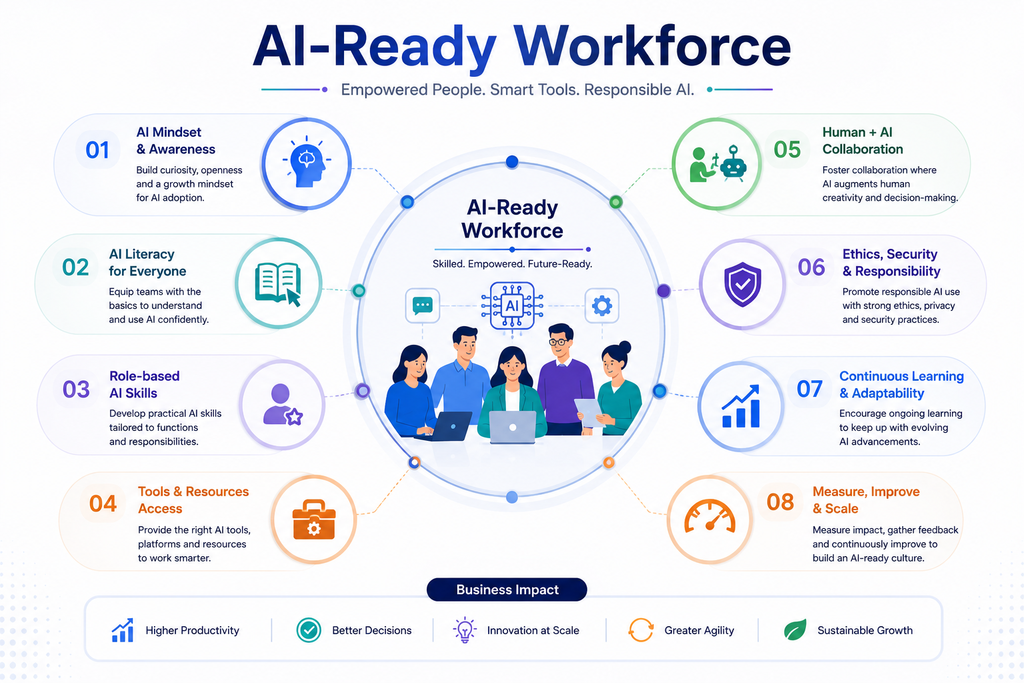
An AI-ready workforce is one where employees have the skills, mindset, tools, and governance to use AI confidently and responsibly in their day-to-day work. It’s not about everyone becoming a data scientist. It’s about people knowing when to use AI, how to use it well, and where the guardrails are.
Four pillars make a workforce AI-ready:
- Skills: People can prompt effectively, evaluate AI output, and apply it to real tasks.
- Mindset: Teams treat AI as a collaborator, staying curious rather than fearful or dismissive.
- Tools: Employees have access to approved, well-integrated AI tools that fit their workflows.
- Governance: Clear policies cover data privacy, security, and acceptable use.
The business case is stronger than ever. According to McKinsey’s State of AI in 2026, 80% of respondents say AI has improved their individual productivity, and 44% of organizations now report scaling AI across the enterprise—up from 38% a year earlier. Yet only 37% report a measurable EBIT impact. That gap tells the real story: individual gains aren’t automatically becoming company gains. The bridge between them is a workforce that knows how to put AI to work.
Why Do You Need an AI-Ready Workforce Now?
You need an AI-ready workforce now because AI adoption has outpaced AI capability at most companies, and the gap is widening. Employees are using these tools whether or not leadership has a plan—which creates both opportunity and risk.
The numbers back this up. McKinsey’s 2026 research found that AI high performers are 3.3 times more likely than their peers to intend to fundamentally transform their business with AI, and nearly three-quarters of them have already redesigned core workflows. These companies aren’t just adding AI to old processes. They’re rethinking how work gets done.
Employee expectations are shifting too. SHRM’s Navigating AI in the Workplace 2026 report found that 41% of workers already use AI on the job, and that workers report higher engagement and stronger commitment when their organizations take an open, supported approach to AI. Early-career professionals feel the pressure most—45% report demand to adopt AI tools in their roles.
Here’s what that means for retention and engagement. When employees use AI in a vacuum, without guidance or approval, two things happen. Skilled people get frustrated by the lack of support. And nearly half of AI users describe some of their own output as low-quality “AI slop,” per SHRM. A structured approach fixes both problems—it channels enthusiasm into quality work and signals that leadership takes the shift seriously.
The risk of waiting is simple. Your best people will keep learning AI on their own, your governance gaps will keep growing, and your competitors will keep pulling ahead.
How Do You Assess Your Current AI Readiness?
Start with an honest audit before you spend a dollar on training. You can’t design a useful program until you know which roles touch AI, where the biggest opportunities sit, and what tools and policies you already have.
Use this five-step mini-framework to map your starting point:
- Map roles and tasks. List your core functions and the repetitive, high-volume tasks within each. These are your AI candidates.
- Identify AI touchpoints. For each task, ask where AI could realistically help—drafting, summarizing, analyzing, coding, or research.
- Survey employees. Find out who’s already using AI, what tools, and how confident they feel. You’ll usually discover more shadow usage than expected.
- Audit tools, policies, and security. Review which tools are approved, what data flows through them, and where privacy or compliance gaps exist.
- Prioritize high-impact areas. Rank opportunities by potential value and ease of adoption. Start where the win is clear and the risk is low.
A short, focused assessment beats a sprawling one. If you want an outside perspective—or a faster path through the audit—our AI Readiness team runs this process with companies regularly and can help you separate real opportunities from noise.
Start with our free AI Readiness Assessment : answer 12 quick questions across data, team, process, and strategy, get an instant 0–100 maturity score, and receive three specific, AI-generated recommendations you can act on today.
What Skills Does an AI-Ready Workforce Need?
An AI-ready workforce needs three tiers of skill: foundational literacy for everyone, functional skills tied to specific roles, and advanced capabilities for technical teams building with AI. Not everyone needs all three—and trying to teach everyone everything is a common, expensive mistake.
Think of it as a pyramid. Every employee needs the foundation. Fewer need functional depth. A small group needs advanced skills.
| Skill tier | Target audience | Time investment | Primary focus |
|---|---|---|---|
| Foundational | All employees | 2–4 hours | AI literacy, prompting basics, ethics, data privacy |
| Functional | Role-specific teams (sales, marketing, service, ops) | 4–8 hours | AI workflows tailored to each function |
| Advanced | Engineers, data, product | 12+ hours | AI integration, custom agents, API usage, governance |
Foundational skills keep everyone safe and productive. This is where people learn what AI can and can’t do, how to write a useful prompt, and why they should never paste sensitive data into a public tool.
Functional skills make AI stick in real work. A marketer learns AI-assisted campaign drafting; a support rep learns to draft and check responses; an analyst learns to summarize and query data. These skills connect directly to daily tasks.
Advanced skills are for the people building your AI future—developers creating custom agents, connecting APIs, and setting technical governance. As McKinsey notes, nearly a third of organizations have chosen to build software in-house using agentic coding tools rather than buy it. That capability lives in this tier.
How Do You Design AI Training for Different Roles?
Design training around what each role actually does, not around a generic “AI 101” everyone sits through. Role-based learning paths respect people’s time and produce skills they’ll use the next day.
Here’s how the paths differ:
- Executives (CEOs, CHROs, CTOs): Focus on strategy, risk, and vision-setting. Short sessions on where AI creates value, how to fund it, and how to model responsible use.
- Functional teams (sales, marketing, service, ops): Hands-on workshops using real work scenarios. A sales team practices with their own CRM; marketing works with actual briefs.
- Technical teams (engineering, data, product): Deep labs on building, integrating, and governing AI systems, including custom agents and API work.
- HR and L&D: Training on how to run the program itself—curating content, tracking adoption, and supporting managers.
Mix your formats to fit how adults actually learn:
- Workshops for concentrated, hands-on practice.
- Microlearning for short lessons people can fit between meetings.
- Hands-on labs for technical teams working with live tools.
- Office hours where anyone can bring a real problem and get help.
- AI champions—enthusiastic employees in each team who model good use and answer everyday questions.
The AI champion model matters more than most leaders expect. Peer support scales in a way formal training never will, and champions surface practical use cases you’d never find from the top down.
If your technical teams need to build custom agents or you lack senior technical leadership to steer the effort, our AI agent development and CTO-as-a-Service offerings can fill those gaps while your internal capability grows.
How Do You Embed AI into Daily Workflows (Not Just Training)?
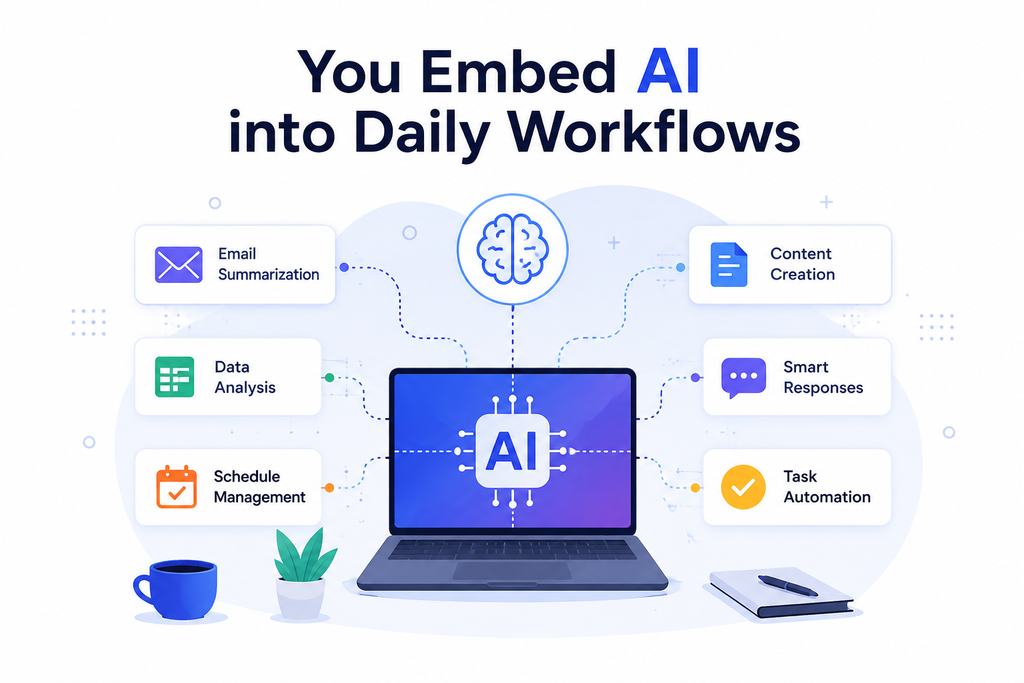
Embed AI by redesigning the workflows themselves, not by hoping people apply what they learned in a workshop. Training creates awareness. Workflow integration creates habit. This is the step most companies skip—and it’s the reason so many training programs fade within a quarter.
McKinsey’s data makes the point sharply: nearly three-quarters of AI high performers have fundamentally redesigned workflows, compared with just one-quarter of everyone else. The difference between adding AI and rebuilding around it is the difference between a productivity blip and a lasting gain.
Focus on four practical moves:
- Redesign key processes. Pick one or two high-volume workflows and rebuild them with AI at the center—not bolted on the side.
- Create approved prompt libraries and playbooks. Give teams tested prompts for common tasks so they don’t start from scratch or reinvent the wheel.
- Set up AI champions and support channels. A dedicated Slack channel or regular office hours keeps momentum going after training ends.
- Integrate tools where work already happens. Put AI inside your CRM, helpdesk, and IDEs rather than in separate tabs people forget to open.
The underlying enabler here is data. AI tools are only as good as the information they can reach, and messy or siloed data quietly kills adoption. Getting your AI-ready data infrastructure in order early prevents a lot of downstream frustration.
A quick example. Picture a 200-person SaaS company. Over 90 days, it runs foundational training for everyone, then role-based labs for sales, support, and engineering. Support builds an approved prompt library inside its helpdesk. Sales integrates AI drafting into the CRM. Engineering pilots a coding agent. By day 90, the company isn’t asking “should we use AI?”—it’s measuring how much time each team is saving and where to expand next.
How Do You Measure the Impact of AI Workforce Training?
Measure impact across five dimensions: adoption, time saved, quality, business outcomes, and employee confidence. Tracking only one—usually adoption—gives a false picture. High usage with low quality is not success.
Watch these metrics:
- Adoption rates: What share of each team uses approved AI tools weekly?
- Time saved: Hours reclaimed on specific tasks, measured before and after.
- Quality improvements: Fewer errors, better output, less rework. This is where you catch the “AI slop” problem SHRM flagged.
- Revenue and cost impact: Faster sales cycles, lower service costs, quicker development.
- Employee confidence and engagement: Do people feel more capable and supported?
Run a 90-day review cycle. Set a baseline before training, check progress at day 30, and do a full review at day 90. Adjust the program based on what the data shows—double down on what works, fix what doesn’t.
Keep expectations honest. McKinsey found individual productivity gains (80%) far outpace enterprise financial impact (37%). Closing that gap takes time and workflow change, so measure both leading indicators (adoption, time saved) and lagging ones (revenue, cost). For a deeper framework on connecting training to returns, see McKinsey’s ongoing research on moving from AI adoption to financial impact.
Common Mistakes When Building an AI-Ready Workforce
Most AI workforce programs stumble for the same handful of reasons. Knowing them in advance saves months of wasted effort.
- One-size-fits-all training. A generic course wastes your experts’ time and leaves functional teams without the specific skills they need. Tailor by role.
- No clear AI vision from leadership. When executives don’t model AI use or set direction, adoption stalls. McKinsey found high performers are twice as likely to have senior leaders visibly committed to AI.
- Ignoring security, privacy, and governance. Skipping guardrails invites data leaks and compliance problems—especially risky in regulated industries.
- Over-investing in tools before use cases. Buying licenses without knowing where they’ll create value burns budget and breeds skepticism. Start with the problem, then pick the tool.
- Not measuring outcomes. Without metrics, you can’t tell whether training worked or where to improve. What you don’t measure, you can’t scale.
How do we keep AI training from becoming a one-time event?
Embed AI into daily workflows, appoint AI champions in each team, maintain prompt libraries, and hold ongoing office hours. Pair this with a recurring review cycle so the program evolves as tools and needs change. Capability grows through continuous practice, not a single workshop.
Final Thoughts: Turning AI Hype into Real Workforce Capability
An AI-ready workforce isn’t a destination you reach and check off. Tools change, roles evolve, and best practices keep shifting. The companies pulling ahead treat readiness as a continuous discipline—assess, train, embed, measure, repeat.
The good news: you don’t have to transform everything overnight. Start with a clear vision, one honest assessment, and a focused 90-day pilot. Prove the value in a corner of the business, then expand with confidence.
At Enlightlab, we help companies do exactly this—shaping AI strategy, running role-based training, building custom AI agents and data infrastructure, and providing CTO-as-a-Service leadership when you need senior technical direction. If you’d like a practical, no-pressure conversation about where to begin, Book a discovery call and we’ll help you map your first move.