Most companies don’t have an AI problem. They have an integration problem.
You already run a CRM full of customer history. Your ERP tracks inventory, orders, and finance. Your helpdesk logs thousands of tickets. The data and workflows exist. The question isn’t whether AI could help it’s how you connect AI to software your teams already depend on, without ripping everything out and starting over.
This guide focuses on exactly that. Not a broad “AI for business” overview, but the practical mechanics of AI integration into existing software: how the pieces connect, which architecture patterns to choose, what it costs, where projects fail, and how to plan the work. If you lead technology or operations as a CTO, CIO, enterprise architect, or founder you’ll leave with a clear mental model of the path from existing software to AI output and back again.
- AI integration into existing software connects AI models to systems you already use, usually through APIs, not a rebuild.
- The core flow is: Business application → API/connector → integration layer → AI model → validation → existing application.
- Common patterns include API integration, middleware, event-driven integration, data pipelines, and embedded AI.
- Legacy systems can be integrated using middleware, API gateways, database connectors, and adapters.
- Validation and human review matter because AI models can produce wrong or low-confidence outputs.
- Security spans authentication, encryption, PII handling, audit logs, and your AI provider’s data policies.
- Integration is the right call when your software works, valuable data exists, and the target process is repetitive and measurable.
What Is AI Integration Into Existing Software?
AI integration into existing software is the process of connecting AI capabilities—such as large language models, prediction models, or classification services—to applications your business already operates. The goal is to add intelligence to current workflows rather than replace the systems that run them.
It helps to separate two ideas that often get confused.
AI development means building or training a model from scratch, or fine-tuning one for a specialized task. AI integration means taking an AI capability—often an existing model or hosted service—and wiring it into your applications so it acts on real business data.
Here’s a simple example. Say your sales team uses a CRM. Every new lead creates a record with company size, industry, and past activity. With AI software integration, that record can be sent to a model that returns useful outputs, such as:
- A lead score predicting conversion likelihood
- A suggested email draft tailored to the lead
- A sentiment read on recent customer messages
- A next-best-action recommendation for the rep
The CRM stays the CRM. The AI works alongside it.
Does AI Integration Require Rebuilding Existing Software?
Usually, no. This is the biggest misconception among leaders scoping their first project.
Most integrating AI into existing software happens through connection points your systems already expose. Common approaches include:
- API-based integration — your app calls an AI service and receives a response
- Middleware — a layer that sits between systems and coordinates the exchange
- Embedded AI — intelligence added inside an existing tool through its extension framework
- Event-driven integration — an action (new ticket, new order) triggers an AI process
- Data pipeline integration — data flows to a model for batch scoring or analysis
- Custom connectors — purpose-built bridges for systems without standard APIs
When would partial modernization be needed? If a system has no usable API, stores data in an inaccessible format, or can’t handle the added load, you may need to modernize a specific component—not the whole platform. That’s targeted work, not a rebuild.
How AI Integration Works
Nearly every AI integration architecture follows the same underlying flow, regardless of which application sits at the center:
Business application → API/connector → integration layer → AI model/AI service → validation & business rules → existing application
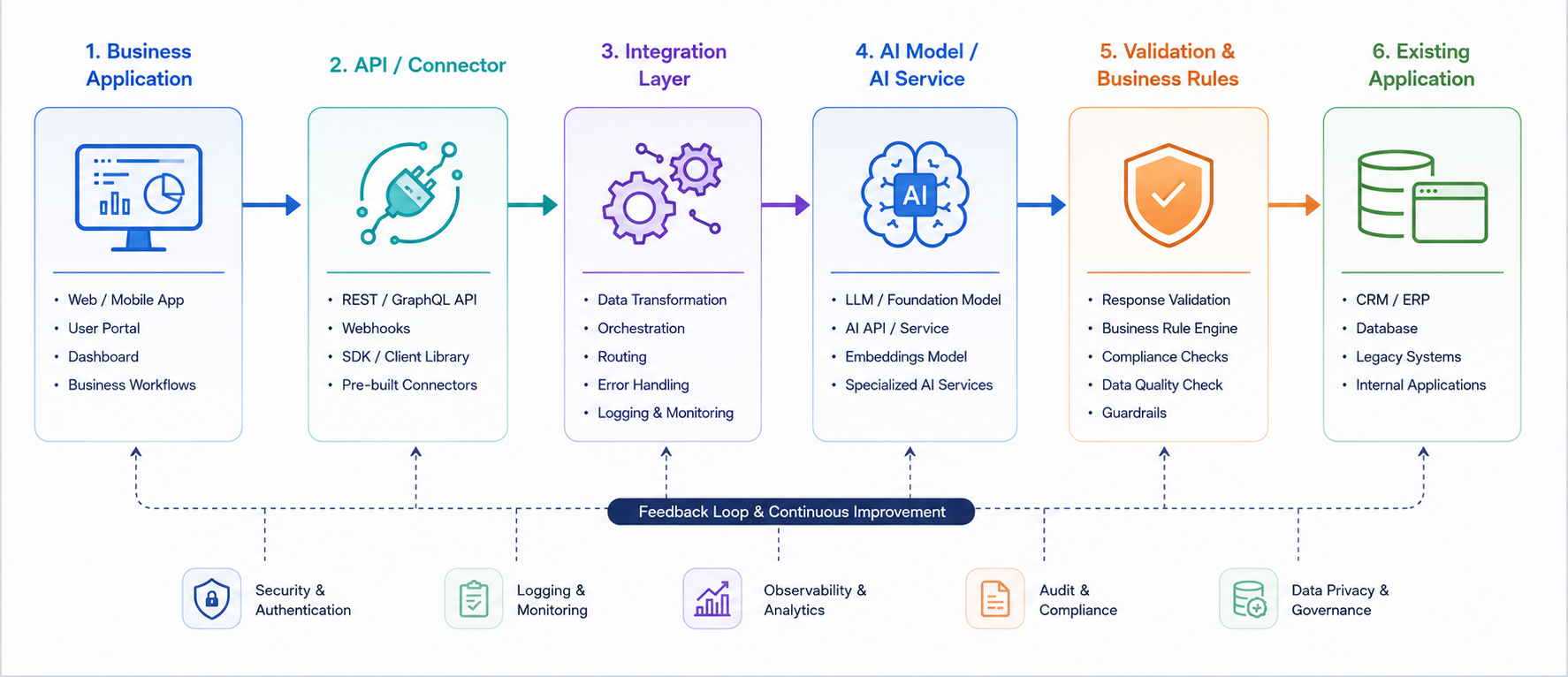
Each component has a job:
- Business application — the system of record where work happens (CRM, ERP, helpdesk).
- API/connector — the interface that lets data move in and out of that application.
- Integration layer — the coordinator. It formats requests, manages authentication, handles retries, and routes data. This is where AI middleware often lives.
- AI model/AI service — the intelligence. It could be a hosted LLM, a custom prediction model, or a classification service.
- Validation & business rules — the guardrails. This step checks confidence scores, applies your logic, and decides whether output is safe to use automatically or needs a human.
- Existing application — the output returns here, so the AI result appears inside the tools your teams already use.
That validation step is what separates a reliable AI workflow integration from a demo. AI models can produce confident-sounding but wrong answers, so a serious design treats every output as something to be checked, not trusted blindly.
Example: AI Integration With a CRM
Consider AI integration with CRM in practice. A new lead lands in the CRM. An event triggers the integration layer, which pulls the relevant record, sends it to an AI service, receives a result, applies business rules, and writes the output back to the lead record.
High-value use cases include:
- Lead scoring to prioritize the pipeline
- Email drafting so reps start from a strong first version
- Sentiment analysis on customer communications
- Churn prediction for at-risk accounts
- Sales call summaries generated from meeting notes
- Next-best-action guidance for each opportunity
The rep never leaves the CRM. The AI simply makes the record smarter.
Example: AI Integration With an ERP
AI integration with ERP is less about chat and more about structured decisions across operations. The architecture mirrors the CRM flow, but the AI service leans toward forecasting and document intelligence.
Typical applications:
- Demand forecasting from historical order data
- Document processing for invoices and purchase orders
- Anomaly detection across financial or operational records
- Inventory insights that flag over- or under-stocking
- Operational reporting summarized in plain language
Because ERP data is sensitive and highly structured, the integration layer does heavy lifting: cleaning inputs, enforcing formats, and validating outputs before anything touches a system of record.
Example: AI Integration With a Customer Support Platform
Support platforms show the pattern clearly because human review sits right in the loop.
The flow: ticket arrives → knowledge retrieval pulls relevant articles → AI drafts a response → confidence check → human approval → ticket update.
Around that core, AI adds real value through:
- Summarization of long ticket threads
- Classification by topic, urgency, or product
- Routing to the right team automatically
- Human review before customer-facing replies go out
The confidence check matters most here. Low-confidence drafts route to an agent; high-confidence ones can move faster. You decide the threshold.
AI Integration With Legacy Systems
AI integration with legacy systems is where many enterprises get stuck—and where good architecture pays off. Older platforms rarely offer modern APIs, but they can still be connected.
Practical techniques include:
- Middleware to translate between old and new
- API gateways to expose controlled endpoints
- Database connectors to read and write data directly
- Adapters that wrap legacy functions in a usable interface
- Event-based integration triggered by database or file changes
- Data sync that mirrors legacy data to a modern store the AI can reach
The strategic decision is modernization versus integration. If the legacy system is stable and integration meets your needs, connect to it. Modernize only the specific pieces that block the workflow. Enlight Lab’s data engineering and cloud consulting work often centers on exactly this kind of targeted enablement.
AI Integration Architecture Patterns
No single pattern fits every case. Here’s how the main AI integration architecture options compare.
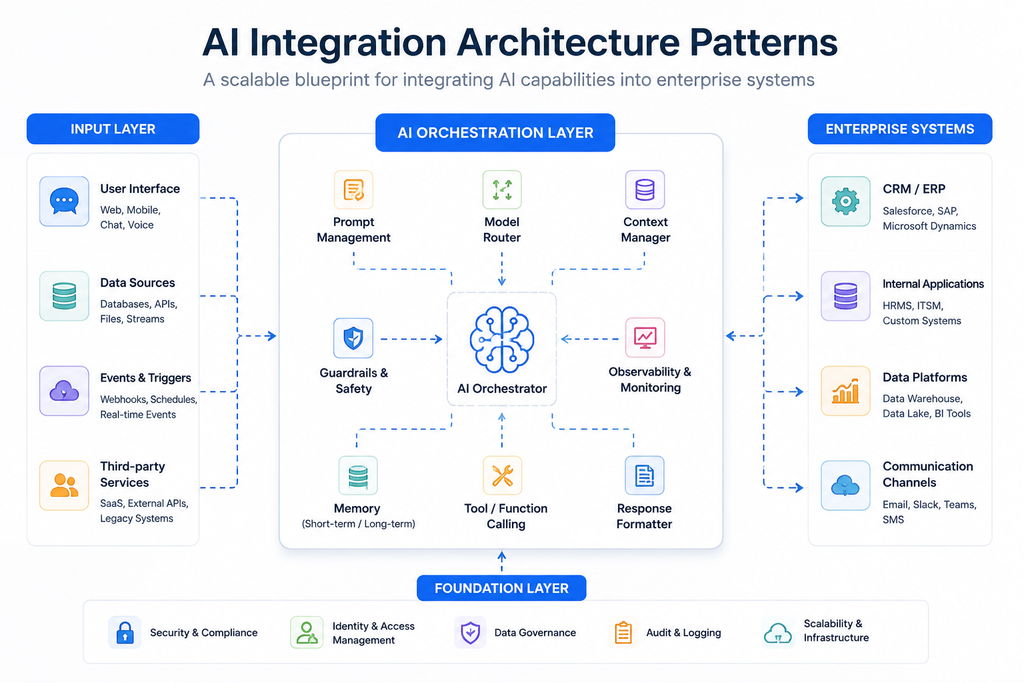
| Pattern | How It Works | Best For | Trade-offs |
|---|---|---|---|
| API Integration | App calls an AI service directly | Simple, request-response use cases | Tight coupling; harder to scale complex logic |
| Middleware | A layer coordinates between systems | Multiple systems, complex routing | More moving parts to maintain |
| Event-Driven | Actions trigger AI processes | Real-time reactions to business events | Needs solid event infrastructure |
| Data Pipeline | Data flows to a model in batches | Forecasting, bulk scoring, analytics | Not real-time by design |
| Embedded AI | AI lives inside an existing tool | Fast wins inside a single platform | Limited by that platform’s extensibility |
Most mature deployments combine patterns—say, event-driven triggers feeding a middleware layer that also runs a nightly data pipeline.
What Technologies Are Used for AI Integration?
A working stack spans several layers:
- AI/LLM layer — hosted models, custom models, or classification and prediction services
- Application layer — your CRM, ERP, support platform, or custom apps
- Integration layer — API management, AI middleware, connectors, and orchestration
- Data layer — databases, data warehouses, and pipelines that feed and store results
- Infrastructure layer — cloud services, networking, and security controls
There’s no universal tool list. The right choices depend on your existing architecture, data location, and latency needs. That’s why an AI/ML integration assessment usually starts by mapping what you already run.
Security and Data Privacy in AI Integration
Every point where data moves is a point to secure. A credible AI API integration accounts for all of them:
- Authentication and authorization — who and what can call the AI service
- Encryption — protecting data in transit and at rest
- PII handling — minimizing and masking personal data sent to models
- Audit logs — recording what was sent, returned, and acted on
- Data retention — controlling how long inputs and outputs are kept
- API security — rate limits, keys, and endpoint protection
- Access controls — least-privilege access across the integration
- Third-party AI provider policies — knowing whether your data trains their models
No architecture makes you compliant on its own. Compliance depends on your obligations, controls, and how they’re implemented—work best done with your security and legal teams.
Common AI Integration Challenges
Most AI integration challenges are practical, not exotic:
- Poor or missing APIs on existing systems
- Legacy systems that resist modern connections
- Fragmented data spread across tools
- Inconsistent data formats that break inputs
- Authentication complexity across systems
- Hallucinations and unreliable outputs
- Latency that hurts user experience
- Rate limits on AI services
- Unclear ownership of the integration
- Monitoring gaps that hide failures
- Cost control as usage scales
- Failure handling when the AI service is down
Naming these early is half the battle. Each one has a design answer—retries, fallbacks, caching, validation, and clear team ownership.
How to Plan an AI Integration Project
A disciplined AI automation integration project follows a repeatable framework:
- Audit your stack — document current systems and how they connect.
- Identify the workflow — pick one repetitive, measurable process.
- Identify the data — confirm what data exists and where it lives.
- Review the APIs — check what each system can expose.
- Select the AI capability — match the model to the job.
- Design the architecture — choose your patterns and integration layer.
- Build a proof of concept — prove value on a narrow slice.
- Test security and failure modes — probe what breaks and how it recovers.
- Deploy gradually — roll out in stages, not all at once.
- Monitor and optimize — track accuracy, cost, and latency, then refine.
Start narrow. One strong workflow beats ten shallow experiments.
How Much Does AI Integration Cost?
There’s no universal price for enterprise AI integration, because cost tracks the shape of your environment. The main drivers:
- Number of systems being connected
- Complexity of each integration
- AI model usage volume
- Data preparation and cleanup effort
- Middleware and infrastructure needs
- Security and compliance requirements
- Real-time versus batch processing
- Testing and quality assurance
- Ongoing monitoring
- Long-term maintenance
A single API-based CRM enhancement is a very different investment than a multi-system, real-time integration touching legacy platforms. Scope drives cost, so define scope tightly.
AI Integration vs Replacing Your Software
When AI enters the roadmap, leaders face a strategic fork. Here’s how the options compare.
| Approach | What It Means | When It Fits |
|---|---|---|
| Add AI to existing software | Integrate AI into current systems | Software works; data and APIs exist |
| Modernize | Upgrade specific components, then integrate | Key systems block integration |
| Replace | Swap a system for an AI-capable one | Current tool is failing regardless of AI |
| Build AI-native | Create new software with AI at the core | The process is novel or a core differentiator |
For most established businesses, adding AI to existing software is the fastest, lowest-risk starting point.
When Should a Business Integrate AI?
Integration makes sense when several conditions line up:
- Your existing software works and your teams rely on it.
- The target process involves repetitive tasks.
- The relevant systems expose APIs or usable data access.
- You hold valuable data the AI can learn from or act on.
- The process is measurable, so you can prove impact.
- Replacing the system would be disruptive and costly.
When those boxes check, AI integration with existing systems is usually the pragmatic path.
When AI Integration May Not Be the Right Answer
Sometimes AI is the wrong tool. Skip or delay integration when:
- The problem is solvable without AI through simpler automation.
- There’s no usable data to work with.
- The workflow is unstable and changes constantly.
- The AI output can’t be validated reliably.
- The complexity outweighs the value it would create.
- There’s no measurable outcome to track success against.
Saying no to a weak use case protects budget and credibility for the strong ones.
How Enlight Lab Approaches AI Integration
Enlight Lab follows a clear method for connecting AI to the systems you already run:
- Map — audit your current stack, data, and workflows.
- Architect — design the integration layer and choose patterns that fit.
- Integrate — build the connections, validation, and controls.
- Activate & Optimize — deploy gradually, then monitor and improve.
Our integration work spans CRM, ERP, data platforms, support systems, communication tools, legacy applications, custom APIs, and cloud environments. If your teams range across AI agent development, AI chatbot development, or AI voice agent development, those capabilities can plug into the same integration foundation.
If you’re scoping a project, our AI integration services and AI consulting teams can help you map the path from existing software to AI output.
Bringing It All Together
Successful AI integration into existing software comes down to one principle: connect AI to the right data, systems, workflows, controls, and outcomes. The technology matters less than the plumbing around it.
The dependable sequence is straightforward—Audit → Design → Integrate → Validate → Deploy → Monitor. Start with one measurable workflow, respect the validation step, secure every data path, and expand only once you’ve proven value. Do that, and AI stops being a side experiment and becomes part of how your business actually runs.