Claude Code, Cursor, and AI agents are excellent at the first list and unreliable at the second. Most of the value, and most of the damage, comes from mixing them up.
Key takeaways
- The useful question isn’t “what can Claude Code do?” It’s “what work should we stop doing manually?”
- AI-assisted coding, AI-native development, AI agents, and automation are different things with different risks.
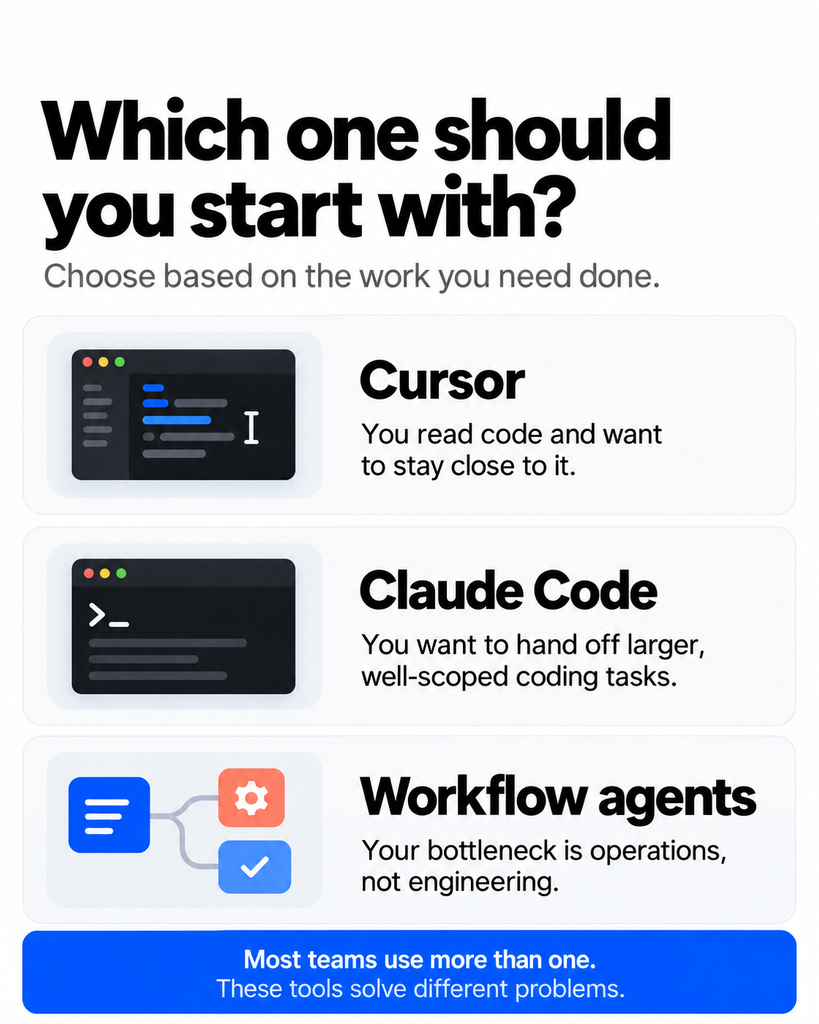
- Cursor tends to suit developers who want to stay close to the code. Claude Code tends to suit delegating multi-step tasks. Agents extend the same idea beyond code.
- The cost of writing code has dropped sharply. The cost of building the wrong thing, or shipping something insecure, has not.
- Non-technical founders can build an MVP with AI, but they need guardrails, and eventually a technical reviewer.
The wrong question
Most founders come to AI development tools with a capability question. Can it write a React component? Can it build a login flow? Can it fix this bug?
Usually the answer is yes, or close enough. But capability isn’t the constraint at an early-stage company. Attention is.
You have a small number of hours, a small amount of runway, and a long list of things that could matter. So the question is about leverage: which tasks, if handed off, free up the most of your scarce judgment for things only you can do?
Think about what a good chief of staff does. They don’t just work faster than you. They take whole categories of work off your plate so you can spend your time on decisions. AI coding tools can play a similar role for software work, but only if you’re deliberate about which categories you hand over.
A founder who uses Claude Code to churn out twice as many features nobody asked for hasn’t gained leverage. They’ve built a bigger pile of things to maintain.
Five terms founders keep mixing up
The AI software development conversation is full of loose vocabulary, and the looseness leads to bad decisions. Here’s a plain-English breakdown.
| Term | What it means | Who’s really in charge |
|---|---|---|
| AI-assisted coding | A developer writes code and AI suggests, completes, or edits parts of it | The developer, line by line |
| AI-native development | The workflow is built around AI from the start: you describe outcomes, AI drafts most of the implementation, humans review and steer | The human, at the level of intent and review |
| AI agents | Systems that pursue a goal by planning steps, using tools, and acting with some autonomy | Shared, with a human setting the goal and boundaries |
| Automation | Fixed rules that do the same thing every time (if X, then Y) | The person who wrote the rule |
| Human decision-making | Choosing what to build, for whom, at what risk, and what to leave out | Always you |
AI-assisted coding is the autocomplete-on-steroids experience. It’s helpful and low-risk, and it mostly makes good developers faster.
AI-native development is a bigger shift. Instead of typing code with help, you specify what should exist and check whether it does. The unit of work becomes a task, like “add team invitations with email confirmation,” instead of a function. Many people call the loosest version of this vibe coding, a term Andrej Karpathy popularized in early 2025 for describing what you want and accepting what the AI produces without closely reading the code. It’s great for exploration. It’s a poor default for anything that handles money, personal data, or a customer’s trust.
AI agents go a step further. An agent doesn’t just respond to a prompt. It works toward a goal: reads files, runs commands, checks results, and tries again. AI coding agents do this inside a codebase. Other agents do it inside your support inbox, CRM, or data warehouse.
Automation is the older, less glamorous cousin. If a task is the same every time, a plain script or a workflow tool is cheaper, faster, and more predictable than an agent. Founders often reach for an AI agent when a ten-line script would do.
Human decision-making is the one that doesn’t go away. Every other row on that table increases how much gets done. None of them decides whether it should be done.
What Cursor, Claude Code, and agents are each good at
These tools overlap, and they change quickly, so treat this as a working model rather than a spec sheet. Check each tool’s current documentation before you commit to a workflow.
Cursor: AI inside the editor
Cursor AI is a code editor built around AI. You work in a familiar development environment, and the AI helps with completions, inline edits, questions about the codebase, and multi-file changes you can review as you go.
Cursor for developers is at its best when the person using it can read and judge code. You stay in the loop, seeing changes as they happen, and steering. For a technical founder or a small engineering team, it’s a natural way to move faster on day-to-day work without giving up control.
Claude Code: delegating whole tasks
Claude Code is an agentic coding tool that lets developers delegate tasks from the command line, and it’s also available in the desktop and mobile apps. Instead of suggesting the next line, it can explore a codebase, plan a change, edit multiple files, run commands and tests, and report back.
Claude Code for developers shines on tasks that are big enough to be tedious but well-defined enough to check: migrating a library, adding test coverage, tracing a bug across several services, or building a feature from a clear spec. You describe the outcome, let it work, and review the result. Project-level instruction files (Claude Code reads a CLAUDE.md file, for example) let you write down your conventions once so you don’t repeat them every session.
AI agents: the same idea, beyond code
The term AI agent development covers much more than software engineering. Agents can triage support tickets, enrich leads, reconcile invoices, summarize customer calls, or monitor for anomalies in your data. For a startup, this is where AI automation gets interesting, because much of what slows a small team isn’t code at all. It’s the operational drag around the product.
What founders should stop doing manually
This is the heart of it. Here are the categories of work where AI coding tools tend to repay the investment fastest. Notice the pattern: each is clear enough to specify and cheap enough to verify.
1. Prototyping and building the first MVP
If you want to build an MVP with AI, this is the sweet spot. Turning a rough idea into a clickable, working prototype used to take weeks and real money. Now it can take days. That changes what you can afford to test.
The point isn’t to launch the prototype. It’s to put something in front of five customers before you’ve spent your seed round. A prototype that teaches you the idea is wrong is worth far more than a beautiful product nobody wants.
2. Integrations and glue code
Connecting Stripe to your database, syncing your CRM with your product, wiring up an email provider. This work is rarely intellectually interesting, but it eats hours. It’s also well-documented, which is exactly where AI coding tools do well.
3. Tests and quality checks
Writing tests is the task most teams skip when they’re busy. AI can draft unit and integration tests quickly, and tests give you something priceless when you’re moving fast: a way to tell whether the AI’s last change broke something. The best use of these tools often isn’t writing features. It’s building the safety net that lets you write features fearlessly.
4. Refactors, migrations, and dependency upgrades
Upgrading a framework version. Renaming a concept across two hundred files. Moving from one library to another. This is tedious, repetitive, and easy to verify (does it still pass the tests?), which makes it ideal for an AI coding agent.
5. Debugging and reading unfamiliar code
Ask a good agent to trace why a checkout fails intermittently, and it can search, read, and reason through the code faster than a person skimming files. It won’t always be right, but it shortens the path to the right question. This is also a quiet lifesaver for founders who inherited a codebase from an agency or a departed contractor.
6. Internal tools and admin dashboards
Every startup needs a back-office: a way to look up a customer, refund an order, or export a report. These are rarely built because they never feel urgent. With AI-powered software development, they cost hours instead of weeks. And because the users are your own team, the risk of a rough edge is low.
7. Documentation and onboarding
READMEs, API docs, runbooks, “how does this system work” write-ups. AI can generate a solid first draft from the code itself, which means your next hire gets productive faster and your knowledge doesn’t live only in one person’s head.
8. Repetitive operational work
Here’s where agents earn their keep beyond engineering: sorting inbound support requests, drafting first-pass responses for a human to approve, pulling weekly metrics into a summary, cleaning messy data. If a person on your team does the same thing more than a few times a week, ask whether an agent (or a simple automation) could do the first 80 percent.
What founders should not hand off
Speed makes it tempting to delegate everything. Here’s what deserves a human, and why.
What to build. AI will happily build whatever you describe, including things nobody wants. It doesn’t know your customers, your market, or your runway. Prioritization is judgment, and judgment is the job.
What to leave out. Every feature has a maintenance cost, and AI makes features feel free. The discipline of saying no matters more than ever when building is cheap.
Security, authentication, and payments. These areas punish confident mistakes. AI-generated code can look correct and still contain subtle flaws in how it handles permissions, sessions, or user data. Have an experienced engineer review anything in this category before it touches real customers.
Privacy and compliance. If you handle personal data from US or UK users, your obligations under laws like GDPR and UK GDPR, CCPA, or sector rules such as HIPAA aren’t something an AI tool can own. Get proper advice. A model can help you draft a checklist, but it can’t carry legal responsibility.
Architecture with a long tail. Choices about your data model, your infrastructure, and your core abstractions are expensive to reverse. AI can lay out the options and trade-offs well. The decision should stay with someone who’ll live with it.
Customer relationships. An agent can draft the reply. Deciding how to handle an angry enterprise customer, or when to break your own policy for a good reason, is human work.
A useful rule: AI can accelerate execution, but it can’t take accountability. If something goes wrong, your name is on it, not the model’s.
The playbook changes depending on who you are
If you’re a non-technical founder
You can now build an MVP with AI in ways that weren’t possible a few years ago. That’s a real advantage, and also a trap.
Use AI coding tools to validate demand fast. Build the prototype, show it to customers, learn. But be honest about what you can’t judge. You may not be able to tell whether the code is secure, maintainable, or about to fall over at a hundred users. Before real customers and real data are involved, bring in a technical advisor, a fractional CTO, or a development partner to review what you’ve built. Think of the AI-built version as an expensive, high-fidelity sketch, not necessarily the foundation.
If you’re a technical founder
Your risk is different: you can review the code, so you may trust the tools too readily and move faster than your own attention can check. Use AI for the tedious majority of the work, and protect your time for architecture, product decisions, and hiring. Write down your conventions in project instruction files so the tools follow your standards, not generic ones.
If you’re a CEO or operator
You may never open a code editor, and that’s fine. Your leverage is in asking better questions. Which manual workflows in our company could an agent handle? What’s our review process for AI-generated code? Who’s accountable if it fails? The most valuable thing a non-coding executive can do is set the rules of engagement, not learn the tools.
If you have a small engineering team
This is where the compounding happens. Two or three engineers with a good AI development workflow can cover ground that used to need a much larger team. But you need shared norms: how tasks are scoped, how AI output gets reviewed, what must never be merged without a human read-through. Without those norms, you get inconsistent code and quiet technical debt at speed.
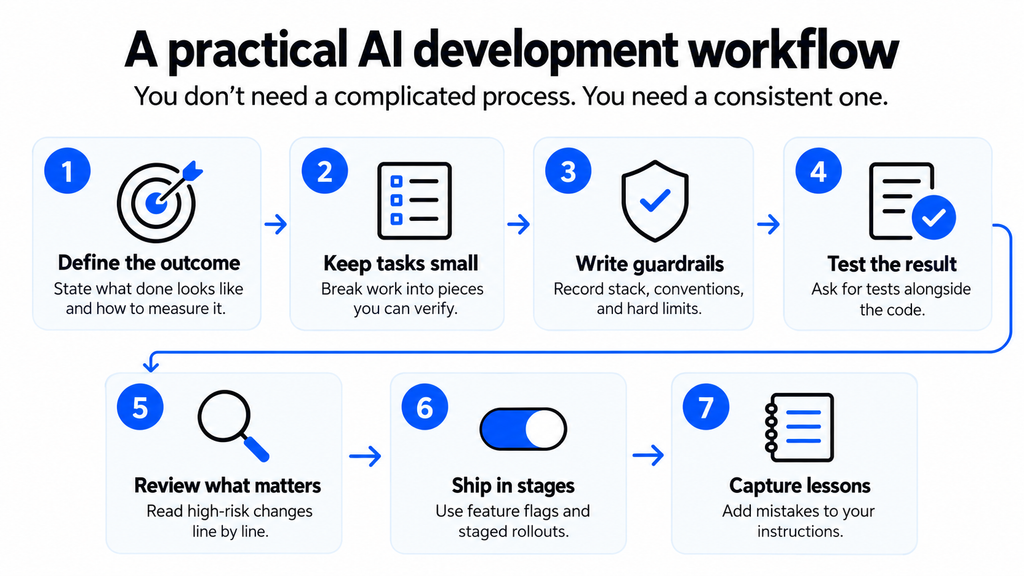
The honest math on time and cost
Founders often ask how much AI can reduce development time and cost. Honestly, there’s no reliable universal number, and be wary of anyone who offers one confidently. It depends on the type of work, the quality of your specification, and how much review you do.
What we can say is where the savings tend to concentrate: early prototyping, boilerplate, tests, migrations, and internal tooling. The cost of producing code has fallen. But three other costs haven’t:
- Review time. Someone still has to check the work, and that someone is usually your most expensive person.
- The cost of wrong decisions. Building the wrong thing fast just means you find out later, with more code to throw away.
- Maintenance. Code you didn’t fully understand when it was written is harder to fix when it breaks.
So the bottleneck moves. It shifts from “how fast can we type” to “how clearly can we decide, specify, and verify.” Teams that adapt to that shift get the benefit. Teams that don’t just generate more code with the same confusion.
A five-question test before you hand something to AI
Before delegating a task to Claude Code, Cursor, or an agent, ask:
- Is the outcome clear? Could you explain what “done” looks like in two sentences?
- Can we verify it? Are there tests, or a fast way to check the result?
- Is the blast radius small? If it’s wrong, what breaks, and for whom?
- Is it reversible? Can we roll it back cleanly?
- Does it depend on trust or judgment about a person? If yes, keep a human at the center.
If you can answer yes to the first four and no to the fifth, delegate freely. If not, use AI as a collaborator, not a replacement.
Common mistakes to avoid
- Confusing a demo with a product. A prototype that works on your laptop isn’t ready for a thousand users.
- Using agents where automation would do. If the steps never change, write the script.
- Skipping the tests because the AI seems confident. Confidence isn’t correctness.
- Letting the tools set your roadmap. Just because something is easy to build doesn’t mean you should build it.
- Never involving an experienced engineer. Even a few hours of expert review at the right moment can prevent months of cleanup.
The bottom line
The founders who get the most from AI coding tools aren’t the ones who generate the most code. They’re the ones who get clear about what deserves their own attention and what doesn’t. They let Claude Code, Cursor, and AI agents absorb the repetitive, well-defined, verifiable work. They protect their time and judgment for the calls that shape the company.
Speed is the visible benefit. Leverage is the real one. And leverage only pays off when someone is still deciding what’s worth building.
If you’re weighing how AI-native development fits into your product, whether that’s an MVP, an existing SaaS platform, or a small team trying to punch above its weight, Enlight Lab can help you work out where AI belongs in your workflow and where it doesn’t.