Most leadership teams are under pressure to “use AI.” The hard question is which workflows are worth changing.
A typical company can list 20 or 30 plausible AI ideas in an afternoon. It cannot fund, staff and maintain all of them. Engineering time is limited, data is uneven, and teams can only absorb so much change at once.
Most companies do not have an AI idea problem. They have an AI prioritization problem.
This guide walks through a workflow-first approach: Find → Map → Identify → Score → Calculate → Decide → Design → Plan. The aim is to move from “we should use AI” to “these are the workflows where AI is most likely to create measurable value, this is what it could be worth, and this is the next step.”
Short answer: The best way to identify AI opportunities is to start with existing business workflows, find the repetitive, information-heavy, high-friction tasks, then evaluate each one on business impact, technical feasibility and data readiness.
Why do most AI projects start backwards?
They start with a technology: a chatbot, an agent, a copilot, an LLM subscription. Then someone searches for a problem to attach it to. This usually looks like one of these:
- Building a chatbot because a competitor launched one
- Adding an “AI feature” with no measurable business problem behind it
- Picking a tool before understanding the process it will sit inside
- Running a pilot with no success criteria, so nobody can say whether it worked
The results are predictable: disconnected pilots, weak ROI, low adoption, and demos that never reach production because nobody planned for the data, integrations or review steps.
AI is an implementation option, not a starting point. Compare these two framings.
Backwards: “We should build an AI agent.”
Workflow-first: “Our sales team spends 15 hours every week researching inbound leads, checking CRM data and drafting follow-ups. Can AI reduce that effort while maintaining quality?”
The second version has a baseline, an owner, a quality bar and a way to measure success. The technology choice comes later.
What makes a good AI opportunity?
A good AI opportunity is a workflow with measurable business impact, where the work is repetitive or information-heavy, the data is accessible and appropriate human oversight is possible. These eight signals help you spot one.
- High volume. The same task happens hundreds or thousands of times. Small time savings multiply.
- Repetitive work. People follow a similar pattern each time, such as triaging, tagging or reformatting.
- Information-heavy work. People read, compare and summarize documents, tickets, emails or records. Language models are well suited to this.
- Manual handoffs. Work moves between people or systems through copy-paste, spreadsheets or email. Automation can connect these steps.
- Slow response times. Customers or colleagues wait because a person must find information first. Retrieval and drafting can shorten the wait.
- Rule-based decisions. Routing, categorization and eligibility checks often follow criteria that can be written down, so they can be checked and tested.
- High error costs. Mistakes in data entry, compliance review or quoting are expensive. AI can add a consistent first-pass check, with a person owning the outcome.
- Expert bottlenecks. A few senior people answer the same questions or review the same documents. AI can handle the routine cases and surface the unusual ones.
A weak opportunity usually has one of these traits:
- It happens too rarely to matter.
- It is already cheap to do manually.
- The needed data does not exist or cannot be accessed.
- The outcome cannot be measured.
- It is high-risk and cannot have human review.
- The process itself is poorly defined.
- It is technically interesting but solves no meaningful business problem.
That last one is common. A clever demo is not a business case.
A workflow example: customer support
Take customer support. The usual idea is “build an AI chatbot.” That is a technology, not a workflow. The real workflow looks more like this:
Customer ticket → Classification → Customer history retrieval → Knowledge retrieval → Response drafting → Human approval → CRM update → Escalation
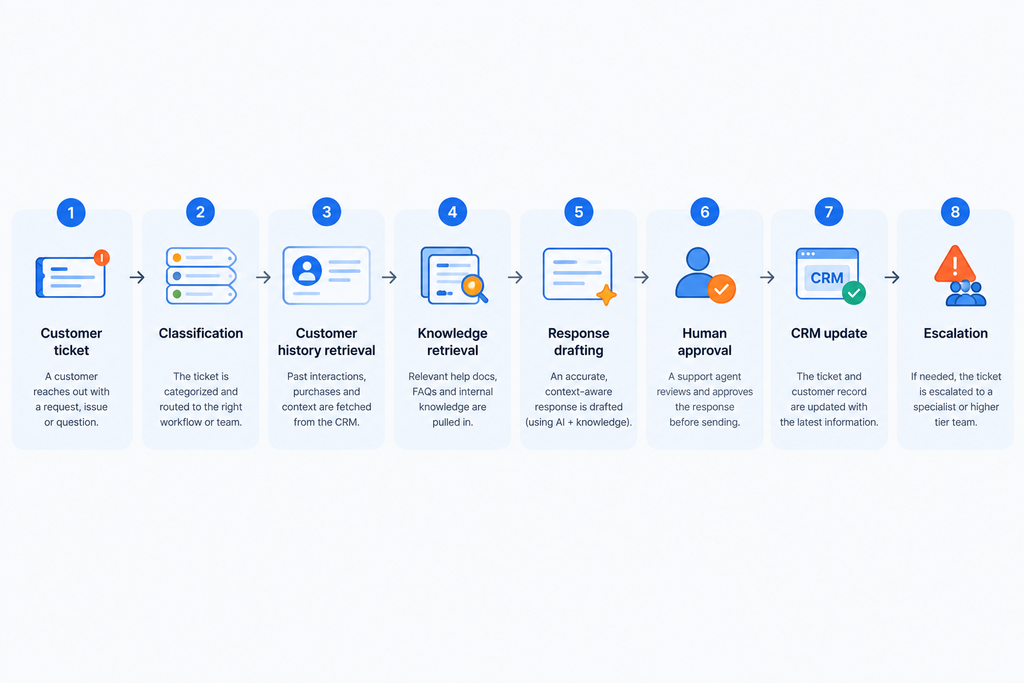
The opportunity is a connected chain involving classification, retrieval, summarization, drafting, automation, human review and escalation. Some steps are simple. Others need integration with your CRM or help desk. A chatbot that answers customers directly might be the riskiest way to start, while drafting replies for agents to approve is often safer and easier to measure.
Thinking in workflows exposes where the value sits, where the risk sits, and which steps need engineering rather than a prompt.
How do you identify AI use cases? Map the workflow first
A goal like “improve customer service with AI” is too vague to assess. “Classify inbound tickets, retrieve relevant knowledge, draft responses and route exceptions” is specific enough to evaluate.
To map a workflow, write down each step as it happens today, note where time or quality is lost, then ask what AI or plain automation could change. Sometimes the answer is plain automation with no AI at all.
| Step | Current activity | Friction | AI/automation opportunity |
|---|---|---|---|
| 1. Intake | Agent reads ticket | Inconsistent tagging | Automatic classification |
| 2. Context | Agent opens CRM and order history | Several tabs, slow lookup | Retrieve and summarize customer history |
| 3. Research | Agent searches help docs | Outdated or scattered articles | Knowledge retrieval (RAG) |
| 4. Drafting | Agent writes reply | Repetitive, tone varies | Draft response for review |
| 5. Review | Agent edits and sends | Quality depends on the person | Human approval step |
| 6. Record | Agent logs notes | Often skipped or incomplete | Automatic CRM update |
| 7. Escalation | Agent pings a senior colleague | Delay, lost context | Rules-based routing with summary |
Keep this exercise small. Pick one team, one workflow and a few weeks of real examples.
Have AI ideas but don’t know which ones deserve investment? The AI Opportunity & Automation Playbook gives you a practical framework to move from a long list of ideas to the two or three actually worth investigating. Get the AI Opportunity & Automation Playbook →
How do you prioritize AI projects?
Score each candidate on three factors from 1 to 5 and multiply them:
Opportunity Score = Impact × Feasibility × Data Readiness
Impact: Does the workflow materially affect revenue, cost, productivity, quality, customer experience, risk or cycle time?
Feasibility: Consider existing systems, integrations, workflow complexity, reliability requirements, technical dependencies and how much human oversight is needed.
Data readiness: Consider whether the data exists, its quality, who can access it, how it is structured, and what permissions and governance apply.
| Opportunity | Impact | Feasibility | Data readiness | Score |
|---|---|---|---|---|
| Customer support automation | 5 | 5 | 4 | 100 |
| Lead qualification | 4 | 5 | 5 | 100 |
| Reporting assistant | 3 | 4 | 4 | 48 |
The maximum score is 125. Multiplication is deliberate: a 1 in any column drags the total down, which reflects reality. A high-impact idea with unusable data should not float to the top.
The scores themselves are judgment calls. Their value is in forcing the conversation, because the disagreements show you which assumptions to test.
A high score is not permission to build. It is a reason to investigate. Two ideas tied at 100 still need baseline data, a look at the real systems, and a check on risk before anyone commits budget.
How do you calculate AI ROI?
You do not need perfect forecasting. You need transparent assumptions that someone can challenge.
Start with the inputs: current manual effort, loaded labor cost, a realistic automation percentage, implementation cost and ongoing operating cost. Then consider the benefits that are harder to price: revenue impact, quality improvements, faster cycle times and reduced risk.
For labor-driven cases, a simple formula works:
Potential annual labor value = Weekly hours × loaded hourly cost × 52 × realistic automation percentage
Hypothetical example: a team spends 40 hours a week on a task. Loaded cost is $45 per hour, and you assume AI handles or speeds up 40% of the work. 40 × $45 × 52 × 0.40 = $37,440 per year.
These numbers are illustrative, not benchmarks. The result is potential value, not guaranteed savings. Time saved only becomes money saved if the hours are redeployed or costs actually fall.
Compare that figure against the full cost: build or licensing, integration, model usage, monitoring, maintenance and the time of the people who review outputs. If the potential value is small relative to those costs, you have learned something cheaply.
Measure the business outcome (resolution time, error rate, conversion, hours reclaimed) rather than AI usage metrics such as number of prompts or active users. Usage tells you people tried it. Outcomes tell you it worked.