Then the team starts using AI coding tools.
Within a few weeks, developers are shipping features faster. Boilerplate takes minutes instead of hours. Prototypes that once took several days are ready for review much sooner.
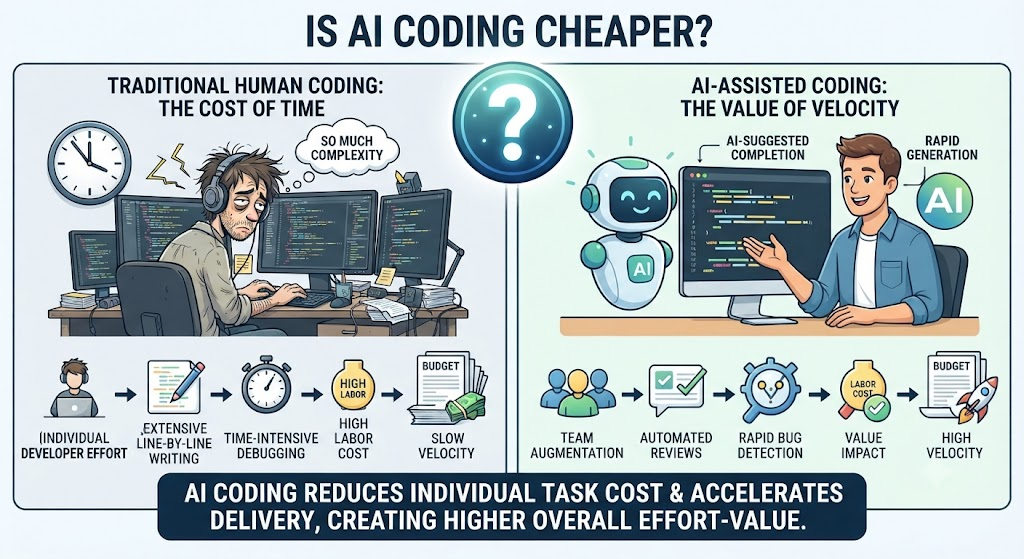
So the founder asks a reasonable question:
“If we’re building faster, shouldn’t our software cost less?”
Sometimes, yes.
But not necessarily.
The reason is simple: coding faster and building software more cheaply are not the same thing.
AI coding can dramatically reduce the time developers spend writing certain types of code. But software costs extend far beyond typing code. Architecture, product decisions, testing, security, deployment, infrastructure, maintenance and rework can all determine what a product ultimately costs to build and operate.
That distinction matters even more for startups, where a few wrong technical decisions early on can become expensive problems later.
So, is AI coding actually cheaper?
The answer depends on what you’re building, how you’re using AI, and how much engineering discipline surrounds it.
Is AI Coding Cheaper? The Short Answer
AI coding can reduce software development costs by making implementation faster, but faster coding does not automatically mean cheaper software.
The real savings depend on what happens after the code is generated.
If AI reduces implementation time while code quality, testing, security and maintainability remain under control, the savings can be significant.
If AI simply produces more code that requires extensive review, rework or maintenance, the apparent savings can disappear.
In other words:
AI can reduce the cost of writing software. It doesn’t automatically reduce the cost of owning software.
AI Coding Really Is Faster
Let’s start with what AI coding does well.
AI-assisted development has changed how developers approach many everyday engineering tasks. Tools can generate code, explain existing code, suggest fixes, write tests, create documentation and help developers move from an idea to a working implementation much faster.
The biggest gains usually appear in work that is:
- repetitive
- well-defined
- predictable
- based on established patterns
- easy to verify
For example, AI can help with:
Boilerplate and scaffolding
Project structures, configuration files, standard components and repetitive setup work can often be generated quickly.
CRUD functionality
If an application needs standard create, read, update and delete operations, AI can produce much of the repetitive implementation.
UI components
AI can help developers create forms, dashboards, tables and other common interface components.
API integrations
When requirements and documentation are clear, AI can accelerate the work of connecting applications to third-party APIs.
Tests and documentation
AI can generate first-draft unit tests, comments, documentation and examples.
SQL and data queries
Developers can use AI to create or explain queries, identify potential issues and explore unfamiliar database structures.
Debugging and refactoring
AI can help interpret error messages, identify likely causes and suggest changes across multiple files.
Prototyping
This may be one of the most valuable startup use cases.
A founder can go from an idea to something clickable much faster than before.
And that’s a real economic benefit.
But there’s an important distinction.
Suppose a developer previously spent three hours implementing a repetitive API layer. With AI assistance, the first version might be ready in an hour.
That doesn’t necessarily mean the feature now costs one hour.
Someone still needs to check:
- Does the implementation match the business rules?
- Are permissions handled correctly?
- Are edge cases covered?
- Does the code fit the existing architecture?
- Is it secure?
- Will it behave correctly when the database is slow?
- Can another developer maintain it?
AI can make the first version faster. The entire software lifecycle doesn’t necessarily become faster by the same amount.
The Part AI Doesn’t Eliminate
Think about software development as a chain:
Product decision → Architecture → Implementation → Testing → Security → Deployment → Monitoring → Maintenance
AI can accelerate several parts of that chain.
But it doesn’t remove the need for the chain itself.
A coding tool can help generate an API.
It doesn’t automatically determine whether you should have that API in the first place.
It can suggest a database schema.
It doesn’t automatically know which data your business should store, how long you need to retain it, or who should have access.
It can generate a microservice.
It doesn’t necessarily mean a microservice is the right architecture for your startup.
These decisions matter because software complexity has a cost.
A founder may save 20 hours of implementation time and then lose 100 hours later because the system was designed around the wrong abstraction.
That’s why technical leadership becomes more important, not less, when development gets faster.
Faster Code Can Still Produce an Expensive Product
Consider a common startup scenario.
A small team uses AI coding tools to build an MVP quickly.
The product launches.
The initial result looks great.
The team has moved quickly, the founders have something to show customers and everyone feels like AI has delivered exactly what it promised.
Then the product starts growing.
A few months later:
- database queries become slow as usage increases
- different parts of the API follow different patterns
- authorization rules aren’t consistent everywhere
- tests cover the happy path but miss important edge cases
- infrastructure costs are higher than expected
- developers spend more time understanding existing code
- seemingly small changes start touching multiple parts of the system
None of these problems are caused automatically by AI.
They can happen with traditionally written software too.
The difference is that AI makes it much easier to produce code quickly.
If the team’s engineering process isn’t keeping pace, technical complexity can accumulate faster.
That creates an uncomfortable situation:
The team became faster at producing software, but not necessarily faster at maintaining it.
This is why AI coding should be treated as an engineering capability, not simply a faster typing tool.
The Hidden Costs of AI-Assisted Coding
When companies calculate AI coding ROI, they often focus on one number:
Hours saved by developers.
That’s useful, but incomplete.
There are several other costs worth considering.
1. Code Review
AI can generate code faster than a human can reasonably review it.
That’s a potential bottleneck.
Someone still needs to determine whether the generated code is:
- correct
- secure
- maintainable
- consistent
- performant
- appropriate for the architecture
If a developer generates 1,000 lines of code instead of 300, the company hasn’t necessarily saved money if another developer now has to spend hours understanding and reviewing those additional lines.
The objective isn’t to maximize generated code.
It’s to minimize the amount of engineering effort required to produce reliable software.
2. Rework
A fast implementation based on the wrong assumption is still wrong.
Imagine a founder wants a subscription system.
The requirement sounds simple:
“Customers should be able to upgrade and downgrade plans.”
But the actual product rules involve:
- prorated billing
- refunds
- usage limits
- failed payments
- trial periods
- cancellation policies
- different permissions
If those requirements aren’t understood before implementation begins, AI can build the wrong interpretation extremely quickly.
The result isn’t productivity.
It’s faster rework.
3. Technical Debt
AI makes it easier to add functionality.
It doesn’t automatically make architectural decisions better.
That’s an important distinction.
When adding another feature becomes extremely easy, teams can be tempted to keep adding instead of stepping back and asking whether the underlying system still makes sense.
Over time, this can result in:
- duplicated logic
- inconsistent patterns
- unnecessary abstractions
- tightly coupled components
- unused dependencies
- difficult-to-understand modules
Technical debt isn’t always bad. Startups often make deliberate trade-offs to move quickly.
The problem is unintentional technical debt that nobody is tracking.
4. Testing
AI can generate tests.
That’s useful.
But generating a test isn’t the same as proving that the software behaves correctly.
A test written from the implementation may simply confirm what the code does.
The more important question is:
Does the software do what the business actually requires?
That’s why testing still needs human judgment.
Depending on the product, this can include:
- unit testing
- integration testing
- end-to-end testing
- security testing
- performance testing
- edge-case testing
AI can assist with many of these activities, but it doesn’t remove the responsibility to validate the system.
5. Security
Software doesn’t become secure simply because AI helped write it.
Teams still need to look for familiar security problems, including:
- weak authentication
- incorrect authorization
- exposed credentials
- unsafe input handling
- vulnerable dependencies
- excessive permissions
- sensitive data appearing in logs
- unintended data exposure through APIs
This becomes especially important when applications handle sensitive customer information or operate in regulated environments.
The more expensive a security mistake could be, the less reasonable it is to treat generated code as automatically trustworthy.
6. Infrastructure Costs
There’s another cost founders sometimes overlook:
The software has to run somewhere.
More features can mean:
- more compute
- more storage
- more database usage
- more background jobs
- more third-party services
- more monitoring
Poorly optimized queries or unnecessary processing can increase cloud costs.
AI may help developers build the functionality faster, but somebody still needs to make sure the system is economically viable to operate.
A product isn’t cheap simply because it was cheap to build.
7. Maintenance
The real test of software often begins after launch.
Requirements change.
Customers request features.
Dependencies get updated.
APIs change.
Bugs appear.
Traffic increases.
New developers join the team.
Someone has to understand the code well enough to make changes safely.
If the team cannot explain why a piece of software works the way it does, every future change can become more expensive.
This is why maintainability is part of development cost.
8. AI Tooling Costs
AI coding tools themselves also have costs.
These can include:
- subscriptions
- developer seats
- API usage
- model usage
- infrastructure for AI workflows
For many companies, these costs may be relatively small compared with engineering labor.
But they still belong in the ROI calculation.
The important point is not whether AI tools cost money.
It’s whether the productivity gained is greater than the total cost introduced.
Where AI Coding Can Actually Save Money
The other side of the argument is equally important.
There are many situations where AI-assisted coding can create meaningful savings.
Prototyping
If the goal is to test whether customers want a product, speed matters.
AI can help a team create a prototype quickly, learn from users and decide what deserves further investment.
In this situation, the value isn’t necessarily production-ready code.
It’s faster learning.
Internal Tools
Internal dashboards, reporting systems, admin panels and workflow applications often have relatively predictable requirements.
AI-assisted development can reduce the effort needed to build and maintain these tools.
Well-Defined Features
AI works particularly well when the requirements are clear and the architecture already exists.
For example:
“Add an endpoint that allows authenticated users to update their notification preferences.”
That’s a much better AI coding task than:
“Build our notification system.”
The first has defined boundaries.
The second requires product and architectural decisions.
Small Engineering Teams
A strong developer using AI tools can often handle more implementation work.
That doesn’t mean one developer suddenly becomes an entire engineering organization.
It means the developer can spend less time on repetitive implementation and more time on architecture, product decisions, review and problem-solving.
For startups, that can be valuable.
Maintenance Work
AI can also be useful after launch.
Developers can use it to:
- understand legacy code
- generate documentation
- create tests
- refactor repetitive code
- investigate bugs
- migrate APIs
- explain unfamiliar modules
These aren’t glamorous tasks, but they consume real engineering time.
Reducing that friction can create meaningful savings.
When AI Coding Can Become More Expensive
AI coding isn’t equally suitable for every type of software work.
The risk profile changes when the cost of a mistake becomes high.
Examples include:
- complex business logic
- healthcare applications
- financial systems
- applications handling sensitive data
- security-critical systems
- large distributed architectures
- high-scale consumer products
- legacy systems with limited documentation
- products with rapidly changing requirements
That doesn’t mean AI shouldn’t be used in these environments.
It means the engineering controls around AI-assisted development need to become stronger.
A useful principle is:
The more expensive the consequences of a technical mistake, the more important engineering judgment becomes.
A bug in an early prototype might cost a few hours.
A bug in a financial transaction flow can affect customers and require extensive remediation.
The tool can be the same.
The required level of oversight isn’t.
A Better Way to Calculate AI Coding ROI
One of the biggest mistakes companies make is measuring AI productivity as:
Hours previously required − hours spent generating code
That’s too narrow.
A more useful conceptual model is:
AI Coding ROI = Engineering Time Saved − Review − Rework − Testing − Maintenance Impact − Tooling and Infrastructure Costs
This isn’t an accounting formula.
It’s a way to force a broader conversation.
Consider an illustrative example.
Without AI
A feature requires:
100 engineering hours
With AI
The initial implementation takes:
55 hours
But the team also spends:
- 15 hours reviewing and testing
- 10 hours on rework
Total: 80 hours
The actual saving is therefore: 20 hours
Not 45.
That’s still meaningful.
Now consider a poorly defined feature.
AI-assisted implementation: 50 hours
Additional review and testing: 20 hours
Rework: 45 hours
Total: 115 hours
The team actually spent more time than the original 100-hour estimate.
Again, these numbers are illustrative rather than industry benchmarks.
The point is simple:
Measure the entire delivery process, not just code generation.
The AI Coding Multiplier
There’s a mindset shift founders should make.
Don’t think of AI as simply replacing engineering effort.
Think of AI as multiplying the effectiveness of an existing engineering process.
A simple way to think about it:
Weak process + AI = faster production of problems
Strong process + AI = faster execution
A strong process doesn’t need to be complicated.
It usually includes:
- clear requirements
- deliberate architecture
- coding standards
- automated testing
- code review
- CI/CD
- security checks
- monitoring
- documentation
- technical ownership
AI works particularly well when these foundations already exist.
The tool accelerates execution.
The engineering process provides direction and control.
AI Coding vs. Traditional Development
The difference isn’t really “AI versus developers.”
It’s more useful to think about where AI changes the workflow.
| Area | Traditional Development | AI-Assisted Development |
|---|---|---|
| Boilerplate | Mostly manual | AI-assisted |
| Prototyping | Human-led, slower | AI-assisted, faster |
| Architecture | Human-led | Human-led + AI assistance |
| Code generation | Human-led | AI-assisted |
| Code review | Human | Human |
| Testing | Human + automation | AI-assisted + human validation |
| Security | Engineering-led | Engineering-led + automated assistance |
| Product decisions | Human | Human |
| Maintenance | Engineering team | Engineering team + AI assistance |
| Accountability | Human/team | Human/team |
The important takeaway is this:
AI changes how software is produced. It doesn’t transfer responsibility for the software to the AI.
Someone still needs to own the architecture, quality, security and business outcome.
What Founders Should Ask Before Using AI Coding
Before deciding that your company needs to “use more AI for development,” ask a different set of questions.
1. What are we actually trying to accelerate?
Is the bottleneck writing code?
Or is it product decisions, requirements, testing or deployment?
AI won’t fix the wrong bottleneck.
2. Are our requirements clear?
If developers don’t understand what they’re building, AI can make the wrong implementation faster.
3. Who owns the architecture?
There should be a clear technical owner.
4. Who reviews AI-generated code?
More generated code requires enough review capacity to maintain quality.
5. How will we test it?
Define what needs automated testing and what requires human validation.
6. What security controls do we need?
The answer depends on the product, data and customers.
7. How will we handle rework?
If an AI-generated implementation doesn’t fit the system, how quickly can the team identify and replace it?
8. Can another developer understand the code?
Try the “new developer” test.
Could someone who didn’t generate the code understand it six months later?
9. What are we measuring?
Are you measuring lines of code?
Pull requests?
Or actual business outcomes?
10. What will the software cost after launch?
Development is only the beginning.
Consider infrastructure, maintenance, monitoring and future feature development.
The Real Metric Isn’t Lines of Code
AI makes one metric particularly dangerous:
How much code did we produce?
More code isn’t necessarily more productivity.
It may mean:
- more features
- more complexity
- more review
- more maintenance
- more potential failure points
A better set of metrics includes:
- time from requirement to production
- engineering hours per feature
- cycle time
- escaped defects
- rework
- deployment frequency
- incident frequency
- cloud costs
- maintenance effort
- customer-facing functionality shipped
The goal isn’t to generate more code.
The goal is to create useful, reliable software with less wasted effort.
That’s a much better definition of productivity.
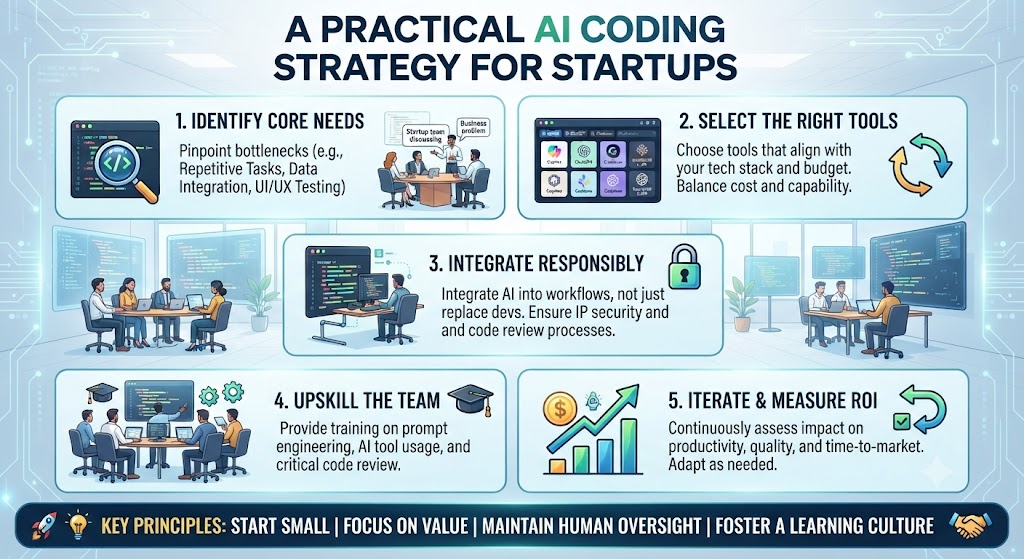
A Practical AI Coding Strategy for Startups
For most startups, a simple operating model works better than trying to automate everything.
Step 1: Define the requirement
Start with the problem.
What does the user need?
What is in scope?
What isn’t?
How will you know the feature works?
This should be human-led.
Step 2: Establish the architecture
Decide on the major technical constraints before generating large amounts of code.
Consider:
- data model
- application structure
- APIs
- authentication
- security
- hosting
- scalability requirements
AI can help explore options, but someone accountable should make the final decisions.
Step 3: Use AI for suitable implementation work
Use AI where it creates leverage:
- scaffolding
- repetitive code
- tests
- documentation
- integrations
- refactoring
- debugging
Don’t assume every task needs the same level of AI involvement.
Step 4: Review the output
Treat generated code as something to evaluate, not something to blindly accept.
Check:
- correctness
- architecture
- security
- performance
- maintainability
Step 5: Test it
Use automated tests alongside human validation.
Make sure the software behaves according to the requirement, not simply according to the generated implementation.
Step 6: Deploy incrementally
Use CI/CD, monitoring and sensible release practices.
Small, observable changes are easier to diagnose than large batches of generated code.
Step 7: Measure the actual economics
Compare the total engineering effort before and after introducing AI.
Include:
implementation + review + testing + rework + maintenance
That’s the number that tells you whether AI is actually saving money.
So, Is AI Coding Actually Cheaper?
It can be. But faster coding alone doesn’t guarantee it.
AI-assisted development can reduce the time and cost associated with many software tasks.
The strongest opportunities are usually well-defined, repetitive or low-risk work where the output can be reviewed and validated efficiently.
But software costs don’t stop when the code is generated.
Architecture, security, testing, infrastructure, maintenance and technical debt still matter.
So the real equation is closer to:
AI-assisted execution + strong engineering judgment + good processes = potential cost savings
rather than:
AI-generated code = cheaper software
For startups, that distinction can make a significant difference.
The Better Question Founders Should Ask
AI coding has changed software development.
The question isn’t whether founders should use it.
The more useful question is:
Where should we use it?
If AI can turn a three-hour repetitive task into a one-hour task without increasing review or maintenance costs, that’s valuable.
If it turns a carefully planned feature into a large amount of code that nobody fully understands, the apparent productivity gain may be misleading.
The objective isn’t to eliminate engineering judgment.
It’s to give engineers better leverage.
That’s why the strongest AI-assisted development teams aren’t necessarily the teams generating the most code.
They’re the teams that can move from:
idea → decision → implementation → validation → production
with less wasted effort.
And that’s ultimately what founders should measure.
Not how quickly AI can write code.
How quickly can your team build something customers need, get it safely into production, and continue improving it without creating a bigger technical problem for tomorrow?
If you’re evaluating where AI coding can genuinely reduce development effort and where architecture, security and technical oversight still matter Enlight Lab can help you assess the product, technical workflow and implementation strategy before you commit more engineering budget.