A B2B service company signs its fortieth client of the year. Onboarding still runs on a shared spreadsheet, a folder of email threads, and a checklist that lives in one coordinator’s head. Documents arrive in the wrong format. Reviewers ask for the same missing page twice. A manager spends Friday afternoon assembling status updates by hand. Nothing is broken enough to stop the business, but every new client adds hours of coordination that nobody budgeted for.
This is the point where many founders and operators start asking how to turn a manual business process into a digital product. The honest answer is that it takes more than swapping a spreadsheet for software. A process that is unclear, unvalidated, or poorly designed will simply become an unclear, unvalidated, poorly designed application.
This guide walks through the decisions that matter: choosing the right process, mapping it, deciding whether to buy, automate, or build, validating demand, defining an MVP, designing for real users, choosing a technical foundation, launching in stages, and scaling on evidence. We will follow one fictional example throughout, so the steps stay concrete.
About the example: Brightwell Advisory is an invented B2B service company used for illustration only. It is not an Enlight Lab client, and no results are claimed for it.
Identify a Manual Process Worth Turning Into Software
Not every manual process deserves software. Manual process digitization pays off when the work is frequent, costly, and consistent enough to be described in rules. Start by scoring candidate processes against a few practical questions.
- Frequency: How often does the process run? A task performed fifty times a week is a stronger candidate than one performed twice a quarter.
- Employee effort: How many hours does it consume, and who does the work? Time spent by senior staff on administrative coordination is especially expensive.
- Delays: Where does work wait? Waiting for documents, approvals, or replies often costs more than the work itself.
- Rework and errors: How often must something be corrected, re-requested, or redone?
- Customer impact: Do customers notice slow turnaround, inconsistent communication, or mistakes?
- Scalability: If volume doubled, would you need to double the headcount?
Brightwell finds that client onboarding scores high on every question. It runs for every new client, involves four people, produces frequent rework, and is the first experience clients have of the company. Reporting is painful too, but it depends on onboarding data being clean, so onboarding comes first.
Be wary of processes that are painful but rare, or that change shape every time. Those often need clearer ownership or a better checklist long before they need software.
Map the Existing Workflow Before Building Anything
Software encodes how work happens. If you cannot describe the work precisely, you cannot build it well. Mapping the current workflow, including its ugly parts, is the cheapest and most valuable step in the whole project.
For each step, record the trigger, the inputs, who is responsible, the business rules applied, the handoffs between people, the output, and the exceptions. Observe the work being done rather than relying on a description of it. People routinely forget the workarounds they use every day.
A simple version of the flow looks like this:
Request received → Information checked → Work assigned → Action completed → Result delivered → Record updated
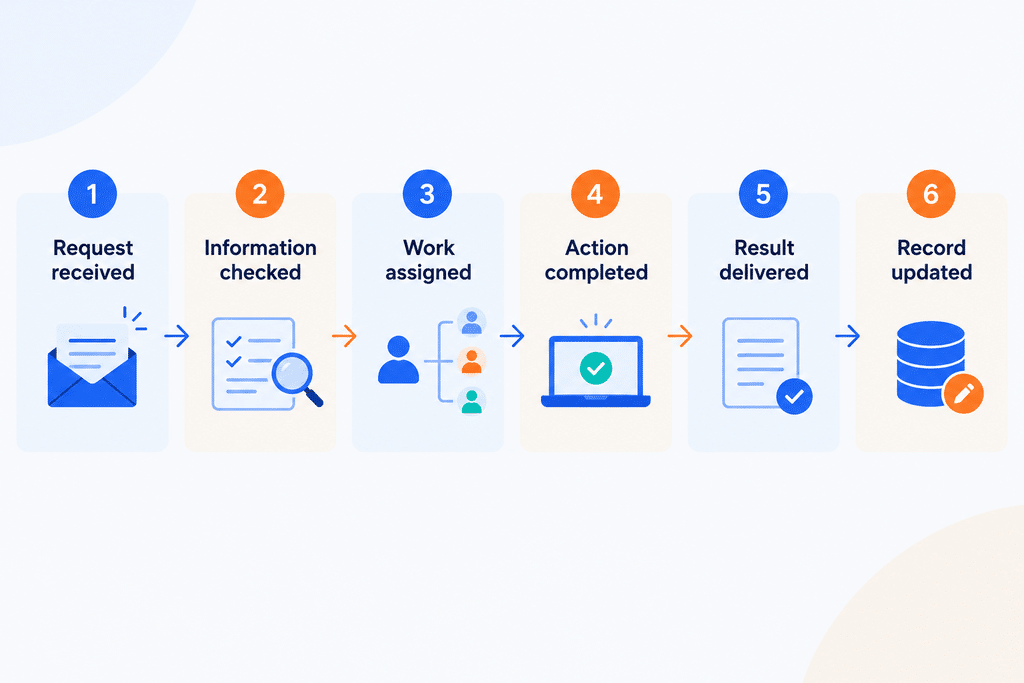
For Brightwell, that becomes: a signed client triggers onboarding, the coordinator checks the intake details, a reviewer is assigned, the review is completed against a standard template, the report is sent to the client, and the tracking spreadsheet is updated.
Once the flow is on paper, sort each step into one of three groups:
- Repetitive tasks suited to automation: sending reminders, checking that required fields are present, routing a file to the right reviewer.
- Decisions that need human judgment: assessing whether a client’s documents are sufficient, or whether a risk finding is material.
- Unusual cases that need exception handling: a client who cannot supply a standard document, or a reviewer who is out of office.
This sorting prevents a common mistake. Teams try to automate judgment, then discover that the real value was in speeding up everything around the judgment.
Decide Whether to Buy, Automate, or Build
Custom software is one option among four, and often not the first one to try. The right choice depends on how unique the process is, how it connects to other systems, and whether it could become something customers use directly.
| Option | Makes sense when | Advantages | Limitations |
|---|---|---|---|
| Improve the existing process | The process is unclear, inconsistent, or owned by no one | Lowest cost, fast, exposes real problems | Does not reduce effort at higher volume |
| Automate selected tasks with existing tools | Pain is concentrated in a few repetitive steps and standard tools cover them | Quick to deploy, modest cost, little engineering | Gets brittle as logic grows; limited control over data and user experience |
| Build a custom internal application | The process is core to how you operate, tools do not fit, and integrations matter | Fits your workflow, central data, full control | Needs ongoing maintenance and clear ownership |
| Develop a customer-facing product or SaaS platform | Customers or peers share the same problem and would pay for a solution | Potential new revenue, defensible process knowledge | Highest investment; needs support, billing, security, and product management |
When comparing options, weigh five factors beyond the sticker price:
- Cost: Include licences, integration work, maintenance, and the staff time the option still requires.
- Integrations: A tool that cannot connect to your accounting, CRM, or document storage will recreate manual work elsewhere.
- Customization: Off-the-shelf software is fastest when your process is close to the standard one. The further you are from it, the more workarounds you pay for.
- Data ownership and security: Know where data lives, who can access it, and what happens if a vendor changes terms or closes.
- Long-term maintenance: Every option has an ongoing cost. Custom builds make that cost visible, which is a feature, not just a drawback.
Brightwell tries the lower rungs first. A shared intake form and a clearer checklist remove some confusion. Reminder automation in an existing workflow tool helps further. But reviewers still juggle several documents per client, status is invisible to clients, and the report template depends on data scattered across files. That points toward a purpose-built application. If other firms might want the same capability, SaaS product development becomes a later question. For an internal tool, custom web application development is the more natural fit.
Validate the Business Opportunity Before Development
Founders often skip validation because the pain feels obvious. But the person who feels the pain is not always the person who will adopt the solution, approve the budget, or pay for it.
Validate with four groups: employees who run the process, stakeholders who depend on its output, prospective buyers if you are considering a product, and the actual users who will touch the system every day.
Useful discovery questions include:
- How often does this process run, and how long does each run take?
- What does it cost you today in time, errors, or delayed revenue?
- What alternatives have you already tried, and why did they fall short?
- Who decides to buy or adopt a solution, and what do they need to see?
- What would prevent your team from using a new tool?
- Which measurable outcome would tell you this worked?
Combine methods. Interviews reveal motivation, workflow observation reveals reality, a clickable prototype tests whether the concept makes sense, and a small pilot with one team or a handful of clients tests whether people actually use it.
Be careful with hypothetical interest. “That sounds useful” costs nothing to say. Stronger signals are behavioural: a customer who shares real data, commits to a pilot, introduces a decision maker, or agrees to pay. If Brightwell hopes to offer the platform to other firms, a few of those firms agreeing to run a real onboarding through a prototype is worth more than a stack of positive survey answers. Published examples of past work, such as the Enlight Lab case studies, can help you see how other teams frame problems and outcomes, though your own validation still has to come from your own users.
Define an MVP Around the Core Business Outcome
MVP development is often misunderstood as building a smaller version of everything. A better definition is the smallest product that delivers a meaningful outcome for a real user. Start with the outcome, then work backwards to features.
For Brightwell, the outcome might be: a new client can be onboarded and assessed with fewer handoffs, visible status, and a consistent report. A first version could include:
- Structured data collection: a client-facing form that captures required information and documents in a consistent format.
- Centralized records: one record per client instead of files scattered across inboxes and drives.
- Status tracking: a clear view of where each client stands and what is blocking progress.
- Approvals: a defined step where a reviewer signs off or requests changes.
- Notifications: automatic reminders to clients and internal staff.
- Standardized outputs: a report generated from the recorded data using the agreed template.
Things that can wait: advanced analytics, a mobile app, deep integrations with every internal system, and extensive customization options.
To decide what stays and what waits, rate each candidate feature on four criteria: customer value, operational impact, business necessity, and implementation effort. Features that score high on value and necessity but low on effort go first. Features that are expensive and only nice to have can be scheduled once real usage data exists.
MVP development also needs a stopping rule. Decide in advance which result would confirm the product is working and which would suggest changing course.
Design the Product Around the User
The most common design mistake is recreating the spreadsheet inside an application. If the old process had duplicate entry, unclear ownership, and hidden status, the new tool will inherit all three.
Good design starts with the people who use the system daily. Aim for these qualities:
- No duplicate data entry. Capture information once and reuse it everywhere.
- Clear next actions. Every user should see what they need to do next without asking a colleague.
- Status visibility. Anyone with permission should be able to tell where a case stands.
- Sensible permissions. Clients, reviewers, coordinators, and managers need different views and different rights.
- Built-in exception handling. Allow for the missing document, the reassigned reviewer, and the late approval. If the product cannot handle exceptions, people will go back to email.
- Testing with real users. Watch someone complete a real task. Where they hesitate is where the design needs work.
This matters commercially, not just aesthetically. A tool that is accurate but awkward will be bypassed, and a bypassed tool delivers none of the efficiency that justified building it. Adoption is the link between product quality and business results.
Choose a Technical Foundation That Can Scale
Technology decisions should follow requirements, not ambition. The goal is a foundation that supports today’s needs and can change as the product grows, without paying for scale you may never reach.
The main areas to decide on are:
- Application structure: A well-organized single application is often the right start. It is easier to build, test, and understand than a collection of services.
- Data modeling: Get the core entities and relationships right early, such as clients, documents, reviews, and reports, because data structure is the hardest thing to change later.
- APIs and integrations: Plan how the product will connect to email, storage, accounting, identity providers, or customer systems.
- Authentication and security: Use established methods for sign-in and role-based access rather than inventing your own.
- Testing, deployment, and monitoring: Automated tests, repeatable deployments, error monitoring, and backups are part of the product, not extras.
- Maintainability: Clear code, documentation, and conventions that a new engineer can follow.
Resist premature complexity. Splitting a young product into many microservices, or building infrastructure for millions of users before you have dozens, adds cost and slows change. A modular, well-structured application can be divided later if evidence demands it. Reliable deployment and observability, covered by DevOps consulting, usually matter more at the start than architectural novelty.
AI belongs in the design only when it improves the workflow in a measurable way. For Brightwell, one candidate is extracting key details from uploaded client documents, or classifying incoming requests. Even then, outputs should be validated, permissions should limit what the system can see, a person should review consequential results, and performance should be monitored over time. If a simple rule or form field does the job, use that instead.
Develop, Test, and Launch in Measurable Stages
A sound delivery process moves through clear stages:
Discovery → Requirements → Design → Development → Code review → Testing → Deployment → Production monitoring.
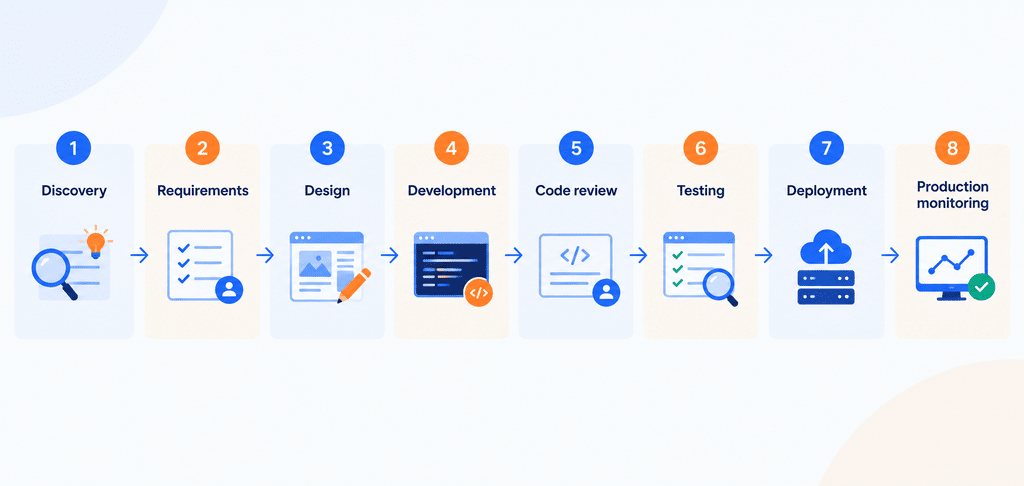
Treat these as a loop, not a one-way line. Build in short increments, show working software to stakeholders regularly, and adjust based on what you learn. Run integration tests against the real systems the product depends on. Launch to a controlled group first, such as a few new clients, before moving everyone over, and keep the old process available as a fallback until the new one has proven itself.
Measure results against the original manual workflow. Record a baseline before launch, then compare after. Useful metrics include:
- Processing time from request to delivered result
- Number of manual steps per case
- Error and rework rates
- Workflow completion rate
- User adoption and active usage
- Cost per transaction or per client
For Brightwell, that means capturing how long onboarding takes today, how many times a file is re-requested, and how many hours coordinators spend on status updates, before any software is live. Without a baseline, improvement is an opinion.
Plan for Security, Ownership, and Maintenance
Launch is the start of a product’s life, not the end. Plan for the following from the beginning:
- Access control: Give each role only the access it needs.
- Data protection: Encrypt sensitive data, limit who can export it, and understand the regulations that apply to your sector. Confirm specific compliance requirements with qualified advisors rather than assuming.
- Audit records: Keep a history of who did what and when, especially for approvals.
- Backups and recovery: Back up regularly and test restoring from those backups.
- Dependency updates and monitoring: Libraries age and vulnerabilities appear, so updates and alerts need an owner.
- Documentation: Record how the system works, how it is deployed, and how to recover it.
- Ownership and handover: Make sure you control the source code, infrastructure accounts, domain, and credentials.
Dependence on a single developer, or on an undocumented deployment process, is a business risk. If the one person who understands the system leaves, or the only deployment steps live in someone’s memory, the product becomes fragile. Ask any development partner how they document, transfer, and support what they build. For businesses without in-house technical leadership, CTO as a service can provide independent oversight of these decisions.
Scale the Product Based on Evidence
After launch, resist the urge to build whatever feels next. Let evidence guide the roadmap: product usage data, customer feedback, support requests, operating costs, and observed bottlenecks.
It helps to separate three kinds of scalability:
- Technical scalability: Can the system handle more users, data, and transactions reliably?
- Operational scalability: Can your team support more customers without a proportional rise in manual effort?
- Commercial scalability: Can you acquire, onboard, and retain customers profitably?
A system can pass the first test and fail the other two. If every new client still needs a staff member to configure settings, chase documents, or fix data by hand, growth will stay expensive however well the servers perform. Brightwell’s product would not truly scale if each new client still required hours of manual setup behind the scenes.
When support requests cluster around one screen, improve that screen. When one integration consumes disproportionate engineering time, revisit it. Scale what the evidence shows is worth scaling.
Common Mistakes to Avoid
- Automating a broken process. You get the same errors, faster. Fix the workflow first.
- Building before validating demand. The result is a polished product nobody asked for.
- Overloading the MVP. Delays, rising cost, and a launch that tests too many ideas at once.
- Choosing technology too early. Decisions made before requirements are clear tend to be expensive to reverse.
- Ignoring user adoption. Staff revert to spreadsheets and the investment produces little.
- Overlooking integrations. Data gets re-entered between systems and manual work returns through the back door.
- Neglecting security. A single incident can damage client trust far more than the software ever saved.
- Failing to define ownership. Nobody maintains it, decides priorities, or answers for results.
- Measuring success only by launch. A launched product that is unused or unreliable has not succeeded.
Conclusion: Turn a Proven Workflow Into a Product That Can Grow
The path from spreadsheet to scalable product is a sequence of decisions rather than a single build. Choose a process worth improving, map how it really works, decide honestly between improving, automating, buying, and building, validate demand with real behavior, define an MVP around one outcome, design for the people who will use it, choose a foundation that fits current needs, launch in measured stages, protect what you have built, and let evidence guide growth.
If your team is spending too much time managing a workflow manually, the first step is to determine whether it needs better tooling, automation, or a purpose-built product.
Enlight Lab helps businesses plan, build, and evolve custom software with senior technical ownership, from early product decisions through production delivery.
Book a 30-minute conversation with Dhananjay Goel to discuss your workflow, evaluate the right technical approach, and identify the next practical step.