Cloud spending keeps climbing. Gartner puts worldwide public cloud end-user spending at roughly $723 billion in 2025, up from about $596 billion the year before, and projects the market will pass $1.4 trillion by 2029 as AI workloads pull more infrastructure into the cloud. Flexera’s 2026 State of the Cloud Report found that wasted cloud spend ticked up to 29% this year the first increase in five years even as 63% of organizations now run a dedicated FinOps team.
None of that waste is really about AWS, Azure, or Google Cloud falling short. All three platforms are mature, well-documented, and battle-tested at enterprise scale. What actually derails migrations is the approach: rushed timelines, unclear ownership, dependency surprises, and the habit of treating a business transformation as if it were a lift-and-shift IT ticket.
This guide breaks down the 12 mistakes we see repeatedly in enterprise migration work, why each one matters, and what to do instead plus a checklist, a seven-phase framework, and an FAQ section covering the questions CIOs and cloud architects ask most.
What Is Cloud Migration?
wy is the process of moving applications, data, and infrastructure from on-premises systems (or from one cloud to another) into cloud-hosted infrastructure managed by a third-party provider. Organizations do this to cut infrastructure costs, scale more easily, improve resilience, ship software faster, and set themselves up for AI and data initiatives that are hard to run on legacy hardware.
There are four broad deployment models, and most enterprises end up using more than one:
-
- Public cloud: shared infrastructure from a provider like AWS, Azure, or Google Cloud
-
- Private cloud: dedicated infrastructure, hosted on-prem or in a colocation facility, used by a single organization
-
- Hybrid cloud: public and private cloud connected through networking and orchestration
-
- Multi-cloud: two or more public cloud providers used deliberately, usually for cost, capability, or geographic reasons
The right mix should follow your compliance and business requirements not whatever the last vendor pitch recommended.
Why Cloud Migrations Actually Fail
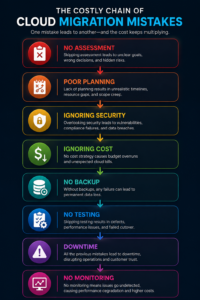
Migrations rarely fail because a platform couldn’t handle the workload. They fail because of planning gaps: a readiness assessment that never happened, business and IT goals that were never reconciled, legacy systems that turned out to be far more tangled than anyone realized, or a launch date set by an executive calendar rather than by what the work actually required.
The pattern we see most often is a migration run entirely by the infrastructure team, with no seat at the table for compliance, legal, or the business units whose systems are actually moving. That works fine for a low-stakes internal tool. It falls apart the moment the migration touches customer data, financial reporting, or anything regulated.
Platform choice matters far less than planning discipline. Pick any of the big three clouds and you’ll have the technical capability to succeed. Whether you actually do comes down to how much groundwork you laid first.
12 Cloud Migration Mistakes to Avoid
1. Skipping the Cloud Readiness Assessment
A readiness assessment looks at your infrastructure, applications, data, security posture, and team skills before you touch anything and skipping it is probably the single most avoidable cause of migration failure.
Done properly, it answers four questions: which workloads are cloud-ready as-is, which need rework first, which should be retired, and what skills gaps need closing before day one. Without that baseline, teams routinely discover mid-migration that a “simple” application has undocumented dependencies on three other systems, or that a compliance requirement rules out the region they’d already committed to.
Budget four to eight weeks for this before you commit to a timeline. The output should include an application inventory, a dependency map, a security and compliance gap analysis, and an honest skills assessment and every later decision should trace back to it.
2. Applying One Migration Strategy to Every Workload
AWS’s “6 Rs” framework Rehost, Replatform, Refactor, Repurchase, Retire, Retain has become the industry standard for a reason: different applications need different treatment, and forcing one strategy across the whole portfolio wastes money in both directions.
| Strategy | What It Means | Best For | Typical Effort |
|---|---|---|---|
| Rehost (lift and shift) | Move as-is onto cloud infrastructure | Low-criticality apps, legacy systems, speed priority | Low |
| Replatform | Targeted optimizations, same core architecture | Apps that benefit from managed services | Medium |
| Refactor | Re-architect for cloud-native services | High-value apps needing scale or resilience | High |
| Repurchase | Swap for a SaaS equivalent | Legacy software with modern alternatives | Medium |
| Retire | Decommission | Redundant or unused systems | Low |
| Retain | Leave on-prem for now | Compliance-locked or recently upgraded systems | None |
Decide strategy application-by-application, not portfolio-wide. Refactoring an internal reporting tool nobody outside finance uses is a waste of engineering time. Rehosting a latency-sensitive customer app just creates a performance problem you’ll pay to fix later.
3. Migrating Without Mapping Dependencies
Dependencies are the connective tissue between systems databases, APIs, auth services, message queues, third-party integrations, shared file stores. Move an application without mapping these first, and you have a reliable recipe for a production outage.
Automated discovery tools (AWS Application Discovery Service, Azure Migrate, Cloudamize, and similar) can map network and service relationships at scale, but they miss things that only show up in architecture docs, runbooks, and change logs so manual review still matters.
The practical rule: migrate dependency clusters together, not one application at a time in isolation. An app that lands in the cloud before its database or auth service does will fail the moment it goes live.
4. Underestimating Data Migration
Data migration gets treated as a subtask when it’s really its own project. Enterprise data environments span structured databases, unstructured storage, data warehouses, streaming pipelines, and archives each with different tooling, validation needs, and tolerance for downtime.
A real data migration plan covers classification and sensitivity, sequencing, transformation requirements, validation and reconciliation, rollback, and any data residency or retention obligations. For large volumes, a phased approach using AWS DMS, Azure Database Migration Service, or Google’s equivalent is usually safer than a single cutover window.
Validate every migrated record before cutover not after. Teams that skip this step tend to discover data integrity problems only after the source environment is already decommissioned, at which point recovery is expensive and sometimes just isn’t possible.
5. Underestimating Security Requirements
Cloud security isn’t your on-prem security model with a new address. Assuming existing controls transfer as-is is how gaps get created.
Start from the shared responsibility model: the provider secures the underlying infrastructure, you secure everything you put on top of it access controls, encryption, network configuration, application security, monitoring. All of it.
The non-negotiables for an enterprise migration:
-
- Least-privilege IAM every user, service, and workload gets only the access it needs to do its specific job
-
- Encryption at rest and in transit, using provider-managed or customer-managed keys depending on your compliance requirements
-
- Dedicated secrets management (AWS Secrets Manager, Azure Key Vault, Google Secret Manager) instead of credentials sitting in code or config files
-
- Zero Trust principles verify every request regardless of where it originates
-
- Compliance controls mapped to cloud-native equivalents before migration, not after
OWASP’s Cloud Security Top 10 is a solid checklist to run every environment against before production cutover.
6. Treating Compliance as a Post-Migration Problem
HIPAA, GDPR, SOC 2, PCI DSS, ISO 27001 none of them have a cloud exemption. Organizations that push compliance planning to after go-live routinely end up with failed audits, costly remediation, and in regulated industries, real penalties.
Compliance planning belongs in the readiness assessment phase, workload by workload: which regulations apply, what specific controls they require, how those controls map to cloud-native services, and how you’ll monitor and evidence compliance on an ongoing basis. AWS, Azure, and Google Cloud all publish which of their services are covered under which certifications check this before you commit to an architecture, not after.
Retrofitting compliance is always more expensive, and usually less complete, than designing for it up front.
7. Skipping Cost Optimization Planning
Cost overruns are one of the most consistently reported migration outcomes, and it’s not close: Flexera’s 2026 State of the Cloud Report found wasted cloud spend rose to 29% this year, reversing five straight years of improvement, driven largely by AI workload costs stacking on top of existing spend.
The usual culprits:
-
- Overprovisioning based on old peak on-prem capacity instead of actual cloud usage
-
- Idle resources dev and test environments left running nights and weekends
-
- Storage in the wrong tier high-performance pricing for data nobody’s actively using
-
- Unmonitored data transfer egress costs that quietly accumulate until the bill arrives
A cost strategy needs reserved capacity planning, automated scheduling for non-production resources, rightsizing policies, storage lifecycle rules, and budget alerts plus someone whose job it actually is to own FinOps. Teams without a named owner consistently watch cloud spend outgrow the business value it’s supposed to deliver.
8. Skipping Testing Before Production Cutover
Cutting over to production without real testing is one of the highest-risk moves in a migration. That testing needs to cover functional behavior, performance under realistic load, security posture, failover, and critically rollback.
What “tested” actually means:
-
- Functional testing every feature behaves the same as it did before
-
- Performance testing response times and throughput hold up under production-level load
-
- Security testing access controls, encryption, and vulnerability posture check out
-
- Disaster recovery testing backup and failover work as documented, not just as designed
-
- Rollback testing you can actually revert if the cutover goes wrong
Rollback testing is the one teams skip most often, usually because the team is confident enough in the migration that testing the “failure path” feels like wasted effort. That confidence is exactly what turns a bad cutover into an extended outage. Test it before you need it, not during the incident.
9. Leaving Disaster Recovery as an Afterthought
Moving to the cloud doesn’t automatically make anything resilient. Without deliberate design for high availability, multi-region failover, and backups, cloud workloads can be just as fragile as whatever they replaced.
Define recovery objectives before you design around them:
-
- RTO (Recovery Time Objective) how long you can be down before it matters
-
- RPO (Recovery Point Objective) how much data loss you can tolerate, measured in time
These vary a lot by workload. A payment system might need an RTO measured in minutes and an RPO measured in seconds. An internal dashboard might comfortably tolerate hours and a full day, respectively. Design for your most demanding workloads, and actually test failover quarterly under realistic conditions not just on paper.
10. No Real Monitoring Strategy After Go-Live
Monitoring isn’t a line item you check off at the end of the project. It’s the ongoing discipline that determines whether problems get caught before they hit users, or after.
Platform-native tools AWS CloudWatch, Azure Monitor, Google Cloud Monitoring give you solid visibility into a single cloud environment. For anything spanning multiple clouds or requiring deeper tracing, tools like Datadog, New Relic, or Dynatrace fill the gap with cross-cloud observability and anomaly detection.
Define your monitoring baseline infrastructure metrics, application performance, security events, cost alerts, compliance checks during planning, not the week before go-live.
11. Not Investing in Team Training
Running cloud infrastructure is a different skill set than running on-prem infrastructure, and teams that migrate without training end up managing environments they don’t fully understand which shows up as security gaps, performance issues, and avoidable costs.
Training should cover cloud architecture fundamentals, the specific services and tools you’re actually using, IAM and security management, cost management and FinOps basics, and incident response for cloud environments. AWS, Microsoft, and Google all offer certification paths tied to specific roles, which makes budgeting for this easier to justify. The team running your environment on day one of production needs to be ready on day one not three weeks into fixing what they didn’t know.
12. Treating Migration as a One-Time Project
Migration isn’t a project with a finish line it’s the start of an ongoing modernization effort. Teams that treat go-live as “done” stop optimizing, accumulate technical debt, and eventually end up managing a cloud environment that’s just as rigid as the system it replaced.
The bulk of cloud’s long-term value shows up after migration: adopting cloud-native services, improving automation, rightsizing and buying reserved capacity, and expanding into AI, machine learning, and serverless where it makes sense. Put quarterly optimization reviews on the calendar and assign someone to own them. The organizations that get the strongest return on cloud investment are the ones still actively improving a year or two after go-live not the ones who closed the project folder at cutover.
Cloud Migration Checklist
Before migration
-
- Infrastructure and application inventory completed, with business criticality ratings
-
- Dependency mapping done for every in-scope application
-
- 6R strategy assigned per workload
-
- Security review completed against the shared responsibility model
-
- Compliance requirements documented and mapped to cloud controls
-
- Backup strategy defined and tested
-
- RTO/RPO defined per workload
-
- Cost model built with baseline and projected spend
-
- Team training completed
During migration
-
- Per-application testing completed before cutover
-
- Data integrity validated post-migration
-
- Security controls validated in the new environment
-
- Performance tested under realistic load
-
- Rollback procedure tested and documented
-
- Monitoring and alerting live before go-live, not after
After migration
-
- Dashboards reviewed daily for the first 30 days
-
- Cost reports reviewed weekly for the first 90 days
-
- Post-migration review completed within 30 days
-
- Optimization backlog created from that review
-
- Governance policies documented and enforced
-
- Quarterly optimization review scheduled
The Seven-Phase Cloud Migration Framework
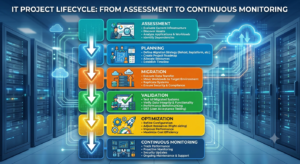
| Phase | Activities | Key Outputs |
|---|---|---|
| 1. Assessment | Readiness assessment, inventory, dependency mapping, skills gap analysis | Migration scope, risk register, readiness report |
| 2. Planning | Strategy selection, timeline, team assignment, compliance planning | Migration plan, compliance blueprint, budget |
| 3. Architecture Design | Cloud, security, network, and DR design | Architecture diagrams, security controls, DR plan |
| 4. Migration | Phased execution by workload group, data migration, cutover | Migrated workloads, validated data, go-live sign-off |
| 5. Testing | Functional, performance, security, and DR testing | Test reports, sign-off against acceptance criteria |
| 6. Optimization | Rightsizing, cost tuning, performance tuning, hardening | Optimized cost profile, performance baseline |
| 7. Continuous Improvement | Quarterly reviews, cloud-native adoption, automation | Modernization roadmap, ongoing cost reduction |
Skipping a phase doesn’t save time it just moves the cost of skipping it to a later, more expensive stage.
AWS vs. Azure vs. Google Cloud
There’s no universal “best” platform the right one depends on your existing stack, workload type, and compliance needs.
| Dimension | AWS | Microsoft Azure | Google Cloud |
|---|---|---|---|
| Best fit | Broad enterprise workloads, e-commerce, SaaS | Microsoft 365 shops, hybrid environments, SAP | Data analytics, AI/ML, Kubernetes-native apps |
| Market position | Largest service catalog, widest adoption | Strong in finance, healthcare, government | Third place, but leading in data-heavy verticals |
| AI tooling | Bedrock, SageMaker | Azure OpenAI Service, Copilot integration | Vertex AI, Gemini integration, TPUs |
| Pricing model | Usage-based, Savings Plans, Reserved Instances | Hybrid Benefit for existing MS licenses | Sustained-use and committed-use discounts |
| Ecosystem | Largest partner network and marketplace | Deep Microsoft product integration | Strong open-source and Kubernetes ecosystem |
| Compliance | Broadest certification coverage, GovCloud | Strong regulated-industry track record, FedRAMP | Solid controls, BeyondCorp Zero Trust model |
Per Flexera’s 2026 data, AWS and Azure remain neck-and-neck for enterprise adoption, with Google Cloud a distant third overall but consistently strong in AI and analytics-heavy environments. Plenty of enterprises run two or more providers deliberately if your workloads genuinely have different platform needs, a governed multi-cloud approach usually beats forcing everything onto one provider.
Key Takeaways
-
- Planning outcomes matter more than platform choice. Readiness assessment, dependency mapping, and compliance planning done up front consistently beat speed-first approaches.
-
- The 6Rs prevent expensive mismatches. Evaluate every application on its own one strategy rarely fits the whole portfolio.
-
- Security and compliance can’t be bolted on later. Design IAM, encryption, and compliance controls into the architecture before the first workload moves.
-
- Cost overruns are predictable and preventable. With wasted cloud spend back up to 29% industry-wide, a named FinOps owner and weekly cost reviews are no longer optional.
-
- Migration is the start, not the end. The strongest long-term ROI goes to teams that keep optimizing well past go-live.