A traditional support form doesn’t have this problem. A web application firewall (WAF) doesn’t have this problem, because there’s no SQL injection or malformed HTTP request to catch the “attack” is a normal-looking English sentence sitting inside a normal-looking support message. The vulnerability isn’t in the transport layer. It’s in the fact that the model can’t always tell the difference between an instruction from its own system prompt and an instruction that arrived embedded in the data it was asked to read.
This is the problem an AI firewall exists to help with. Not the only problem, and not a problem it solves by itself but a real one, and a growing one as AI systems move from “generate a response” to “read data, call tools, and take action.”
This article walks through what an AI firewall actually is, where it fits in an AI security architecture, what it can and can’t protect against, how it compares to a WAF, an API gateway, and an AI gateway, and the part most vendor content skips when you genuinely don’t need one yet.
What Is an AI Firewall?
An AI firewall is a security and policy enforcement layer placed between users, applications, AI models, and the tools or data those models can access. It inspects prompts, model outputs, and tool calls against defined policies filtering prompt injection attempts, blocking sensitive data leakage, and restricting which actions an AI system is allowed to take.
Unlike a network firewall, which reasons about IP addresses, ports, and packet headers, an AI firewall reasons about natural-language content and application-level behavior. It typically sits in one of two places: as a reverse proxy in front of the model API (inspecting prompts going in and completions coming out), or as a policy layer wrapped around the model’s tool-calling and agent framework (inspecting what the AI is trying to do, not just what it’s trying to say).
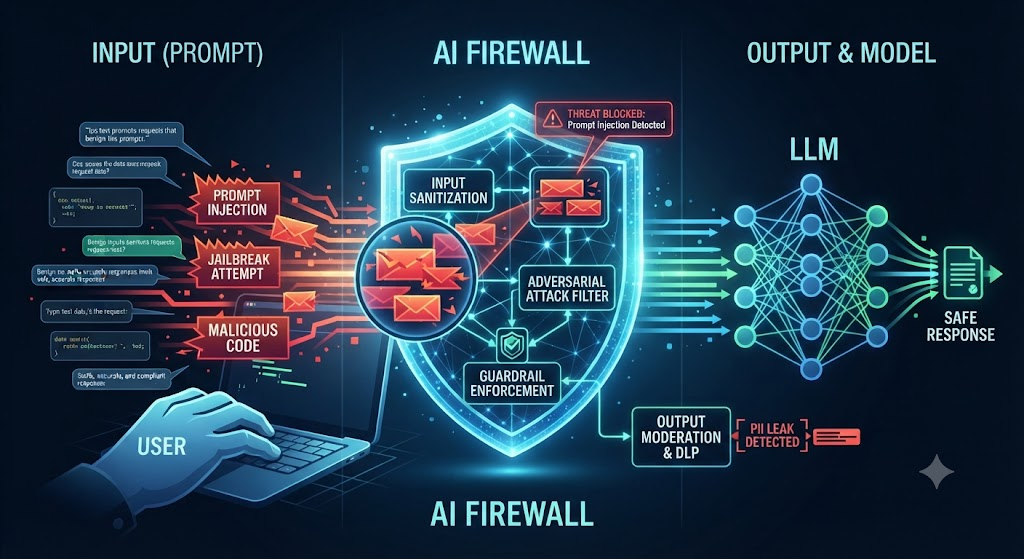
Depending on the product, an AI firewall can enforce policies such as:
- Blocking known prompt-injection patterns and jailbreak attempts before they reach the model
- Redacting or blocking sensitive data PII, credentials, internal identifiers from model inputs or outputs
- Restricting which tools, APIs, or data sources a given agent identity can invoke
- Rate-limiting and anomaly detection on AI traffic (unusual query volume, unusual data access patterns)
- Logging and auditing every prompt, response, and tool call for compliance and incident review
- Enforcing content policies on generated output before it reaches a user or a downstream system
The industry hasn’t fully settled on this definition. Some vendors sell “AI firewall” as a prompt/response inspection product. Others use the same term for something closer to an identity-and-access-control layer for agents. Both are legitimate uses of the term they just address different parts of the same underlying problem: controlling what an AI system can see, say, and do.
Why Traditional Application Security Isn’t Enough for AI
This isn’t a claim that your existing security stack is obsolete. Your WAF, API gateway, IAM system, and secrets manager are all still doing real work. The point is narrower: AI applications introduce a few properties that those tools were never built to reason about.
Inputs are unstructured and non-deterministic. A REST API has a schema. A prompt is a paragraph of English. Two semantically identical requests can be phrased a hundred different ways, which makes signature-based filtering (the backbone of classic WAF rules) far less reliable against prompt-based attacks.
The model executes instructions embedded in data, not just in code. This is the core mechanism behind prompt injection. When an LLM summarizes a webpage, reads an email, or parses a PDF, anything written in that content is, to the model, just more text and the model doesn’t reliably distinguish “content to analyze” from “instructions to follow.” OWASP’s Top 10 for LLM Applications (2025) lists this as its top-ranked risk, and specifically calls out that injected instructions can arrive indirectly smuggled into retrieved documents, tool outputs, or web pages the model reads on your behalf, not just typed directly by a user.
Outputs can trigger real actions. A traditional application returns a string to a browser. An agentic AI system’s output can be a function call: send this email, update this record, run this query. OWASP categorizes the failure to validate that output before acting on it as improper output handling, and the risk of an agent holding more permission or autonomy than the surrounding controls can safely supervise as excessive agency.
Context accumulates across a session. A multi-turn agent conversation, or a chain of tool calls, can drift somewhere the first message never suggested. A single-request inspection point can approve every step individually while missing that the sequence, taken together, is doing something it shouldn’t.
None of this means throw out your existing controls. It means the controls need a companion layer that understands prompts, model behavior, and tool calls the way your WAF understands HTTP requests.
How Does an AI Firewall Work?
At a conceptual level, the traffic flow looks like this:
User / Application → AI Firewall → LLM / AI Model → Tools / APIs / Data Sources → AI Firewall (again) → Response
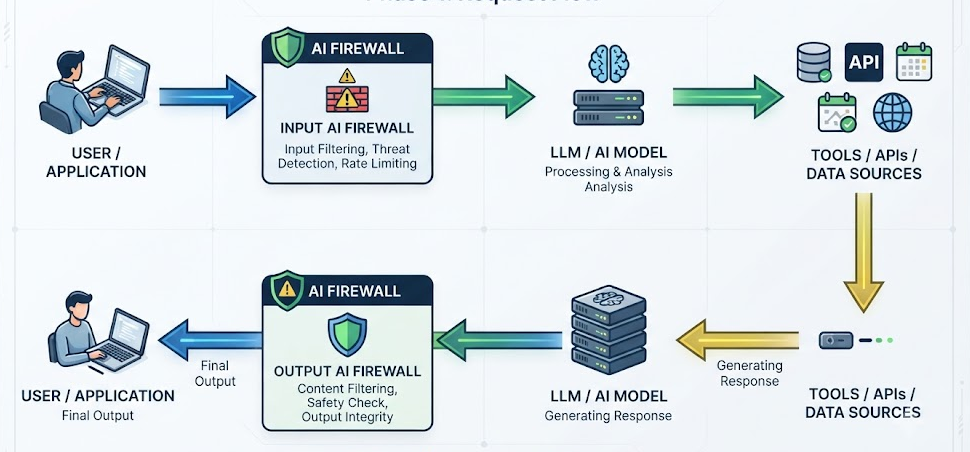
Controls typically apply at three checkpoints:
1. Before the prompt reaches the model. Input validation, prompt-injection pattern detection, PII/secret redaction, rate limiting, and policy checks against the user’s identity and role.
2. Before a tool call executes. Authorization checks against what that specific agent or user is permitted to do, parameter validation, and for higher-risk actions a human approval gate before execution.
3. Before the response reaches the user or a downstream system. Output validation and sanitization (especially if the output will be rendered as HTML, executed as code, or used in a database query), sensitive-data filtering, and content policy checks.
If you’re sketching an architecture diagram for this, the useful version isn’t a single box labeled “AI Firewall” sitting alone in the middle of the page. It’s a layer that touches three separate junctions input, tool call, output each with its own policy set, sitting alongside (not instead of) your existing identity provider, API gateway, and logging infrastructure.
What Does an AI Firewall Protect Against?
These map closely to the risk categories OWASP’s GenAI Security Project documents in its Top 10 for LLM Applications. Worth saying plainly: none of these controls eliminate the underlying risk. They reduce the odds of a successful attack and shrink the blast radius when one gets through.
Prompt injection. A user directly tries to override the system prompt “ignore your instructions and instead…” An AI firewall can pattern-match against known injection techniques and, more usefully, restrict what the model is authorized to do regardless of what it’s told, so a successful injection has less to work with.
Indirect prompt injection. The instruction doesn’t come from the user typing it it arrives inside a document the model retrieves, a webpage it browses, an email it reads, or the output of another tool. This is harder to catch than direct injection because the malicious text is mixed in with legitimate content the model is supposed to process. Firewalls that inspect retrieved content before it’s added to the model’s context, and that treat tool outputs as untrusted input rather than trusted context, help here.
Sensitive information disclosure. The model or the surrounding pipeline leaks something it shouldn’t: a customer’s data pulled from a system it had access to but the current user didn’t have permission to see, an internal document, a credential accidentally included in a fine-tuning set or a retrieval index. An AI firewall can apply DLP-style filtering to outputs and enforce that responses respect the requesting user’s actual data permissions, not just the AI system’s broad access.
Malicious or unsafe tool calls. An agent is tricked via injection or a poorly scoped prompt into calling a tool in a way that causes harm: querying data it shouldn’t, hitting an API with parameters that trigger an unintended side effect. Tool-call authorization policies, parameter validation, and approval gates on consequential actions are the relevant controls.
Unauthorized AI actions. Related to excessive agency: the AI system holds broader permissions than the current task requires, so a mistake or manipulation has a bigger blast radius than it needed to. This is a permissions and scoping problem as much as a filtering problem.
Unsafe model outputs. The model generates something harmful, non-compliant, or simply wrong with enough confidence that a downstream process or a person acts on it as if it were verified fact. Output content filtering and, where the model’s output feeds into another system, output validation against an expected schema both help.
Excessive agent permissions. Different from a single unauthorized action this is the cumulative state where an agent has quietly accumulated more tool access, data access, or autonomy than anyone explicitly reviewed. It tends to build up gradually as teams add “just one more integration,” which is exactly why it needs ongoing review, not a one-time check.
Abuse and anomalous AI traffic. Automated scraping of a public-facing AI feature, cost-driven abuse (deliberately triggering expensive, long-running model calls), or credential-stuffing style probing for jailbreaks. Rate limiting, anomaly detection, and usage monitoring at the AI layer address this OWASP’s 2025 list groups this under unbounded consumption, reflecting that resource exhaustion is now treated as a security risk, not just a cost-management problem.
What an AI Firewall Does NOT Protect Against
This is the section most vendor pages skip, and it’s the one that actually matters for a buying decision.
An AI firewall does not fix:
- Poor identity and access management. If your underlying IAM setup lets any authenticated user query any customer’s data, an AI firewall sitting in front of the model doesn’t change what the backend will actually return once a tool call is authorized.
- Overly broad application permissions. If the service account your AI agent uses has admin-level database access “to keep things simple,” no amount of prompt filtering closes that gap. The fix is least-privilege scoping at the infrastructure layer.
- Vulnerable APIs. An AI firewall inspects what goes to and from the model. It typically doesn’t replace a security review of the APIs the model calls SQL injection in a backend endpoint is still SQL injection whether the request that triggered it came from a human or an agent.
- Compromised infrastructure. If an attacker already has a foothold in your cloud environment, an AI-specific control layer isn’t your incident response plan.
- Insecure databases or storage. Misconfigured buckets, missing encryption at rest, weak database access controls none of this is an AI problem, and none of it gets fixed by an AI-specific layer.
- Bad secrets management. Hardcoded API keys, credentials in prompts or logs, secrets checked into a repo general security hygiene, not an AI firewall’s job.
- Vulnerable third-party dependencies. OWASP’s LLM Top 10 flags supply-chain risk compromised models, datasets, or libraries as its own category precisely because it sits outside prompt/output inspection.
- Incorrect business logic. If the refund workflow itself has a flaw say, it doesn’t check whether a refund has already been issued an AI agent using that workflow correctly will still trigger the bug. The AI firewall did its job; the application didn’t.
- Weak human approval processes. A firewall can enforce that an approval gate exists before a consequential action executes. It can’t fix a process where “approval” means a person clicks “approve” on autopilot without reading what they’re approving.
The honest framing: an AI firewall is one layer in a broader AI security architecture, alongside identity and authentication, data access controls, model access controls, tool permission , API security, input and output validation, logging, monitoring, and human-approval workflows. It doesn’t replace any of those. It’s the layer that understands AI-specific behavior everything else still has to be built and maintained the way it always did.
AI Firewall vs WAF vs API Gateway vs AI Gateway
Terminology in this space is genuinely inconsistent between vendors the same word gets used for meaningfully different products, and some products span more than one row of this table. Treat this as a way to think about the layers, not a fixed industry taxonomy.
| Technology | Primary purpose | Typical traffic | AI-specific controls |
|---|---|---|---|
| WAF | Protect web applications from network- and application-layer attacks (SQLi, XSS, CSRF) | HTTP/HTTPS requests to web apps | Generally none some vendors are bolting on prompt-injection signatures |
| API Gateway | Route, authenticate, rate-limit, and manage traffic to APIs | REST/GraphQL/RPC calls between services | None by default governs any API traffic, AI-related or not |
| AI Gateway | Centralized routing, cost tracking, caching, and observability across multiple AI models and providers | Prompts and completions flowing to LLM APIs | Basic prompt/response logging and sometimes lightweight guardrails, but limited to what passes through the gateway itself |
| AI Firewall | Inspect and enforce security policy on AI inputs, outputs, and agent behavior | Prompts, completions, and tool/agent calls | Prompt-injection detection, output filtering, sensitive-data redaction, tool-call authorization |
A useful way to hold the distinction: an AI gateway is primarily an operational and cost-management layer it answers “which model handled this request, what did it cost, and can I fail over to another provider.” An AI firewall is primarily a security and policy layer it answers “should this request have been allowed, and should this response have gone out.” Some platforms genuinely do both. Some “AI gateway” products have added enough guardrail features that the line has blurred on purpose, as a sales strategy as much as an architectural one. When evaluating a vendor, ask what specific policies it enforces and where in the request lifecycle it enforces them the label on the product page tells you less than the answer to that question.
It’s also worth noting a real limitation that applies to gateway-style products regardless of label: a gateway only sees traffic that actually routes through it. Direct service-to-service calls, internal agent-to-tool hops that bypass the proxy, and anything outside its network path are invisible to it which is exactly why tool-level authorization and least-privilege scoping matter even when a gateway or firewall is in place.
Do AI Agents Need an AI Firewall?
This is where the conversation stops being theoretical.
A question-answering chatbot has a bounded failure mode: it says something wrong or inappropriate. Unpleasant, potentially damaging to trust, but contained nothing external actually happens as a direct result.
An agent that can read a CRM, query a database, send an email, create a ticket, call a payment API, and update a record has a fundamentally different failure mode: it can take an action with a real consequence in the world, and it can be manipulated through direct or indirect prompt injection into taking an action nobody authorized.
The relevant engineering principle here is one that already exists in security: least privilege, applied to AI agents the same way it’s applied to service accounts and human users.
A concrete example. A support agent handling customer tickets might legitimately need:
- Permission to read a customer’s order history yes
- Permission to issue a refund directly, no human in the loop probably not
- Permission to draft a reply email yes
- Permission to send that email without review depends heavily on the stakes; often no, at least initially
The pattern is consistent: read access is usually lower risk than write access, and write access to anything with financial, legal, or customer-facing consequence usually deserves an approval step, at least until the agent has a track record. This isn’t a novel idea it’s the same reasoning that governs which employees get which system permissions. What’s new is that the “user” making these requests can be socially engineered through a support ticket, and it doesn’t get tired, suspicious, or slower to comply the tenth time it’s asked.
An AI firewall or, more precisely, the tool-authorization and policy-enforcement piece of one is one of the practical ways to implement that scoping in a system where the agent’s actions are triggered by natural-language reasoning rather than a fixed code path. But the scoping decision itself what should this agent actually be allowed to do is a design decision your team has to make. No product makes it for you.
When Does a Startup Actually Need an AI Firewall?
Not every team building with LLMs needs a dedicated AI security product on day one, and pretending otherwise doesn’t serve anyone but the vendors selling one.
Signals you’re approaching the point where AI-specific security controls earn their cost
- The AI system has access to sensitive customer data PII, financial records, health information, anything that would be a real incident if it leaked
- The AI connects to internal systems: your CRM, your ticketing system, your production database, your billing platform
- Agents can take actions with real consequences refunds, account changes, sending communications, modifying records
- You operate in a regulated environment healthcare, financial services, anywhere HIPAA, GDPR, or similar frameworks apply
- You’re routing across multiple models or providers, which makes consistent policy enforcement across all of them harder to do by hand
- The AI feature is customer-facing at meaningful scale, which increases both the attack surface and the cost of a mistake
- Agents can reach production systems, not just a sandboxed copy
- AI-generated actions carry financial or operational weight the kind of thing that would show up in a postmortem
Situations where a dedicated AI firewall is probably premature
- You’re running a simple internal chatbot with no access to sensitive data or external systems
- The AI only answers questions using content you’d already be comfortable making public
- There’s no tool-calling or agentic behavior it’s a straightforward request/response pattern
- You’re still in early prototyping, and the priority is validating the product idea, not hardening infrastructure that might not exist in three months
- Your existing application security review process already covers the (limited) surface the AI touches
In the premature case, that doesn’t mean “do nothing.” Basic prompt-injection awareness, sensible output handling, and not connecting an unvetted agent directly to production data are good practice regardless of scale they’re just achievable through careful engineering and code review rather than a dedicated security product. The moment that changes is usually the moment an agent gets write access to something that matters, or the moment you’re handling data that would trigger a compliance obligation or a genuinely bad headline if it leaked.
How Should a Team Evaluate an AI Firewall?
If you’ve concluded you’re past the “premature” list above, a few questions cut through most of the marketing:
Where exactly does it sit in the request path, and what does it actually see? A product that only inspects the initial user prompt won’t catch indirect injection buried in a retrieved document or a tool’s response. Ask specifically whether it inspects tool outputs and retrieval results, not just the first message in a conversation.
Does it do tool-call authorization, or only prompt/output filtering? These are different capabilities. Filtering catches some bad inputs and outputs. Authorization prevents an agent from taking an action it was never scoped to take in the first place, regardless of how it got there. For agentic systems, the second matters more.
What’s the false-positive cost? A firewall that blocks legitimate requests too aggressively gets disabled or worked around by frustrated engineers within a quarter. Ask for real numbers, not a demo.
Does it integrate with your existing identity provider, or does it become a parallel identity system? Agent identity that’s disconnected from your actual IAM setup creates a second system of record to keep in sync, and drift between the two is its own risk.
What does the audit trail actually capture? For regulated environments, you need to reconstruct not just what the model said, but which tools it called, with what parameters, under whose authorization, and why. Confirm the logging is detailed enough to answer “what exactly happened” after the fact, not just “an interaction occurred.”
What happens when it’s wrong? Every filtering system has failure modes in both directions. Ask what the vendor’s own incident history looks like, and how the product degrades does a system failure fail open (requests pass through unfiltered) or fail closed (the AI feature goes down)? For most production systems, fail-closed is the safer default, but it has real availability implications you should plan for.