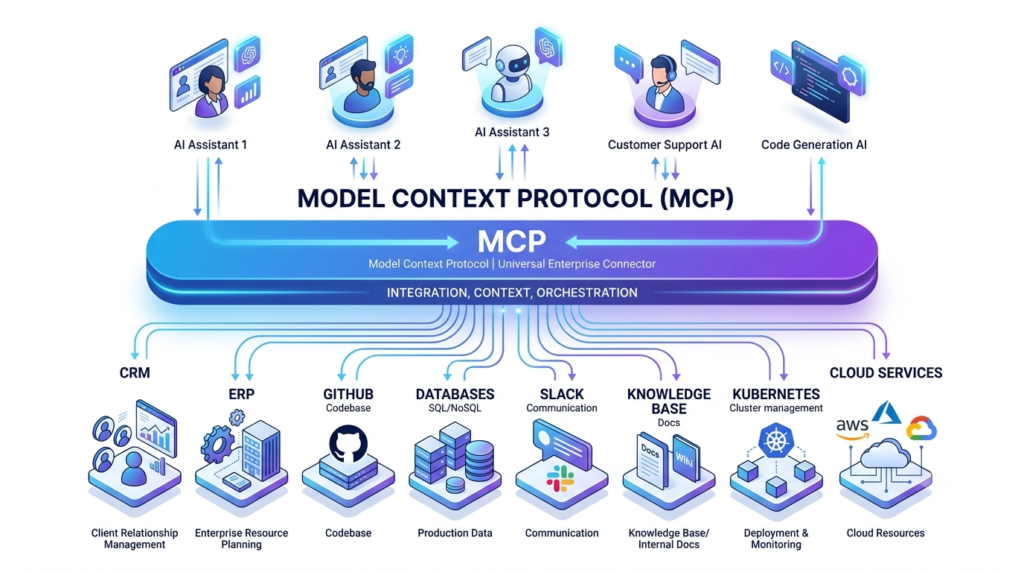
TL;DR: Model Context Protocol (MCP) is an open standard that connects AI models to enterprise systems through a consistent interface. It replaces one-off, custom integrations with a reusable protocol. For enterprises running multiple AI agents across CRM, ERP, databases, and internal tools, MCP reduces integration sprawl, improves governance, and shortens the path from prototype to production.
Three things to know before you read further:
MCP standardizes how AI models access tools and data, similar to how a common driver interface lets an operating system talk to any hardware.
It matters most when you have many models talking to many systems. The value scales with integration complexity.
Adoption is an architecture decision, not a model decision. Security, access control, and observability determine whether it succeeds.
Direct Answer: Model Context Protocol is an open specification, introduced by Anthropic, that defines how AI applications connect to external tools, data sources, and systems through a standardized client-server model. Instead of writing bespoke integration code for every model and every system, you build one MCP server per system. Any MCP-compatible AI client can then use it.
The practical benefit is decoupling. Your AI models no longer need custom code to reach your Salesforce instance, your data warehouse, or your internal wiki. They speak a common protocol. That decoupling is what makes MCP relevant to enterprise architecture rather than a single project.
Why Model Context Protocol Exists
MCP exists to solve the N×M integration problem in enterprise AI.
Here is the problem in concrete terms. You have three AI applications: a customer support assistant, an internal knowledge assistant, and a developer copilot. Each needs access to six systems: CRM, ERP, a document store, Slack, GitHub, and a SQL database. Without a standard, you write custom integration code for every combination. That is 3 × 6 = 18 integrations to build, test, secure, and maintain.
Now add a fourth AI application. You write six more integrations. Add a seventh system, and you write four more. The maintenance burden grows multiplicatively. Every model upgrade, every API change, every credential rotation multiplies across the matrix.
This is the pattern we see repeatedly in enterprise AI programs. Teams build impressive pilots, then discover that scaling those pilots means rewriting integrations they thought were finished. The integration layer becomes the bottleneck, not the model.
MCP converts that N×M problem into an N+M problem. You build one MCP server per system (M servers) and one MCP client capability per AI application (N clients). Any client can use any server. The four AI applications and seven systems that required 28 custom integrations now require 11 reusable components.
The consequence of ignoring this: integration debt compounds silently until a routine model migration or vendor change forces a rewrite you did not budget for.
What is Model Context Protocol?
Direct Answer: Model Context Protocol is an open, model-agnostic standard that defines a consistent interface between AI applications and the tools, data, and systems they need to access.
Think of MCP the way you think of the Language Server Protocol for code editors. Before LSP, every editor needed custom integration code for every programming language. After LSP, any editor could support any language through one standard. MCP applies the same principle to AI: any compatible AI application can connect to any compatible system through one protocol.
MCP defines three things:
A wire format for how AI clients and servers exchange messages, built on JSON-RPC.
A set of primitives that servers expose: tools (actions the model can invoke), resources (data the model can read), and prompts (reusable templates).
A negotiation model so clients and servers agree on capabilities at connection time.
The protocol is open. Anthropic published the specification and reference implementations, and adoption now spans multiple AI vendors and open-source tooling. That openness matters for enterprise architecture. You are adopting a standard, not locking into a single vendor’s proprietary integration layer.
Key takeaway: MCP is a protocol, not a product. It describes how systems talk, which is exactly why it survives model changes.
Core Components of MCP
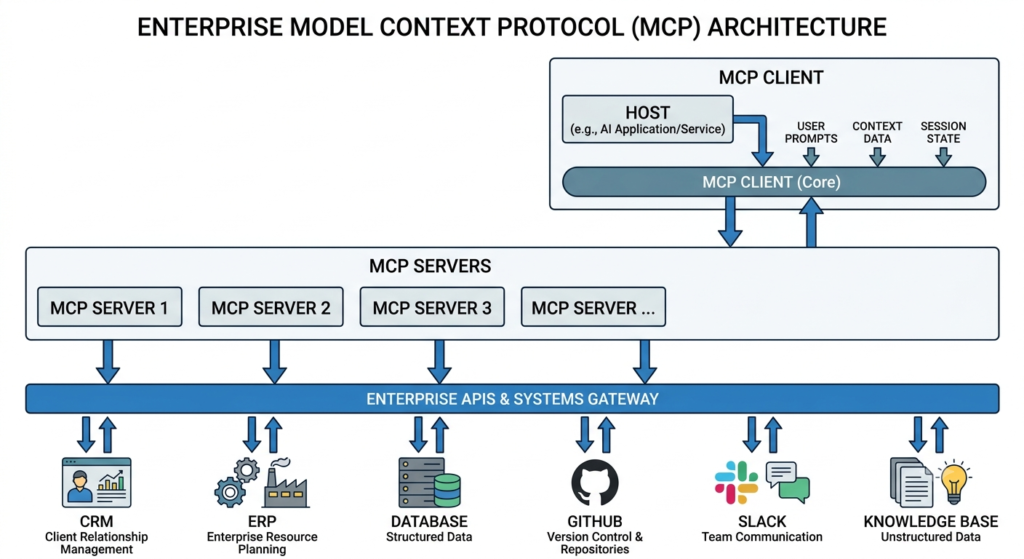
MCP uses a client-server architecture with four distinct roles. Understanding these roles is essential before designing any MCP implementation.
MCP Host
The host is the AI application the user interacts with. This is your customer support assistant, your knowledge assistant, or your developer copilot. The host contains the language model and manages the overall interaction. It also holds one or more MCP clients.
MCP Client
The MCP client lives inside the host and maintains a dedicated connection to a single MCP server. If your host needs to reach five systems, it runs five clients, each paired with one server. The client handles capability negotiation, message routing, and connection lifecycle for its server.
This one-to-one pairing is deliberate. It creates a clean isolation boundary. A failure or compromise in one server connection does not cascade to others.
MCP Server
The MCP server is the component you build for each enterprise system. A Salesforce MCP server exposes CRM actions and records. A GitHub MCP server exposes repositories, issues, and pull requests. The server translates between the MCP protocol and the underlying system’s native API.
The server is where your enterprise logic lives: which records are readable, which actions require approval, what data gets filtered. This makes the server the natural enforcement point for access control and governance.
Transport Layer
The transport layer moves messages between client and server. MCP supports local transport for servers running on the same machine as the host, and remote transport over HTTP for networked services. For enterprise deployments, remote transport with proper authentication is the norm, because your MCP servers typically run as centralized services rather than local processes.
Key takeaway: The MCP server is the component that carries your enterprise design decisions. Invest your governance effort there.
How MCP Works (Step-by-Step)
Here is what happens when an AI assistant handles a request using MCP.
Initialization. When the host starts, each MCP client connects to its assigned MCP server. The client and server negotiate capabilities. The server declares which tools, resources, and prompts it offers.
Discovery. The host learns what each connected server can do. A CRM server might advertise get_customer, update_opportunity, and list_open_tickets. The model now knows these actions exist.
User request. A support agent asks the assistant, “What is the renewal date for Acme Corporation’s enterprise contract?”
Reasoning and tool selection. The model determines it needs CRM data and selects the get_customer tool from the CRM server, with “Acme Corporation” as the parameter.
Invocation. The MCP client sends the tool call to the CRM server over the transport layer. The server validates the request against access rules, calls the underlying CRM API, and applies any data filtering.
Response. The server returns structured results to the client. The client passes them back to the host.
Grounded generation. The model generates an answer grounded in the returned data, not in its training data. The agent gets a verified renewal date.
Audit. The invocation, the retrieved data, and the response are logged for governance.
Notice that the model never touches the CRM directly. Every interaction flows through the server, which is where validation, filtering, and logging happen. This indirection is the foundation of secure MCP implementation.
Enterprise MCP Architecture
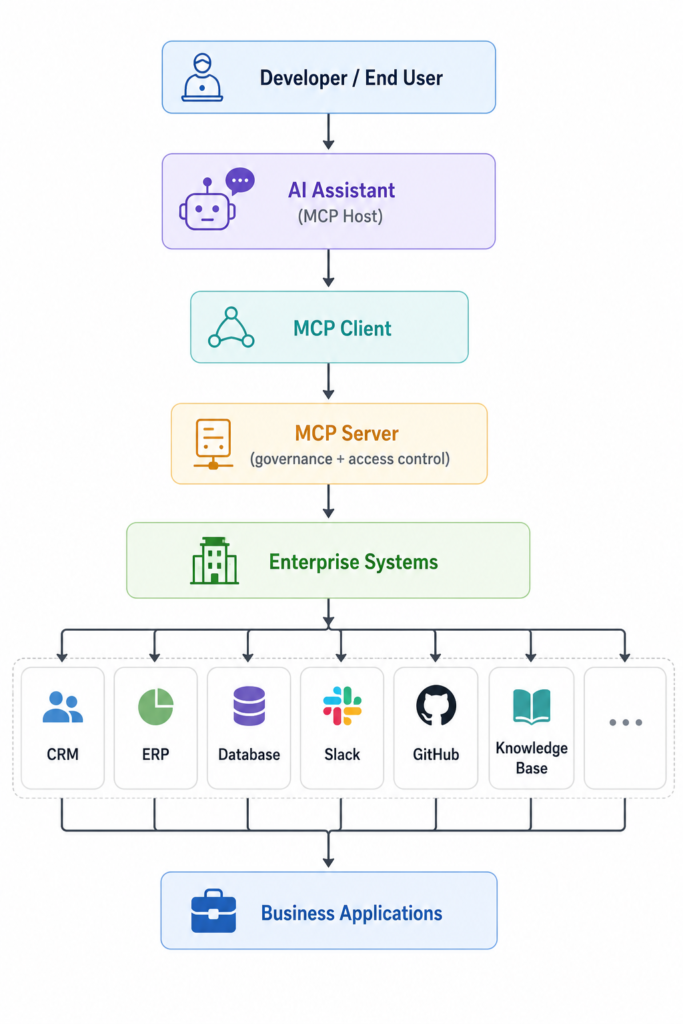
Direct Answer: A production MCP architecture places MCP servers as a governed integration tier between your AI applications and your systems of record.
The flow looks like this:
In this model, the MCP server tier is not a thin pass-through. It is an architectural control plane. Each server enforces authentication, authorization, rate limits, input validation, output filtering, and audit logging before any request reaches a system of record.
Several design decisions define a strong enterprise MCP architecture:
Centralize MCP servers as managed services. Run them in your existing platform environment with the same deployment, monitoring, and security controls as your other production services. Avoid scattered local servers that escape governance.
Treat each server as a bounded context. One server per system, with a clear ownership boundary. The team that owns Salesforce owns the Salesforce MCP server.
Insert an identity and policy layer. Requests carry the end user’s identity so the server can apply role-based access control. The AI application should never hold more privilege than the user it acts for.
Instrument everything. Emit metrics and traces from every server. You need visibility into which tools are called, how often, by whom, and with what latency.
This positions MCP as an extension of your existing enterprise integration strategy, not a parallel one. Platform engineers already understand this pattern: it mirrors how an API gateway governs traffic to microservices.
The consequence of skipping the governance tier: you end up with AI agents holding broad direct access to production systems, which is exactly the failure mode security teams block AI programs to prevent.
Model Context Protocol vs REST APIs
Direct Answer: MCP does not replace REST APIs. It sits above them, providing a model-native interface while your MCP servers still call REST APIs underneath.
The distinction matters because these serve different consumers. REST APIs are designed for developers writing deterministic code. MCP is designed for AI models that reason, select actions dynamically, and need self-describing capabilities.
Dimension
REST API
Model Context Protocol
Integration model
Point-to-point; custom client code per integration
Standardized client-server; one server reused across all AI clients
Context awareness
Stateless; each call is independent
Context-aware; capabilities and session negotiated, tools self-describe
Agent compatibility
Requires custom wrapper for each model to use
Native; any MCP-compatible model can discover and call tools
AI agents that dynamically discover and invoke tools
Read the table as guidance, not as a verdict. If you are integrating two backend services with fixed, known contracts, a REST API is the right tool. If you are connecting reasoning models to a growing set of systems where the model decides at runtime which action to take, MCP earns its place.
In practice, both coexist. Your MCP server for the ERP system almost certainly calls the ERP’s REST API internally. MCP standardizes the model-facing side. REST standardizes the system-facing side.
Model Context Protocol vs Function Calling
Direct Answer: Function calling defines how a single model invokes a tool. MCP defines how any model connects to a reusable ecosystem of tools. They operate at different layers and work together.
Function calling is a model capability. You define a schema, the model returns structured arguments, and your code executes the function. It works well. But it is bound to your application. The function definitions live in your codebase, coupled to one model integration. When you add a second AI application, you redefine those functions again.
This is the coupling problem. Function calling tells a model what a tool looks like. It does not tell you how to expose, secure, discover, or reuse that tool across applications.
MCP solves the reuse and governance layer that function calling leaves open:
Reusability. An MCP server is written once and consumed by every MCP client. Function definitions are typically rewritten per application.
Discovery. MCP clients discover available tools at connection time. Function calling requires you to hardcode definitions into each prompt or request.
Decoupling. MCP separates the tool provider (server) from the tool consumer (model). Function calling binds them together in application code.
Governance. MCP servers centralize access control and audit. Function calling scatters that logic across each application.
Under the hood, an MCP client often uses the model’s function-calling capability to actually invoke a tool. So the relationship is not competitive. Function calling is the mechanism. MCP is the architecture around it.
Key takeaway: Use function calling when a single application needs a handful of tools. Adopt MCP when multiple applications need to share tools across your enterprise.
Enterprise Use Cases
MCP delivers the most value where multiple AI applications need governed access to shared systems. These scenarios reflect patterns we see across enterprise engagements.
Customer Support AI
A support assistant needs live data from the CRM, the ticketing system, the knowledge base, and the billing platform. With MCP, each of these is one server. The assistant retrieves the customer’s account status, open tickets, and relevant documentation, then drafts a grounded response. When you later add a proactive churn-detection agent, it reuses the same servers without new integration work.
Enterprise Knowledge Assistant
A knowledge assistant searches across SharePoint, Confluence, and internal wikis. An MCP server for each repository exposes search and retrieval as resources. Role-based access control at the server enforces that finance staff retrieve finance documents and HR staff retrieve HR documents. The same servers later power a compliance research agent.
Internal Developer Portal
Platform engineers increasingly embed AI into internal developer portals. An MCP server for GitHub exposes repositories and pull requests. A server for the CI/CD system exposes pipeline status. A server for the observability stack exposes logs and metrics. Developers query their portal in natural language: “Which of my services failed deployment this week and why?” The assistant reasons across all three servers.
CRM Integration
CRM integration is the highest-frequency MCP use case. A single Salesforce or Dynamics MCP server exposes read and write actions with approval gates on writes. Every AI application in the organization reaches the CRM through this one governed server, which eliminates the risk of scattered, inconsistently secured CRM integrations.
ERP Integration
ERP integration demands strict controls because ERP systems hold financial and operational records. An ERP MCP server typically exposes read access broadly and gates any write behind human approval. An AI assistant can answer “What is our current inventory for SKU 4471?” while a purchase-order creation always routes through a human.
Healthcare
In healthcare, an MCP server sits in front of the EHR system. The server enforces role-based access aligned to clinical roles and applies data minimization so only necessary fields return. Every retrieval is logged for compliance. The protocol’s indirection is an advantage here: the model never queries the EHR directly, and the server becomes the auditable enforcement point regulators expect.
Financial Services
Financial services teams use MCP servers to expose market data, transaction records, and risk models to AI applications, with strict segregation of duties. A trading-support assistant can read positions but cannot execute trades. The server enforces this boundary regardless of what the model attempts, which is precisely the control financial regulators require.
Manufacturing
Manufacturing operations connect AI assistants to MES, quality systems, and maintenance records. An MCP server exposes machine telemetry and work orders. A maintenance assistant answers “Which line 3 machines are due for preventive maintenance?” by reasoning over live operational data rather than static reports.
Key takeaway: In every case, the value comes from reuse. The second and third AI application cost far less than the first because the servers already exist.
Security & Governance Considerations
Direct Answer: MCP concentrates security enforcement at the server tier, which is an advantage only if you design that tier deliberately.
MCP introduces a component that can invoke real actions on real systems on behalf of AI models. That power requires disciplined controls. The following are non-negotiable for enterprise MCP implementation.
Authenticate every connection. MCP clients must authenticate to servers using your existing identity infrastructure. Anonymous or shared-credential connections are unacceptable in production.
Propagate end-user identity. The server should apply access control based on the actual user the AI acts for, not a service account with broad privileges. This aligns with least-privilege principles and prevents privilege escalation through the AI layer.
Enforce authorization at the server. Role-based access control belongs in the MCP server, where it applies uniformly to every client. A support agent’s assistant and an executive’s assistant hitting the same CRM server should see different data.
Guard against prompt injection and excessive agency. The risks in OWASP’s LLM Top 10 apply directly to MCP. Malicious content retrieved through one server could try to manipulate the model into calling destructive tools on another. Gate high-impact actions behind human approval and validate every tool input.
Require approval for high-risk actions. Database writes, financial transactions, external communications, and record deletions should require explicit human confirmation. Read access can be automated; consequential writes should not be.
Log everything. Every tool invocation, every retrieved resource, and every action must be logged with the requesting identity. Without this audit trail, incident investigation becomes guesswork and compliance review becomes impossible.
Isolate and sandbox servers. Run each server with the minimum system access it needs. A compromised knowledge-base server should not be able to reach your ERP.
Frameworks from NIST on AI risk management and the OWASP LLM guidance give you a defensible baseline. Map your MCP controls against them before production.
The consequence of weak MCP governance: you hand reasoning models broad, unlogged access to systems of record, which is the single fastest way to get an enterprise AI program shut down by security and compliance.
Implementation Best Practices
These practices reflect what separates MCP deployments that scale from those that stall.
Start with one high-value system. Build one MCP server for your highest-leverage system, usually the CRM or knowledge base. Prove the pattern before expanding. Early, contained success builds organizational confidence.
Treat MCP servers as products, not scripts. Assign clear ownership, version them, document their tools, and maintain them like any production service. Servers written as throwaway scripts become unmaintainable within months.
Design servers around business capabilities. Expose tools that map to business actions (get_customer_account, create_support_ticket), not raw database operations. This makes servers reusable and keeps model reasoning clean.
Keep the governance layer in the server. Do not push access control into individual AI applications. Centralizing it in the server means every current and future client inherits it automatically.
Instrument from day one. Track tool usage, latency, error rates, and per-user activity from the first deployment. Observability added after launch consistently misses the early signals that predict scaling problems.
Version capabilities explicitly. When you change a server’s tools, version the change. AI applications depending on a tool should not break because the server evolved silently.
Keep a human in the loop for consequential actions. Automate retrieval and low-risk actions. Require approval for anything with financial, legal, or safety implications.
Common Implementation Mistakes
We see the same failure patterns across MCP adoption efforts.
Exposing raw system access instead of business capabilities. Servers that mirror low-level API calls force the model to orchestrate complex sequences and multiply the surface for errors. Model the server around business intent.
Running ungoverned local servers. Developer laptops full of local MCP servers with hardcoded credentials feel productive in a pilot and become a security liability in production. Centralize and govern.
Granting the AI layer broad service-account privileges. When the MCP server authenticates with a high-privilege service account, every user effectively inherits those privileges through the AI. Propagate real user identity instead.
Skipping the audit layer. Teams defer logging to “later” and then cannot answer basic governance questions when the first incident occurs. Build audit in from the start.
Treating MCP as a model feature rather than an architecture decision. MCP touches identity, networking, security, and platform operations. Scoping it as a single team’s AI project underestimates the cross-functional work required.
Adopting MCP before you have the integration problem it solves. If you have one AI application talking to two systems, MCP is overhead. The value appears when the matrix grows.
Should Your Organization Adopt MCP?
Direct Answer: Adopt MCP when you have, or expect to have, multiple AI applications that need governed access to multiple enterprise systems. If you have a single narrow use case, direct function calling is simpler and sufficient.
MCP is an investment in an integration standard. That investment pays off with scale. Use the checklist below to assess readiness.
Enterprise MCP Adoption Checklist
Strategic fit
We have, or plan to build, more than one AI application within 12 months.
Those applications need access to three or more enterprise systems.
We are experiencing, or anticipating, integration sprawl across AI projects.
Technical readiness
We have a centralized platform environment to host MCP servers as managed services.
We have an identity provider capable of propagating end-user identity to services.
Our target systems expose APIs that MCP servers can call.
Governance readiness
We can enforce role-based access control at the server tier.
We have audit logging and monitoring infrastructure to instrument MCP servers.
We have a process to gate high-risk AI-initiated actions behind human approval.
We have mapped our controls against NIST AI RMF and OWASP LLM guidance.
Organizational readiness
System owners are prepared to own the MCP server for their system.
Security and platform teams are engaged, not just the AI team.
We have identified one high-value system to pilot first.
If you check most boxes in the strategic and readiness sections, MCP is a sound investment. If you check few, start smaller and revisit once your AI portfolio grows.
Conclusion
Model Context Protocol is best understood as an architecture decision, not a model feature. It solves a specific and expensive problem: the multiplying cost of connecting many AI applications to many enterprise systems. By standardizing that connection through a client-server model, MCP turns integration sprawl into a set of reusable, governed components.
The organizations that get the most value from Model Context Protocol are the ones that treat the server tier as a control plane. They centralize governance, propagate real user identity, log every action, and gate consequential writes. They start with one high-value system and expand as their AI portfolio grows. The protocol gives them a standard. Their architecture discipline turns that standard into an advantage.
If your AI program is moving beyond isolated pilots toward a portfolio of production applications, MCP deserves a place in your reference architecture. The competitive advantage in enterprise AI is rarely the model. It is the ability to connect that model to your systems securely, repeatably, and at scale.
If you are evaluating whether MCP fits your architecture, Enlight Lab helps enterprises design secure, production-ready AI integration platforms. Reach out at enlightlab.com to discuss your systems, your governance requirements, and your roadmap.
Frequently Asked Question (FAQ)
What is Model Context Protocol in simple terms?
Model Context Protocol is an open standard that lets AI applications connect to tools, data, and enterprise systems through one consistent interface. Instead of writing custom integration code for every model-to-system pairing, you build one MCP server per system, and any compatible AI application can use it. It works like a universal adapter between AI models and your business systems.
Is MCP the same as an API?
No. An API is designed for developers writing deterministic code. MCP is designed for AI models that reason and select actions dynamically. MCP typically sits above your existing APIs: your MCP server calls the underlying REST API internally while exposing a model-native, self-describing interface to AI clients. They complement each other rather than compete.
How is MCP different from function calling?
Function calling defines how one model invokes a single tool inside one application. MCP defines how any model connects to a shared, reusable ecosystem of tools across many applications. Function calling is often the mechanism an MCP client uses to invoke a tool, while MCP adds the reusability, discovery, and governance layer that function calling alone does not provide.
Do I need MCP if I only have one AI application?
Usually not. MCP’s value scales with integration complexity. For a single application connecting to one or two systems, direct function calling is simpler and sufficient. MCP becomes worthwhile when you have multiple AI applications needing governed access to multiple systems, because it eliminates duplicated integration work.
What are the main security risks of MCP?
The primary risks are excessive agency, prompt injection, and over-privileged access. Because MCP servers can invoke real actions on real systems, you must authenticate every connection, propagate end-user identity, enforce access control at the server, gate high-risk actions behind human approval, and log every invocation. Mapping your controls against NIST AI RMF and OWASP LLM guidance gives you a defensible baseline.
Which enterprise systems can MCP connect to?
Any system that exposes an API can be wrapped in an MCP server. Common enterprise targets include CRM platforms like Salesforce and Dynamics, ERP systems, databases, document repositories like SharePoint and Confluence, Slack, GitHub, and internal services. The MCP server translates between the protocol and each system’s native API.
How do we start an MCP implementation?
Begin with one high-value system, typically your CRM or knowledge base. Build a single MCP server for it, hosted as a managed service with authentication, role-based access control, and audit logging from day one. Prove the pattern with one AI application, then reuse that server as you add more applications. Engage security and platform teams early, since MCP touches identity, networking, and governance, not just AI.
Turn Your AI Vision into Reality with Trusted AI Experts
Develop Secure, Scalable, and Custom AI Software That Drives Business Growth
Your SaaS revenue is growing. Customer usage is increasing. Your product team is shipping new features. But when you review the monthly cloud invoice, something