What Is an AI Receptionist?
An AI receptionist is a voice AI application built specifically to handle inbound (and sometimes outbound) business phone calls – answering, understanding what the caller wants in natural language, and taking an action such as booking an appointment, logging a lead, answering a question, or transferring the call to a person.
It’s worth being precise about how this differs from tools people already know:
- Traditional receptionist: a person who answers calls, but is limited by working hours, call volume, and availability.
- Answering machine / voicemail: passively records a message; it cannot ask questions, check a calendar, or take action.
- IVR (“press 1 for sales”): a menu-driven system that routes calls based on button presses, not conversation.
- Generic chatbot: typically text-based and reactive; it doesn’t handle live phone calls or spoken conversation.
- AI receptionist: combines speech recognition, a conversational AI engine, and integrations so it can hold a real spoken conversation and complete a task, not just play a recording or route by keypress.
The conversational layer is powered by the same category of technology used in broader voice AI systems — speech recognition, a language model, and text-to-speech — but an AI receptionist is purpose-built around business phone workflows: answering, scheduling, FAQs, routing, and lead capture, rather than being a general-purpose voice assistant.
How Does an AI Receptionist Work?
At a practical level, a call moves through a short pipeline: the caller dials in, the telephony system connects the call, speech recognition converts what’s said into text, a conversation engine interprets the request against the business’s instructions, and — if needed – the system checks or updates a connected business tool before responding.
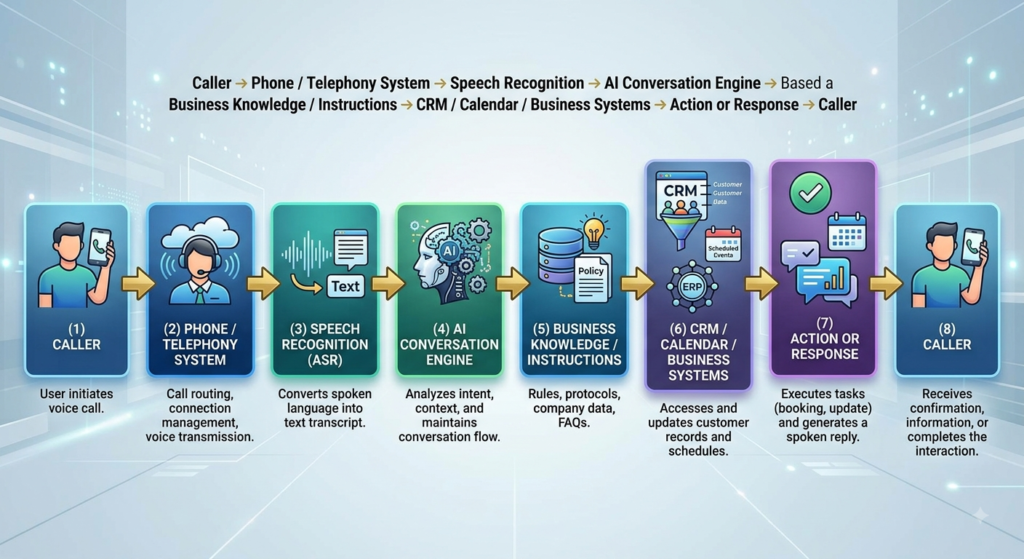
In business-friendly terms, each stage does the following:
- Telephony system: routes the call to the AI receptionist, similar to how it would route to a desk phone.
- Speech recognition: converts the caller’s spoken words into text the system can process.
- Conversation engine: figures out intent — is this a booking request, a question, a complaint, a wrong number?
- Business knowledge / instructions: the rules, FAQs, and boundaries the business has defined — what the AI is allowed to say and do.
- CRM / calendar / business systems: where the AI checks availability, books time, or logs caller details.
- Action or response: the AI confirms the outcome back to the caller in natural speech.
For example, if a caller says, “Can I schedule an appointment for Friday?”, the AI recognizes the scheduling intent, checks calendar availability through an integration, offers available times, confirms the booking, and reads the confirmation back to the caller. If the request falls outside what the AI is permitted to handle — a billing dispute, a medical question, an angry customer — it should be configured to hand the call off to a human, with context, rather than attempt an answer it isn’t equipped to give.
What Can an AI Receptionist Actually Do?
Capabilities vary by vendor and by how a specific deployment is configured. The table below outlines common capabilities and what they typically look like in practice — not every AI receptionist supports every row, and some depend heavily on the integrations and instructions a business puts in place.
| Capability | What it does | Example business outcome |
|---|---|---|
| Answer incoming calls | Picks up calls automatically, including during busy periods or after hours | Fewer calls go to voicemail |
| Capture leads | Collects caller name, contact details, and reason for calling | New inquiries are logged even if no staff are available |
| Qualify leads | Asks structured follow-up questions before routing to sales | Sales team spends time on relevant leads |
| Schedule appointments | Checks calendar availability and books a slot | Fewer back-and-forth calls to find a time |
| Reschedule appointments | Looks up an existing booking and updates it | Reduces no-shows from missed reschedule requests |
| Answer FAQs | Responds to common questions using approved business information | Staff spend less time on repetitive questions |
| Route calls | Directs the caller to the right department or person | Callers reach the right team faster |
| Collect basic customer information | Gathers details needed before a callback or handoff | Staff have context before calling the customer back |
| Send follow-ups | Depending on the implementation, triggers a confirmation text or email | Reduces missed appointments |
| Update CRM records | Creates or updates a record through an approved integration | Call activity is reflected in the CRM without manual entry |
| Handle after-hours calls | Continues answering calls outside business hours | Businesses don’t lose evening/weekend inquiries |
| Transfer calls to employees | Escalates live to a specific person or team when needed | Complex or sensitive requests reach a human |
| Provide multilingual assistance | Where supported, converses in more than one language | Businesses can serve non-English-speaking callers |
Key Features to Look for in an AI Receptionist
The features below matter less as a checklist and more for what they mean operationally for a small business.
Natural conversation
The system should understand phrasing the way a real caller speaks, not just fixed keywords — this determines whether callers feel understood or give up and hang up.
Call routing
Correctly identifying intent and sending the call to the right person or department reduces internal transfers and caller frustration.
Appointment scheduling
Direct calendar integration turns scheduling into a self-service task for the caller, which matters most for service businesses with high call volume.
CRM integration
Without this, every call still requires manual data entry, which undercuts a lot of the time savings the AI is meant to provide.
Lead capture
Structured capture of name, contact information, and intent ensures inquiries aren’t lost simply because no one was available to answer.
Human handoff
A clear, reliable path to a human for anything outside the AI’s scope is arguably the single most important feature for trust and safety.
Business knowledge
The AI needs accurate, current information about hours, services, pricing policy, and procedures — stale knowledge produces wrong answers.
Call summaries
Automatic summaries let staff review what happened on a call without listening to the full recording.
Analytics
Visibility into call volume, outcomes, and missed-call recovery helps a business judge whether the system is actually working.
Multilingual support
Relevant for businesses serving diverse communities; availability and quality vary significantly by vendor.
Authentication and security
Especially important where callers share personal or account information — the system needs safeguards against impersonation and data exposure.
Custom workflows
The ability to define business-specific rules (what to ask, when to escalate, what not to promise) is what separates a generic script from a workflow that fits how your business actually operates.
AI Receptionist Use Cases for Small Businesses
1. Missed-call recovery
Calls that arrive during busy periods, lunch breaks, or after closing time often go unanswered. An AI receptionist picks up those calls instead of sending them to voicemail, which many callers simply don’t leave — they call a competitor instead.
2. Appointment booking
For service businesses, a large share of calls are booking or rescheduling requests. An AI receptionist can check availability and confirm a time directly, without a staff member stepping away from other work.
3. Lead qualification
Before a lead reaches sales, the AI can ask a handful of structured questions — budget, timeline, service needed — so the person following up already has useful context.
4. Customer FAQs
Questions like “what are your hours” or “do you accept walk-ins” are repetitive but still require someone to stop and answer. An AI receptionist handles these consistently, every time.
5. After-hours support
Availability outside business hours doesn’t mean replacing human support — it means routine requests (hours, booking, basic questions) can still be handled when the office is closed, with anything sensitive routed to voicemail or a callback queue.
6. Call routing
Rather than a caller navigating a phone tree, they can simply say what they need, and the AI directs the call to the right department or person.
7. Follow-up calls
Depending on the implementation, the system can support automated reminder or confirmation follow-ups for appointments — reducing no-shows without staff having to place the calls manually.
8. CRM updates
Through approved integrations, the AI can potentially create a new contact record or update an existing one based on call details, keeping the CRM current without manual entry after every call.
Which Small Businesses Can Benefit From an AI Receptionist?
Businesses with high call volume, frequent scheduling, or repetitive inquiries tend to see the clearest fit.
| Industry | Example use case | Potential benefit |
|---|---|---|
| Real estate | Answering listing inquiries and scheduling showings | Faster response to time-sensitive leads |
| Healthcare practices | Appointment scheduling and general office questions | Reduced front-desk call load (requires strict privacy and access controls — see note below) |
| Home services | Booking service calls and capturing job details | Fewer missed jobs during busy or after-hours periods |
| Legal services | Initial intake and appointment scheduling | Consistent first response to new inquiries |
| Dental practices | Appointment booking, rescheduling, and reminders | Fewer no-shows and less manual scheduling work |
| Hospitality | Reservation and general inquiry handling | Coverage during peak call periods |
| Automotive | Service appointment booking and status questions | Reduced hold times for routine requests |
| Property management | Maintenance requests and tenant inquiries | Faster triage of routine vs. urgent requests |
| Financial / professional services | Scheduling consultations and answering general questions | More consistent first-line client experience |
| E-commerce / customer support | Order status and common policy questions | Lower support call backlog |
| Local service businesses | General inquiries and booking | Coverage without adding front-desk staff |
For healthcare and other businesses handling sensitive personal or patient information, any AI receptionist deployment requires appropriate security, privacy, access control, and compliance considerations — these should be assessed with your compliance and legal advisors before implementation, as requirements vary by jurisdiction and use case.
How Much Does an AI Receptionist Cost in 2026?
There is no single universal price for an AI receptionist, and any article that quotes one flat number is oversimplifying. Cost is driven by a combination of factors that vary by business and vendor:
- Call volume and minutes used per month
- Telephony provider and number of phone lines
- Speech-to-text usage
- Text-to-speech usage
- Underlying language model / AI usage
- Number and complexity of integrations (CRM, calendar, ticketing)
- Number of distinct workflows configured
- Degree of customization required
- Multilingual requirements
- Ongoing support and monitoring
- Hosting and infrastructure
- Security and compliance requirements
Rather than a single price, it’s more useful to think in terms of three broad delivery models:
1. Subscription AI receptionist
A pre-built, off-the-shelf platform with a monthly fee, usually tiered by call or minute volume. This suits businesses that want to get started quickly with standard features and limited customization needs.
2. Usage-based AI receptionist
Pricing scales with actual usage — minutes, calls, or API consumption — rather than a flat subscription. This suits businesses with variable or seasonal call volume that don’t want to pay for unused capacity.
3. Custom AI receptionist development
A purpose-built solution designed around a business’s specific workflows, integrations, and compliance requirements. This suits businesses with non-standard processes, multiple system integrations, or requirements that off-the-shelf platforms don’t support well. Costs here reflect a software development engagement rather than a subscription fee, and typically involve upfront implementation plus ongoing usage and support costs.
Because pricing structures and rates change frequently and vary by vendor, region, and volume, treat any specific number you see — including on vendor websites — as a starting reference point to confirm directly, not a final figure.
AI Receptionist vs Traditional Receptionist
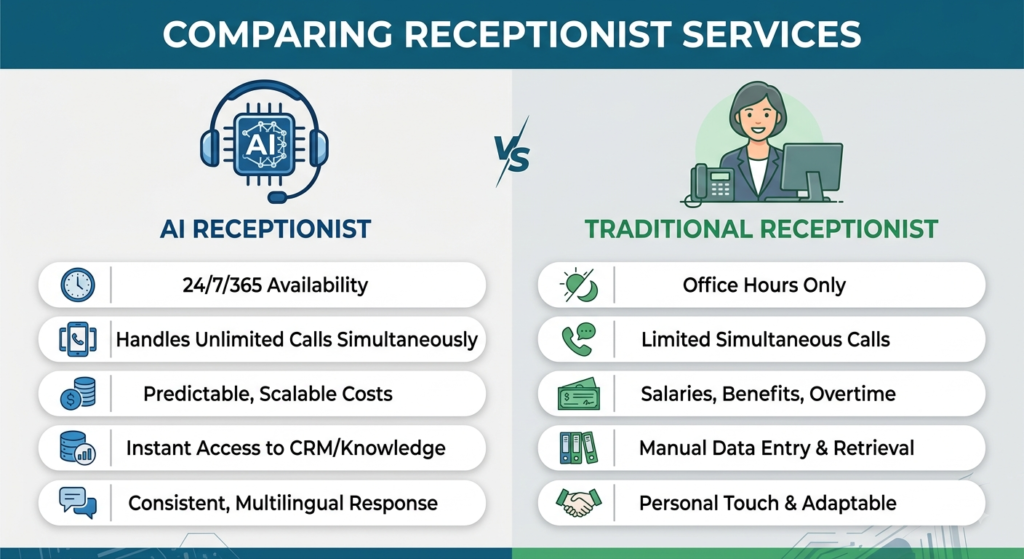
The most useful framing isn’t “AI vs. human” as a competition — it’s that AI is strongest at repetitive, structured, high-volume interactions, while humans remain essential for complex, sensitive, emotional, or judgment-heavy situations.
| Factor | AI Receptionist | Traditional Receptionist |
|---|---|---|
| Availability | Can operate 24/7 | Limited to working hours |
| Repetitive call handling | Consistent, doesn’t tire or vary by mood | Can become inconsistent under high volume |
| Appointment scheduling | Direct calendar integration, self-service | Manual lookup and confirmation |
| Lead capture | Structured, consistent data collection | Depends on individual diligence |
| Human empathy | Limited; simulated, not genuine | Strong — reads tone, context, and nuance |
| Complex situations | Should escalate rather than attempt | Can adapt and use judgment in real time |
| Scalability | Handles call spikes without added cost per call | Requires additional staff for volume growth |
| Operating cost | Often lower marginal cost at scale | Salary, benefits, and training costs |
| Customization | Configurable workflows and rules | Naturally flexible, but inconsistent |
| Integrations | Can connect directly to CRM/calendar systems | Manual entry unless separately trained |
| Escalation | Needs defined rules to hand off | Can self-direct based on judgment |
| Accountability | Requires monitoring and correction by the business | Direct accountability to a manager |
AI Receptionist vs IVR
IVR (interactive voice response) is menu-driven: “Press 1 for sales, press 2 for support.” It routes calls based on button presses and can’t understand what a caller actually needs beyond the options presented.
An AI receptionist instead asks, “How can I help you today?” and interprets the caller’s spoken response in natural language. Modern AI receptionists can go beyond routing — understanding a conversational request and potentially completing an action like booking an appointment, rather than simply directing the caller to a department. For a broader comparison of conversational AI against traditional IVR systems, Read this: AI voice agent vs Traditional IVR systems.
Benefits of an AI Receptionist for Small Businesses
The practical benefits tend to show up as measurable operational changes rather than abstract efficiency gains:
- Fewer missed calls, since the system answers even during busy periods or after hours
- Faster response to inquiries, particularly time-sensitive ones like scheduling
- 24/7 availability for routine requests, without requiring overnight or weekend staffing
- Improved lead capture, since every call can be logged rather than only the ones staff manage to answer
- Reduced repetitive workload for staff, freeing time for higher-value work
- Appointment automation that reduces manual back-and-forth
- A more consistent customer experience, since the AI follows the same process every time
- Scalable call handling during volume spikes without needing to add staff
- Faster routing to the right person or department
- Better operational visibility through call summaries and analytics
Limitations and Risks of AI Receptionists
A trustworthy evaluation of AI receptionists has to include where they fall short. These are real, common failure points — not hypothetical edge cases:
- Misunderstandings: the AI can misinterpret unusual phrasing, background noise, or ambiguous requests
- Accents and noisy environments: speech recognition accuracy can degrade with strong accents, poor call quality, or loud environments
- Complex customer requests: multi-step or highly specific requests may exceed what the AI is configured to handle
- Emotional conversations: distressed, upset, or highly sensitive calls generally need a human, not an AI
- Hallucinations or incorrect responses: like any AI system, it can generate a plausible-sounding but inaccurate answer if not tightly constrained
- Integration failures: if the CRM or calendar connection breaks, the AI may confirm actions that didn’t actually happen
- Privacy and security concerns: calls may involve personal information that requires careful handling and access controls
- Latency: noticeable delay in responses can make conversations feel unnatural and frustrate callers
- Poor implementation: vague instructions or missing escalation rules lead to poor caller experiences regardless of the underlying technology
- Inappropriate automation: some calls simply shouldn’t be automated — legal, medical, or crisis-related calls, for example
- Need for human escalation: without a clear, reliable handoff path, callers can get stuck with no way to reach a person
In production deployments, most of these risks are managed — not eliminated — through clear business rules, real-world testing against actual call scenarios, ongoing monitoring, and a dependable human escalation path. A common implementation mistake is treating the AI receptionist as a finished product at launch rather than a system that needs monitoring and adjustment as real calls reveal gaps.
How to Choose an AI Receptionist for Your Business
Before evaluating vendors, it helps to define your own requirements clearly. A practical checklist:
- Expected call volume and peak-time patterns
- Current business hours and after-hours needs
- Required integrations (CRM, calendar, ticketing, telephony)
- Specific CRM platform in use
- Calendar system in use
- Existing telephony provider or number setup
- Call transfer requirements to specific staff or departments
- Human escalation rules and availability
- Security and data-handling requirements
- Reporting and analytics needs
- Multilingual requirements
- Degree of customization needed for your workflows
- Expected growth in call volume over the next 12–24 months
- Preferred pricing model (subscription, usage-based, custom)
- Vendor support and monitoring during and after launch
A simple decision framework
Choose an off-the-shelf solution when: your workflows are fairly standard (basic scheduling, FAQs, routing), you want to launch quickly, and your integration needs are limited to common platforms the vendor already supports.
Choose a customized implementation when: your business has non-standard workflows, multiple systems that need to work together, specific compliance requirements, or call volume and complexity that off-the-shelf tools don’t handle well.
When Should a Small Business Invest in an AI Receptionist?
An AI receptionist may make sense when:
- Calls are frequently missed during busy periods or after hours
- Employees spend significant time answering repetitive questions
- Appointments are handled manually and consume staff time
- Leads arrive outside business hours and go unaddressed until the next day
- Call volume is growing faster than staffing capacity
- Staff cannot answer every call during peak periods
- The business already uses CRM or calendar software the AI can integrate with
- The business needs consistent, first-line call handling across shifts or locations
It may not make sense yet when call volume is very low, when nearly every call involves complex or highly sensitive conversations, when there’s no budget for proper setup and testing, or when the business doesn’t have the internal systems (or willingness to add them) that make integrations worthwhile.
How to Implement an AI Receptionist
Implementation is more than connecting a phone number to an AI model. A realistic roadmap looks like this:
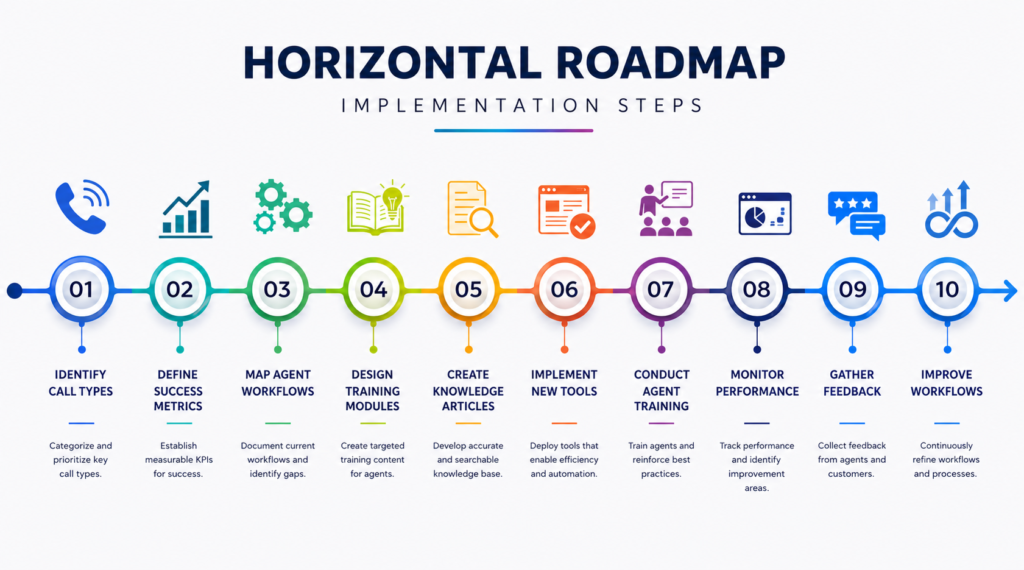
Step 1 — Identify call types
Review recent call logs or staff input to understand what callers actually ask for most often.
Step 2 — Map business workflows
Document how scheduling, routing, and common questions are currently handled so the AI mirrors real processes.
Step 3 — Select the telephony approach
Decide whether to use a new number, port an existing one, or route through an existing system.
Step 4 — Define the AI’s knowledge and boundaries
Provide accurate business information and explicitly define what the AI should never attempt to handle on its own.
Step 5 — Integrate CRM/calendar/business systems
Connect the tools the AI needs to check availability, log leads, or update records.
Step 6 — Define human escalation
Set clear rules for when and how a call transfers to a person, and make sure that path is always reliable.
Step 7 — Test real scenarios
Run the AI through actual call patterns, including edge cases and ambiguous requests, before launch.
Step 8 — Launch gradually
Start with a subset of call types or hours rather than switching over all calls at once.
Step 9 — Monitor calls and outcomes
Review call summaries, escalation rates, and caller feedback regularly after launch.
Step 10 — Improve the workflows
Use what monitoring reveals to refine instructions, add missing FAQs, and adjust escalation rules over time.
Is an AI Receptionist Worth It for a Small Business?
There isn’t a universal yes or no answer — the decision comes down to weighing call volume, missed opportunities, repetitive workload, staffing cost, customer expectations, and integration requirements together for your specific business.
A business with high call volume, frequent scheduling needs, and repetitive FAQs is likely to see clear operational value. A business with very low call volume, mostly complex or sensitive conversations, or no existing digital systems to integrate with may find the investment harder to justify right away. For businesses evaluating this decision, it’s usually more productive to start by quantifying missed calls and repetitive call time over a typical month than to start by comparing vendor feature lists.
Enlight Lab’s Approach to AI-Powered Voice Solutions
Enlight Lab works with small and mid-sized businesses to design AI-powered voice workflows that connect directly to the systems a business already uses. The important architectural consideration in any AI receptionist project isn’t the AI model itself — it’s how well the system integrates with existing CRM, calendar, and telephony infrastructure, and how clearly its boundaries and escalation rules are defined.
Depending on a business’s needs, this can include capabilities such as:
- Natural voice interactions for inbound calls
- CRM integration for lead capture and record updates
- Appointment scheduling connected to existing calendar systems
- Business workflow automation tailored to specific processes
- Lead capture and qualification
- Call routing to the right person or department
- Custom API integrations for business-specific systems
- Human escalation paths built into the workflow
For businesses evaluating whether an AI receptionist fits their operations, explore Enlight Lab’s AI voice solution to see how a voice AI workflow can be scoped around your specific call patterns and systems. Related reading: AI Voice agents in healthcare and How to build an ai voice agent.