Most enterprise software was never built to talk to itself. Your CRM holds customer history. Your ERP manages procurement and inventory. Your helpdesk tracks open tickets. Your knowledge base holds product documentation. Each of these works fine in isolation – the trouble is that nobody actually works in isolation. Employees switch between six to ten applications a day, copy-pasting data between them, chasing approvals manually, and hunting for information that already exists somewhere in the stack.
AI agents change that math. They sit between your people and your systems, pull from whatever’s connected, execute multi-step actions across platforms, and hand back one coherent answer – without the employee ever leaving their workflow.
This guide covers how AI agents connect to CRM, ERP, knowledge bases, databases, and communication tools in production enterprise environments: the architecture, real workflow examples, security requirements, and a build-versus-buy framework. The architecture decisions covered here are usually what separates a project that delivers measurable ROI from one that quietly becomes another shelved IT initiative.
AI Agent vs. Chatbot: What’s Actually Different
One of the most persistent mix-ups in enterprise AI is treating “chatbot” and “AI agent” as interchangeable. They’re not, and the distinction changes your entire integration scope.
A chatbot generates text. An AI agent generates a response and takes action – updating records, scheduling meetings, triggering workflows, querying live systems on its own.
| Dimension | AI Chatbot | AI Assistant / Copilot | AI Agent |
|---|---|---|---|
| Primary function | Responds to questions | Supports human tasks | Executes tasks autonomously |
| System access | Static knowledge base | Read access to select systems | Read and write access across systems |
| Action capability | None | Limited suggestions | Creates tickets, updates records, sends emails |
| Multi-step reasoning | Single-turn responses | Limited context retention | Full multi-step planning and execution |
| Human oversight required | Low | Moderate | Configurable per action type |
| Integration complexity | Low | Medium | High |
| Best suited for | FAQ handling, basic support | Writing assistance, search | Process automation, workflow orchestration |
The practical takeaway: if you just need FAQs answered, a chatbot does the job. If you need a lead qualified, a CRM record updated, a follow-up scheduled, and the account team notified – all from one conversation – that’s agent territory.
Why Enterprise Systems Need an Orchestration Layer at All
Enterprise systems tend to accumulate in layers over decades. Each tool is optimized for its own function, but almost none are optimized for the employee who has to use all of them together — and that gap is where most of the wasted time in a large organization actually lives.
The pain points show up in almost every mid‑to‑large enterprise, in roughly the same shape each time:
Manual data entry.
Sales reps spend a large share of their week on non‑selling work. Salesforce’s own State of Sales research finds that roughly 60% of a rep’s time goes to non‑selling tasks like hunting for the right pitch deck, manually logging customer notes, and chasing internal approvals. None of that is time spent actually selling.
Data silos.
A customer success manager checking account health has to query the CRM, the helpdesk, the billing system, and the analytics platform separately, then reconcile it all by hand before they can take any meaningful action.
Slow approvals.
A purchase order that needs three sign‑offs often spends more time sitting in inboxes than it does actually being reviewed, stretching simple decisions across days or weeks.
Document search overhead.
This isn’t a new problem. A McKinsey study found that knowledge workers spend around 19% of their time searching for and gathering information — a figure that has held up remarkably consistently over the years, despite better search tools shipping every year.
Context switching.
A Harvard Business Review study found that the average digital worker toggles between applications roughly 1,200 times a day, adding up to nearly four hours a week just reorienting after each switch — over a year, that’s close to five working weeks spent purely on cognitive overhead, not output.
Delayed reporting.
Monthly business reviews depend on manually assembled data that is often stale by the time the deck is finished, let alone presented.
An AI agent doesn’t replace any of these underlying systems. It adds a reasoning‑and‑action layer on top of them — an orchestration layer that connects tools, automates the glue work between them, and gives employees a single interface for doing the work they were actually hired to do.
The Architecture, Layer by Layer
The architecture behind an enterprise AI agent follows a consistent shape across industries — worth understanding before you talk to a single vendor.
Employee → Web App / Chat Interface
         → AI Agent (Reasoning + Orchestration)
         → LLM (Claude / GPT / Gemini)
         → API Gateway / Security Layer
         → Integrated Systems:
             ├── CRM (Salesforce, HubSpot, Dynamics)
             ├── ERP (SAP, Oracle, NetSuite)
             ├── HRMS (Workday, BambooHR)
             ├── Helpdesk (Zendesk, ServiceNow, Freshdesk)
             ├── Communication (Slack, Teams, Email)
             ├── Calendar (Google, Outlook)
             ├── Databases (PostgreSQL, Snowflake, BigQuery)
             └── Knowledge Base (SharePoint, Confluence, Notion)
         → Business Actions (Create, Update, Approve, Notify)
         → Analytics & Monitoring Layer
Each layer does one job. The LLM reasons. The API gateway enforces security and routing. The connected systems supply live business data. The analytics layer logs every interaction for performance monitoring, cost tracking, and audit trail.
One decision matters more than any other for reliability: does the agent pull live, verified data from your systems before answering, or does it answer from static training knowledge? In production, static knowledge goes stale fast. Live retrieval isn’t a nice-to-have — it’s the whole point.
Connecting AI Agents to CRM Systems
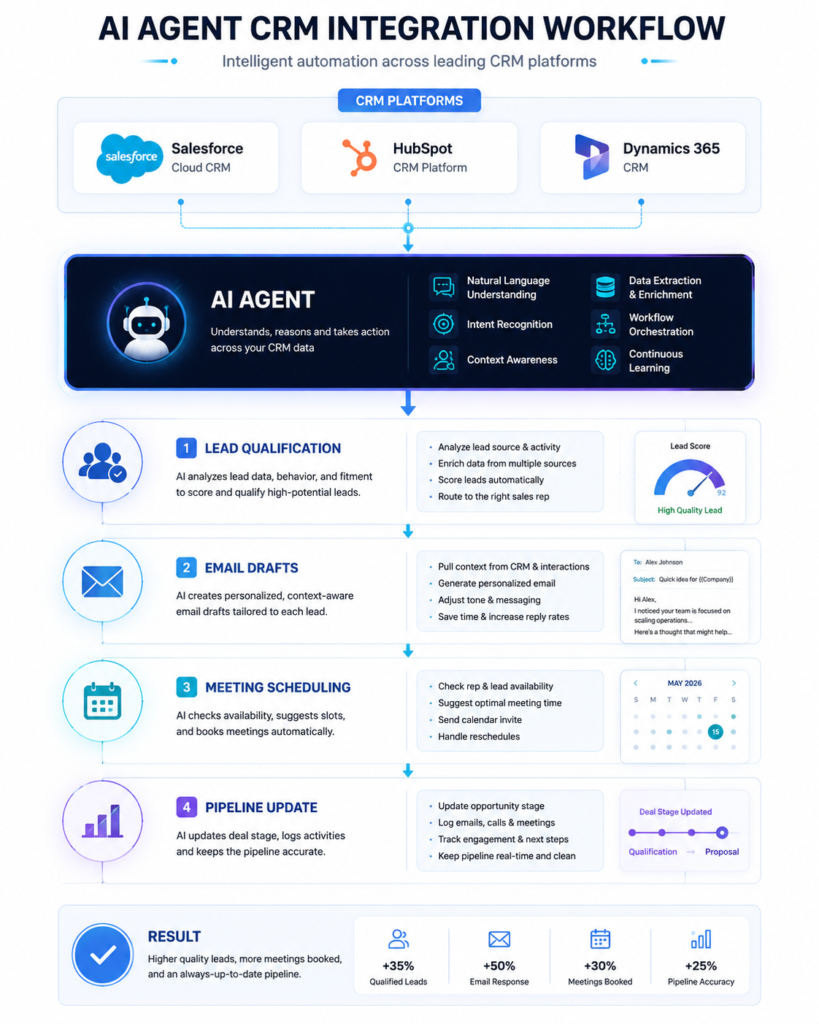
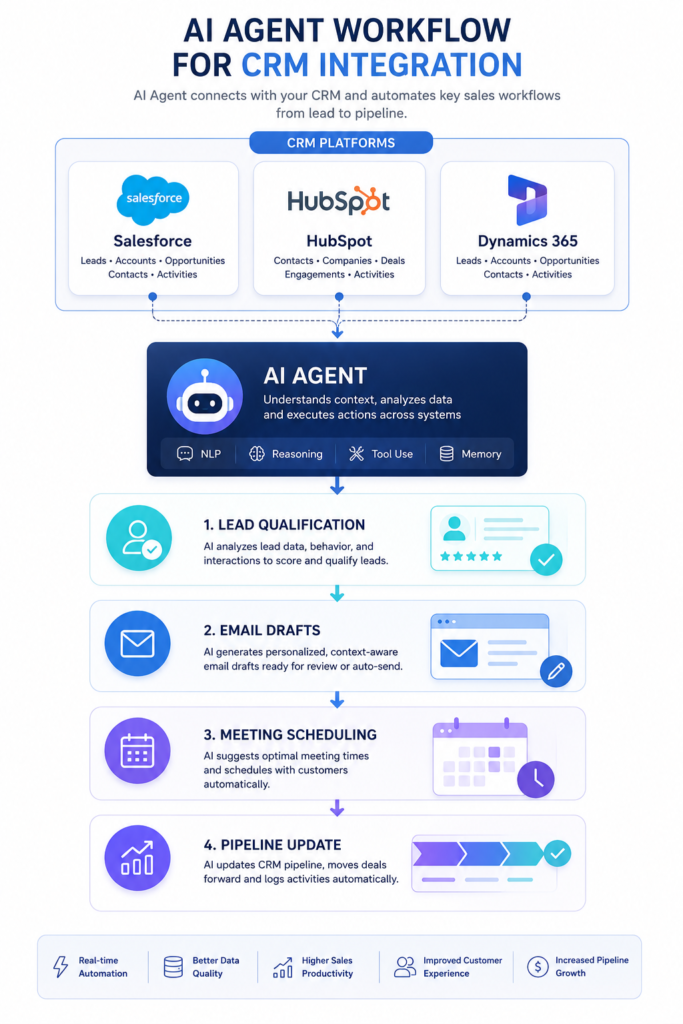
AI agents connect to CRM platforms through REST APIs and OAuth, with webhooks handling real-time event triggers. Once connected, an agent can read customer records, move pipeline stages, log activity, schedule meetings, and summarize accounts — without a rep ever opening the CRM.
Supported Platforms
| CRM Platform | API Type | Key Integration Points |
|---|---|---|
| Salesforce | REST API, SOQL, Webhooks | Leads, Opportunities, Contacts, Activities, Reports |
| HubSpot | REST API, Webhooks | Deals, Contacts, Sequences, Meetings, Properties |
| Microsoft Dynamics 365 | OData REST API, Power Automate | Accounts, Opportunities, Cases, Emails |
| Zoho CRM | REST API, Webhooks | Leads, Deals, Contacts, Custom Modules |
| Pipedrive | REST API, Webhooks | Deals, Activities, Persons, Organizations |
How the Connection Actually Works
OAuth 2.0 grants scoped access without ever exposing user credentials. Token-based auth means a sales agent can read and update opportunity records without touching finance data — permission boundaries are enforced at the token level, not by policy alone.
Webhooks let the CRM push events to the agent the moment they happen. A lead status change or a deal hitting a new stage triggers the agent instantly, no polling required.
REST APIs handle the actual read/write work — querying account data, updating fields, creating records, pulling pipeline summaries, all through standard HTTP calls.
What This Looks Like in Practice
-
- Lead qualification. An inbound lead lands. The agent pulls company firmographics, checks the CRM for prior relationship history, scores the lead against your criteria, and routes it to the right rep with a summary attached — all before that rep’s first touch.
-
- Meeting scheduling. A rep says: “Schedule a follow-up with Apex Corp for Thursday afternoon.” The agent checks calendar availability, books the event, logs the activity in the CRM, and sends the invite.
-
- Pipeline summaries. A VP asks: “What deals are at risk this quarter?” The agent queries open opportunities above a value threshold, filters by close date, checks last-activity timestamps, and returns a ranked list with context — in seconds, not the thirty minutes it takes to build that report by hand.
-
- Customer history retrieval. A customer calls support. Before the call routes to a human, the agent pulls purchase history, open tickets, renewal date, and recent sentiment — so the rep isn’t starting cold.
Connecting AI Agents to ERP Systems
ERP connections run through vendor APIs, OData endpoints, and certified middleware. Agents automate procurement, check inventory, process purchase orders, verify invoice status, and surface financial summaries — without anyone having to learn a dense ERP interface.
ERP is the highest-value, highest-complexity integration in most enterprise stacks. It holds the financial and supply-chain data that actually drives decisions — and it’s also the system employees complain about most.
Supported Platforms
| ERP Platform | Connection Method | Key Use Cases |
|---|---|---|
| SAP S/4HANA | SAP API Business Hub, OData, RFC | Purchase orders, inventory, financial reporting |
| Oracle ERP Cloud | REST APIs, Oracle Integration Cloud | Procurement, invoicing, project costing |
| Microsoft Dynamics 365 Finance | OData REST API, Power Automate | GL entries, vendor payments, budget tracking |
| NetSuite | SuiteScript, REST APIs | Inventory, order management, financial close |
| Odoo | XML-RPC, JSON-RPC, REST | Manufacturing, logistics, purchase management |
What This Looks Like in Practice
Procurement automation. A department manager asks: “Approve the laptop purchase for engineering.” The agent pulls the request from the ERP, checks the department’s budget, confirms the vendor is on the approved list, verifies the amount is within the manager’s authority, and either approves it directly or escalates with a summary — turning a three-day email chain into a thirty-second exchange.
Inventory management. A warehouse manager asks: “Which SKUs are below reorder threshold?” The agent checks live inventory against reorder points and returns a prioritized list with stock levels, daily consumption, and supplier lead times — information that used to take four ERP screens to assemble.
Invoice reconciliation. Accounts payable asks: “Is the Acme invoice from last week still pending?” The agent searches by vendor and date, pulls the record, checks approval status, and surfaces the outstanding approver — no internal email thread required.
Supply chain visibility. A supply chain director asks: “What’s the status of our Q3 component orders?” The agent checks open POs, pulls shipment tracking where it exists, flags anything at risk of delay, and returns a summary with recommended next steps.
ERP integrations carry the highest data sensitivity in the stack. Keep agent permissions read-only for most workflows, and require explicit human sign-off for anything that touches financial records or purchase authority.
Connecting AI Agents to Knowledge Bases
Knowledge base integration runs through Retrieval-Augmented Generation (RAG). Documents get chunked, converted into vector embeddings, stored in a vector database, and retrieved via semantic search whenever someone asks a question. That grounds every answer in your actual documentation instead of whatever the underlying LLM happened to learn in training.
Most enterprise knowledge lives in formats that keyword search handles badly — long policy PDFs, technical manuals, internal wikis, slide decks. Keyword search returns too much noise; nobody has time to sift it. Semantic search finds documents by meaning instead of exact word match, which is the actual fix.
Common Knowledge Sources
-
- SharePoint and OneDrive — connected via Microsoft Graph API, indexing document libraries and syncing permission structures so the agent only surfaces what a given user is already allowed to see.
-
- Confluence and Notion — connected via their REST APIs, pulling page content and comments into the retrieval pipeline on a scheduled or event-driven sync.
-
- Google Drive — connected via the Drive API, with the same permission-aware indexing approach.
-
- PDF repositories and contract stores — ingested through document-parsing pipelines that extract text, tables, and metadata before chunking for embedding.
The design detail that matters most here: permission-aware retrieval. An agent’s RAG pipeline should never surface a document to a user who wouldn’t already have access to it through the source system. Getting this wrong is the fastest way to turn a productivity tool into a data-leak incident.
Security and Governance
None of the above matters if the integration isn’t locked down properly. A few non-negotiables for production deployments:
-
- Least-privilege access. Scope every connection to the minimum read/write permissions the workflow actually needs — not the broadest token available.
-
- Human-in-the-loop for high-stakes actions. Anything that moves money, commits legal language, or touches HR/PII should require explicit human confirmation before execution, regardless of how confident the agent is.
-
- Full audit logging. Every query, every action, every system touched — logged and reviewable, both for compliance and for debugging when something goes wrong.
-
- Data residency and retention. Confirm where data flows and is stored, especially across CRM/ERP systems that may have their own regulatory constraints (GDPR, HIPAA, SOC 2).
Build vs. Buy: A Decision Framework
Build in-house if: you have a mature platform team, integration needs are highly specific to internal systems that no vendor supports out of the box, and you have the runway to maintain the integration long-term.
Buy a platform if: your integration needs map to standard CRM/ERP/helpdesk connectors that established vendors already support, speed to deployment matters more than deep customization, and you’d rather point engineering time at your core product.
Hybrid is the most common real-world answer: buy the orchestration and connector layer, build the custom logic and workflows on top of it.
Where to Start
Most successful deployments don’t start with “connect everything.” They start with one high-friction workflow — lead qualification, invoice lookups, PO approvals — proven end to end, then expand outward once the pattern is trusted. The architecture above scales, but the rollout shouldn’t try to boil the ocean on day one.