You already know AI is changing how businesses operate.
What you may still be trying to figure out is how to integrate AI into existing software without creating downtime, security risks, and bloated infrastructure costs.
You are not “behind” because you have not shipped AI yet. You are being cautious. And that concern is completely valid. Most failures do not happen because teams cannot build models. They happen because leaders rush to embed AI into their current software products without fixing the foundation first.
If you are a founder, CTO, or product owner, you already feel the pressure and want to jump into AI because competitors are doing it even without first understanding whether their systems are actually ready.
The good news?
You do not need to rebuild your entire platform to start using AI effectively.
In 2026, the companies winning with AI are not replacing everything overnight. They are strategically layering AI into their existing software, workflows, and operations in ways that reduce risk while creating measurable business value.
If you want AI to improve your product without breaking your current systems, this guide will walk you through exactly how to do it, what benefits you gain, and the best approaches for existing software.
What It Really Means to Integrate AI Into an Existing Product
When leaders say “add AI,” they often mean different things. If you do not define it, you end up building the wrong thing.
AI integration can mean one of these
- Assist: AI helps users do tasks faster (summaries, draft replies, recommendations).
- Automate: AI runs a task with guardrails (routing, triage, extraction, classification).
- Decide: AI influences outcomes (risk scoring, approvals, prioritization).
The biggest failures happen when you jump straight to “Decide” before you have earned trust.
Where AI fits inside your software
- User layer: prompts, buttons, review screens, explanations
- App layer: business rules, workflows, permissions, audit logs
- AI layer: model calls, retrieval, prompt templates, evaluation
- Data layer: sources, pipelines, quality checks, governance
- Ops layer: monitoring, alerts, cost controls, rollbacks
Why AI Integration Projects Fail So Often
Most AI failures do not happen because the AI model is bad. They happen because the foundation underneath the AI is weak.
If your infrastructure, data systems, and workflows are not prepared properly, even the most advanced AI solution will struggle.
Your Existing Software May Not Be AI-Ready Yet
If your software was built years ago, there is a good chance it was never designed for modern AI workloads. That does not mean you need to replace everything. But it does mean you need a smarter integration strategy.
Many businesses still rely on:
- Monolithic applications
- Outdated databases
- Hard-coded workflows
- Limited API connectivity
- Siloed systems across departments
When AI gets layered onto unstable architecture, problems appear quickly.
You may start seeing:
- Slow application performance
- Integration conflicts
- Security vulnerabilities
- Unreliable AI responses
- Rising infrastructure costs
AI is only as reliable as the system supporting it.
Poor Data Quality Will Hurt Your AI Results
If your data is messy, your AI outputs will be messy too. This is one of the biggest reasons AI projects fail.
Your AI systems depend on:
- Clean data
- Structured information
- Consistent formatting
- Real-time accessibility
- Reliable data pipelines
But many companies still operate with duplicate records, disconnected systems, incomplete customer data, and scattered files. Even powerful AI models cannot produce reliable results from low-quality inputs.
You Cannot Treat AI Like a Shortcut
One of the biggest mistakes founders make is expecting AI to solve every operational problem overnight. AI works best when you use it strategically.
The companies seeing strong ROI from AI are focusing on:
- Automating repetitive workflows
- Improving decision-making
- Reducing operational bottlenecks
- Enhancing customer experiences
- Supporting internal teams
You do not need to replace your entire business to benefit from AI. You simply need to identify where AI creates the most value first.
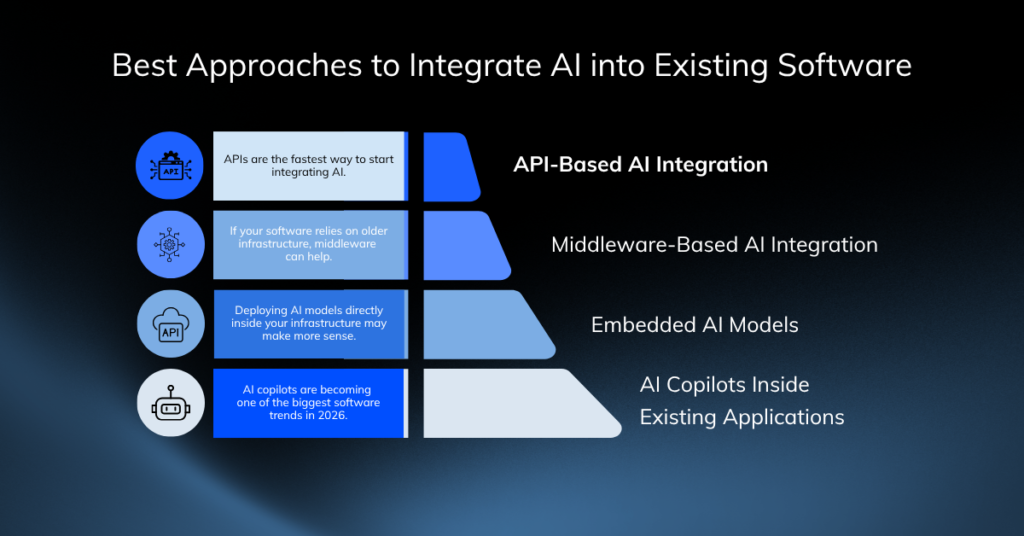
Best Approaches to Integrate AI into Existing Software
There is no one-size-fits-all AI integration strategy.
The right approach depends on your:
- Budget
- Infrastructure
- Security requirements
- Technical resources
- Long-term scalability goals
API-Based AI Integration
For many startups and growing SaaS companies, APIs are the fastest way to start integrating AI. Instead of rebuilding your infrastructure, you connect AI services directly into your current applications.
Why this approach works
- Faster deployment
- Lower development costs
- Easier maintenance
- Better scalability
- Reduced engineering complexity
Many businesses use platforms like OpenAI API Platform and Google Cloud Vertex AI to integrate AI into existing applications faster without rebuilding their entire infrastructure.
Best For
- SaaS platforms
- Internal tools
- MVPs
- Customer support systems
- Workflow automation
Middleware-Based AI Integration
If your software relies on older infrastructure, middleware can help bridge the gap.
Middleware allows you to:
- Transform data between systems
- Route workflows efficiently
- Manage AI orchestration
- Improve compatibility with legacy applications
This approach is especially useful if you cannot modernize your systems immediately.
Embedded AI Models
Some businesses need tighter security, lower latency, or more control over performance. In those cases, deploying AI models directly inside your infrastructure may make more sense.
Best For
- Healthcare systems
- Financial platforms
- Enterprise software
- High-security environments
While this approach gives you more customization, it also increases operational complexity and maintenance costs.
AI Copilots Inside Existing Applications
AI copilots are becoming one of the biggest software trends in 2026. Instead of replacing your current tools, copilots enhance workflows inside applications your team already uses.
Examples include:
- CRM assistants
- AI-powered dashboards
- Internal knowledge assistants
- Coding copilots
- Workflow automation assistants
This often improves adoption because your team does not need to learn entirely new systems.
The Safest Way to Integrate AI into Existing Software: A Failure-Proof Framework
The best way to integrate AI into existing software without costly failures is to start with one high-impact workflow, evaluate your current infrastructure, prepare clean data, and deploy AI gradually using APIs or modular services. If you scale AI in phases instead of rebuilding everything at once, you reduce risk, control costs, and protect your existing systems.
- Identify one high-value AI use case
- Audit your current software architecture
- Organize and centralize your data
- Choose the right AI model or provider
- Integrate AI through APIs or middleware
- Test AI in controlled environments
- Monitor performance and security continuously
- Scale gradually across workflows
Now let’s break that down in a way you can actually execute.
Step 1: Evaluate Your Current Architecture
Start by asking:
- Does your software support APIs?
- Is your infrastructure cloud-ready?
- Can your systems handle real-time processing?
- Are your databases scalable?
- Is your software modular or tightly coupled?
Systems built with microservices and APIs are usually easier to modernize with AI. Older monolithic systems may require middleware or phased modernization first.
Step 2: Choose an AI use case that will not wreck your roadmap
If you try to “AI everything,” you will end up shipping nothing. Instead, start with a workflow that affects users or teams frequently, creates visible pain, delivers measurable impact, and is safe to test on a small scale.
Focus on processes that happen daily or weekly, where time is wasted; complaints are common, or operational costs are high. When you can clearly measure outcomes such as time saved, fewer support tickets, or protected revenue, you make AI adoption easier to justify and scale without creating unnecessary risk.
High-impact use cases that integrate well into existing software
- Support ticket triage and suggested replies
- Knowledge search across internal docs (RAG)
- Data extraction from PDFs and emails
- Product recommendations with explanations
- Sales or onboarding copilots inside your app
If you want quick wins, choose “Assist” first. Earn trust. Then move toward “Automate.”
Step 2: Define success and failure before you write code
Before you write a single line of code, you need to define what success and failure actually look like because this is the step most teams skip and later regret.
Start by identifying three types of metrics. First, define business metrics that measure real impact, such as time saved, higher conversion rates, or reduced churn. Then establish quality metrics to evaluate how well the AI performs, including accuracy, hallucination rate, and escalation frequency. Finally, set risk metrics to monitor issues that can damage trust or compliance, such as privacy incidents, policy violations, or unsafe outputs.
When you define these metrics early, you make it far easier to evaluate results, reduce risk, and improve the system with confidence.
Your “stop button” matters
Set a clear rollback trigger like:
- “If the AI response confidence drops below X, route to human.”
- “If user complaints exceed Y per week, disable the feature flag.”
This reduces fear inside your team because you have a safe exit.
Step 3: Audit Your Data Readiness
If your data is scattered, your AI will be confident and wrong. That is the worst kind of wrong.
A major survey tied poor data readiness to widespread AI delays and failures.
Your data should be:
- Structured and organized
- Accessible through APIs or databases
- Updated regularly
- Secure and compliant
- Large enough for meaningful analysis
If your data infrastructure is weak, prioritize fixing it before scaling AI initiatives.
What to do if your data is not ready
Do not stop. Narrow.
- Start with a smaller dataset that you trust
- Use retrieval with curated documents before training anything new
- Add validation checks in pipelines, not in the model
This is how you integrate AI into existing software without turning your data gaps into product failures.
Step 4: Pick The Right AI Model
You do not need the “most advanced” approach. You need the one that ships safely.
Depending on your goals, you may need:
- Generative AI
- Predictive machine learning
- Recommendation systems
- Retrieval-Augmented Generation (RAG)
- Computer vision models
The best AI solution is the one aligned with your actual business problem, not the trendiest technology.
Step 6: Build Trust With “Human-in-the-loop” Design
Human review is not a slowdown. It is your safety net. When you integrate AI into existing software, there are certain areas where human oversight should never be removed. It is especially in financial decisions like pricing or risk scoring, healthcare and legal workflows, systems involving personal data, or any situation where a wrong output could harm a user. In these cases, AI should support human decision-making, not replace it entirely.
The best AI experiences are designed to make users feel in control. Instead of presenting AI output as a final decision, position it as a suggested answer that users can review, edit, and approve before taking action. You should also explain why the AI made a recommendation and show sources whenever retrieval-based information is used. These small trust patterns increase confidence, improve adoption, and strengthen long-term retention because users feel assisted rather than overridden.
Step 7: Test Like You Are Protecting Your Brand
AI testing is fundamentally different from traditional QA because you are not only testing whether the system works. You are testing how it behaves under real-world conditions. So, you should never deploy AI directly into production without testing it in a controlled environment first.
An AI feature can appear functional while still producing unsafe, inconsistent, or misleading outputs that damage user trust and your brand reputation. That is why your testing process should go beyond normal functionality checks and focus on reliability, safety, and resilience.
You should test for:
- Edge cases such as extremely short prompts, long prompts, unclear requests, or unusual user inputs
- Safety and policy violations
- Risks of sensitive data leakage
- Latency, outages, and timeout failures
- Consistency across different user roles, regions, and use cases
Step 8: Deploy AI to Your Architecture Gradually
Instead of spreading AI across every part of your system, treat it as a separate service behind a clear API boundary. Think of it as “AI as a service,” not “AI everywhere.” This approach keeps your core application stable while giving you the flexibility to swap models, improve prompts, or change vendors without rewriting product logic.
Successful AI adoption rarely happens through a single large rollout. The safest and most effective approach is gradual deployment in phases, allowing teams to test performance, control risk, and improve workflows incrementally without disrupting existing systems.
To keep the system reliable, you only need a few core components:
- A gateway for model calls with rate limits and usage controls
- Prompt templates stored and versioned like application code
- A retrieval layer if the AI needs access to internal company knowledge
- Logging for inputs, outputs, and user feedback
- Feature flags to safely control who can access AI features
This architecture makes it easier to isolate failures, manage costs, and scale AI adoption without breaking what already works.
Step 8: Monitor and Optimize Continuously
Many teams think shipping is the finish line. It is not. AI systems are not “set and forget” tools. Once deployed successfully, they require continuous monitoring and ongoing optimization to remain reliable, accurate, and cost-effective over time. User behavior changes, data evolves, and model performance can decline if systems are left unmanaged.
ML systems degrade over time because real users behave differently than test data. Production tracing and monitoring guidance highlights the need to capture real traffic, edge cases, and quality signals continuously.
What to monitor every week
- Output quality (thumbs up/down, edits, escalations)
- Cost per successful task, not cost per token
- Latency and failure rates
- Drift signals like data changes, behavior changes
Continuous monitoring in production helps you detect issues such as:
- Model drift, where outputs become less accurate over time
- Hallucinations or misleading responses
- Performance degradation and slower response times
- Unexpected cost spikes from increased usage
- Security and compliance risks
AI should be regularly reviewed, tested, and refined to ensure it continues to align with business goals, user expectations, and safety standards. The business leaders that succeed with AI are not the ones that deploy fastest. They are the ones that continuously improve and adapt their systems over time.
Common AI Integration Mistakes You Should Avoid
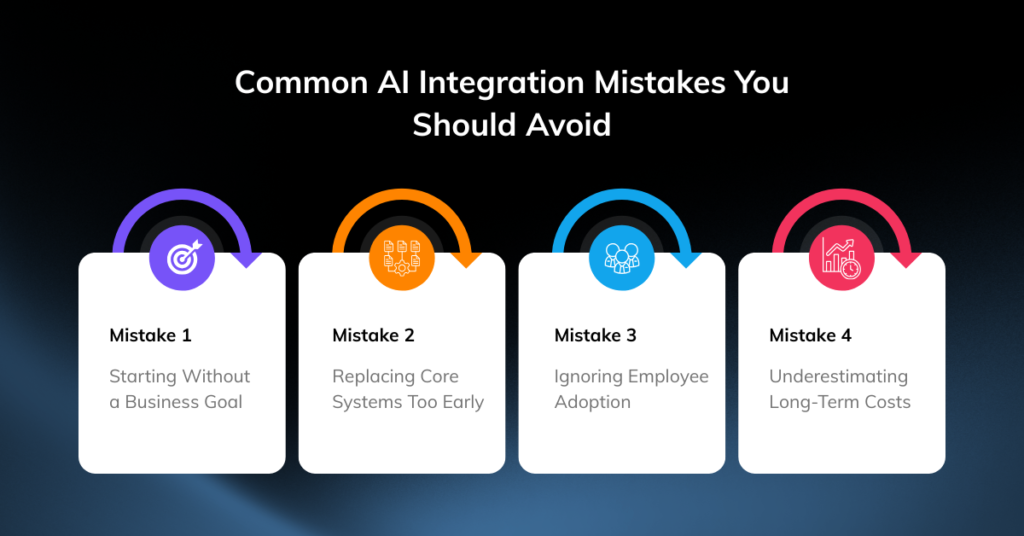
Mistake 1: Starting Without a Business Goal
If you deploy AI without solving a specific problem, your project can quickly lose direction. Start with a measurable operational objective. That is how you create ROI.
Mistake 2: Replacing Core Systems Too Early
You do not need to rebuild your entire platform just to start using AI. In many cases, layering AI strategically onto your existing systems is faster, safer, and far more cost-effective.
Mistake 3: Ignoring Employee Adoption
Even the best AI tools fail if your team does not trust or use them.
Your employees need:
- Training
- Clear workflows
- Transparency
- Confidence in AI outputs
Successful AI adoption is as much about people as technology.
Mistake 4: Underestimating Long-Term Costs
AI costs can spiral faster than most founders expect. Especially, if you scale too early.
Your expenses may include:
- API usage
- Cloud infrastructure
- GPU compute
- Data storage
- Monitoring systems
- Engineering maintenance
This is why you should always focus on ROI before aggressive expansion.
How Much Does It Cost to Integrate AI into Existing Software?
One of the first questions founders ask is: “How much is this actually going to cost?”
The answer depends on your infrastructure, complexity, and scalability goals.
The final investment is usually shaped by factors such as your current software architecture, data quality, compliance requirements, model selection, and the level of customization required.
Basic AI Enhancements
Estimated investment: $5,000–$25,000
Typical timeline: 2–8 weeks
These projects usually involve integrating pre-built AI APIs into an existing application with minimal infrastructure changes.
Common examples include AI-powered search, automated summaries, smart content suggestions, or chatbot assistance within customer support systems.
Custom AI Features for Existing Products
Estimated investment: $25,000–$100,000
Typical timeline: 2–6 months
At this stage, businesses move beyond simple API connections and begin developing AI workflows tailored to their product or customer experience. Projects may include recommendation systems, intelligent automation, personalized dashboards, document analysis, or workflow optimization tools.
Enterprise-Scale AI Integration
Estimated investment: $100,000–$500,000+
Typical timeline: 6–12 months
Enterprise AI projects usually involve multiple systems, departments, and data sources. These implementations often combine predictive analytics, internal knowledge retrieval, workflow automation, conversational AI, and advanced reporting into a unified platform.
Fully Custom AI Platforms
Estimated investment: $500,000–$2M+
Typical timeline: 12–24 months
These are highly specialized systems built for organizations with complex operational or regulatory requirements. Examples include proprietary machine learning platforms, industry-specific AI infrastructure, large-scale automation ecosystems, or private AI deployments trained on internal datasets.
The most successful AI projects in 2026 are not the biggest. They are the ones that solve clear business problems and scale through measurable results. Talk to our software development experts for a tailored estimate on cost, scope, and timeline based on your specific AI integration goals.
Future of AI Integration Beyond 2026
AI integration is moving toward more autonomous and intelligent systems.
You will likely see businesses adopting:
- Agentic AI workflows
- Multimodal AI systems
- Smaller specialized AI models
- Real-time personalization
- AI-native enterprise software
The companies that succeed will be the ones integrating AI strategically and responsibly into their existing software.
Final Checklist Before You Integrate AI into Existing Software
Before deployment, ask yourself these questions:
- Do you have a clear AI use case?
- Is your data organized and accessible?
- Have you defined measurable KPIs?
- Can your infrastructure support AI workloads?
- Have you tested security and compliance risks?
- Do you have monitoring systems in place?
- Is your team properly trained?
- Are you scaling gradually instead of rushing deployment?
This checklist alone can help you avoid many expensive AI implementation failures.
Make Your Existing Software Smarter With the Right AI Integration
Learning how to integrate AI into existing software successfully is no longer optional if you want your business to stay competitive. But rushing implementation without a clear strategy can create downtime, technical debt, security risks, and unnecessary costs.
If you want AI to become a real growth driver for your business, you need a strategy that protects your current systems.
The companies winning with AI in 2026 are the ones making smart, phased decisions backed by strong infrastructure, reliable data, and clear operational goals.
You do not need to rebuild everything overnight. You simply need the right integration roadmap.
At Enlight Lab, we help founders, CTOs, and growing businesses integrate AI into existing software systems safely, strategically, and without costly failures.
From AI readiness assessments to scalable implementation roadmaps, we help you turn AI from a risky experiment into a measurable business advantage. If you are ready to turn your existing software into a streamlined AI-powered solution your team and customers actually love using, partner with us today.