Most AI projects don’t fail because the model is bad. They fail because the business wasn’t ready to run that model in production. The data was messy, the integrations were untested, nobody owned the system, and there was no plan for what happens when the AI gets something wrong.
Deciding whether your company should adopt AI is a separate question. If that’s where you are, start with our AI Readiness Assessment to gauge organizational readiness. This article assumes you’ve already made the decision and picked a use case. Now you need to know one thing: is this specific AI system ready to deploy?
This is a pre-deployment implementation checklist. It’s built for the people accountable when an AI system reaches production, including CTOs, CIOs, enterprise architects, engineering leaders, and product leaders. Each item below is something you fix or validate before development wraps and the system goes live, not after users start complaining.
Work through all 15 checks, mark each one done, and you’ll move from an AI idea to a deployment you can actually trust.
What Is AI Implementation Readiness?
AI implementation readiness is the state of having every technical, data, security, and operational prerequisite validated before an AI system enters production. It answers a narrow, practical question: if we deploy this AI solution tomorrow, will it work reliably, safely, and within budget?
This is different from general AI readiness. Organizational readiness asks whether your company has the strategy, culture, and skills to benefit from AI at all. Implementation readiness is far more concrete. It’s about a specific use case, specific data, specific integrations, and a specific plan for going to production.
Think of it as the difference between deciding to build a house and confirming the foundation can hold the weight before you pour concrete. Both matter. But only one of them stops the structure from collapsing after move-in day.
The 15-Point AI Implementation Readiness Checklist
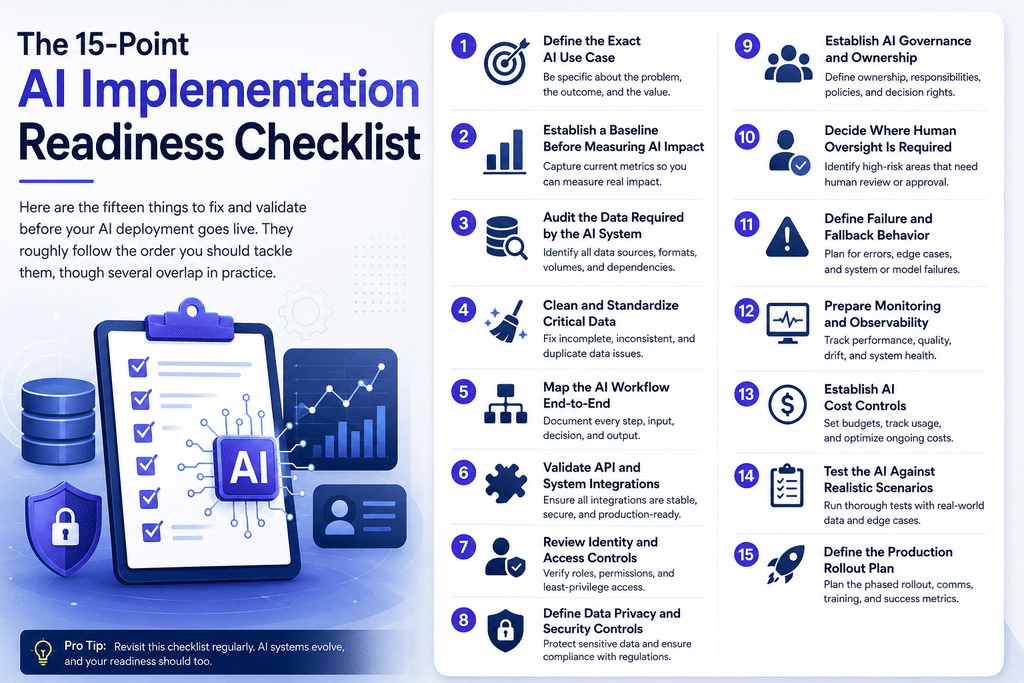
Here are the fifteen things to fix and validate before your AI deployment goes live. They roughly follow the order you should tackle them, though several overlap in practice.
1. Define the Exact AI Use Case
Vague use cases produce vague results. “Improve customer support with AI” is not a use case. “Automatically draft responses to billing questions in the support queue, with an agent reviewing each draft before it sends” is.
Write down the precise task, the input the AI receives, the output it produces, and the decision or action that follows. If you can’t describe it in one specific sentence, you’re not ready to build, let alone deploy. A tightly scoped use case also makes every later check on this list easier.
2. Establish a Baseline Before Measuring AI Impact
You can’t prove AI improved anything if you never measured the “before.” Capture current performance for the process the AI will touch. That might be average handling time, error rate, conversion rate, cost per transaction, or hours spent on a manual task.
Record these numbers before deployment. Without a baseline, “the AI is working” becomes a matter of opinion, and opinions don’t survive a budget review.
3. Audit the Data Required by the AI System
List every data source the AI system needs to function. For each source, confirm where it lives, who owns it, how it’s accessed, how fresh it is, and whether you’re actually allowed to use it for this purpose.
AI data readiness fails most often here. Teams assume the data exists in a usable form, then discover it’s locked in a legacy system, updated once a quarter, or governed by a contract that forbids the exact use they planned. Find these problems now. Our Data Engineering work often starts with exactly this kind of audit.
4. Clean and Standardize Critical Data
Once you know what data you have, look at its quality. Duplicate records, inconsistent formats, missing fields, and stale entries all degrade AI output in ways that are hard to spot until they cause a visible mistake.
You don’t need perfect data everywhere. You need clean, standardized data in the specific fields the AI relies on. Prioritize the inputs that drive the model’s most important decisions and fix those first.
5. Map the AI Workflow End-to-End
Draw the full path a request takes, from the moment it enters the system to the moment a result reaches the user or triggers an action. Include every handoff, every system it passes through, and every human touchpoint.
This map exposes hidden dependencies. It shows where latency will build up, where a single failure stalls everything, and where the AI’s output feeds into a downstream system that expects a very particular format.
6. Validate API and System Integrations
AI rarely operates alone. It calls APIs, reads from databases, and pushes results into CRMs, ticketing tools, or internal apps. Every one of these connections is a place things break.
Test each integration under realistic conditions. Check rate limits, timeout behavior, authentication expiry, and what happens when a dependency returns an error or nothing at all. Solid AI/ML Integration is often the difference between a demo that impresses and a system that survives contact with real traffic.
7. Review Identity and Access Controls
Decide who and what can access the AI system, and what the system itself is allowed to access. An AI agent with broad, unscoped permissions is a security incident waiting to happen.
Apply least privilege. The AI should reach only the data and services its use case requires, nothing more. Confirm that user roles, service accounts, and API keys are all scoped correctly before anything goes live.
8. Define Data Privacy and Security Controls
Clarify what data the AI processes, whether any of it is personal or regulated, and how it’s protected in transit and at rest. If your use case touches customer data, health records, or financial information, your AI security requirements are not optional.
Document how data flows to any third-party model provider, what they retain, and whether that aligns with your compliance obligations. Encryption, data residency, and retention policies all need answers before deployment, not during an audit.
9. Establish AI Governance and Ownership
Every production AI system needs a named owner. Not a committee, a person, or at minimum a clearly accountable team.
AI governance covers who approves changes, who reviews outputs, who responds to incidents, and who decides when the system should be paused. Write down these responsibilities. When something goes wrong at 2 a.m., “I thought your team owned that” is not an answer anyone wants to give.
10. Decide Where Human Oversight Is Required
Not every AI decision should be automatic. Identify the points in your workflow where a human must review, approve, or override the AI before its output takes effect.
The right amount of oversight depends on risk. A model drafting internal summaries can run with light supervision. A model approving refunds or making clinical suggestions needs a human firmly in the loop. Decide this deliberately rather than defaulting to full automation because it looks impressive.
11. Define Failure and Fallback Behavior
Ask a blunt question: what does the system do when the AI fails? Models time out, return nonsense, or become unavailable. If you haven’t planned for that, your fallback is chaos.
Define graceful degradation. Maybe the request routes to a human. Maybe it returns a safe default. Maybe it queues and retries. Whatever you choose, the user should never hit a dead end because the AI had a bad moment.
12. Prepare Monitoring and Observability
You can’t manage what you can’t see. Before deployment, set up monitoring for the metrics that matter: response quality, latency, error rates, usage volume, and cost.
AI systems also drift. Output that was accurate at launch can degrade as real-world inputs shift away from what the model expects. Observability lets you catch that decline early, before users lose trust in the system.
13. Establish AI Cost Controls
AI costs can escalate fast, especially with usage-based pricing on large models. A single misconfigured loop or an unexpected spike in traffic can turn a modest monthly bill into a very uncomfortable conversation.
Set budgets, rate limits, and alerts. Know your cost per request and your projected cost at expected volume. Then model what happens if volume triples. AI production readiness includes financial readiness, not just technical readiness.
14. Test the AI Against Realistic Scenarios
Testing with clean, happy-path examples tells you almost nothing. Test with messy, ambiguous, adversarial, and edge-case inputs that mirror what real users will throw at it.
Include the inputs you hope never happen: malformed requests, offensive prompts, incomplete data, and attempts to manipulate the system. This is where you discover the gap between “works in the demo” and “works in production.”
15. Define the Production Rollout Plan
Don’t flip a switch and expose the AI to 100% of traffic on day one. Plan a staged rollout. Start with a small percentage of users or a limited scope, watch the monitoring closely, and expand as confidence grows.
Define your rollback plan too. If something goes wrong, how fast can you pull the system back? A clean rollout plan with a working kill switch is one of the strongest signals that a team is genuinely ready to deploy.
The AI Implementation Readiness Checklist Table
Use this table to track your progress. A system isn’t ready until every box is checked.
What Happens If You Skip These Checks?
Skipping readiness checks doesn’t save time. It moves the cost to a worse moment.
Skip the data audit, and you’ll discover mid-build that a critical source can’t be accessed, forcing a redesign. Skip integration testing, and the system fails the first time a downstream API times out. Skip cost controls, and finance flags a bill nobody forecasted. Skip governance, and an incident lingers because no one is sure who’s responsible for fixing it.
The pattern is consistent. Problems caught before deployment are cheap and quiet. The same problems caught after deployment are expensive, public, and often erode trust in the entire AI initiative. One embarrassing production failure can set an organization’s AI ambitions back by a year, not because the technology failed, but because confidence did.
AI Pilot vs Production: What Changes?
A pilot proves an idea can work. Production means it must work, repeatedly, for real users, under real conditions. The jump between them is where most readiness gaps hide.
Here’s how the two differ across the dimensions that matter most.
| Dimension | Pilot | Production |
|---|---|---|
| Data | Sample or static dataset, often hand-picked | Live, changing data at full volume |
| Users | Small internal group, forgiving of quirks | Real users with real expectations and no patience |
| Security | Relaxed, often bypassed for speed | Least privilege, full access controls, compliance enforced |
| Monitoring | Minimal or manual spot checks | Continuous monitoring with alerts and dashboards |
| Failure handling | Restart and try again | Defined fallback, graceful degradation, rollback |
| Integrations | Mocked or lightly tested | Fully validated under load and failure conditions |
| Governance | Informal, whoever built it | Named owner, change control, incident response |
| Cost | Small, easy to absorb | Scales with usage, needs budgets and alerts |
If your AI system behaves like the left column but you’re about to treat it like the right column, that gap is your entire risk exposure. The checklist above exists to close it.
When Should a Business Delay AI Deployment?
Sometimes the readiest move is to wait. Delay deployment if any of these are true:
- The core data isn’t accessible or trustworthy. No amount of model tuning fixes a bad data foundation. Fix the data first.
- Nobody owns the system in production. If you can’t name the accountable owner, you’re not ready to run it live.
- There’s no fallback plan. Deploying without a failure path means the first serious error becomes a serious outage.
- Security and privacy questions are unanswered. For regulated data, “we’ll sort it out later” is how deployments become liabilities.
- You can’t measure whether it’s working. Without monitoring and a baseline, you’re flying blind.
Delaying a launch feels like a setback. Launching something that isn’t ready feels far worse a week later. A short, honest delay to close real gaps almost always beats a rushed deployment that damages trust.
How Enlight Lab Can Help
Working through this checklist takes technical judgment across data, integrations, security, and operations. That’s rarely the strength of a single team, which is where an outside perspective helps.
If you are planning an AI implementation and want to identify technical, data, integration, or deployment gaps before development begins, an implementation-readiness review can help turn an AI idea into a practical deployment plan.
Define, Validate, Integrate, Secure, Test, Monitor, Deploy
Successful AI deployment isn’t about having the smartest model. It’s about doing the unglamorous work that lets a good model run reliably in the real world.
The sequence holds up every time. Define the exact use case. Validate your data and integrations. Integrate the AI cleanly into existing systems. Secure access, privacy, and compliance. Test against realistic and hostile scenarios. Monitor performance and cost continuously. Then, and only then, deploy in stages with a rollback plan ready.
Follow that order, work through all 15 checks, and you’ll join the minority of teams whose AI projects succeed in production rather than stall on the way there. The teams that treat readiness as a discipline, not a formality, are the ones still running their AI systems a year later.