Building an ERP system is one of the most significant technology investments a business can make. Get it right, and you gain a unified platform that streamlines operations, reduces manual errors, and scales with your growth. Get it wrong or budget poorly and you’re looking at expensive overruns, missed deadlines, and a system that doesn’t fit your workflows.
The challenge is that ERP pricing rarely comes with a simple answer. Costs shift based on how complex your business processes are, where your development team is located, how many modules you need, and whether you’re building from scratch or extending an existing platform. In 2026, factors like AI feature integration, cloud architecture decisions, and cybersecurity requirements are adding new layers to the pricing conversation.
This guide was written to give decision-makers founders, CTOs, operations leads, and procurement teams a clear, honest picture of what ERP software development actually costs. You’ll find cost breakdowns by complexity and region, a budget allocation guide by project phase, a comparison of custom vs. off-the-shelf ERP, and practical advice on reducing spend without cutting corners.
No inflated estimates. No vague ranges. Just a practical framework to help you plan your ERP investment with confidence.
How Much Does ERP Software Development Cost in 2026?
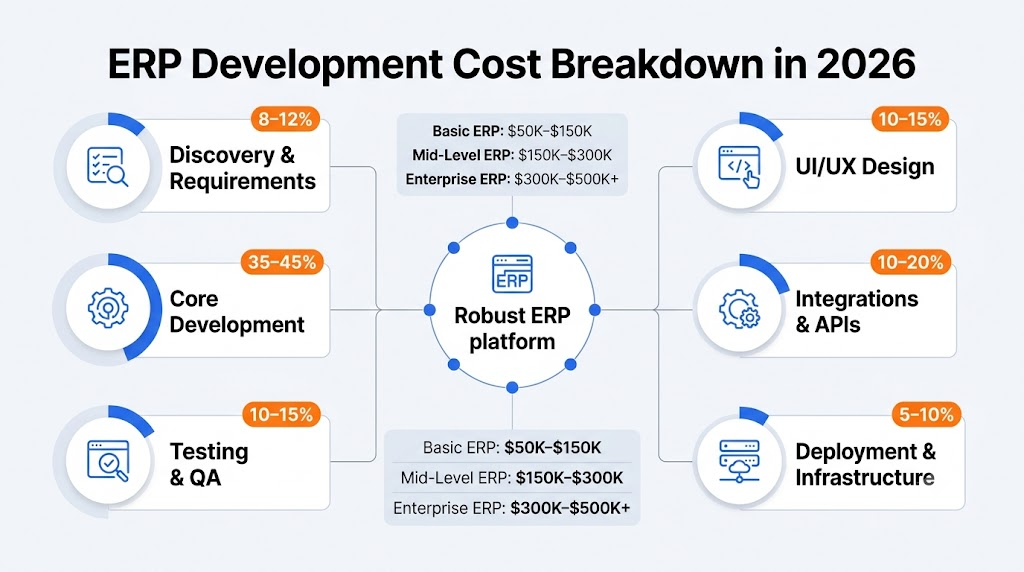
ERP development costs vary widely based on the scope and nature of the project. The table below outlines approximate cost ranges by ERP type to give you a working starting point.
| ERP Type | Approximate Cost Range | Typical Timeline |
|---|---|---|
| Basic Custom ERP | $50,000 – $150,000 | 4–8 months |
| Mid-Level Custom ERP | $150,000 – $300,000 | 8–14 months |
| Enterprise-Grade Custom ERP | $300,000 – $500,000+ | 14–24+ months |
| Off-the-Shelf ERP (e.g., SAP, Oracle) | $10,000 – $100,000+/year | 2–6 months implementation |
| SaaS ERP (e.g., NetSuite, Odoo) | $5,000 – $50,000+/year | 1–4 months setup |
These are project-specific estimates. Actual costs depend heavily on the factors covered throughout this guide.
ERP Software Development Cost by Complexity
Basic ERP
A basic ERP system typically covers one to three core modules such as accounting, inventory, or HR and serves smaller teams with straightforward workflows. These systems are best suited to startups or SMBs that have outgrown spreadsheets but don’t yet need the full capabilities of an enterprise platform.
Typical cost range: $50,000 – $150,000
Best for: Small businesses, early-stage startups, single-department automation
Mid-Level ERP
Mid-level ERPs introduce more modules, third-party integrations, role-based access controls, and reporting dashboards. They’re designed for growing companies managing multiple departments or locations, and often require custom API work and more sophisticated data models.
Typical cost range: $150,000 – $300,000
Best for: SMBs scaling operations, companies with multi-department workflows
Enterprise ERP
Enterprise-grade ERP systems are built for large organizations with complex, multi-site operations. They typically include advanced analytics, AI-powered features, high-availability cloud infrastructure, robust security frameworks, and support for hundreds or thousands of concurrent users.
Typical cost range: $300,000 – $500,000+
Best for: Large enterprises, regulated industries, global operations
ERP Development Cost Breakdown by Phase
Understanding where your budget goes across the project lifecycle is critical for planning. Below are approximate budget allocations by development phase.
| Phase | Typical Budget Allocation |
|---|---|
| Discovery & Requirements Analysis | 8–12% |
| UI/UX Design | 10–15% |
| Core Development | 35–45% |
| Integrations & APIs | 10–20% |
| Testing & QA | 10–15% |
| Deployment & Infrastructure Setup | 5–10% |
| Training & Documentation | 3–6% |
| Post-Launch Support (Year 1) | 15–20% of total build cost |
The largest budget item is almost always core development. But integrations and post-launch support are where projects most frequently run over budget so it’s worth setting aside contingency funds for both.
ERP Modules That Affect Development Cost
Each module you add to your ERP increases development time and complexity. Below are the most common ERP modules and their relative cost impact.
- Finance & Accounting Moderate cost; essential for most businesses
- Inventory & Warehouse Management Moderate to high; complex data flows and real-time sync requirements
- Human Resources & Payroll Moderate; compliance requirements add complexity
- CRM (Customer Relationship Management) Moderate; often integrated rather than built
- Supply Chain Management High; involves multi-party data, logistics APIs, and forecasting logic
- Manufacturing & Production Planning High; real-time tracking and resource scheduling are complex
- Project Management Low to moderate; often a simpler build
- Business Intelligence & Reporting Moderate to high; custom dashboards and data pipeline work add time
- E-commerce Integration Moderate; depends on platform and order volume
The more modules you include at launch, the higher the cost. A phased rollout Starting with core modules and adding others over time is one of the most effective ways to manage ERP development spend.
Key Factors That Affect ERP Software Development Cost
Business Process Complexity
The more unique or non-standard your business processes are, the more custom logic your ERP needs to encode. A business with straightforward workflows can often use templates or adapt existing patterns. One with highly specific approval chains, multi-currency operations, or industry-specific compliance needs will require more bespoke engineering.
Number of Users
User volume affects database architecture, licensing, and performance testing requirements. A system designed for 20 internal users is architecturally different from one handling 2,000 concurrent users across multiple time zones.
Number of Modules
More modules mean more development sprints, more integration points between modules, and more QA cycles. Each module should be evaluated against its ROI before including it in the initial build scope.
Integrations
Connecting your ERP to third-party platforms payment gateways, CRMs, logistics APIs, e-commerce platforms, or government tax systems adds both development time and ongoing maintenance overhead. The complexity of each API and the quality of its documentation significantly affect cost.
Cloud vs. On-Premise
Cloud ERP deployments generally have lower upfront infrastructure costs and faster deployment cycles, but carry recurring hosting and SaaS fees. On-premise solutions require hardware investment and internal IT management but give organizations more control over data sovereignty an important consideration for regulated industries. Cloud-native architectures have become the default for most new builds in 2026.
Security Requirements
Industries such as healthcare, finance, and legal services face strict compliance obligations HIPAA, SOC 2, GDPR, PCI-DSS, and others. Meeting these standards requires additional architecture work, security audits, encryption at rest and in transit, and audit logging all of which add to development cost.
Mobile Applications
If your ERP needs to be accessible via mobile especially in manufacturing, logistics, or field service contexts budget for separate iOS and Android development or a responsive PWA approach. Mobile development typically adds 15–30% to the base project cost.
AI Features
AI-powered features such as demand forecasting, anomaly detection, natural language reporting, or intelligent automation are increasingly requested in ERP builds. These features require additional data engineering, model training infrastructure, and integration work. AI feature development can add $20,000 to $100,000+ to a project, depending on scope.
Geographic Development Rates
Where your development team is based has one of the largest single impacts on your total cost. See the regional rate table below.
ERP Development Cost by Development Team Location
| Region | Typical Hourly Rate (USD) |
|---|---|
| North America (USA/Canada) | $120 – $250/hr |
| Western Europe (UK, Germany, Netherlands) | $90 – $180/hr |
| Eastern Europe (Poland, Ukraine, Romania) | $45 – $90/hr |
| Middle East (UAE, Saudi Arabia) | $60 – $120/hr |
| South Asia (India, Pakistan, Bangladesh) | $25 – $60/hr |
| Southeast Asia (Philippines, Vietnam) | $25 – $55/hr |
| Latin America (Brazil, Argentina, Colombia) | $40 – $80/hr |
These rates are approximate and reflect senior-level developers in each region. Actual rates depend on team seniority, company size, and engagement model (dedicated team, fixed price, or time-and-materials). Many organizations use a blended model an onshore project manager or architect paired with an offshore development team to balance cost and communication quality.
Custom ERP vs. Off-the-Shelf ERP: Which Is More Cost-Effective?
This is one of the most common questions in ERP planning and the answer depends on your organization’s size, process complexity, and long-term goals.
| Criteria | Custom ERP | Off-the-Shelf ERP (SAP, Oracle, NetSuite) |
|---|---|---|
| Upfront Cost | Higher ($50K–$500K+) | Lower ($10K–$100K setup) |
| Long-Term Cost | Lower (no recurring license) | Higher (annual licensing + add-ons) |
| Fit to Business Processes | Exact fit | Requires process adaptation |
| Implementation Timeline | 4–24 months | 1–6 months |
| Scalability | Fully customizable | Limited by vendor roadmap |
| Vendor Dependency | None | High |
| Maintenance | Internal or outsourced | Vendor-managed |
| Best For | Unique workflows, long-term growth | Standard processes, fast deployment |
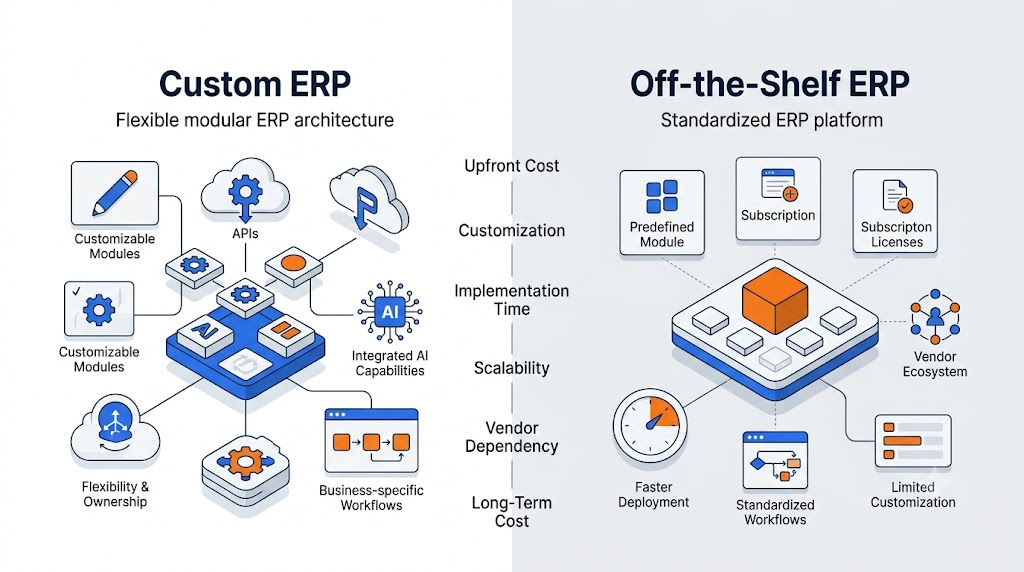
Choose custom ERP if your workflows are non-standard, you plan to scale significantly, or vendor lock-in and recurring licensing costs are a concern over a 5+ year horizon.
Choose off-the-shelf ERP if your processes are relatively standard, you need to deploy quickly, or your budget doesn’t support a full custom build right now.
Read also: Why Software Projects Go Over Budget: 12 Hidden Causes and How to Prevent Them
Hidden ERP Development Costs You Should Budget For
Several cost categories routinely catch organizations off-guard. Budgeting for them upfront prevents unpleasant surprises mid-project.
- Data migration: Moving legacy data into your new ERP is often more complex than anticipated expect $5,000 to $50,000+ depending on data quality and volume
- Change management: User adoption doesn’t happen automatically. Training programs, documentation, and internal champions cost time and money
- License fees for third-party components: Certain libraries, mapping tools, or reporting engines carry per-seat or usage-based fees
- Infrastructure and hosting: Cloud hosting costs scale with usage budget for production, staging, and development environments separately
- Security audits and penetration testing: Especially critical for regulated industries; typically $5,000 to $30,000 per audit cycle
- Ongoing maintenance: Budget approximately 15–20% of your initial development cost annually for bug fixes, updates, and minor enhancements
- Scope changes: Most ERP projects expand in scope once stakeholders see early prototypes. A well-defined discovery phase reduces this risk significantly
How Long Does It Take to Develop ERP Software?
Timeline and cost are closely linked in ERP development. Below are approximate development timelines by project complexity.
| ERP Complexity | Approximate Timeline |
|---|---|
| Basic ERP (1–3 modules) | 4–8 months |
| Mid-Level ERP (4–7 modules) | 8–14 months |
| Enterprise ERP (8+ modules, complex integrations) | 14–24+ months |
These timelines assume a dedicated team working full-time on the project. Part-time teams, unclear requirements, or frequent scope changes can extend timelines considerably. A phased delivery model where core modules go live first and others are added iteratively can reduce time-to-value without waiting for the entire system to be complete.
How to Reduce ERP Development Costs Without Cutting Corners
Cost reduction doesn’t have to mean compromising on quality. These approaches can meaningfully lower your ERP development spend.
Start with a discovery phase. A 2–4 week discovery sprint to map requirements, define architecture, and identify integration points costs a fraction of what late-stage rework costs. Organizations that skip discovery tend to spend more overall.
Prioritize modules for Phase 1. Resist the urge to build everything at once. Identify the three to five modules that will deliver the most immediate operational value and launch with those. Add remaining modules in subsequent phases.
Use a blended team model. Pairing a local solution architect or project manager with an offshore development team is a widely used approach for managing costs while maintaining communication quality and accountability.
Leverage existing frameworks and APIs. Rather than building every component from scratch, experienced developers use proven frameworks and integrate established third-party APIs (for payments, communications, mapping, etc.) where appropriate. This reduces development hours significantly.
Choose cloud-native architecture. Cloud-native builds tend to have lower infrastructure costs at the start, scale more cost-effectively, and require less internal IT overhead than on-premise alternatives.
Define a clear scope and change control process. Scope creep is one of the primary drivers of ERP cost overruns. Establish a formal change request process before development begins so that any additions to scope are evaluated against budget and timeline impact.
Is Custom ERP Software Worth the Investment?
For businesses with straightforward processes and standard workflows, off-the-shelf ERP solutions often represent better value at least in the short term. The lower upfront cost and faster implementation make them a practical choice for organizations that don’t need highly specific customization.
For businesses with complex, differentiated processes, custom ERP development tends to deliver better long-term value. When your competitive advantage lies in how you operate not just what you sell forcing those operations into a generic software template can introduce friction and workarounds that erode efficiency over time.
The calculus shifts further in favor of custom ERP when you factor in licensing costs over a 5–10 year horizon. Annual licensing for enterprise-grade platforms like SAP S/4HANA or Oracle ERP Cloud can run $50,000 to $500,000+ per year depending on user count and modules. Over a decade, that’s a significant sum compared to a one-time custom development investment.
The honest answer: it depends on your current scale, your 5-year growth trajectory, and how differentiated your operational workflows are. A well-run ERP discovery process with a team that understands both your business and the technology will give you a much clearer answer than any general framework can.
Plan Your ERP Budget with Precision, Not Guesswork
ERP development is a complex investment but it doesn’t have to be an unpredictable one. The organizations that manage ERP projects well are those that invest time in requirements clarity upfront, choose a development partner with genuine domain expertise, and treat the initial build as a foundation rather than a finished product.
A few principles worth carrying forward:
- Don’t let sticker shock push you toward off-the-shelf solutions that don’t fit your operations. The cost of adapting your processes to rigid software compounds over time.
- Phase your build. A well-scoped Phase 1 that goes live in six months delivers more value than a perfect system that takes two years.
- Budget for the full lifecycle. Development is the beginning, not the end. Maintenance, training, and iterative improvement are where long-term ERP success is built.
If you’re at the planning stage and want to explore what a custom ERP might look like for your specific situation, Enlight Lab works with startups, SMBs, and enterprises across the USA, UK, and UAE on custom software development, cloud architecture, and AI integration. Feel free to reach out for a no-pressure technical conversation.