Kubernetes has become the default answer to “how should we deploy our infrastructure?” That default is wrong for most startups. The question is not whether Kubernetes is powerful. It clearly is. The question is whether the benefits justify the cost at your current stage – and for most founders, technical co-founders, and early engineering teams, they do not.
This guide is not a Kubernetes tutorial. It is an executive decision framework. It covers what Kubernetes is, when it genuinely serves startups, when it becomes a liability, how it compares to the most common alternatives, what it actually costs, and how to make the migration decision at the right time. Every recommendation includes the reasoning, trade-offs, risks, and business impact.
If you are a startup founder evaluating your infrastructure stack, a CTO planning your platform roadmap, or a DevOps engineer trying to make the case for or against Kubernetes adoption, this guide gives you the tools to make the right call.
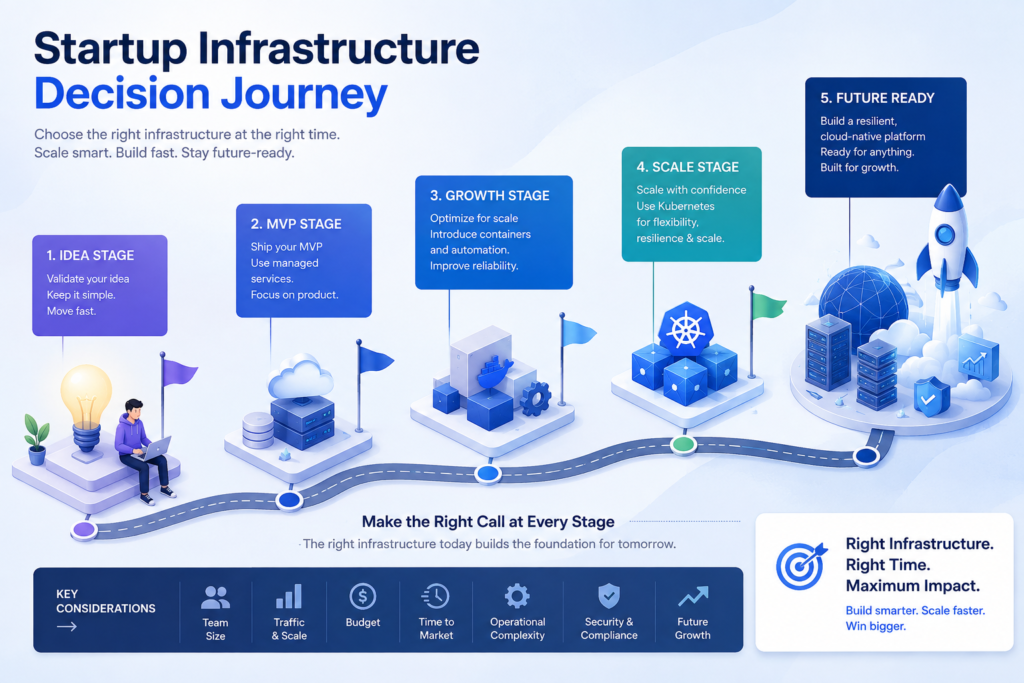
What Is Kubernetes, and Why Does It Exist?
Kubernetes is an open-source container orchestration platform that automates the deployment, scaling, and management of containerized applications. It was designed to solve the operational complexity of running containers across multiple machines at scale. For small applications running on a single server, Kubernetes solves a problem you do not have yet.
Containers changed how software gets packaged and deployed. Docker made it straightforward to bundle an application and its dependencies into a portable unit. The problem Docker did not solve was what happens when you run hundreds or thousands of those containers across multiple machines: How do you schedule them? How do you replace failed containers automatically? How do you route traffic? How do you scale up during peak demand and scale down to save cost?
Kubernetes answers all of those questions. It provides a declarative system for describing how your application should run, and it continuously works to maintain that desired state.
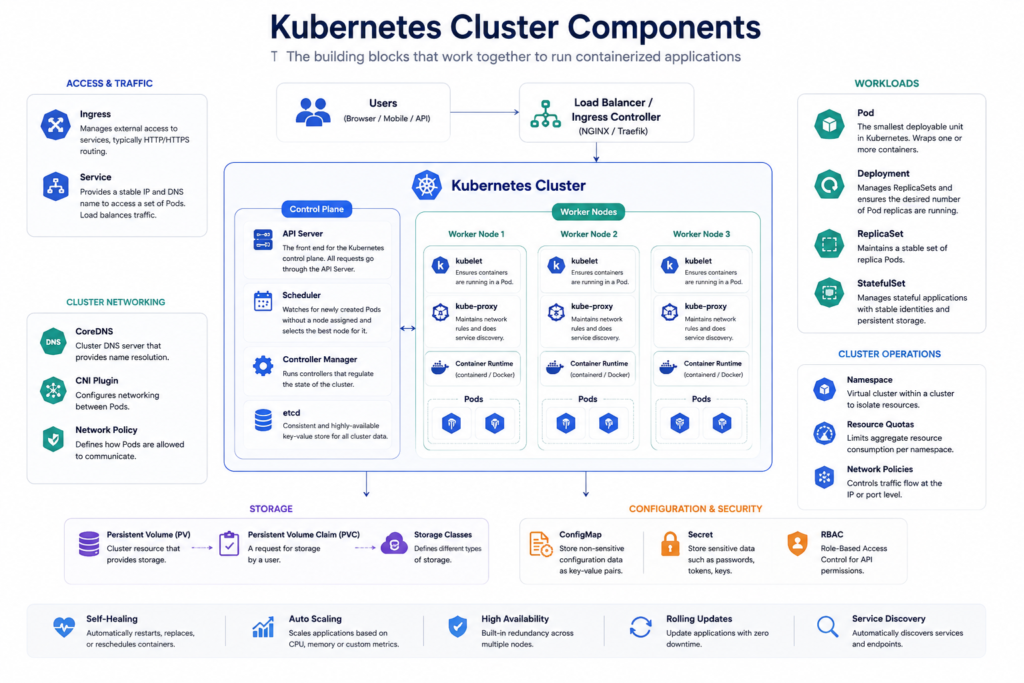
Core Kubernetes Concepts Defined
Before evaluating whether Kubernetes fits your startup, you need a working vocabulary. Here are the terms you will encounter in every architecture discussion:
- Pod: The smallest deployable unit in Kubernetes. A Pod wraps one or more containers that share network and storage resources.
- Node: A physical or virtual machine that runs Pods. Nodes are the compute workers of your cluster.
- Cluster: A set of Nodes managed together. One cluster contains a Control Plane and one or more Worker Nodes.
- Control Plane: The brain of Kubernetes. It makes global decisions about scheduling, scaling, and cluster state.
- Worker Nodes: The machines that actually run your application workloads.
- Deployment: A declarative specification for how many replicas of a Pod should run and how updates should be applied.
- ReplicaSet: Ensures a specified number of Pod replicas are running at any given time. Usually managed by a Deployment.
- Service: A stable network endpoint that routes traffic to Pods, even as Pods are created and destroyed.
- Ingress: A set of rules for routing external HTTP and HTTPS traffic into your cluster services.
- Namespace: A logical partition within a cluster used to isolate resources between teams, environments, or applications.
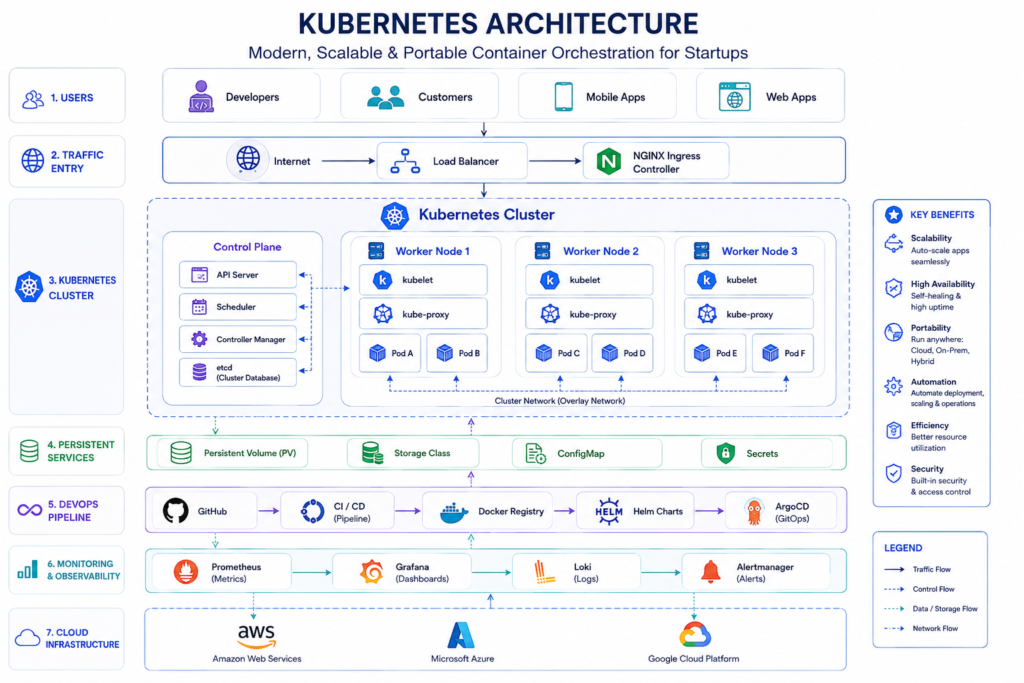
Docker vs. Kubernetes: What Is the Difference?
One of the most common misconceptions we encounter is that Docker and Kubernetes are competing technologies. In reality, they solve different problems at different layers. Docker packages your application into a container image. Kubernetes decides where that container runs, how many copies of it exist, and what happens when it fails. Docker is a container runtime. Kubernetes is an orchestration platform. Most Kubernetes clusters use Docker or containerd as their container runtime under the hood.
A useful mental model: Docker is how you build and ship a single container. Kubernetes is how you operate hundreds of containers across a distributed system.
Why Do Startups Consider Kubernetes?
Startups are drawn to Kubernetes because it solves real problems, scalability, high availability, CI/CD automation, and infrastructure portability. The challenge is that most startups encounter these problems at a stage when simpler tools solve them with a fraction of the complexity and cost.
The appeal of Kubernetes to startup founders and engineering teams is understandable. The scenarios it promises to solve are genuinely important:
- Scalability: Kubernetes can automatically scale application replicas up and down based on CPU, memory, or custom metrics using the Horizontal Pod Autoscaler (HPA) and Cluster Autoscaler.
- High Availability: Kubernetes restarts failed containers, reschedules workloads from failed nodes, and distributes replicas across availability zones.
- Zero Downtime Deployments: Rolling updates and canary releases allow new application versions to be deployed without service interruption.
- Infrastructure Automation: Declarative manifests allow infrastructure state to be described in code, enabling GitOps workflows with tools like ArgoCD and FluxCD.
- CI/CD Integration: Kubernetes integrates naturally with CI/CD pipelines, enabling automated testing, building, and deployment workflows.
- Cloud Portability: A Kubernetes workload can run on Amazon EKS, Azure AKS, Google Kubernetes Engine (GKE), or on-premises without rewriting application code.
- Microservices Support: Kubernetes provides the networking, service discovery, and deployment tooling that microservice architectures require.
- Enterprise Credibility: Many enterprise customers and compliance frameworks expect Kubernetes-based infrastructure.
These benefits are real. At sufficient scale, they justify the investment. The mistake most startups make is adopting Kubernetes to solve tomorrow’s problems with today’s engineering capacity.
When Should Startups Use Kubernetes?
Startups should adopt Kubernetes when they have multiple engineers managing complex workloads, are running microservices at meaningful traffic scale, have genuine high-availability requirements, or are serving enterprise customers with compliance and infrastructure expectations. If none of these apply, Kubernetes is the wrong choice today.
Kubernetes becomes a rational decision when several conditions are true simultaneously:
You have a growing SaaS product with real traffic. Not prototype traffic. Not beta traffic. Production traffic with actual users, SLAs, and consequences for downtime. Horizontal Pod Autoscaler needs something to scale in response to.
You are running microservices. If your application is genuinely decomposed into multiple independently deployable services not a monolith split arbitrarily into microservices for architectural fashion Kubernetes provides real value for service discovery, networking, and independent deployment.
Your team includes at least two or three engineers dedicated to platform and infrastructure. Kubernetes is not a tool you deploy and forget. It requires ongoing maintenance, security patching, upgrade management, and incident response expertise.
You deploy frequently. If your team deploys multiple times per day across multiple services, Kubernetes’ rolling deployment and canary release capabilities deliver measurable operational value.
You serve enterprise customers with compliance requirements. Enterprise sales cycles increasingly include security questionnaires that ask about infrastructure controls, RBAC, audit logging, and network policies. Kubernetes provides native support for these requirements.
You are running multiple environments. Managing separate development, staging, and production environments using Namespaces and Helm charts is straightforward in Kubernetes once the initial setup is complete.
You are building toward Platform Engineering or GitOps. If your roadmap includes self-service developer platforms, GitOps workflows with ArgoCD or FluxCD, or Terraform-managed infrastructure, Kubernetes is the natural foundation.
Real startup scenario: A Series A SaaS company with 15 engineers, 50,000 daily active users, and an enterprise sales pipeline that requires SOC 2 compliance. They are deploying 10 to 15 times per day across six microservices. Kubernetes is the right call here. The operational complexity is justified by the scale and enterprise requirements.
When Kubernetes Is Overkill for Startups
Kubernetes is overkill for any startup that is pre-product-market fit, running a monolith, deploying less than once per day, operating with fewer than five engineers, or handling low-to-moderate traffic on a limited budget. The operational overhead will slow you down more than the platform benefits speed you up.
The most expensive infrastructure decision a startup can make is adopting Kubernetes before it is ready. The cost is not primarily financial—it is the engineering time consumed by cluster management, the cognitive load on developers, and the velocity lost to platform maintenance instead of product development.
Here is what Kubernetes overkill looks like in practice:
You are building an MVP. Your job is to validate a hypothesis. Every hour spent configuring Kubernetes is an hour not spent learning whether your product solves a real problem. Docker Compose, Cloud Run, or a managed PaaS platform deploys your MVP in hours. A Kubernetes cluster requires days to set up correctly.
Your team has three or fewer engineers. Kubernetes demands dedicated expertise. A three-person founding team cannot afford to have one engineer maintaining cluster state, writing YAML manifests, debugging Pod scheduling issues, and managing certificate renewals. That engineer should be building the product.
You run a monolith. Kubernetes was designed for distributed, containerized workloads. A monolithic application running a single process on a single server gains almost nothing from Kubernetes orchestration. The correct answer for a monolith is a managed PaaS, a single VM, or a simple container service.
You deploy once per week or less. If your deployment cadence is low, you do not need the rolling update machinery Kubernetes provides. A manual deployment process works fine.
Your traffic is low and predictable. Autoscaling solves the problem of variable, unpredictable traffic. If your traffic is stable and within the capacity of one or two instances, autoscaling adds no value.
You have limited DevOps expertise. Misconfigured Kubernetes clusters are not just inefficient, they are a security liability. Improperly configured RBAC, exposed dashboards, unmanaged secrets, and missing network policies have contributed to well-documented production incidents. If your team has not operated Kubernetes before, the learning curve will introduce risk before it introduces value.
Your cloud budget is under $5,000 per month. Managed Kubernetes clusters require a minimum viable infrastructure configuration, control plane costs, multiple worker nodes, load balancers, persistent storage, monitoring, and logging. On Amazon EKS, Google Kubernetes Engine, or Azure AKS, a minimal production configuration will cost $300 to $600 per month before you write a single application. At early-stage budgets, that money is better spent on product.
Kubernetes vs. Docker Compose: Which Should Your Startup Use?
Docker Compose is the right choice for local development, small teams, and early-stage startups running simple applications. Kubernetes is the right choice for production workloads that require high availability, horizontal scaling, and automated orchestration across multiple nodes. For most pre-Series A startups, Docker Compose in development and a managed container service in production is the optimal combination.
| Dimension | Docker Compose | Kubernetes |
| Architecture | Single-host, multi-container orchestration | Multi-host cluster with distributed scheduling |
| Scaling | Manual, single node only | Automatic horizontal scaling across nodes |
| Networking | Simple bridge network, local DNS | Advanced service mesh, network policies, Ingress |
| Deployment | Simple docker-compose up | Rolling updates, canary releases, blue-green |
| Operations | Minimal — no cluster state to manage | Significant — cluster upgrades, node management, YAML manifests |
| Learning Curve | Low (hours to days) | High (weeks to months) |
| Cost | Minimal — single VM or local machine | Significant — control plane, multiple nodes, networking |
| Maintenance | Near zero for small applications | Ongoing — security patches, cluster upgrades, certificate management |
| Security | Basic container isolation | RBAC, network policies, secrets management, Pod security |
| Best For | Local dev, MVPs, small internal tools | Production SaaS, microservices, high-traffic applications |
Recommendation: Use Docker Compose for local development regardless of your production platform. For production, the decision point is whether you need multi-node scaling and automated orchestration. If the answer is no, choose Docker Compose plus a simple managed service. If the answer is yes, Kubernetes is the right direction.
Kubernetes vs. Amazon ECS: What Is the Better Choice?
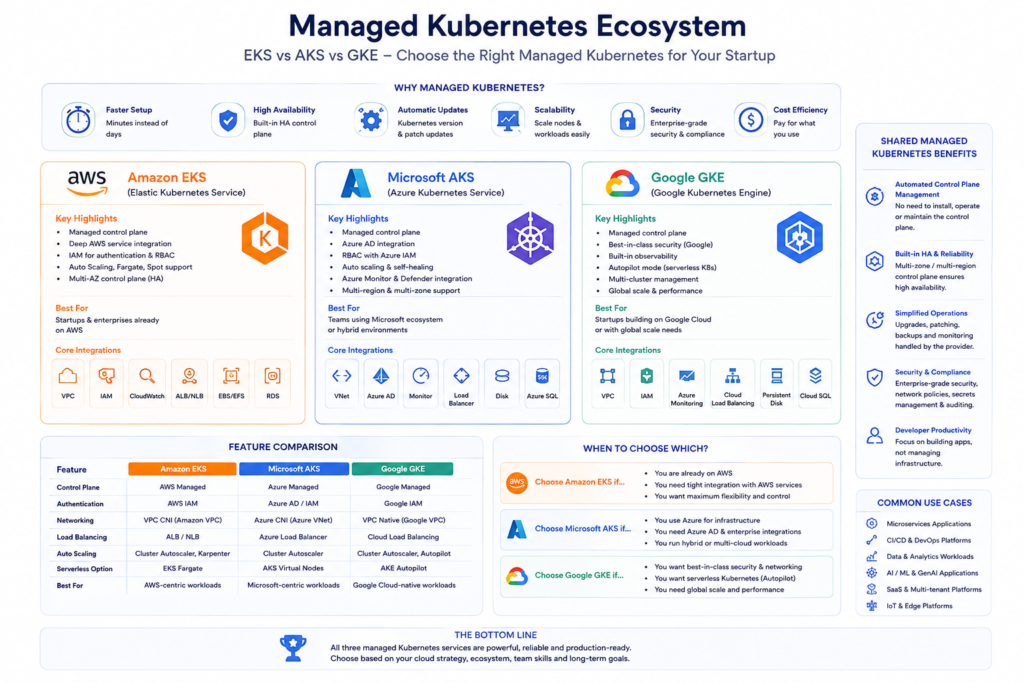
Amazon ECS is simpler, cheaper to operate, and faster to deploy for AWS-native teams. Kubernetes (via Amazon EKS) is more flexible, portable, and better suited to teams that need advanced orchestration, multi-cloud options, or a large open-source ecosystem. Most early-stage AWS-native startups should start with ECS.
Amazon Elastic Container Service (ECS) solves many of the same problems as Kubernetes container scheduling, scaling, service discovery, and deployment automation, with substantially less operational overhead.
ECS Advantages for Startups:
- Deep native AWS integration: IAM roles, VPC networking, ALB/NLB, CloudWatch, and Secrets Manager work without custom configuration
- No control plane to manage or pay for separately on Fargate
- Simpler operational model — no YAML manifests, no controller manager, no etcd
- Lower total cost for AWS-native workloads
- Faster time-to-production for teams already using AWS services
Kubernetes (EKS) Advantages:
- Portable: workloads can move to GKE, AKS, or on-premises without rewriting
- Richer open-source ecosystem: Helm, ArgoCD, Karpenter, Prometheus, and hundreds of operators
- More granular networking and security controls
- Better multi-cluster and multi-tenant architectures at enterprise scale
- Stronger GitOps support with ArgoCD and FluxCD
Choose ECS when: You are AWS-native, have a small DevOps team, do not need multi-cloud portability, and want to reduce operational complexity.
Choose EKS when: You need Kubernetes-specific features, plan to run on multiple clouds, have a team with existing Kubernetes expertise, or have enterprise customers requiring Kubernetes-based infrastructure.
Kubernetes vs. Google Cloud Run: When Serverless Wins
Google Cloud Run is the right choice for stateless, HTTP-driven workloads where you want zero infrastructure management and true scale-to-zero cost efficiency. Kubernetes is better when you need persistent workloads, stateful applications, complex networking, or infrastructure that your team controls fully.
Cloud Run is a fully managed serverless container platform. You push a container image. Cloud Run handles everything else: scaling from zero to thousands of instances, traffic routing, TLS termination, and capacity management. You pay only for the compute time your application actually uses.
For early-stage startups running stateless APIs or web applications, Cloud Run delivers an exceptional cost and operational profile. Scaling from zero means no idle compute cost. Cold starts—the main trade-off—typically add 100 to 500 milliseconds for most containers.
Kubernetes becomes the better choice when your workload requires: persistent background workers that cannot tolerate cold starts, stateful applications with complex storage requirements, internal microservice communication that benefits from Kubernetes service mesh, or infrastructure portability that Cloud Run’s Google lock-in prevents.
Kubernetes vs. Azure Container Apps: Microsoft’s Managed Answer
Azure Container Apps is Microsoft’s opinionated, managed container platform built on Kubernetes and KEDA. It is well-suited for Azure-native teams who want Kubernetes-style scaling without cluster management. Standard Kubernetes (via AKS) is better when you need full control over the cluster or have workloads that require capabilities Azure Container Apps does not expose.
Azure Container Apps abstracts Kubernetes cluster management while preserving key capabilities: KEDA-based event-driven autoscaling, Dapr integration for microservice communication, traffic splitting for blue-green deployments, and native Azure integration. For teams already in the Microsoft ecosystem using Azure Active Directory, Azure Service Bus, and Azure Key Vault, Container Apps reduces the gap between Kubernetes’ power and a managed PaaS experience.
The limitation is control. When you need to customize Kubernetes admission controllers, deploy operators, or implement network policies that Azure Container Apps does not expose, Azure Kubernetes Service (AKS) is the right choice.
Kubernetes vs. Docker Swarm: Why Swarm Lost
Direct Answer: Docker Swarm is simpler to operate than Kubernetes but has effectively lost the container orchestration market. It offers less automation, a smaller ecosystem, and no major cloud provider has built a managed offering around it. For new projects, Docker Swarm is not a forward-looking choice.
Docker Swarm clusters are faster to set up than Kubernetes and require less operational expertise. For small teams running a handful of services, Swarm’s simplicity was historically appealing. The ecosystem divergence over the past five years has made Swarm a difficult choice to justify. Cloud providers do not offer managed Swarm services. The operator ecosystem, tooling, and community investment are concentrated entirely in Kubernetes.
If your team is considering Swarm for simplicity, Cloud Run, Fly.io, or ECS on Fargate will deliver equivalent simplicity with stronger managed service support and a longer future.
Kubernetes vs. HashiCorp Nomad: The Enterprise Alternative
Nomad is a flexible workload orchestrator that handles containers, VMs, batch jobs, and standalone binaries, not just containers. It is simpler to operate than Kubernetes and integrates natively with HashiCorp Vault and Consul. Kubernetes is better supported by cloud providers and has a larger ecosystem. Nomad is the right choice for organizations already invested in the HashiCorp stack or running mixed workloads.
HashiCorp Nomad takes a deliberately simpler architecture compared to Kubernetes. It runs as a single binary, manages diverse workload types, and integrates with Vault for secrets management and Consul for service discovery. For organizations running batch jobs, ML workloads, or legacy applications alongside containers, Nomad’s flexibility is genuine.
The trade-off is ecosystem size. Kubernetes has a vastly larger collection of operators, Helm charts, and community tooling. Cloud provider integrations with EKS, GKE, and AKS give Kubernetes a structural advantage for startups building on public cloud. Nomad is a strong choice for infrastructure-mature teams at enterprise scale, not for early-stage startups making their first infrastructure decisions.
What Does Kubernetes Actually Cost?
A minimal production-grade Kubernetes cluster on a managed service like EKS, GKE, or AKS typically costs $400 to $900 per month in infrastructure alone, before accounting for engineering time. Total cost of ownership, including engineering salaries dedicated to cluster operations, commonly exceeds $10,000 per month for small teams. Ignoring these costs is the most common Kubernetes budgeting mistake.
Most startup teams evaluate Kubernetes pricing by looking at compute instance costs. The real cost picture is substantially larger:
| Cost Category | Typical Range | Notes |
| Control Plane | $70–$150/month | EKS charges $0.10/hour per cluster; GKE offers one free zonal cluster |
| Worker Nodes | $150–$500/month | Minimum 2–3 nodes for high availability; varies by instance size |
| Networking | $50–$200/month | Load balancers, NAT gateways, cross-AZ traffic |
| Storage | $20–$100/month | Persistent volumes for stateful workloads and logging |
| Load Balancers | $20–$50/month | One or more per cluster |
| Logging | $50–$200/month | CloudWatch, Datadog, or self-hosted ELK stack |
| Monitoring | $0–$150/month | Managed Prometheus/Grafana or Datadog |
| Backups | $10–$50/month | etcd backups, persistent volume snapshots |
| Engineering Time | $8,000–$25,000+/month | Most expensive and most frequently ignored |
The engineering cost deserves particular attention. A startup that assigns one mid-level engineer to cluster operations at 50% of their time is spending $5,000 to $8,000 per month on Kubernetes maintenance before writing a single application feature. At early-stage burn rates, that cost is not trivial.
Managed vs. Self-Managed Kubernetes Pricing: Self-managed Kubernetes clusters (running on plain EC2, GCE, or Azure VMs) save the control plane fee but multiply the engineering cost. The managed services—Amazon EKS, Google Kubernetes Engine, and Azure AKS—charge a control plane premium in exchange for automated upgrades, monitoring integrations, and reduced operational burden. For most startups that have reached Kubernetes maturity, managed Kubernetes is worth the premium.
Common Kubernetes Mistakes Startups Make
The most damaging Kubernetes mistakes are adopting it too early, ignoring operational costs, skipping RBAC and secrets management, and treating deployment as the end of the project rather than the beginning. Each mistake compounds over time, and the cost of correction grows with cluster complexity.
We see the same failures across startup Kubernetes adoptions:
Adopting Kubernetes before achieving product-market fit. Infrastructure complexity becomes organizational debt. Every hour the founding team spends debugging Pod scheduling issues is an hour not spent validating the product. Startups that adopt Kubernetes at the MVP stage consistently report that it slowed their iteration speed.
No GitOps workflow. Teams that manage Kubernetes configuration through ad hoc kubectl apply commands create clusters whose state cannot be reliably reproduced or audited. Implementing ArgoCD or FluxCD from the start costs two days. Retrofitting it after a complex cluster grows costs two weeks.
Missing RBAC. Role-Based Access Control is not optional. Clusters without RBAC give every team member access to every resource across every namespace. When something breaks—and something always breaks—the blast radius is the entire cluster.
Poor secrets management. Storing secrets in plain-text Kubernetes Secret objects or committing them to Git repositories are the two most common secret management failures. Use HashiCorp Vault, AWS Secrets Manager, or the Kubernetes External Secrets Operator from day one.
Ignoring observability. Kubernetes workloads fail silently without proper monitoring. Prometheus, Grafana, and OpenTelemetry should be considered mandatory infrastructure, not optional additions. Clusters without observability are clusters you cannot diagnose.
Self-hosting clusters prematurely. Self-managed Kubernetes clusters require etcd management, control plane upgrades, certificate rotation, and infrastructure provisioning expertise. Unless you have strong reasons to avoid managed services, use EKS, GKE, or AKS.
Decomposing into too many microservices. Kubernetes makes it easy to deploy many services. It does not make many services the right architectural choice. Every additional service adds network latency, deployment complexity, and observability requirements. Ten microservices often solve the same problem a modular monolith would solve more simply.
Overengineering the platform before the product has users. A startup that spends three months building a sophisticated Kubernetes platform—service mesh, multi-cluster federation, advanced admission controllers—before shipping a product has inverted its priorities.
Kubernetes Security Best Practices for Startups
Kubernetes security requires layered controls: RBAC for access management, Network Policies for traffic isolation, Secrets management via Vault or external providers, image scanning in CI/CD pipelines, and runtime security monitoring. Skipping any layer creates exploitable gaps—not theoretical ones.
The Kubernetes attack surface is larger than most startup teams anticipate. A 2022 Red Hat report found that 55% of organizations had experienced a Kubernetes security incident in the previous 12 months. The most common vectors were misconfigured RBAC, exposed dashboards, and unmanaged service account permissions.
RBAC (Role-Based Access Control): Define the minimum permissions each service account and user requires. Avoid the cluster-admin role for application workloads. Audit role bindings quarterly. RBAC mistakes are silent until they become incidents.
Network Policies: By default, all Pods in a Kubernetes cluster can communicate with all other Pods. Network Policies define explicit allow rules for inter-Pod traffic. Implement deny-all defaults per Namespace and open only the connections your application requires.
Secrets Management: Use the Kubernetes External Secrets Operator with AWS Secrets Manager, HashiCorp Vault, or Azure Key Vault. Do not store plaintext credentials in Kubernetes Secrets without encryption at rest. Never commit secret values to Git repositories.
Admission Controllers with OPA/Kyverno: Open Policy Agent (OPA) and Kyverno allow you to enforce organizational policies on every Kubernetes resource at admission time: no privileged containers, required resource limits, mandatory security contexts. Policies enforced at admission are policies that cannot be bypassed.
Image Scanning: Scan container images for known vulnerabilities in your CI/CD pipeline before deployment. Tools like Trivy, Snyk, or AWS ECR image scanning identify vulnerabilities before they reach production. Every unscanned image is a potential supply chain risk.
Least Privilege for Service Accounts: Each Pod should run with a dedicated service account that has only the permissions it needs. The default service account in most namespaces has permissions that are broader than any application workload requires.
Runtime Security: Tools like Falco provide runtime behavioral monitoring. If a container begins making unexpected system calls, accessing files outside its expected paths, or establishing unexpected network connections, Falco generates an alert. Admission controls prevent bad configurations. Runtime security detects unexpected behaviors.
Kubernetes Best Practices for Startups That Have Adopted It
The highest-leverage Kubernetes best practices for startups are implementing GitOps from day one, adopting Helm for package management, setting up Prometheus and Grafana for observability, using Horizontal Pod Autoscaler and Cluster Autoscaler for cost efficiency, and treating disaster recovery as a first-class requirement rather than a future task.
GitOps with ArgoCD or FluxCD: Store all Kubernetes manifests in Git. Use ArgoCD or FluxCD to reconcile cluster state with the Git repository. This approach makes cluster state auditable, reproducible, and recoverable. When something breaks, rollback is a Git revert.
Helm for Application Packaging: Helm charts encapsulate Kubernetes manifests into versioned, configurable packages. Managing raw YAML files without Helm at scale creates configuration drift and deployment inconsistency. Helm is not perfect, but it is the standard, and the ecosystem of pre-built charts is extensive.
Terraform for Infrastructure Provisioning: Provision the Kubernetes cluster itself using Terraform (or Pulumi). Infrastructure-as-code for cluster provisioning means your cluster configuration is version-controlled, reviewable, and reproducible. Manual cluster provisioning creates configuration debt that compounds with every upgrade.
Prometheus and Grafana for Observability: Prometheus scrapes metrics from every workload and Kubernetes component. Grafana visualizes them. The Prometheus Operator makes deploying both tools on Kubernetes straightforward. Add OpenTelemetry for distributed tracing if your application generates meaningful request volumes across multiple services.
Horizontal Pod Autoscaler: Configure HPA for every production workload with meaningful CPU or request-rate targets. Autoscaling is one of Kubernetes’ strongest value propositions—do not leave it unconfigured.
Cluster Autoscaler or Karpenter: Automatically add and remove nodes based on pending Pod scheduling requirements. Karpenter (AWS-native) is generally faster and more cost-efficient than the standard Cluster Autoscaler on EKS.
Disaster Recovery Planning: Test your ability to restore a cluster from scratch. Know your etcd backup strategy. Know your persistent volume snapshot frequency. Clusters that have never been restored from backup are clusters whose recovery path is unknown.
Kubernetes Decision Matrix by Startup Stage
Startup infrastructure should match startup stage. Bootstrapped and pre-seed startups almost universally benefit more from managed PaaS platforms than from Kubernetes. The investment in Kubernetes becomes rational at Series A and becomes a competitive advantage at Series B and beyond.
| Startup Stage | Team Size | Traffic | Recommended Platform | Reasoning |
| Bootstrapped / Side Project | 1–2 engineers | Minimal | Fly.io, Render, Railway, PaaS | Zero infrastructure overhead; focus entirely on product |
| Pre-Seed / MVP | 2–3 engineers | Low | Docker Compose + Cloud Run or ECS Fargate | Fast iteration; managed scaling; minimal cost |
| Seed | 3–6 engineers | Growing | ECS Fargate, Cloud Run, or Heroku | Scale without DevOps hire; add Kubernetes when outgrown |
| Series A | 7–15 engineers | Moderate-High | Managed Kubernetes (EKS, GKE, AKS) | Microservices, enterprise customers, compliance needs emerge |
| Series B | 15–50 engineers | High | Managed Kubernetes + Platform Engineering | Dedicated platform team; GitOps; advanced autoscaling |
| Enterprise SaaS | 50+ engineers | Very High | Kubernetes + Service Mesh + Multi-Cluster | Full platform engineering investment justified |
| Hypergrowth Startup | Rapid scaling | Unpredictable peaks | Kubernetes + Karpenter + Spot Instance strategy | Cost efficiency and scale automation critical |
Real Startup Examples: Matching Infrastructure to Stage
Real startup infrastructure decisions are almost always shaped by team size and customer requirements, not by technical sophistication. The startups that adopt Kubernetes too early consistently slow down. The ones that wait until the need is genuine move faster overall.
Startup A – Pre-Seed Developer Tool (3 engineers, 500 users): This team deployed on a single Heroku dyno for six months, then migrated to Cloud Run when usage grew. They did not touch Kubernetes until Series A, when an enterprise customer required SOC 2 infrastructure controls. The decision to wait saved approximately 400 hours of platform engineering across the seed stage.
Startup B – Series A SaaS Platform (12 engineers, 15,000 daily active users): This team adopted Amazon EKS at Series A when they decomposed their monolith into four microservices and began receiving enterprise inbound. They used Helm for packaging, ArgoCD for GitOps, and deployed Prometheus and Grafana in the first sprint. The investment paid back within three months through reduced deployment friction and faster enterprise deal closures.
Startup C – Bootstrapped Marketplace (2 engineers): This team evaluated Kubernetes twice and chose Docker Compose both times. Their application runs on two EC2 instances behind an Application Load Balancer. They deploy weekly via GitHub Actions. Their infrastructure costs $180 per month. For their traffic profile and team size, this is the correct decision.
Startup D – Hypergrowth B2C Platform (Series B, 35 engineers, unpredictable traffic spikes): Traffic spikes of 10x during product launches made manual scaling unworkable. They adopted EKS with Karpenter for node provisioning and HPA for Pod scaling. Within 30 days of adoption, they reduced their compute spend by 40% compared to statically provisioned instances. Autoscaling is the feature that most directly justified their Kubernetes investment.
Migration Roadmap: From Docker Compose to Platform Engineering
Infrastructure migration should follow business maturity. Moving before you are ready adds complexity without adding value. Moving too late creates technical debt that slows growth. The roadmap below reflects the natural evolution of startup infrastructure across four stages.
Stage 1: Docker Compose (Pre-Seed to Seed)
Use Docker Compose for local development and a simple managed service (Cloud Run, Fly.io, Render, or ECS Fargate) for production. Containerize everything from day one—this investment pays back when you eventually migrate to Kubernetes. Deploy via GitHub Actions or CircleCI.
Move to Stage 2 when: Your managed service is costing more than a minimal Kubernetes cluster, or you have more than five services that need independent scaling.
Stage 2: Managed Container Service (Seed to Series A)
Amazon ECS on Fargate or Google Cloud Run provide managed scaling, rolling deployments, and native cloud integration without cluster management overhead. Add proper CI/CD, secrets management, and centralized logging at this stage.
Move to Stage 3 when: You have genuine microservices, a dedicated platform engineer or team, enterprise customers requiring infrastructure controls, or workloads that ECS/Cloud Run cannot efficiently support.
Stage 3: Managed Kubernetes (Series A to Series B)
Adopt Amazon EKS, Google Kubernetes Engine, or Azure AKS. Implement Helm, ArgoCD or FluxCD for GitOps, Prometheus and Grafana for observability, and RBAC from the first sprint. Use Terraform to provision the cluster. Do not skip the security baseline.
Move to Stage 4 when: Your engineering org has grown to 25+ engineers, you have a dedicated platform team, and you are building internal developer platforms or multi-tenant SaaS infrastructure.
Stage 4: Advanced Platform Engineering (Series B and Beyond)
Implement full GitOps workflows, multi-cluster federation for geographic distribution, service mesh (Istio or Linkerd) for mTLS and traffic management, Karpenter for cost-optimized node provisioning, and OpenTelemetry for distributed observability. At this stage, platform engineering is a competitive advantage.
Should Your Startup Use Kubernetes? The Final Recommendation
Use Kubernetes if you are Series A or beyond, have multiple engineers, run genuine microservices, face high-availability requirements, or serve enterprise customers. Skip Kubernetes if you are pre-product-market fit, running a monolith, operating with fewer than five engineers, or constrained to a small cloud budget. The choice is a business decision, not a technical one.
The single most common mistake we see is startups treating Kubernetes as the default infrastructure choice because it is what successful large-scale companies run. That reasoning inverts the logic. Netflix and Airbnb run Kubernetes because they have hundreds of engineers, thousands of services, and billions of requests. They did not start there.
Your infrastructure should match your current operational complexity, not your aspirational scale. Build infrastructure that serves your next six months, not your next six years. Complexity you do not need today is complexity that slows you down today.
If you are not sure whether your startup has reached Kubernetes maturity, ask these five questions:
- Do we have more than two engineers who can maintain a Kubernetes cluster?
- Are we running more than three independently deployable services?
- Do we have genuine high-availability requirements, defined SLAs, or enterprise customers?
- Is our current deployment process a bottleneck to shipping?
- Can we afford $8,000 to $15,000 per month in combined infrastructure and engineering cost for our platform?
If you answer yes to four or five of these questions, Kubernetes is likely the right next step. If you answer yes to fewer than three, choose a simpler path first.
When you do reach Kubernetes maturity, start with a managed service. EKS, GKE, or AKS eliminates the operational burden of control plane management and gives your team the foundation to build platform engineering practices correctly. Self-managing a Kubernetes cluster at early adoption is a tax on your engineering capacity that rarely pays back.
Ready to evaluate your startup’s Kubernetes readiness? Enlight Lab works with startup founders, CTOs, and engineering teams to design infrastructure that matches their stage, growth trajectory, and team capacity. Whether you are evaluating Kubernetes adoption, migrating from a monolith to microservices, or building a platform engineering practice from scratch, our Kubernetes Consulting, DevOps Consulting Services, Cloud Consulting Services, and Platform Engineering Services teams bring direct implementation experience across dozens of startup infrastructure engagements. Contact Enlight Lab to discuss your architecture, assess your readiness, and define the infrastructure path that serves your business, not just your technical ambitions.
Frequently Asked Questions
Should startups use Kubernetes?
Most startups should not use Kubernetes in their early stages. Pre-product-market fit startups, those with fewer than five engineers, monolithic architectures, or low traffic should use simpler managed services like Cloud Run, ECS Fargate, or Fly.io. Kubernetes becomes the right choice at Series A or beyond, when genuine microservices, high-availability requirements, or enterprise customer demands justify the operational investment.
Is Kubernetes worth it for a startup?
Kubernetes is worth it when the operational benefits—automated scaling, high availability, rolling deployments, and GitOps workflows—outweigh the setup, maintenance, and engineering costs. For most startups, this tipping point occurs between Series A and Series B, when team size, traffic volume, and enterprise requirements align to justify the platform investment.
Is Kubernetes overkill for small teams?
Yes. A team of three to five engineers that adopts Kubernetes will spend a disproportionate share of its engineering capacity on cluster maintenance rather than product development. For small teams, the opportunity cost of Kubernetes is measured in product features not built and customer feedback not acted on.
When should a startup adopt Kubernetes?
Adopt Kubernetes when you have multiple engineers with platform experience, are running microservices at meaningful traffic scale, have genuine high-availability requirements, serve enterprise customers with compliance expectations, or are deploying multiple times per day across several services. If these conditions are not yet true, delay adoption.
How many developers do you need before adopting Kubernetes?
A reasonable minimum is five engineers, with at least one dedicated to DevOps or platform engineering responsibilities. Kubernetes without a dedicated maintainer degrades in security, reliability, and cost efficiency over time.
Should I use Docker Compose instead of Kubernetes?
Docker Compose is the right choice for local development at any scale, and for production deployments at small-to-medium scale on single-host environments. For multi-node, auto-scaling, production-grade workloads, Kubernetes provides capabilities Docker Compose cannot. The most common correct answer for early-stage startups is Docker Compose for local development and a managed container service for production.
What is the cheapest Kubernetes platform?
Google Kubernetes Engine offers one free zonal cluster (control plane fee waived), making it the cheapest entry point for managed Kubernetes. Beyond the control plane, worker node, networking, and storage costs apply regardless of provider. Self-managed Kubernetes on spot instances can reduce compute costs but increases engineering maintenance requirements substantially.
Is Kubernetes expensive for startups?
Yes, when total cost of ownership is calculated honestly. Infrastructure costs for a minimal production cluster range from $400 to $900 per month. Engineering time for cluster maintenance adds $5,000 to $15,000 per month at early-stage salary rates. For pre-Series A startups, these costs are rarely justified by the operational benefits.
Should startups use Amazon ECS instead of Kubernetes?
For AWS-native startups, ECS on Fargate is frequently the better early choice. It provides managed container orchestration, auto-scaling, rolling deployments, and native AWS integration without the operational overhead of a Kubernetes cluster. Migrate to Amazon