An Acquisition Can Double Your Software Complexity Overnight
Acquiring another company can expand your customer base, strengthen your product portfolio, and give you access to new capabilities. But it can also introduce a technology environment that operates very differently from your own.
Imagine a SaaS company that has just acquired a smaller software business. The deal makes strategic sense. The products complement each other, the customer bases overlap, and the acquired team brings valuable expertise.
Then the integration work begins.
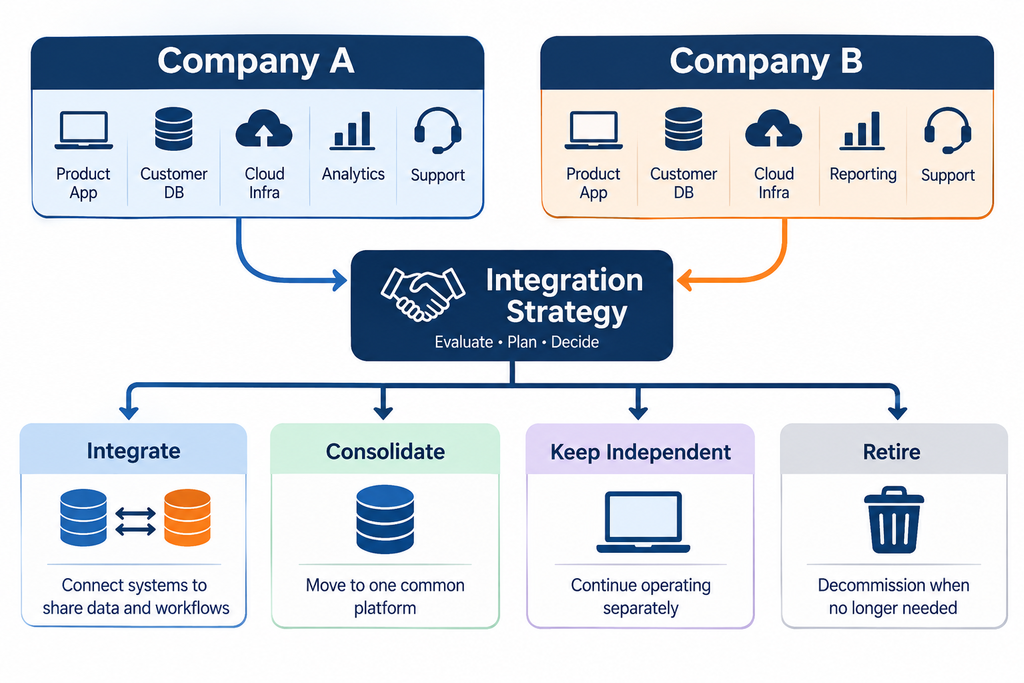
The acquiring company has its own CRM, billing platform, customer support tools, cloud infrastructure, analytics stack, and engineering workflows. The acquired company has its own versions of nearly all of them, built around different technical decisions and business processes.
Leadership now faces some difficult questions.
Should both products continue operating?
Which customer database should become the primary record?
Should the engineering teams maintain separate codebases?
Can the billing systems be combined without disrupting subscriptions?
Which cloud services can be retired, and which are supporting critical applications?
These decisions affect more than IT spending. They influence customer experience, product development, operational efficiency, security, and the long-term value of the acquisition.
The biggest mistake is assuming that all duplicate software should be eliminated immediately. Two systems may perform similar functions but support different customers, workflows, or technical requirements.
The goal of software integration after an acquisition is not to merge everything as quickly as possible. It is to create a technology environment that supports the combined business without introducing unnecessary cost or risk.
That requires a structured process for deciding what to keep, integrate, consolidate, modernize, or retire.
Why Software Integration After an Acquisition Is More Complicated Than It Looks
Two companies can sell similar products while operating completely different technology environments.
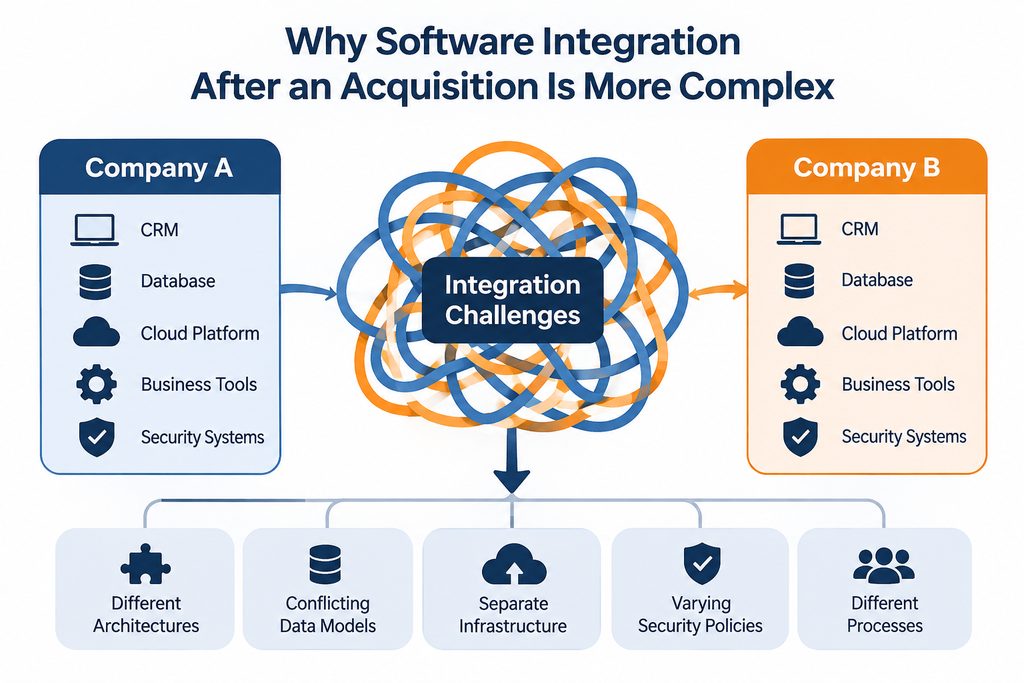
One may use a modern application architecture with well-documented APIs, automated testing, and continuous deployment. The other may depend on a tightly coupled application with limited documentation and manual releases that only a few engineers understand.
Even if both products serve the same market, combining them may require substantial engineering work.
Common differences include:
- Application architecture: Different programming languages, frameworks, databases, and software design decisions.
- Cloud infrastructure: Separate hosting environments, deployment processes, monitoring systems, and security configurations.
- Data structures: Different customer identifiers, account models, field definitions, and historical records.
- Business applications: Overlapping CRM, billing, support, finance, and reporting tools.
- Security controls: Different identity systems, permission models, credential management, and compliance requirements.
- Engineering practices: Different development workflows, testing standards, release procedures, and documentation.
- Third-party dependencies: Vendor contracts, external APIs, integrations, and software licenses that may not transfer or combine easily.
These differences create dependencies that are not always visible during an initial review.
For example, a reporting application may appear redundant until the finance team reveals that it contains business rules used to reconcile revenue. Replacing it without understanding those rules could introduce errors into financial reporting.
This is why technical similarity should never be the only basis for an integration decision.
A system is not interchangeable with another simply because both have the same label. The real question is whether the surviving system can meet the same business requirements reliably, securely, and at an acceptable cost.
The Five Choices for Every Software System
There is no single integration strategy that works for every application. Some systems should be combined, while others should remain separate or eventually be replaced.
Evaluate each application individually and choose from five practical options.
1. Keep the System Independent
Keeping a system independent can be the right decision when the acquired product serves a different customer segment, has specialized functionality, or would be expensive and risky to merge.
For example, an acquired SaaS product may have its own customer base, release cycle, and technical requirements. Forcing it onto the acquiring company’s platform could slow development without creating enough business value to justify the effort.
Independent operation can be temporary while leadership develops a longer-term strategy, or it can be a permanent choice.
However, independence must be deliberate. The business still needs clear ownership, security controls, support arrangements, vendor management, and visibility into operating costs.
A separate system with a defined purpose and accountable owner may be entirely reasonable. A separate system that nobody understands or maintains is a liability.
2. Integrate the Systems
Integration allows applications to remain separate while exchanging the information needed for shared workflows.
For example, the two businesses might keep their existing products but connect account information, synchronize selected billing data, or allow authorized employees to view customer information across both environments.
APIs, event-driven integrations, and integration platforms can help connect these systems without immediately merging their databases or codebases.
The advantage is that the combined business can introduce useful cross-system capabilities while reducing the immediate risk of a full migration.
The trade-off is ongoing complexity. Integrations require monitoring, error handling, security controls, and clear rules about which system owns each piece of information.
If both applications can update the same customer record without a clear source of truth, the integration may create conflicting information rather than solve it.
3. Consolidate Onto One Existing Platform
Consolidation makes sense when both companies use applications for essentially the same purpose and one platform can meet the combined business’s requirements.
Common candidates include CRM systems, customer support platforms, identity management tools, and internal reporting applications.
Before selecting the platform that will remain, compare:
- Required features and business workflows.
- Integration and migration effort.
- Data quality and compatibility.
- Licensing and operating costs.
- Security and access controls.
- User adoption and training requirements.
- Future business and product needs.
Do not automatically choose the acquiring company’s software simply because it is already familiar to leadership.
The acquired company may have a better system for a particular workflow. A smaller platform may also be easier to maintain or better suited to the combined organization’s future requirements.
The decision should reflect what the business needs, not which team has more influence.
4. Rebuild or Modernize Selected Functionality
Sometimes neither application adequately supports the combined business.
The systems may have architectural limitations, expensive maintenance requirements, security weaknesses, or functionality gaps that prevent the organization from executing its product strategy.
Rebuilding may be justified, but it should not be the default response to unfamiliar technology.
First, identify the specific requirements that existing systems cannot meet. Determine whether configuration, integration, or targeted modernization can address those gaps.
For example, a business might retain an acquired product while replacing only its outdated authentication component or improving a critical integration layer.
This can preserve valuable functionality without taking on the cost and delivery risk of rebuilding the entire application.
5. Retire the System
Retirement is appropriate when an application no longer provides enough value to justify its costs and risks, and its responsibilities can be transferred safely.
However, shutting down software requires more than canceling a subscription.
Before retiring a system, identify its users, dependencies, integrations, contractual obligations, data retention requirements, and downstream processes. Decide what happens to its records, credentials, reports, and historical information.
The business may need to migrate data, replace integrations, preserve audit records, and monitor for unexpected dependencies after the application is switched off.
The key principle is simple: retire the application only after its essential responsibilities have been addressed.
Start With a Technology Inventory, Not a Migration Project
Before deciding what to combine or replace, establish what the combined business actually operates.
An application inventory provides a practical starting point. For each system, document:
- Application name and business purpose.
- Business owner and technical owner.
- Users and critical business processes supported.
- Data stored or processed.
- Integrations and system dependencies.
- Hosting environment and infrastructure requirements.
- Security and compliance considerations.
- Licensing, vendor commitments, and operating costs.
- Known limitations and maintenance requirements.
Include more than visible software subscriptions. Custom applications, databases, scripts, scheduled jobs, APIs, cloud resources, and third-party dependencies can be equally important.
Consider a hypothetical acquired company with a small internal application that generates financial reports. Leadership may not recognize it as a critical system because it is not a customer-facing product. But if finance relies on it for monthly reconciliation, shutting it down without a replacement could disrupt an essential business process.
The inventory should reveal these dependencies before major decisions are made.
The level of detail should match the acquisition. A small company may be able to begin with a spreadsheet, interviews with key employees, and a review of its software and cloud accounts. A larger acquisition may require more formal architecture documentation and dependency mapping.
The objective is not to create documentation for its own sake. It is to give decision-makers enough visibility to act safely.
Conduct Technical Due Diligence Before Making Major Decisions
Technical due diligence helps leadership understand the condition, risks, and future requirements of the acquired company’s technology.
It should inform the integration plan rather than end with a list of technical observations.
Architecture and maintainability: Determine whether the application is documented, whether its components can be changed independently, and whether the engineering team can maintain it without relying on a small number of individuals.
Security and access: Review identity management, permissions, credential handling, vulnerabilities, unsupported components, and access to sensitive information.
Infrastructure and reliability: Examine hosting, backups, monitoring, disaster recovery, deployment processes, and incident response procedures.
Data quality and ownership: Assess the accuracy, structure, accessibility, and governance of important records. Identify dependencies on proprietary databases or external platforms.
Software licenses and intellectual property: Confirm software ownership, third-party license obligations, vendor agreements, and restrictions that could affect future development or integration.
Engineering capacity: Understand whether the combined team has the expertise and capacity to maintain the system while continuing product development.
Operating costs: Evaluate hosting, licenses, support, maintenance, and the additional investment needed to meet future requirements.
Findings should be evaluated in context. An older framework does not automatically make an application unsuitable. A poorly documented system may still support an important product and need to remain operational while the business develops a safer modernization plan.
The critical question is whether the risks and costs of keeping the system are greater or smaller than those associated with changing it.
How to Decide Which Software to Keep After an Acquisition
Once the inventory and technical review are complete, compare each system using five decision criteria.
| Criterion | Questions to ask |
|---|---|
| Strategic value | Does the system support an important product, customer segment, or business capability? |
| Technical condition | Is it secure, reliable, maintainable, and adaptable? |
| Integration effort | What work is required to connect, consolidate, migrate, or replace it? |
| Business risk | What could happen to customers or operations if the system changes or fails? |
| Total cost | What will it cost to operate, integrate, modernize, or replace the system? |
Use the answers to compare the available options: keep, integrate, consolidate, rebuild, or retire.
For example, a strategically important acquired product may deserve continued investment despite having a different architecture. A duplicate internal tool may be a good consolidation candidate if the surviving platform meets the business requirements. An application that is scheduled for retirement may still require a carefully planned data migration because it contains valuable customer history.
These criteria form a practical decision framework, not a mathematically validated scoring model. Avoid assigning arbitrary scores that imply more certainty than the evidence supports.
Involve the relevant business and technical stakeholders. Finance can assess operating costs, product leaders can evaluate roadmap requirements, customer support can identify service risks, and engineers can explain technical dependencies.
A decision that looks attractive from a licensing perspective may be a poor choice if it introduces major migration costs or disrupts an important customer workflow.
Data Migration Is Often One of the Hardest Parts
Applications can sometimes be replaced more easily than the information they contain.
Two companies may define customers differently, use different account identifiers, store subscription history in different formats, or maintain inconsistent records across systems.
Imagine a hypothetical situation in which one platform represents a customer as an individual user, while another represents a customer as a company account containing multiple users and subscriptions.
Moving the records requires more than copying database rows. The combined business must decide how the two customer models relate and how historical activity should be preserved.
A reliable migration plan should address:
- Mapping source fields to destination fields.
- Standardizing important data definitions.
- Identifying duplicates and resolving conflicts.
- Preserving relationships between customers, accounts, users, and subscriptions.
- Validating migrated records against agreed requirements.
- Maintaining security and access permissions.
- Preserving required historical and audit information.
- Planning production cutover and recovery procedures.
- Communicating relevant changes to affected customers.
Test the migration before production cutover, including cases involving incomplete records, duplicate accounts, unusual subscription arrangements, and historical data.
Define what successful migration means before moving the data. Depending on the system, that may involve record counts, field-level validation, relationship checks, financial reconciliation, or confirmation that critical workflows still operate correctly.
Assign a clear owner to the migration and involve the people who understand how the data is used.
Without that accountability, the technical team may successfully transfer the records while unintentionally losing information that the business needs.
Protect Customers and Business Operations During Integration
An integration can be technically successful and still damage the business if customers lose access, billing becomes unreliable, or familiar workflows stop working.
Customers may depend on existing login systems, APIs, third-party integrations, data exports, and product-specific behavior. They may have built their own processes around these capabilities.
Before making significant changes, identify critical customer journeys and determine which dependencies must remain stable.
A practical transition plan should include:
- Testing integrations and migrations in controlled environments.
- Defining what changes for customers and what remains unchanged.
- Introducing changes in phases when appropriate.
- Monitoring application errors, performance, billing, and support requests.
- Establishing rollback or recovery procedures.
- Communicating material changes to affected customers.
- Assigning responsibility for incidents during the transition.
Not every integration needs a big-bang migration. In some situations, the safer approach is to maintain separate systems while gradually moving specific workflows or customer groups.
The transition should also have clear decision points. If testing reveals unresolved data problems or unacceptable reliability risks, leadership should be able to delay the next stage rather than proceed because the original deadline is approaching.
Protecting customer trust and business continuity should be part of the integration plan from the beginning, not an activity reserved for the final release.
Build a Phased Post-Acquisition Software Integration Roadmap
A phased roadmap helps leadership move from understanding the existing environment to making controlled changes. The sequence below should be adapted to the size and complexity of the acquisition.
Phase 1: Stabilize and understand
Confirm ownership of critical systems, address urgent security and reliability risks, build the initial technology inventory, and protect essential customer and business operations.
Avoid making irreversible changes before the team understands the systems involved.
Phase 2: Evaluate and prioritize
Complete the technical assessment, map important dependencies, identify overlapping applications, and clarify the combined company’s product and technology direction.
Prioritize systems based on business value, risk, and the urgency of the decision.
Phase 3: Design the target environment
Decide which applications to retain, integrate, consolidate, modernize, or retire. Define data ownership, target architecture, migration requirements, and the responsibilities of each team.
Estimate both implementation costs and ongoing operating costs. Establish how the business will evaluate whether the integration is working.
Phase 4: Execute controlled changes
Start with well-understood work that provides useful value without exposing critical operations to unnecessary risk.
Test integrations, validate migrated data, roll out changes in stages where appropriate, and monitor customer and system performance.
Phase 5: Optimize and review
Retire redundant systems only after their dependencies have been addressed. Review operating costs, security controls, support arrangements, and the effectiveness of the new environment.
Confirm that the technology decisions support the acquisition’s original business objectives.
There is no universal timeline for this process. A small acquisition with well-documented applications may require a very different approach from a business with multiple legacy products, complex customer data, and strict regulatory obligations.
The roadmap should reflect actual dependencies and risks, not an arbitrary deadline.
Common Mistakes to Avoid After an Acquisition
Several mistakes can make integration more expensive or disruptive than necessary.
Retiring software before mapping dependencies. Critical reports, integrations, or business processes may stop working. Inventory the system and validate its dependencies before shutdown.
Assuming similar applications can be merged easily. Similar features do not guarantee compatible data models or workflows. Compare the systems in detail before committing to a consolidation plan.
Migrating data without validating its meaning. Records may arrive intact but lose important relationships or historical context. Define migration requirements and validate the results with business users.
Underestimating long-term integration costs. APIs and synchronization processes require monitoring and maintenance. Budget for ongoing support, not only initial development.
Rebuilding too early. A complete rewrite can introduce delivery delays and new defects. First determine whether configuration, integration, or targeted modernization will meet the actual requirements.
Ignoring customer workflows. Internal simplification may break integrations or processes that customers rely on. Identify critical journeys and test them before making changes.
Excluding the people who operate the systems. Leadership may overlook undocumented dependencies and practical constraints. Involve business owners, support teams, and engineers early.
Measuring success only through software savings. Reduced licensing costs do not necessarily mean the integration is successful. Evaluate whether the combined technology environment supports the acquisition’s strategic objectives, reliability requirements, customer experience, and operating model.
When Should You Bring in External Technology Expertise?
Internal teams may be well equipped to manage a straightforward integration. External expertise becomes useful when the decisions are complex, the risks are significant, or the engineering team lacks the capacity to assess and execute the work.
Consider additional support when:
- Leadership lacks a clear view of the acquired company’s technology.
- The two organizations use substantially different architectures.
- Critical applications have limited documentation.
- Data migration or system consolidation could affect customers or revenue operations.
- Multiple systems appear redundant, but their dependencies are unclear.
- Engineering teams need to maintain existing products while planning integration.
- Leadership needs an independent assessment of technology options and costs.
An experienced technology partner or Fractional CTO can help assess applications, review architecture, identify dependencies, prioritize risks, and develop a realistic integration roadmap.
Enlight Lab is a technology consulting and software development company that helps businesses make practical technology decisions and plan engineering work. Depending on the assessment, relevant support may include CTO as a Service, custom software development, SaaS development, or DevOps consulting.
The objective is not to bring in outside help for every technical task. It is to make sure important decisions are based on a clear understanding of the systems, trade-offs, costs, and business risks.
Conclusion: The Goal Is to Build the Right Technology Environment
When one company acquires another, it inherits more than applications and infrastructure. It inherits technical decisions, business rules, data relationships, vendor commitments, and workflows that may have developed over many years.
Replacing everything is rarely a sensible starting point. Keeping everything indefinitely can leave the combined business with unnecessary complexity and cost.
The better approach is to understand the environment first, evaluate each system’s role, and choose the right path based on strategic value, technical condition, integration effort, business risk, and total cost.
Start by inventorying the systems and their dependencies. Conduct technical due diligence. Decide what to keep, integrate, consolidate, modernize, or retire. Plan data migration carefully, protect customers, and execute changes in phases.
Most importantly, judge success by whether the combined business has a more reliable and maintainable technology environment that supports its strategy, not simply by how many applications have been removed.
Planning a Software Integration After an Acquisition?
Enlight Lab helps businesses assess their technology environment, evaluate software architecture, and plan practical software development and integration work.
If you are integrating an acquired company and need clarity on what to keep, connect, modernize, or replace, speak with Dhananjay Goel, Founder and Fractional CTO at Enlight Lab, about your technology roadmap.