Quick Answer: Building AI applications with Claude requires five foundational elements: clear business objectives, well-prepared enterprise data, a Retrieval-Augmented Generation (RAG) architecture, secure system integrations, and continuous post-launch monitoring. Claude excels at long-context reasoning, document intelligence, and enterprise knowledge workflows. However, the overall application architecture determines long-term success more than the language model itself.
Many organizations begin by defining an AI strategy before selecting technologies or models. If you’re still evaluating your AI roadmap, our guide on AI Strategy Roadmap for Enterprises explains how to prioritize use cases, assess readiness, and plan implementation.
At the center of many of these solutions is Claude, Anthropic’s family of large language models. Known for its strong reasoning capabilities, long-context understanding, and enterprise-friendly design, Claude has become a popular foundation for organizations building production-grade AI systems.
However, choosing Claude is only the beginning. One of the most common misconceptions we encounter is that selecting the right language model automatically guarantees a successful AI application. In reality, the model is just one layer of a much larger system. The quality of your data, the way information is retrieved, the integrations with existing business systems, and the overall application architecture have a greater impact on long-term performance than the model itself.
A customer support assistant who retrieves outdated documentation will produce poor responses regardless of which model powers it. An AI agent connected to unreliable APIs or incomplete business data will struggle to deliver meaningful outcomes at any scale.
This guide takes an architectural perspective rather than a simple API tutorial. Whether you are a CTO planning an enterprise AI initiative, a founder building an AI product, or an engineering leader evaluating Claude for production workloads, you will find practical guidance on building scalable, secure, and maintainable AI applications that deliver real business value.
What Is Claude?
Direct Answer: Claude is a family of large language models developed by Anthropic for reasoning, document understanding, code generation, and enterprise AI applications. Unlike traditional software that follows predefined rules, Claude understands natural language, reasons across large amounts of information, and generates context-aware responses across a wide range of enterprise workflows.
Claude comes in several tiers suited to different workloads. Claude Haiku delivers fast, cost-efficient responses for high-volume tasks. Claude Sonnet balances reasoning quality and speed for most enterprise applications. Claude Opus handles the most complex reasoning and analysis tasks where accuracy outweighs latency concerns.
Think of Claude not as a standalone chatbot but as the intelligence layer inside a larger application that interacts with databases, APIs, enterprise software, and business workflows. The model provides reasoning. The surrounding architecture provides reliability.
Organizations commonly build the following with Claude:
Internal knowledge assistants and enterprise search platforms
Customer support automation and AI chatbots
Contract analysis and legal document review
Financial reporting and compliance documentation
Software engineering assistance and code review
AI agents that execute multi-step business workflows
Voice AI applications for customer service and operations
Retrieval-Augmented Generation (RAG) platforms over proprietary data
Claude’s most recognized strength is its ability to process very large documents while maintaining context across lengthy conversations. According to Anthropic’s technical documentation, Claude models support context windows that make them particularly effective for organizations working with policy manuals, legal contracts, research reports, engineering documentation, and other knowledge-intensive content.
What Can You Build Using Claude?
Claude is flexible enough to power a wide variety of AI applications across industries. Most successful implementations start with a single high-value use case and expand as the initial deployment proves its ROI.
AI Customer Support Assistants
Customer service is one of the fastest-growing enterprise AI use cases. Instead of answering a limited set of predefined questions, Claude-powered assistants retrieve information from product documentation, CRM systems, FAQs, and knowledge bases to provide accurate, personalized support at scale.
These assistants handle order tracking, account resets, billing questions, product recommendations, and escalation routing. When combined with RAG, they become significantly more accurate because every response is grounded in verified business information rather than model training data.
Enterprise Knowledge Assistants
Most organizations have valuable knowledge scattered across SharePoint, Confluence, Google Drive, Notion, PDFs, and internal wikis. Employees waste hours every week searching manually through disconnected systems.
Claude-powered knowledge assistants search across multiple repositories and return grounded answers based on company information. Employees ask questions in natural language. The assistant finds the right answer across hundreds of documents in seconds. According to McKinsey’s 2023 productivity research, knowledge workers spend an average of 19% of their working week searching for and gathering information. AI knowledge assistants directly address this cost.
AI Agents
Unlike traditional chatbots that only generate responses, AI agents perform actions. A Claude-powered agent can retrieve customer information, create support tickets, update CRM records, schedule meetings, generate reports, send emails, trigger business workflows, and query internal databases.
Claude provides the reasoning capability. External tools and APIs execute the required business actions. The result is an autonomous system that handles multi-step business processes without constant human instruction.
Document Intelligence Platforms
Organizations process enormous volumes of documents every day: contracts, insurance policies, medical records, financial statements, standard operating procedures, legal agreements, and technical specifications.
Claude extracts information, summarizes content, compares versions, classifies documents, and answers complex questions across thousands of pages. Users ask questions in plain language instead of reviewing every file manually.
AI Coding Assistants
Development teams use Claude to explain legacy code, generate documentation, create unit tests, refactor functions, write APIs, review pull requests, and debug errors. GitHub’s research on AI coding tools found that developers using AI assistance completed tasks 55% faster than those without. Claude reduces repetitive engineering work so developers focus on architecture and business logic.
Voice AI Applications
Voice interfaces are increasingly common across customer service, healthcare, logistics, and field operations. Claude acts as the reasoning engine behind voice applications that understand spoken requests, retrieve relevant information, and generate natural responses before text-to-speech systems deliver the output.
Why Enterprises Are Choosing Claude for AI Applications
Enterprise AI projects are evaluated on practical business outcomes, implementation risk, security, governance, and long-term scalability. Several characteristics have made Claude an attractive choice for enterprise workloads.
Exceptional long-context understanding
Most enterprise information exists in long documents: employee handbooks, compliance policies, contracts, research reports, and technical manuals. Claude’s ability to reason across large amounts of information makes it particularly valuable for document-heavy workflows. Development teams can preserve more context during retrieval, which improves both response quality and user experience.
Strong RAG performance
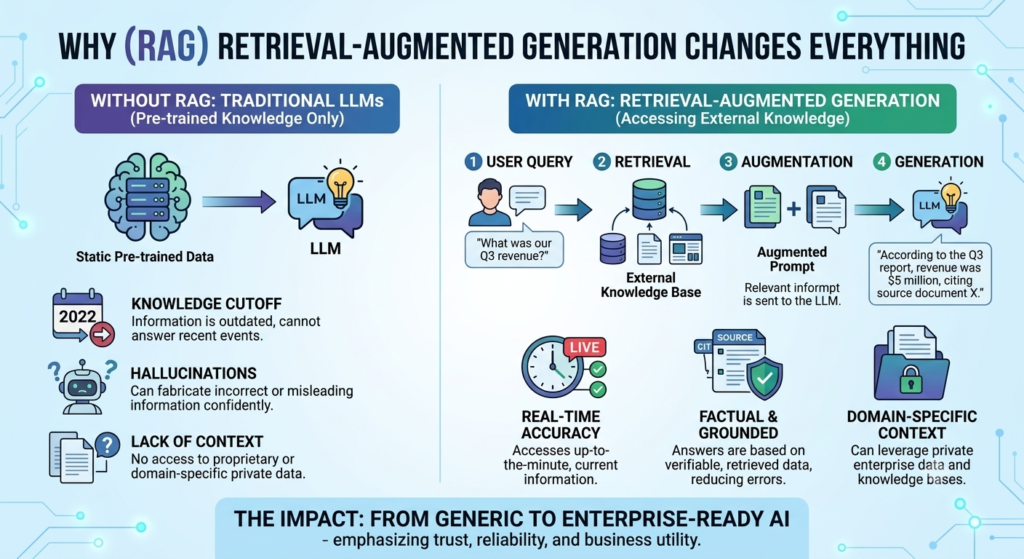
Most enterprise AI applications rely on Retrieval-Augmented Generation rather than static prompts. Instead of answering questions using only model training data, Claude retrieves relevant information from trusted business sources before generating a response. This reduces hallucinations while improving transparency and accuracy. Claude’s reasoning capabilities make it particularly effective at synthesizing retrieved information into coherent, context-aware responses.
Enterprise-focused safety and governance
Business applications require predictable behavior. Customer-facing AI systems must avoid exposing confidential information, generating inappropriate responses, or violating organizational policies. Claude’s design philosophy prioritizes controllability and governance, making it well-suited for organizations operating in regulated environments where reliable behavior is non-negotiable.
Strong structured reasoning
Many enterprise tasks involve structured reasoning rather than creative writing: comparing contracts, analyzing policies, reviewing technical documentation, explaining regulations, summarizing financial reports. Claude consistently performs well in scenarios requiring careful analysis across multiple sources of information, which makes it valuable for knowledge workers across finance, legal, compliance, and operations.
Well-suited for AI agent architectures
Modern AI agents rarely rely on a single prompt. They retrieve enterprise data, call APIs, execute workflows, reason through multiple steps, validate outputs, and collaborate with other systems. Claude’s reasoning capabilities make it well-suited for enterprise AI agent architectures where accuracy and logical consistency matter more than generating creative responses.
Enlight Lab Insight: Over the past two years, one pattern has become clear across our enterprise AI implementations. Organizations often spend weeks debating which language model to select while overlooking the foundations that determine whether the project actually succeeds. The model is rarely the primary reason an AI application fails. More often, problems originate from fragmented knowledge bases, poorly designed retrieval systems, missing integrations, weak governance, or unrealistic expectations about what AI can automate. Before writing a single prompt, answer five questions:
What business problem are we solving?
Which internal systems will the application need to access?
Where does trusted information currently live?
How will responses be validated?
How will performance be monitored after deployment?
The AI Application Framework: Seven Phases from Concept to Scale
Building a successful AI application involves more than integrating the Claude API. Enterprise projects require thoughtful planning, secure architecture, reliable data, and continuous optimization. The following seven-phase framework reflects the approach Enlight Lab uses across enterprise AI engagements.
Phase 1: Define the Business Problem
Many AI initiatives fail because teams begin with technology instead of business objectives. Before writing a single line of code, clearly identify the problem being solved, the users who will interact with the application, the measurable outcomes expected, and the existing workflows AI should improve.
A customer support assistant may aim to reduce ticket volume by helping users resolve common issues independently. An internal knowledge assistant might focus on reducing the time employees spend searching for information. Clear objectives guide every architectural decision that follows.
Phase 2: Prepare Enterprise Data
The quality of an AI application depends heavily on the quality of the information it can access. Before integrating Claude, audit existing knowledge sources: product documentation, internal knowledge bases, CRM systems, ERP platforms, technical documentation, policies, support articles, standard operating procedures, PDFs, and databases.
One mistake we frequently see is organizations assuming their documentation is AI-ready. In reality, many knowledge bases contain outdated, duplicated, or incomplete information that reduces response quality. According to Deloitte research, over 52% of organizations cite data quality as the biggest blocker to AI deployment. Cleaning your data before development delivers a greater return than spending additional time optimizing prompts.
Phase 3: Design the Application Architecture
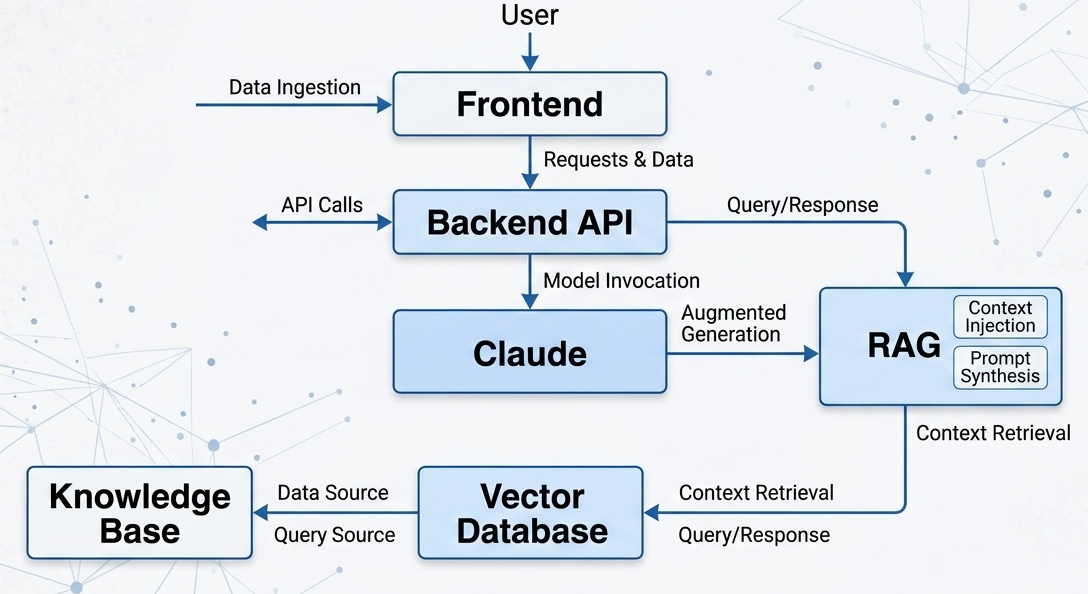
Once data is prepared, define how every system will interact. A typical enterprise AI architecture flows from user interface through backend API and authentication layer to business logic, then to Claude and the retrieval layer, then to the vector database, and finally to enterprise systems including CRM, ERP, ticketing, document management, and internal APIs.
Rather than allowing Claude to generate responses independently, enterprise systems retrieve verified information before every response. This architecture improves accuracy while maintaining governance over business knowledge.
Phase 4:Build and Integrate
Development begins once the architecture has been validated. Typical implementation activities include building backend APIs, connecting Claude, implementing authentication, integrating enterprise systems, creating retrieval pipelines, developing prompt templates, configuring conversation memory, and implementing user permissions.
The focus should remain on creating reliable, auditable workflows rather than simply generating text. Every integration point is a potential failure mode and should be tested against real-world edge cases before production.
Phase 5:Validate Before Production
Testing AI applications requires more than traditional software testing. Teams should evaluate accuracy, hallucination rate, response consistency, security vulnerabilities, latency, user satisfaction, knowledge retrieval quality, and escalation handling.
Testing should include real users and real business scenarios rather than synthetic examples. OWASP’s LLM Top 10 (2025)provides a useful security checklist for AI applications, including prompt injection, insecure output handling, sensitive information disclosure, and excessive agency. Run every application against these vectors before launch.
Phase 6: Deploy Securely
Enterprise deployment involves much more than publishing an application. Production environments require identity management, role-based access control, encryption at rest and in transit, audit logging, rate limiting, monitoring, incident response procedures, and compliance controls.
Organizations operating in regulated industries should design for governance from the beginning rather than adding it after deployment. Retrofitting compliance is consistently more expensive than building it in from the start.
Phase 7: Optimize Continuously
AI applications evolve alongside the business. Successful teams continuously improve prompt design, knowledge quality, retrieval accuracy, infrastructure costs, user experience, conversation analytics, and model selection as capabilities and pricing evolve.
The most successful AI applications are treated as living systems rather than completed software projects. The teams that generate the highest long-term ROI are the ones that schedule optimization cycles before they need them, not after performance degrades.
How to Build AI Applications Using Claude: Step-by-Step
Step 1: Choose the Right Use Case
Not every business problem requires AI. Good candidates include customer support, enterprise search, document automation, AI copilots, knowledge assistants, workflow automation, and internal help desks. Avoid using AI simply because it is popular. The application should solve a measurable business problem with a defined success metric.
Step 2: Select the Right Claude Model Different Claude models serve different workloads. The right model depends on your latency requirements, reasoning complexity, expected traffic volume, and cost constraints.
Requirement
Recommended Model
Why
Fast, high-volume responses
Claude Haiku
Lowest cost and latency for repetitive tasks
General enterprise applications
Claude Sonnet
Best balance of quality, speed, and cost
Complex reasoning and analysis
Claude Opus
Highest capability for nuanced document work
Advanced agentic workflows
Latest enterprise-tier Claude
Broadest tool use and instruction-following
Rather than selecting the most powerful model by default, evaluate latency, cost per token, reasoning requirements, and expected traffic. Routing simpler queries to Haiku and complex ones to Sonnet or Opus can reduce operating costs by 40 to 70% without affecting quality.
Step 3: Build the Backend
The backend coordinates every interaction: authentication, business logic, API routing, conversation management, user permissions, logging, and analytics. Popular backend technologies include Python with FastAPI, Node.js, NestJS, ASP.NET, and Spring Boot. The choice depends on your team’s existing expertise and your infrastructure environment.
Step 4: Connect Claude Securely
Claude becomes the reasoning layer inside your backend. Rather than exposing the model directly to users, route all requests through your application layer. This architecture improves security by allowing input validation and output filtering before responses reach users. It also enables prompt versioning, A/B testing, and monitoring at the application level.
Step5: Implement Retrieval-Augmented Generation
RAG Architecture Flow: User question arrives. Application searches the knowledge base using semantic similarity. The most relevant document chunks are retrieved. Retrieved context is sent to Claude alongside the user question. Claude generates a response grounded in the retrieved documents. The verified answer is returned to the user.
This approach significantly improves factual accuracy while reducing hallucinations. According to Makebot.ai’s analysis of production RAG deployments, RAG systems reduce hallucinations by 70 to 90% compared to standard model inference. For document-heavy industries such as healthcare, insurance, legal services, and financial services, RAG is not optional. It is the foundation of reliable enterprise AI.
Step 6: Connect Enterprise Systems
Most production AI applications interact with business software. Common integrations include Salesforce, HubSpot, Microsoft Dynamics, SAP, Jira, Zendesk, ServiceNow, SharePoint, Google Workspace, and Slack. These integrations allow AI applications to retrieve live business information rather than relying on static documents that may be weeks or months out of date.
Each integration adds complexity and maintenance overhead. Prioritize integrations that directly affect response quality and user satisfaction over those that are technically possible but rarely needed.
Step 7: Test with Real Users and Real Scenarios
Before deployment, validate answer quality, business accuracy, security posture, performance under load, edge case handling, and escalation workflows. Real users consistently expose issues that developers overlook during internal testing. Budget for at least two rounds of user testing: one before feature-complete and one before launch.
Direct Answer: RAG (Retrieval-Augmented Generation) is the architecture that grounds Claude's responses in your verified business data rather than relying on model training alone. It is the single most impactful technical decision in most enterprise AI implementations.
Imagine an employee asks: ‘What is our refund policy for enterprise customers?’
Without RAG, Claude generates an answer using its general knowledge. The answer may be plausible, but it will not reflect your actual business policy, your specific contract terms, or your current pricing structure.
With RAG, the application searches your internal policy documents, retrieves the most relevant sections, sends those sections to Claude as context, and generates a response that reflects your actual business policy. The employee gets a verified answer. The organization maintains control over what the AI communicates.
This distinction matters enormously in practice. A RAG architecture also allows knowledge to be updated continuously without retraining the underlying language model. When your refund policy changes, you update the document. The AI reflects the change in its next response. No retraining required.
Direct Answer: One of the biggest implementation mistakes we see is teams spending weeks refining prompts while neglecting their retrieval pipeline. In production environments, the difference between an average AI application and an exceptional one rarely comes down to prompt wording. More often it comes down to whether the system retrieves the right information at the right time. Invest early in data preparation, document organization, and retrieval quality. A well-designed RAG architecture consistently delivers better results than complex prompt engineering applied to poor information sources.
Claude vs GPT vs Gemini: Choosing the Right Model for Your Workload
Direct Answer: There is no universal winner among Claude, GPT, and Gemini. Claude excels at long-document reasoning and enterprise knowledge systems. GPT excels at general-purpose applications, coding, and ecosystem breadth. Gemini excels in Google Workspace environments and multimodal workflows. The best enterprise AI programs use different models for different tasks rather than forcing every use case onto the same foundation.
Capability
Claude
GPT-4
Gemini
Long document reasoning
Excellent
Very Good
Very Good
RAG applications
Excellent
Very Good
Very Good
Code generation
Very Good
Excellent
Very Good
Enterprise knowledge assistants
Excellent
Excellent
Good
Google Workspace integration
Limited
Moderate
Excellent
Multimodal capabilities
Very Good
Excellent
Excellent
Enterprise governance controls
Excellent
Very Good
Very Good
API ecosystem maturity
Growing
Mature
Mature
Best suited for
Knowledge systems, RAG, document intelligence
General AI apps, coding, multimodal
Google ecosystem, productivity
Rather than asking which model is the best, ask which model best matches your specific workload, compliance requirements, and existing technology stack. The most successful enterprise AI platforms are model-agnostic: they create an architecture that allows different models to handle different tasks and can adapt as capabilities, pricing, and governance requirements evolve.
Recommended Technology Stack for Claude Applications
A production-ready AI application is much more than an LLM. It consists of multiple layers working together. The right technology choices at each layer determine how maintainable, scalable, and cost-effective the system is over time.
Enlight Lab Insight: Architecture decisions made early are difficult and expensive to reverse. Organizations sometimes focus heavily on selecting the latest language model while overlooking integration design, observability, or governance. Months later, they discover that changing providers or scaling the system requires significant rework. Design every AI application around clear interfaces and modular components. This allows you to upgrade models, replace vector databases, or add new capabilities without rebuilding the entire platform.
Security and Governance Best Practices
Enterprise AI applications frequently process confidential business information, customer records, financial data, and intellectual property. Security should be part of the initial design, not an afterthought applied after launch.
OWASP’s LLM Top 10 (2025) identifies the highest-priority security risks for AI applications, starting with prompt injection at number one. A prompt injection attack occurs when user input or external content manipulates the model into ignoring its instructions, revealing confidential data, or executing unintended actions. Every enterprise Claude application should be tested against this vector before production.
Authentication and access control
Ensure every user is authenticated before accessing AI services through Single Sign-On, OAuth, Active Directory, or Microsoft Entra ID with multi-factor authentication. Implement role-based access control so that HR teams only access HR documents, finance teams only access financial information, and support agents cannot retrieve executive reports.
Protect against prompt injection
Mitigation strategies include input validation that checks user requests before they reach the model, prompt isolation that prevents user input from modifying system instructions, output filtering that blocks responses containing prohibited content or data patterns, and human approval requirements for high-risk actions such as database writes or external communications.
Encrypt everything
Protect information both at rest and in transit using industry-standard encryption. Apply secure key management practices and rotate credentials on a defined schedule. For healthcare and financial services deployments, confirm that encryption standards meet the specific requirements of HIPAA, SOC 2, and applicable data protection regulations.
Audit everything
Maintain detailed logs for user requests, retrieved documents, model responses, API calls, and administrative actions. Audit trails simplify troubleshooting, support compliance requirements, and provide the evidence base for governance reviews. Without audit logs, diagnosing production issues requires guesswork.
Cost Optimization Strategies for Production Claude Applications
Many organizations focus on API pricing without considering the broader operational costs of AI applications. The total cost of ownership includes model usage, infrastructure, storage, monitoring, maintenance, human review workflows, and ongoing optimization.
Strategy
How It Works
Typical Saving
Model routing
Route simple queries to Haiku, complex queries to Sonnet or Opus
40-70% reduction in inference cost
Prompt caching
Cache repeated context to avoid reprocessing identical information
20-40% reduction on high-volume applications
RAG optimization
Better retrieval means less irrelevant context sent to the model
Improves quality and reduces token consumption simultaneously
Response caching
Cache frequent answers that do not require fresh inference
Significant savings on FAQ-heavy applications
Context window discipline
Test production inputs at realistic lengths, not sanitized samples
Prevents cost surprises when real users ask longer questions
Track cost per conversation, cost per user, and monthly token consumption from the first week of production. Visibility enables proactive optimization. Applications that are not monitored from launch consistently generate budget surprises within the first three months.
Common Architecture Patterns for Claude Applications
AI Chat Assistant
The simplest production pattern. Combines a Claude integration with a RAG pipeline and conversation memory. Well-suited for customer support FAQ handling, internal help desks, and single-domain knowledge assistants. Start here before building more complex patterns.
AI Copilot
Designed to assist employees while integrating with multiple enterprise systems: CRM, ERP, email, documents, calendar, and knowledge bases. The copilot retrieves context from relevant systems before responding, making it significantly more useful than a standalone chat assistant. The typical deployment timeline is two to four months.
AI Agent
Unlike assistants, AI agents perform actions: creating support tickets, scheduling meetings, updating databases, sending notifications, and running workflows. These systems combine Claude’s reasoning with external tool execution. Gartner predicts 40% of enterprise applications will include task-specific AI agents by the end of 2026, up from under 5% in 2025.
Multi-Agent System
For complex business processes, multiple specialized agents collaborate. A customer inquiry might flow through a support agent, then a billing agent, then a knowledge agent, then a scheduling agent, before returning a final response to the customer. This architecture improves scalability and allows each agent to specialize. It also introduces coordination complexity that requires careful orchestration design.
Architecture in Practice: Enterprise Knowledge Assistant
A mid-sized enterprise faced a common challenge: employees were spending significant time searching across multiple internal systems for policies, technical documentation, and operational procedures. Information lived in SharePoint, Confluence, a legacy document management system, and dozens of department-specific folders.
The organization implemented a Claude-powered knowledge assistant using an RAG architecture. Internal documents were indexed into a Pinecone vector database. Users are authenticated through their existing Single Sign-On provider. Role-based access controls ensured that each user could only retrieve documents appropriate to their department and clearance level.
When an employee asked a question, the application performed a semantic search across indexed documents, retrieved the most relevant sections, sent those sections to Claude as context alongside the user question, and returned a grounded answer with a source citation. Users could click the citation to view the original document.
The results were measurable within the first month. Employees found information faster. Support teams handled fewer repetitive questions from colleagues. Subject matter experts spent less time answering routine requests and more time on work that required their specific expertise. Most importantly, every answer was grounded in the organization’s own verified documentation rather than model inference alone.
The architecture also allowed knowledge to be updated continuously without retraining. When a policy changed, the team updated the source document and re-indexed it. The assistant reflected the change in its next response.
A scalable AI application also depends on reliable infrastructure, APIs, cloud architecture, and security. Our AI Consulting Services help organizations design production-ready AI platforms.
Common Mistakes When Building AI Applications with Claude
Starting with the model instead of the business problem: Teams that begin by asking which Claude model to use before defining measurable success criteria consistently build impressive demonstrations rather than valuable business tools.
Assuming better prompts will solve everything: Poor documentation, incomplete knowledge bases, and weak retrieval pipelines cannot be fixed with better prompts. In enterprise applications, improving data quality delivers greater results than refining prompt wording.
Skipping data readiness: Claude can only reason over the information it receives. Outdated, duplicated, or inconsistent company documentation produces poor responses regardless of which model is used. Audit documentation before development begins.
Skipping RAG entirely: Organizations that expect Claude to answer company-specific questions using only its pre-trained knowledge consistently see hallucinations and outdated responses. RAG is not an optional enhancement for enterprise applications. It is a foundational component.
Building around a single AI provider: The AI landscape evolves rapidly. A system tightly coupled to one model becomes difficult to adapt as pricing, capabilities, or governance requirements change. Design with modular AI layers from the start.
Treating deployment as the finish line: Launching an AI application is the beginning of the lifecycle, not the end. Successful organizations monitor user feedback, retrieval quality, model performance, costs, knowledge freshness, and security events continuously.
Best Practices for Enterprise Claude Development
Start with one high-value use case. Early success builds confidence and provides lessons for future initiatives.
Build RAG systems to ground responses in trusted enterprise knowledge before relying on model training.
Keep humans in the loop for legal decisions, financial approvals, healthcare recommendations, and compliance-related outputs.
Build modular architectures. Separate frontend, backend, retrieval layer, Claude integration, business logic, and monitoring so each component can be upgraded independently.
Monitor business KPIs alongside technical metrics: customer satisfaction, resolution time, employee productivity, and support ticket reduction.
Design for continuous learning. Use conversation analytics to improve prompt templates, knowledge organization, and retrieval performance over time.
Maintain a model-agnostic architecture. Avoid tight coupling to any single AI provider, regardless of how strong the current offering appears.
Key Takeways
Claude is a powerful foundation for enterprise AI: especially applications involving document intelligence, knowledge assistants, and AI agents. Its long-context reasoning and enterprise governance design make it well-suited for regulated industries.
The model is one layer of many: Successful AI applications depend on architecture, data quality, integrations, governance, and continuous optimization more than the choice of language model.
RAG is not optional for enterprise applications: Grounding responses in trusted business information is the single most impactful technical decision in most enterprise AI implementations.
Model-agnostic architectures protect your investment: AI models evolve rapidly. Designing for flexibility allows organizations to adapt without rebuilding entire applications.
Deployment is the beginning, not the end: Enterprise AI should be measured by business outcomes and maintained through continuous monitoring, knowledge updates, and optimization cycles.
Security and governance belong in Phase 1: Retrofitting compliance after deployment is consistently more expensive and less complete than designing for it from the start.
Conclusion
combines strong reasoning, long-context understanding, and enterprise-focused capabilities that map directly to the problems large organizations face every day.
But building a successful AI solution requires much more than selecting the right language model. The most effective applications are built on reliable data, thoughtful architecture, secure integrations, and a clear understanding of the business problem they are designed to solve. These principles hold regardless of which model you choose or how AI technology evolves.
Organizations that invest in these foundations today will be better positioned to adapt as AI capabilities continue to advance. The competitive advantage in enterprise AI is not access to better models. It is the organizational capability to implement them correctly, maintain them responsibly, and expand them as the business grows.
One misconception we frequently encounter is that enterprise AI projects fail because the language model is not advanced enough. In practice, most challenges arise elsewhere. Successful projects consistently share three characteristics: clear business objectives, reliable enterprise data, and continuous optimization after deployment. Claude is a powerful reasoning engine, but it delivers the greatest value when supported by well-structured architecture, trusted knowledge sources, secure integrations, and ongoing governance.
Ready to build your next AI application with Claude? Contact Enlight Lab at enlightlab.com to discuss your goals, evaluate your architecture, and design a solution that aligns with your business, technology stack, and long-term AI strategy.
Frequently Asked Question (FAQ)
Is Claude suitable for enterprise AI applications?
Yes. Claude is widely used for enterprise knowledge assistants, AI agents, document intelligence, customer support automation, and internal copilots. Its long-context reasoning and strong document understanding make it particularly effective for knowledge-intensive applications. Claude supports context windows large enough to process entire contracts, research papers, or policy manuals in a single interaction according to Anthropic’s technical documentation.
Do I need RAG when building with Claude?
In most enterprise scenarios, yes. RAG allows Claude to retrieve information from your own knowledge base before generating responses, which improves accuracy and reduces hallucinations by 70 to 90% compared to standard model inference (Makebot.ai, 2024). Without RAG, Claude relies on general training data that does not reflect your specific policies, products, pricing, or procedures. For any application involving proprietary business knowledge, RAG should be treated as a core architectural component.
Which Claude model should I use for my application?
It depends on your workload. Claude Haiku is fastest and most cost-efficient for high-volume repetitive tasks. Claude Sonnet balances quality and speed for most enterprise applications. Claude Opus handles the most complex reasoning and analysis. Many production systems route queries across models based on complexity, which reduces costs by 40 to 70% without affecting quality on routine requests.
How long does it take to build a Claude-powered enterprise application?
Timeline depends on scope and integration complexity. A focused prototype takes two to four weeks. A department-level production solution typically takes two to three months. A multi-system enterprise AI platform takes four to nine months. Integrations, data preparation, and compliance requirements typically have a greater impact on timelines than Claude integration itself.
Can Claude integrate with enterprise software?
Yes. Claude integrates through its API with any system capable of making HTTP requests. Common integrations include Salesforce, HubSpot, SAP, Zendesk, ServiceNow, SharePoint, Microsoft 365, Google Workspace, Jira, and internal databases. Integration complexity varies significantly by system. Legacy systems without clean APIs often require custom middleware and add two to four weeks of development time per integration.
Is Claude suitable for regulated industries?
Yes, provided the application includes appropriate governance, access controls, audit logging, encryption, and compliance processes. Healthcare, financial services, insurance, and legal organizations commonly deploy Claude-powered applications with these controls in place. Organizations in regulated industries should treat compliance as a Phase 1 design consideration, not a post-launch addition.
How much does it cost to build a Claude-powered AI application?
Costs vary by scope, integration complexity, and compliance requirements. A prototype typically costs $10,000 to $30,000. A department-level production solution ranges from $50,000 to $150,000. A multi-system enterprise AI platform costs $200,000 to $1 million or more. Total cost of ownership should be evaluated rather than API pricing alone, as infrastructure, monitoring, integration maintenance, and ongoing optimization represent significant portions of the real operating cost.
Should every AI application use Claude?
Not necessarily. Claude is an excellent choice for document-heavy reasoning and enterprise knowledge systems. Some workloads benefit from other models depending on latency requirements, multimodal capabilities, ecosystem integrations, or cost profile. The best enterprise AI architecture remains model-agnostic and evaluates models against specific workload requirements rather than defaulting to a single provider for every use case.
Turn Your AI Vision into Reality with Trusted AI Experts
Develop Secure, Scalable, and Custom AI Software That Drives Business Growth
Introduction: Your First Technical Decision Isn’t About Code You have an idea for a SaaS product. Perhaps you’ve identified a problem businesses struggle with every